1. 서론
This manual provides detailed instructions for the installation, operation, and maintenance of the Aigo B760L D4 Motherboard. Please read this manual thoroughly before installing or using the product to ensure proper functionality and to prevent damage.
2. 안전 정보
항상 다음 안전 예방 조치를 준수하십시오.
- Disconnect power before installing or removing any components.
- 민감한 부품을 만지지 않도록 마더보드의 가장자리를 잡으세요.
- Use an anti-static wrist strap to prevent electrostatic discharge (ESD) damage.
- 과열을 방지하려면 컴퓨터 케이스 내부의 적절한 환기를 확보하세요.
- 마더보드를 습기나 극한의 온도에 노출시키지 마세요.
3. 패키지 내용
패키지에 모든 품목이 들어 있는지 확인하세요.
- Aigo B760L D4 Motherboard
- 사용 설명서 (본 문서)
- SATA 케이블 (수량은 다를 수 있습니다)
- I / O 실드
- 드라이버 CD/USB (포함된 경우)
4. 제품 오버view
The Aigo B760L D4 is an M-ATX motherboard designed for Intel LGA 1700 processors, featuring the Intel B760 chipset. It supports DDR4 memory and offers a range of connectivity options.
4.1 마더보드 레이아웃
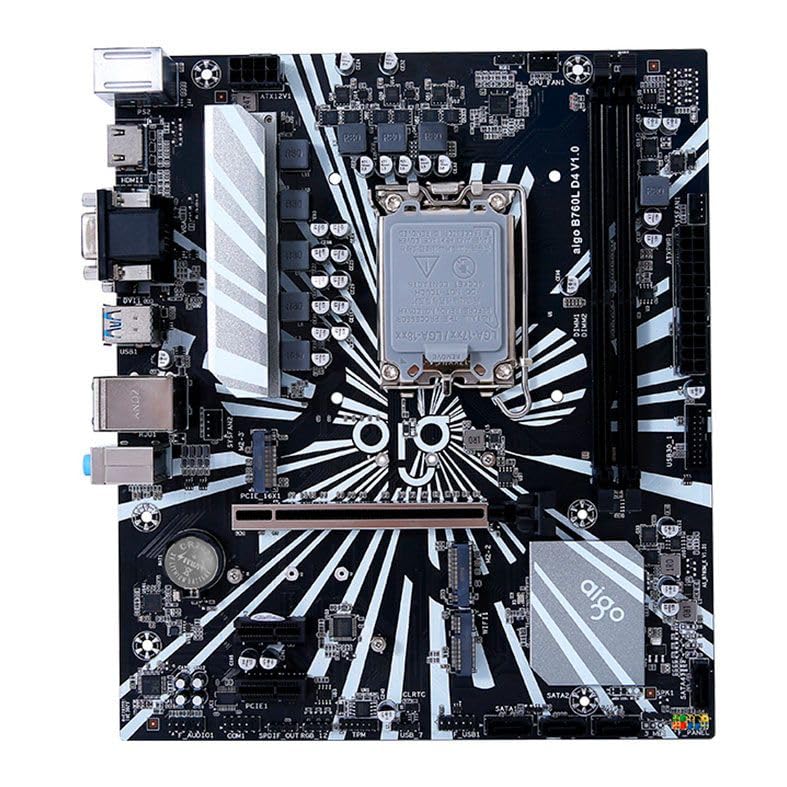
그림 1: 이상view of the Aigo B760L D4 Motherboard alongside its retail packaging.

그림 2: 상향식 view of the Aigo B760L D4 Motherboard, highlighting component placement.

그림 3: 각도 view of the Aigo B760L D4 Motherboard, showing the CPU socket and memory slots.
4.2 후면 I/O 패널

Figure 4: Rear I/O panel of the Aigo B760L D4 Motherboard, displaying various connectivity ports.
후면 I/O 패널에는 다음이 포함됩니다.
- 1 x PS/2 Keyboard and Mouse port
- 2개의 USB 2.0 포트
- 4개의 USB 3.0 포트
- 1 x HDMI 포트
- 2 x DVI ports
- 1 x VGA 포트
- 1 x RJ45 LAN port
- Audio jacks (Line In, Line Out, Mic In)
5. 설정
5.1 CPU 설치
- 마더보드에서 LGA 1700 CPU 소켓을 찾으세요.
- CPU 소켓 레버를 열고 로드 플레이트를 들어 올립니다.
- CPU를 소켓에 조심스럽게 맞추고 CPU의 삼각형 표시가 소켓의 표시와 일치하는지 확인하세요.
- CPU를 억지로 끼우지 말고 조심스럽게 소켓에 넣으세요.
- 적재판을 닫고 레버로 고정하십시오.
5.2 DDR4 메모리 설치
The motherboard supports up to 64GB of DDR4 memory across two slots, with speeds from 2133 MHz to 3200 MHz in dual-channel configuration.
- DIMM 슬롯의 양쪽 끝에 있는 클립을 엽니다.
- 메모리 모듈을 슬롯에 맞춰서 모듈의 홈이 슬롯의 키와 일치하는지 확인합니다.
- 클립이 제자리에 고정될 때까지 메모리 모듈의 양쪽 끝을 단단히 누릅니다.
5.3 저장 장치 설치
The motherboard features 4 x SATA 3.0 ports and 2 x M.2 NVME Dual-Protocol slots.
5.3.1 SATA 드라이브
- SATA 데이터 케이블의 한쪽 끝을 마더보드의 SATA 포트에 연결합니다.
- SATA 데이터 케이블의 다른 쪽 끝을 SATA 하드 드라이브나 SSD에 연결합니다.
- 파워서플라이에서 드라이브로 SATA 전원 케이블을 연결하세요.
5.3.2 M.2 NVME Drives
- 메인보드에서 M.2 슬롯을 찾으세요.
- M.2 스탠드오프 나사를 제거합니다.
- Insert the M.2 NVME drive into the slot at a 30-degree angle.
- Gently push the drive down and secure it with the standoff screw.
5.4 전원 연결
파워서플라이의 24핀 ATX 전원 커넥터와 8핀 ATX 12V 전원 커넥터를 마더보드의 해당 포트에 연결하십시오.
5.5 확장 카드 설치
The motherboard includes 1 x PCIe x16 slot and 1 x PCIe x1 slot.
- 확장 카드(예: 그래픽 카드)를 해당 PCIe 슬롯에 장착하십시오.
- 카드가 슬롯에 제대로 고정될 때까지 꾹 눌러주세요.
- 카드(그래픽 카드)를 나사로 컴퓨터 케이스에 고정하세요.
6. 운영
6.1 첫 번째 부팅 및 BIOS 설정
After assembling your system, connect a monitor, keyboard, and mouse. Power on the system. During startup, press the designated key (usually 델 or F2) to enter the BIOS/UEFI setup utility. Here you can configure boot order, system time, and other advanced settings.
6.2 운영 체제 설치
The Aigo B760L D4 Motherboard supports Windows 10 and Windows 11 operating systems. Insert your OS installation media (USB drive or DVD) and follow the on-screen instructions to install the operating system.
6.3 드라이버 설치
After OS installation, install the necessary drivers for the chipset, audio, LAN, and other integrated components. These drivers are typically provided on a CD/USB with the motherboard or can be downloaded from the manufacturer's web대지.
7. 유지관리
- 깨끗하게 유지하세요: 컴퓨터 케이스 내부의 먼지는 압축 공기를 사용하여 정기적으로 청소하십시오. 먼지가 쌓이면 과열될 수 있습니다.
- BIOS 업데이트: 정기적으로 제조업체를 확인하십시오 webBIOS/UEFI 업데이트 사이트입니다. 업데이트를 통해 안정성, 호환성 및 성능을 향상시킬 수 있습니다. 업데이트 지침을 주의 깊게 따르십시오.
- 드라이버 업데이트 : 최적의 성능과 새로운 소프트웨어 및 하드웨어와의 호환성을 보장하려면 드라이버를 최신 상태로 유지하십시오.
- 환경 제어: Operate the system in a cool, dry, and well-ventilated environment.
8. 문제 해결
8.1 전원 없음
- Ensure the power supply is connected correctly to the motherboard (24-pin and 8-pin ATX 12V).
- Check if the power supply switch is in the "ON" position.
- Verify that the power button on the case is correctly connected to the motherboard's front panel header.
8.2 디스플레이 없음
- 모니터가 올바른 비디오 출력(내장 그래픽 또는 전용 그래픽 카드)에 연결되어 있는지 확인하십시오.
- 그래픽 카드와 메모리 모듈을 다시 장착하세요.
- 메모리 모듈을 하나만 설치한 상태로 부팅해 보세요.
8.3 시스템 불안정성/충돌
- CPU와 GPU 온도를 확인하여 과열되지 않는지 확인하십시오.
- Verify that all power connectors are securely attached.
- 메모리 진단 도구를 실행하여 RAM에 오류가 있는지 확인하십시오.
- Ensure BIOS is updated to the latest stable version.
9. 사양
| 특징 | 사양 |
|---|---|
| 상표 | 아이고 |
| 모델 | AIGO-B760L-D4 |
| 칩셋 | 인텔 B760 |
| CPU 소켓 | LGA 1700 |
| 메모리 슬롯 | 2개의 DDR4 DIMM 슬롯 |
| 최대 메모리 용량 | 64GB |
| 메모리 속도 지원 | 2133 ~ 3200 MHz (Dual Channel) |
| 오디오 인터페이스 | 1 x HDMI, 2 x DVI, 1 x VGA |
| SATA 슬롯 | 4 x SATA 3.0 |
| M.2 슬롯 | 2 x M.2 NVME Dual-Protocol |
| USB 포트(후면) | 2 X USB 2.0, 4 X USB 3.0 |
| 확장 슬롯 | PCIe x1 1개, PCIe x1 16개 |
| 운영 체제 지원 | 윈도우 10/11 |
| PS / 2 포트 | 1 x PS/2 Keyboard and Mouse |
| 파워 페이즈 | 8상 |
| 전원 커넥터 | 24핀 ATX 1개, 8핀 ATX 12V 1개 |
| 와이파이 인터페이스 | 1 x WiFi interface (PCIe compatible) |
| LAN 포트 | 1 X RJ45 |
| 치수 | 24.4 x 21 cm (M-ATX) |
10. 보증 및 지원
보증 정보 및 기술 지원에 대해서는 구매 시 제공된 설명서를 참조하거나 Aigo 공식 웹사이트를 방문하십시오. web사이트. 보증 청구를 위해 구매 증빙 자료를 보관하세요.


