1. 제품 오버view
The RadioShack USB Type-C Headset is designed for clear audio communication and comfortable listening on computers and laptops. It features 40mm drivers for quality sound and an omnidirectional microphone for effective voice capture. The headset connects via a USB Type-C port, offering a stable and reliable connection.
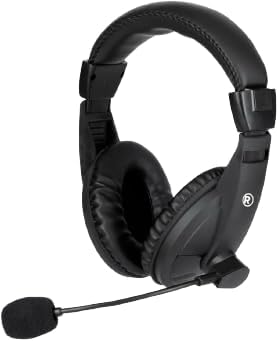
이미지 1.1: 앞쪽 view of the RadioShack USB Type-C Headset, showcasin귀를 완전히 덮는 디자인과 내장 마이크가 특징입니다.

이미지 1.2: 옆 view of the headset, highlighting the adjustable headband and the flexible microphone arm.
2. 설정 지침
- 헤드셋 연결: Locate an available USB Type-C port on your computer or laptop. Insert the USB Type-C connector of the headset firmly into the port.
- 드라이버 설치: The headset is plug-and-play. Your operating system (Windows, macOS, Linux) should automatically detect and install the necessary drivers. This process typically takes a few seconds.
- 오디오 설정을 확인하세요: After connecting, open your computer's sound settings. Ensure the RadioShack USB Headset is selected as the default playback and recording device.

이미지 2.1: 클로즈업 view of the USB Type-C connector, which plugs into your device.
3. 헤드셋 작동
3.1 Wearing and Adjusting
- 헤드밴드 조정: Extend or retract the headband slides on both sides to achieve a comfortable fit over your head.
- Positioning the Ear Pads: Ensure the soft, cushioned ear pads fully cover your ears for optimal sound isolation and comfort.

이미지 3.1: A person wearing the headset, demonstrating the ergonomic design and comfortable fit for extended use.
3.2 마이크 사용
- 마이크 배치: Gently bend the flexible microphone arm to position the omnidirectional microphone approximately 1-2 inches (2.5-5 cm) from your mouth for clear voice pickup.
- 음소거/음소거 해제: If your headset features an in-line remote control, use the designated button to mute or unmute the microphone as needed.
3.3 볼륨 조절
- 원격 제어: Utilize the remote control integrated into the cable to adjust the volume up or down.
- 시스템 볼륨: Alternatively, adjust the volume directly through your computer's operating system sound settings.
4. 유지관리
- 청소: Use a soft, dry cloth to wipe down the headset, ear pads, and microphone. Avoid using harsh chemicals or abrasive materials.
- 저장: 헤드셋은 깨끗하고 건조한 곳에 보관하고, 극한 온도와 직사광선을 피하십시오. 케이블이 꼬이지 않도록 주의하십시오.
- 케이블 관리: The 110cm (3.5 feet) cable provides ample length. Avoid sharp bends or excessive pulling on the cable to prevent damage.

이미지 4.1: The headset displaying its 110cm (3.5 feet) cable, offering broad length for comfortable movement.
5. 문제 해결
- 헤드셋에서 소리가 나지 않음:
- USB Type-C 커넥터가 포트에 완전히 삽입되었는지 확인하세요.
- Check your computer's sound settings to confirm the RadioShack USB Headset is selected as the default playback device.
- Increase the volume using the in-line remote control or your computer's system volume.
- Try connecting the headset to a different USB Type-C port or another computer to rule out port or device issues.
- 마이크가 작동하지 않음:
- Verify the microphone is not muted via the in-line remote or your computer's sound settings.
- Confirm the RadioShack USB Headset is selected as the default recording device in your computer's sound settings.
- Adjust the microphone's physical position closer to your mouth.
- Check privacy settings on your operating system that might restrict microphone access for certain applications.
- 왜곡된 오디오:
- Lower the volume to see if distortion reduces.
- Ensure the audio source is not the cause of the distortion.
- Update your computer's audio drivers if available.
6. 사양
| 특징 | 세부 사항 |
|---|---|
| 모델 번호 | 2604800 |
| 연결 기술 | USB 타입-C |
| 오디오 드라이버 유형 | 다이내믹 드라이버(40mm) |
| 마이크 유형 | 전방위 |
| 이어피스 모양 | 귀 위 |
| 케이블 길이 | 110cm(3.5피트) |
| 제어 방법 | Remote (in-line) |
| 호환 장치 | Computers, Laptops |
| 재료 | 아크릴로니트릴 부타디엔 스티렌(ABS) |
| 품목 무게 | 10.6 온스(0.66 파운드) |
| 색상 | 검은색 |
7. 보증 및 지원
For warranty information and customer support, please refer to the official RadioShack web사이트를 방문하거나 고객 서비스에 직접 문의하세요. 보증 청구에 대비해 구매 증빙 자료로 구매 영수증을 보관하세요.
온라인 지원: 방문하다 www.라디오샤크.com for FAQs, product registration, and contact options.


