1. 서론
Thank you for choosing the AFEXOA BL60 Sunrise Wake Up Alarm Clock. This device combines a natural sunrise simulation alarm, a smart Bluetooth speaker, a white noise sleep aid machine, and a versatile night light. Designed to enhance your daily routine, it offers a gentle wake-up experience and a calming environment for sleep. Please read this manual carefully to ensure proper use and optimal performance.

Figure 1: The AFEXOA BL60 Sunrise Wake Up Alarm Clock.
2. 안전 정보
- 기기를 물이나 과도한 습기에 노출시키지 마세요.
- 장치를 떨어뜨리거나 강한 충격을 가하지 마십시오.
- Use only the provided power adapter or a certified 5V power source.
- Keep out of reach of children unless under adult supervision.
- 기기를 직접 분해하거나 수리하려고 하지 마세요. 도움이 필요하면 고객 지원에 문의하세요.
3. 패키지 내용
다음 품목이 패키지에 포함되어 있는지 확인하세요.
- AFEXOA BL60 Sunrise Wake Up Alarm Clock
- USB 전원 케이블
- 사용자 설명서
4. 제품 오버view
The AFEXOA BL60 features an intuitive design with controls located on the device's body and base. The digital display shows time and various settings. The astronaut's helmet functions as the light source.
5. 설정
5.1 전원 연결
- Connect the provided USB power cable to the device's power input port.
- Plug the other end of the USB cable into a 5V USB power adapter (not included) and then into a wall outlet.
- The device will power on, and the display will illuminate.
5.2 초기 시간 설정
최초 전원 켜짐 시 또는 전원 꺼짐 후tage, you may need to set the current time. Refer to the 'Operating Instructions' section for detailed steps on setting the time and display brightness.
5.3 Backup Battery (CR2032)
The device requires 1 CR2032 battery (not included) for time backup during power interruptions. Install the battery in the compartment located at the bottom of the device, ensuring correct polarity.
6. 사용 설명서
6.1 Sunrise Wake-Up Light Function
The sunrise simulation gradually brightens your room, mimicking a natural sunrise to help you wake up gently. You can set the duration for the light to increase from 1% to 100% brightness between 10 to 120 minutes before your alarm time.
- Setting Duration: Use the dedicated buttons to adjust the sunrise duration.
- 활성화: Ensure the wake-up light feature is enabled when setting your alarm.

Figure 2: Sunrise simulation feature with adjustable duration.
6.2 야간 조명 기능
The device offers a versatile night light with 22 lighting modes, including 16 fixed colors and 6 dynamic ambient light modes. Brightness is adjustable across 20 levels, and there are 3 dimmer modes (Off, Dim, Bright, Auto) for the time display.
- 색상 선택: Use the touch controls or dedicated buttons to cycle through colors and modes.
- 밝기 조정: 원하는 대로 조명 강도를 조절하세요.
- 디스플레이 조광기: Set the time display brightness to Off, Dim, Bright, or Auto mode.

Figure 3: Color-changing night light with brightness control.
6.3 알람 시계 설정
The BL60 features dual alarms, allowing you to set two separate wake-up times. Choose from 7 gentle alarm sounds and adjust the volume across 16 levels, up to 110 dB.
- 알람 설정: Press the alarm button to enter alarm setting mode. Use the navigation buttons to set the time, alarm sound, and volume.
- 알람 소리: Options include birds, ocean, piano, beep, and three soft music melodies.
- 스누즈 기능 : Press the snooze button when the alarm sounds to temporarily silence it for a few minutes.

Figure 4: Wake-up light operation and available alarm sounds.
6.4 Sleep Aid & White Noise Machine
Improve your sleep with 21 soothing sounds, including white noise, pink noise, brown noise, fan sounds, natural sounds, and lullabies. The volume can be precisely adjusted across 16 levels. An optional sleep timer (15, 30, 45, 60, or 90 minutes) automatically turns off sounds and lights.
- 사운드 선택: Cycle through the 21 available sounds using the dedicated button.
- 볼륨 조절: Adjust the sound volume to your comfort level.
- 수면 타이머 : Set the timer for automatic shut-off.
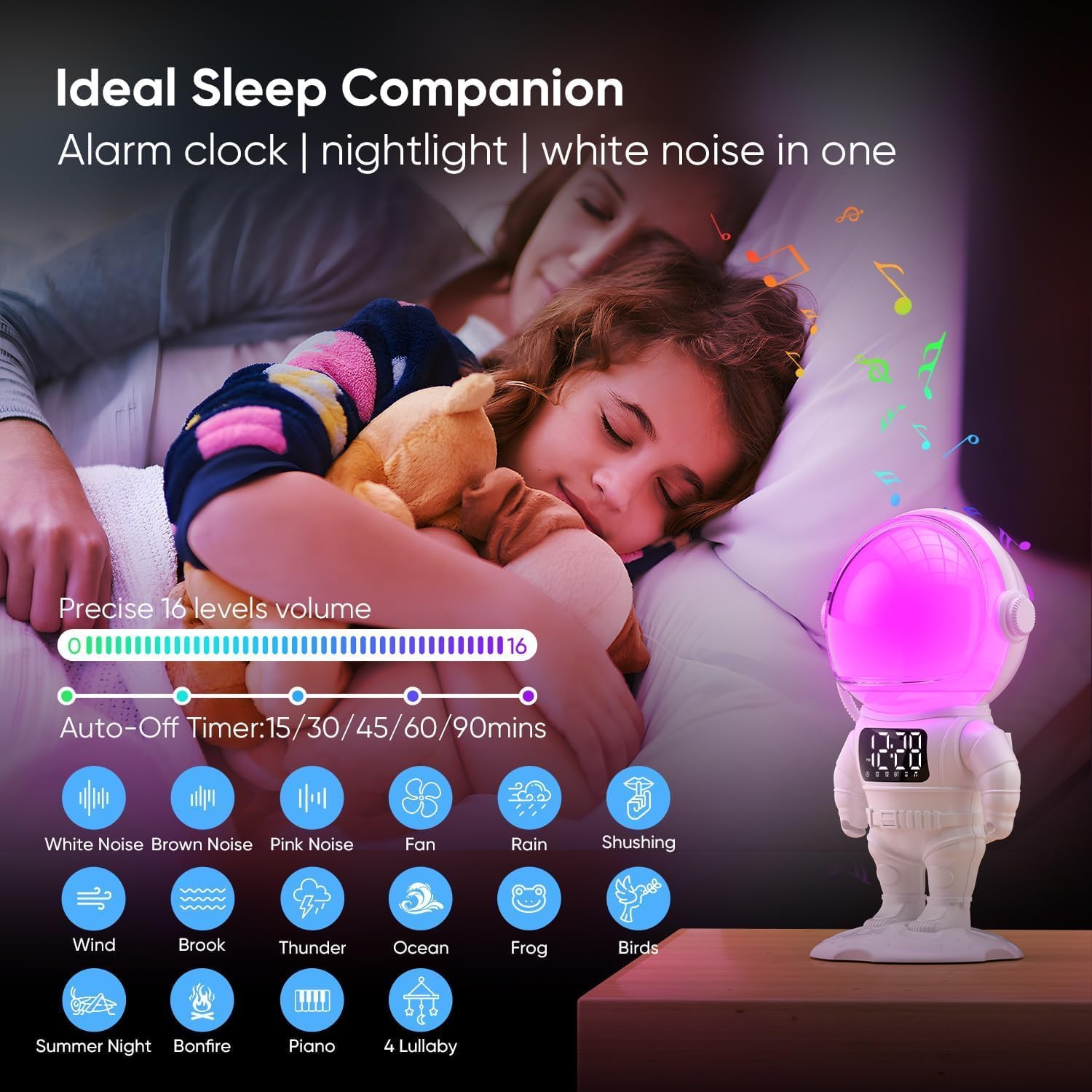
Figure 5: Sleep aid features with white noise and timer options.
6.5 블루투스 스피커 모드
Connect your smartphone, tablet, or other Bluetooth-enabled devices to the BL60 to play your favorite audio. The device is compatible with game consoles, MP3 players, desktop computers, laptops, smartphones, and tablets.
- 블루투스 활성화: Press the Bluetooth button on the device to enter pairing mode. The display will indicate Bluetooth status.
- 편성: On your external device, search for 'AFEXOA BL60' (or similar name) in the Bluetooth settings and connect.
- 오디오 재생: Once paired, audio from your device will play through the BL60 speaker.
7. 유지관리
- 청소: 부드럽고 마른 천으로 기기를 닦으세요. 연마성 세제나 용제를 사용하지 마세요.
- 저장: 장기간 사용하지 않을 때는 기기를 서늘하고 건조한 곳에 보관하세요.
- 배터리 교체: If the time backup battery (CR2032) needs replacement, ensure the device is unplugged before opening the battery compartment.
8. 문제 해결
- 장치가 켜지지 않음: Ensure the USB cable is securely connected to both the device and a working 5V power adapter/outlet.
- Alarm sound is too loud/quiet: Adjust the alarm volume using the dedicated controls in the alarm settings.
- Sunrise light not working: Check if the sunrise simulation feature is enabled in the alarm settings and if the duration is set correctly.
- 블루투스가 연결되지 않음: Ensure the device is in Bluetooth pairing mode and your external device's Bluetooth is enabled and searching for new devices. Try restarting both devices.
- Charging cable makes a sound: If the power adapter or cable emits a persistent sound, try using a different certified 5V USB power adapter.
9. 사양
| 특징 | 사양 |
|---|---|
| 상표 | AFEXOA |
| 모델 번호 | BL60 |
| 치수(길이 x 너비 x 높이) | 11 x 11 x 24cm |
| 무게 | 620그램 |
| 재료 | 아크릴로니트릴 부타디엔 스티렌(ABS) |
| 권tage | 5 볼트 |
| 전원 | 코드식 전기 |
| 특별 기능 | Color Changing, LED Light, Timer, Wake-up Light, Sunrise Alarm |
| 호환성 | Game Console, MP3 Player, Desktop Computer, Laptop, Smartphone, Tablet |
| 백업 배터리 | 1 CR2032(포함되지 않음) |
For detailed product information and energy efficiency, please refer to the EPREL database: EPREL 제품 정보
10. 보증 및 지원
This product comes with a standard manufacturer's warranty. For warranty claims, technical support, or any questions regarding your AFEXOA BL60, please contact your retailer or the manufacturer's customer service. Keep your purchase receipt as proof of purchase.


