1. 제품 오버view
The llano CS2 18W PD USB-C Fast Charger is designed for efficient and safe charging of Nikon EN-EL14 and EN-EL14a camera batteries. This compact charger features a digital display for real-time battery status, multiple safety protections, and versatile charging options, making it an ideal accessory for photographers.

2. 주요 특징
- 18W PD 고속 충전: Provides up to 50% faster charging for Nikon EN-EL14/EN-EL14a batteries compared to standard USB chargers.
- Dual Battery Slots: 배터리 두 개를 동시에 충전합니다.
- 고급 디지털 디스플레이: Real-time monitoring of battery charge levels and charging status.
- 종합 보호: Incorporates 10-layer protection against over-voltage, overheating, short-circuiting, and more, ensuring battery longevity and safety.
- 매우 휴대하기 편리한 디자인: 작고 가벼워 여행이나 이동 중에도 사용하기에 이상적입니다.
- 다양한 전원 입력 방식: Supports charging via wall adapters, car chargers, and portable power banks using a USB-C connection.
- Integrated SD Card Storage: Includes a dedicated slot for storing one SD card.
- Magnetic Flip-Open Lid: Ensures secure closure and protects batteries from dust and damage.

3. 호환성
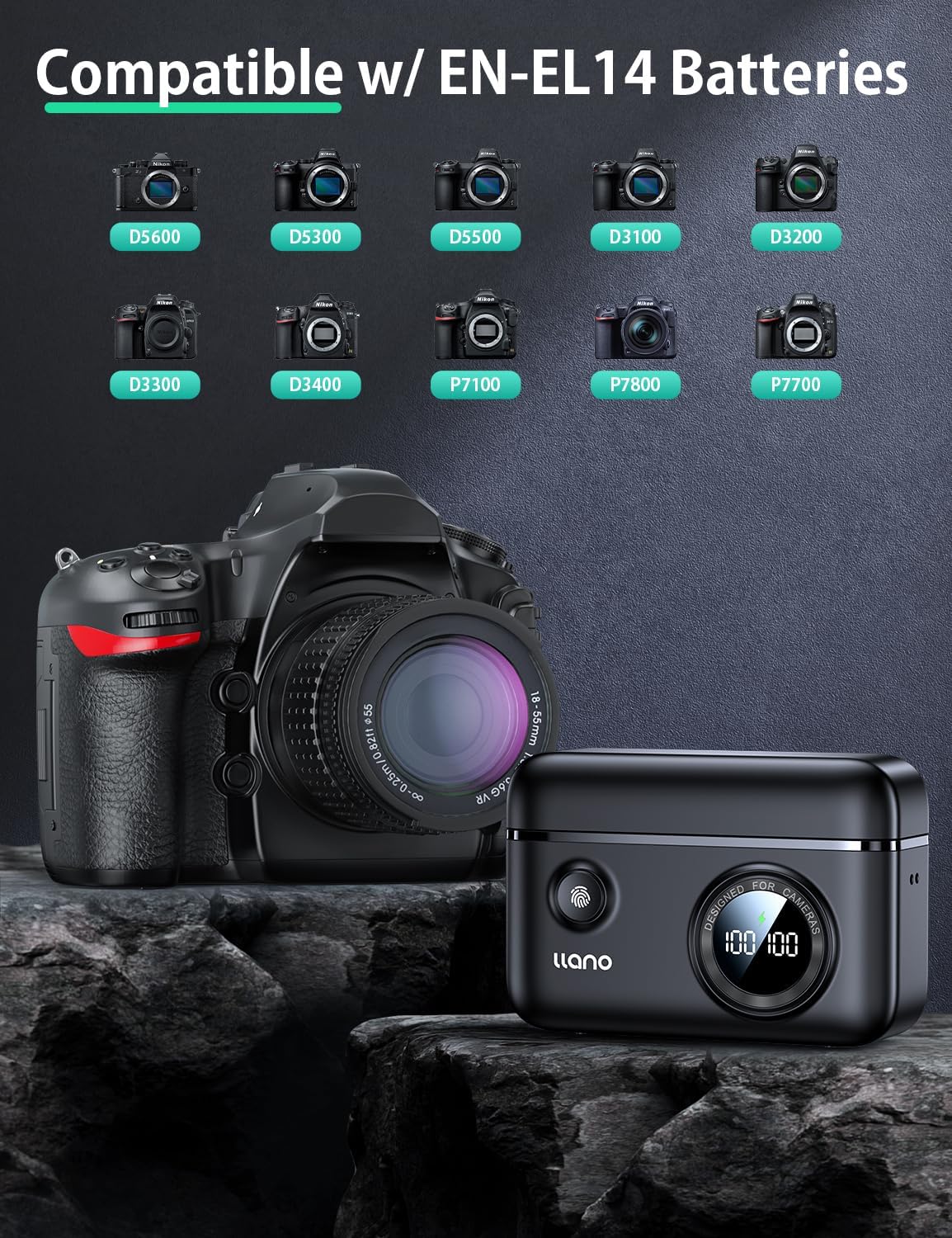
The llano CS2 charger is compatible with Nikon EN-EL14 and EN-EL14a batteries, used in various Nikon camera models, including:
- Nikon D3200, D3300, D3400, D3500
- Nikon D5100, D5200, D5300, D5500, D5600
- Nikon Coolpix P7000, P7100, P7700, P7800
4. 상자 안에 무엇이 들어있나요?
- llano CS2 18W PD USB-C Fast Charger
- 매는 밧줄
- USB-C to USB-C 케이블
- 끈이 달린 가방
5. 설정 지침
- 전원 연결: Connect the provided USB-C cable to the charger's input port and to a compatible 18W PD (Power Delivery) USB-C power source (e.g., wall adapter, car charger, power bank). The digital display will illuminate.
- 배터리 삽입: Open the magnetic lid. Insert one or two Nikon EN-EL14/EN-EL14a batteries into the designated charging slots (CH1 and CH2), ensuring correct orientation. The digital display will show the current charge percentage for each inserted battery.
- Optional SD Card Storage: If desired, place an SD card into the dedicated storage slot on the side of the charger. This slot is for storage only and does not function as a card reader.

6. 사용 설명서
- 충전 시작: Once batteries are inserted and the charger is connected to a power source, charging will begin automatically. The digital display will show the charging icon and the increasing 퍼센트tage 각 배터리에 대해.
- Monitoring Charge Status: 디지털 디스플레이는 실시간으로 배터리 잔량을 표시합니다.tage. A lightning bolt icon indicates active charging. When a battery reaches 100%, the charging process for that slot will stop automatically.
- Checking Battery Level (Unplugged): Press the button on the front of the charger to view the current charge level of inserted batteries without being connected to a power source.
- 배터리 제거: Once charging is complete, or if you need to remove a battery, gently pull it out from its slot.

7. 유지관리
- 청소: Use a soft, dry cloth to clean the charger's exterior. Avoid using liquid cleaners or solvents. Ensure no debris enters the charging slots or USB-C port.
- 저장: Store the charger in a cool, dry place away from direct sunlight and extreme temperatures. Utilize the magnetic lid to protect the battery slots and the included drawstring bag for scratch resistance during transport.
- 손질: Avoid dropping the charger or subjecting it to strong impacts. Ensure batteries are inserted and removed gently to prevent damage to the contacts.

8. 문제 해결
| 문제 | 가능한 원인 | 해결책 |
|---|---|---|
| Charger display is off / No power | 전원 연결이 안 되었거나 케이블/어댑터에 문제가 있습니다. | Ensure the USB-C cable is securely connected to both the charger and a working power source. Try a different USB-C cable or power adapter. |
| 배터리가 충전되지 않음 | Battery not properly inserted; battery is damaged or incompatible; charger contacts are dirty. | Re-insert the battery, ensuring it clicks into place. Verify the battery is an EN-EL14/EN-EL14a type. Clean charger and battery contacts with a dry cloth. |
| 충전 속도가 느림 | Power source does not support 18W PD; cable is not PD compatible. | Use an 18W (or higher) Power Delivery (PD) compatible USB-C power adapter and a PD-compatible USB-C cable for optimal charging speed. |
| Digital display shows incorrect percentage | Temporary display glitch; battery calibration needed. | Remove and re-insert the battery. Allow the battery to fully charge and discharge a few times to recalibrate. |
9. 사양
| 사양 | 세부 사항 |
|---|---|
| 모델 번호 | LJN-CS004 |
| 상표 | 일라노 |
| 제품 치수 | 4.4인치 깊이 x 1.7인치 너비 x 3.3인치 높이(11.18cm x 4.32cm x 8.38cm) |
| 품목 무게 | 0.4파운드(약 181그램) |
| 입력 Voltage | 8.4 볼트 |
| 출력 볼륨tage | 7.4 볼트 |
| 배터리 충전 시간 | Approx. 1.45 Hours (with 18W PD charger) |
| 커넥터 유형 | USB-C |
| 포트 수 | 1 (USB-C 입력) |
| 색상 | 검은색 |
| 인증 | 연방통신위원회(FCC) |
10. 보증 및 지원
This llano CS2 Fast Charger comes with an 18개월 보증 from the date of purchase. For warranty claims, technical support, or any inquiries regarding your product, please contact llano customer service through the retailer where the product was purchased or visit the official llano web지원 연락처 정보 사이트.
보증 확인을 위해 구매 증빙서류를 보관하세요.


