소개
Thank you for choosing the Mesqool CR1025 Digital Alarm Clock Radio. This device combines multiple functions including a digital alarm clock, Bluetooth 5.0 speaker, FM radio, night light, and dual USB charging ports. This manual provides detailed instructions to help you set up and operate your new device effectively.
패키지 내용
- Mesqool CR1025 Digital Alarm Clock Radio
- 전원 어댑터
- 사용자 설명서
- C Battery (for backup)
제품 끝view
Familiarize yourself with the components and controls of your Mesqool CR1025 Digital Alarm Clock Radio.
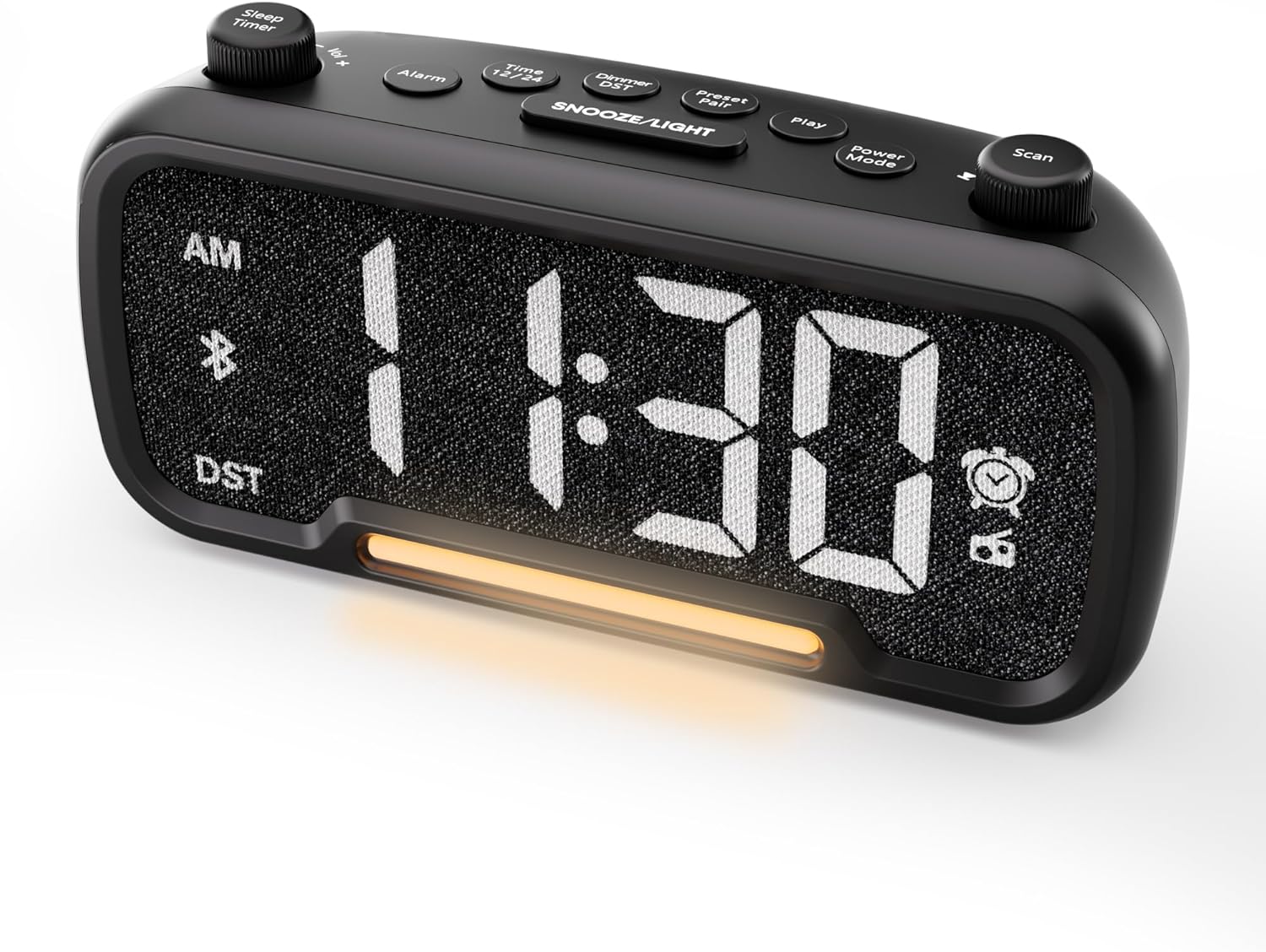

Control Buttons and Knobs:
- Sleep Timer / Vol +/- Knob (Left): Adjusts volume, sets sleep timer duration.
- 알람 버튼: 알람을 설정하고 활성화/비활성화합니다.
- Time 12/24 Button: 12시간제와 24시간제 시간 형식 간 전환 기능을 제공합니다.
- Dimmer / DST Button: Adjusts display brightness, activates/deactivates Daylight Saving Time (DST).
- Preset / Pair Button: Saves FM radio presets, initiates Bluetooth pairing.
- 재생 버튼: Plays/pauses media in Bluetooth mode.
- 전원 모드 버튼: Cycles through operating modes (FM, Bluetooth, AUX).
- Scan / TU +/- Knob (Right): Scans FM radio stations, manually tunes FM frequency.
- 스누즈/조명 버튼: Activates snooze function, turns night light on/off.

설정
1. 초기 파워업
Connect the provided power adapter to the DC 5V IN port on the back of the alarm clock and plug it into a standard wall outlet. The display will light up. Ensure the C battery is installed for backup in case of power outage.

2. 시간 설정
- 를 누르고 계세요 시간 12/24 버튼을 2초 동안 누르세요. 시침 숫자가 깜빡이기 시작합니다.
- 회전하다 볼륨 +/- knob (left knob) to adjust the hour.
- 를 누르세요 시간 12/24 버튼을 다시 누르세요. 분 표시 숫자가 깜빡이기 시작합니다.
- 회전하다 볼륨 +/- 분을 조정하는 손잡이.
- 를 누르세요 시간 12/24 button once more to confirm the time setting.
Video demonstrating how to set the time on the Mesqool Digital Alarm Clock Radio.
3. 12/24 시간 형식
To switch between 12-hour and 24-hour time formats, short press the 시간 12/24 button. The display will change accordingly.
4. 일광 절약 시간제(DST) 조정
To activate or deactivate DST, press and hold the Dimmer / DST button for 2 seconds. The time will adjust by one hour forward or backward, and the DST indicator will appear or disappear on the display.
작동 지침
1. 알람 설정
- 를 누르고 계세요 경보 버튼을 2초 동안 누르세요. 시 숫자가 깜빡입니다.
- 회전하다 볼륨 +/- knob to adjust the desired alarm hour.
- 를 누르세요 경보 버튼을 다시 누르세요. 분 숫자가 깜빡입니다.
- 회전하다 볼륨 +/- knob to adjust the desired alarm minute.
- 를 누르세요 경보 button again. The alarm sound selection will flash (bell icon for buzzer, radio icon for FM radio). Rotate the 볼륨 +/- knob to choose between buzzer or FM radio as the alarm sound.
- If FM radio is selected, press the 경보 button again. The volume level will flash (L01-L16). Rotate the 볼륨 +/- knob to set the desired alarm volume.
- 를 누르세요 경보 button once more to confirm and activate the alarm. The alarm icon will appear on the display.
To deactivate the alarm, short press the 경보 버튼을 누르면 알람 아이콘이 화면에서 사라집니다.

스누즈 기능 :
알람이 울리면 버튼을 누르세요. 스누즈 / 라이트 button to activate the snooze function for 9 minutes. The alarm will sound again after 9 minutes. To turn off the alarm completely, press any other button except 스누즈 / 라이트.

2. FM 라디오 작동
- 를 누르세요 전원 모드 button repeatedly until the radio icon lights up on the display, indicating FM radio mode.
- Auto-Scan and Save Presets: 를 누르세요 Scan / TU +/- knob (right knob) to automatically search for available FM stations and save them as presets (up to 20 stations). The display will show "P01", "P02", etc., as stations are saved.
- 수동 조정 : 회전하다 Scan / TU +/- knob to manually browse frequencies.
- 프리셋 불러오기: 짧게 누르세요 프리셋/페어 저장된 방송국 프리셋을 순환하는 버튼입니다.
- 볼륨 조절: 회전하다 볼륨 +/- knob (left knob) to adjust the radio volume (L01-L16).

Video demonstrating how to set the FM radio alarm on the Mesqool Digital Alarm Clock Radio.
3. 블루투스 스피커 작동
- 를 누르세요 전원 모드 button repeatedly until the Bluetooth icon (bt) starts flashing on the display, indicating pairing mode.
- On your mobile device, enable Bluetooth and search for "CR1025" in the list of available devices.
- Select "CR1025" to pair. Once connected, the Bluetooth icon will stop flashing and remain solid.
- 이제 알람시계 스피커를 통해 기기의 오디오를 재생할 수 있습니다.
- 사용하세요 볼륨 +/- knob on the alarm clock or your mobile device to adjust the volume.
- 를 누르세요 놀다 버튼을 눌러 오디오를 재생하거나 일시 중지합니다.

Video demonstrating how to set up Bluetooth on the Mesqool Digital Alarm Clock Radio.
4. 야간 조명 작동
The alarm clock features a gentle night light. To turn the night light on or off, short press the 스누즈 / 라이트 단추.

5. Dimmer Setting
The display brightness can be adjusted to 5 levels. Short press the Dimmer / DST button to cycle through the brightness levels (L01-L05). Select the level that best suits your environment.

6. Sleep Timer Setting
The sleep timer allows you to set a duration for the FM radio or Bluetooth speaker to play before automatically turning off. This is useful for falling asleep to music or podcasts.
- While in FM radio or Bluetooth mode, press the 슬립 타이머 button. The display will show the current sleep timer duration (e.g., "30" for 30 minutes).
- 회전하다 Sleep Timer / Vol +/- knob to select the desired duration: 15, 30, 60, 90, or 120 minutes. You can also select "OFF" to disable the sleep timer.
- The timer will start counting down, and the device will automatically turn off after the selected duration.
7. USB 충전 포트
The alarm clock is equipped with two USB charging ports (Type-C and USB-A) on the back, each providing 5V/1A output. These ports can be used to conveniently charge your smartphone, tablet, or other USB-powered devices.

문제 해결
| 문제 | 가능한 해결책 |
|---|---|
| 시계 표시가 비어 있습니다. | Ensure the power adapter is securely connected to both the clock and a working power outlet. Check if the power outlet is functional. |
| 알람이 울리지 않습니다. | Verify that the alarm is set and activated (alarm icon visible on display). Check the alarm volume level. Ensure the correct alarm sound (buzzer or FM radio) is selected. |
| FM 라디오 수신이 좋지 않습니다. | Extend the FM antenna fully. Try repositioning the antenna or the clock for better signal. Perform an auto-scan again to find stronger stations. |
| 블루투스 장치를 페어링할 수 없습니다. | Ensure the clock is in Bluetooth pairing mode (flashing 'bt' icon). Make sure Bluetooth is enabled on your mobile device and it is within range. Forget "CR1025" from your device's Bluetooth list and try pairing again. |
| USB 충전 포트가 작동하지 않습니다. | Confirm the alarm clock is powered on. Ensure the charging cables are properly connected to both the clock and your device. Try a different USB cable or device to rule out cable/device issues. |
명세서
| 특징 | 세부 사항 |
|---|---|
| 상표 | 메스쿨 |
| 모델 번호 | CR1025 |
| 색상 | 검은색 |
| 디스플레이 유형 | 디지털 LED |
| 제품 치수 | 6.61인치 길이 x 3.31인치 너비 x 2.32인치 높이 |
| 전원 | 유선 전기 (AC 어댑터 포함) |
| 배터리 백업 | C형 배터리 1개(포함) |
| 블루투스 버전 | V5.0 |
| FM 라디오 주파수 | 87.5-108MHz |
| FM 프리셋 | 최대 20개 스테이션 |
| 디스플레이 디머 | 5단계 |
| 알람 소리 | 부저, FM 라디오 |
| 다시 알림 시간 | 9 분 |
| USB 충전 출력 | Type-C & USB-A, 5V/1A each |
| 재료 | 플라스틱 |
| 품목 무게 | 0.48파운드(약 7.7온스) |
유지
- 부드럽고 마른 천으로 기기를 닦으십시오. 액체 세척제나 연마성 재질을 사용하지 마십시오.
- 기기를 직사광선, 극한 온도 및 높은 습도로부터 멀리하십시오.
- 과열을 방지하려면 장치 주변을 적절하게 환기시키십시오.
- If the device will not be used for an extended period, remove the backup battery.
안전 정보
- 장치를 물이나 습기에 노출시키지 마십시오.
- 직접 기기를 분해하거나 수리하지 마십시오. 자격을 갖춘 서비스 담당자에게 문의하십시오.
- 기기를 어린이의 손이 닿지 않는 곳에 보관하세요.
- 제공된 전원 어댑터만 사용하십시오. 승인되지 않은 어댑터를 사용하면 기기가 손상되고 보증이 무효화될 수 있습니다.
- Avoid placing the device near heat sources or open flames.
보증 및 지원
Specific warranty details are not provided in the product information. For warranty claims, technical support, or further assistance, please contact Mesqool customer service through their official web제품을 구매하신 판매처 또는 소매점에 문의하십시오. 보증 관련 문의 시 필요시 구매 증빙 자료를 보관해 주시기 바랍니다.
Visit the Mesqool Store for more information: Mesqool Official Store


