1. 서론
This manual provides comprehensive instructions for the setup, operation, maintenance, and troubleshooting of your SUAAT S10 Android 14 Tablet. Please read this manual carefully before using your device to ensure proper functionality and to maximize your user experience.
2. 패키지 내용
Verify that all items listed below are included in your package. If any items are missing or damaged, please contact SUAAT customer support.
- SUAAT S10 정제
- 태블릿 케이스
- 블루투스 키보드
- 생쥐
- Type-C-USB 어댑터
- C형 데이터 케이블
- European Standard Charger
- OTG 어댑터
- 스크린 보호기
- 사용 설명서(본 문서)

그림 2.1: 포함된 패키지 내용
3. 제품 오버view
The SUAAT S10 tablet features a 10.1-inch IPS display, an Octa-Core processor, and runs on Android 14. It is designed for versatile use, from entertainment to productivity.
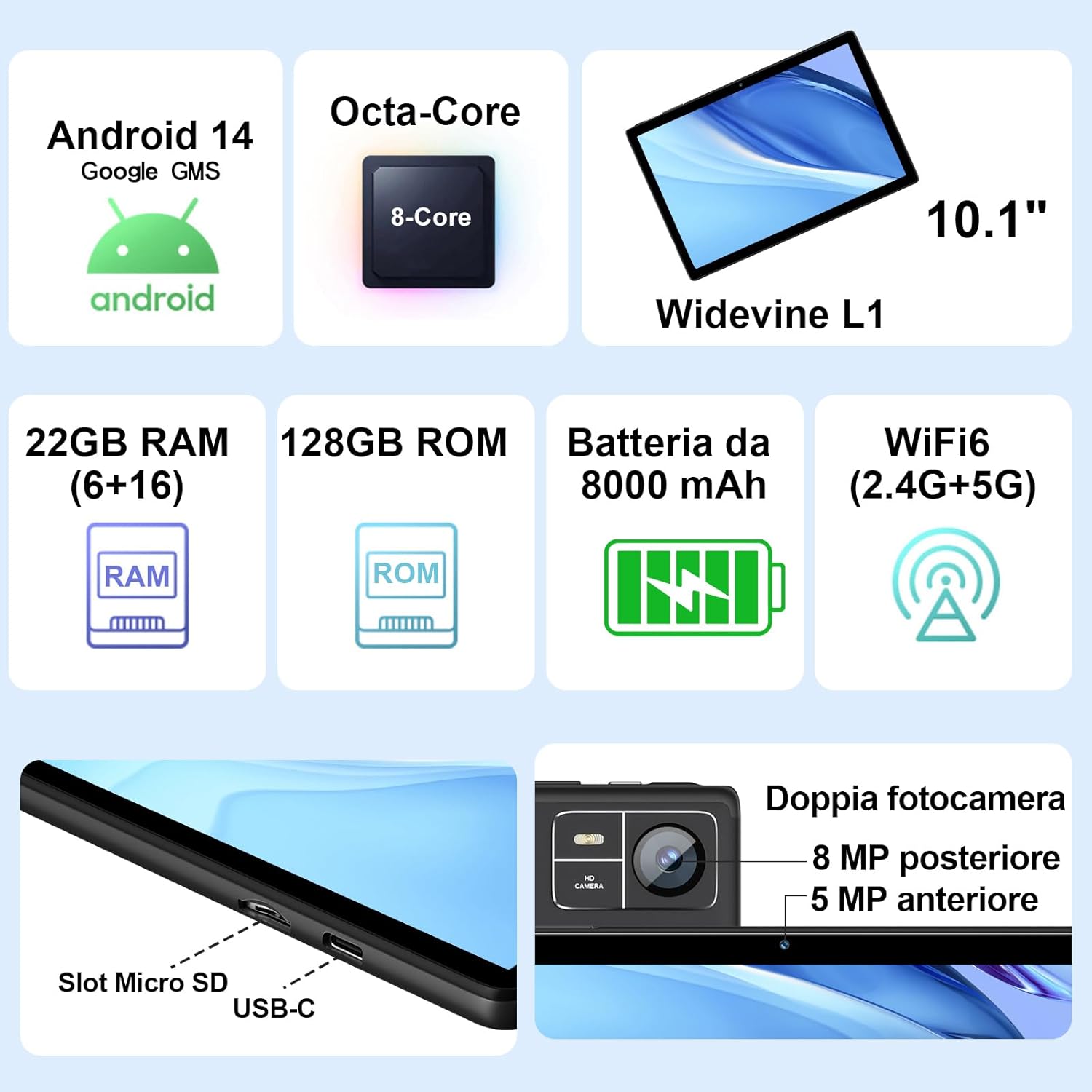
Figure 3.1: Key Features and Ports
3.1 물리적 특징
- 표시하다: 10.1-inch IPS screen (1280 x 800 resolution)
- 카메라: 5 MP Front Camera, 8 MP Rear Camera
- 포트: USB Type-C, MicroSD Card Slot
- 버튼: 전원 버튼, 볼륨 높이기/낮추기
4. 설정
4.1 초기 충전
Before first use, fully charge your tablet using the provided Type-C data cable and European standard charger. The battery indicator on the screen will show charging status.
4.2 전원 켜기/끄기
- 전원을 켜려면: Press and hold the Power button until the SUAAT logo appears.
- 전원을 끄려면: 전원 옵션이 나타날 때까지 전원 버튼을 길게 누른 다음 "전원 끄기"를 선택하세요.
- 재시작하기 위해: 전원 옵션이 나타날 때까지 전원 버튼을 길게 누른 다음 "다시 시작"을 선택하십시오.
4.3 초기 설정 마법사
태블릿을 처음 켜면 초기 설정 과정을 안내합니다.
- 원하는 언어를 선택하세요.
- Wi-Fi 네트워크에 연결합니다.
- Google 계정으로 로그인하거나 새 계정을 만드세요. Google Play 스토어 및 기타 Google 서비스에 접속하려면 이 과정이 필요합니다.
- 화면 잠금(PIN, 패턴 또는 비밀번호)을 설정합니다.
- Review and accept Google services terms.
4.4 MicroSD 카드 삽입
The tablet supports MicroSD cards up to 1TB for expanded storage.
- 태블릿 측면에 있는 MicroSD 카드 슬롯을 찾으세요.
- 마이크로SD 카드를 슬롯에 딸깍 소리가 날 때까지 부드럽게 삽입하십시오. 카드의 방향이 올바른지 확인하십시오.
- 제거하려면 카드가 튀어나올 때까지 조심스럽게 밀어 넣으세요.
4.5 Connecting Accessories (Keyboard and Mouse)
The included Bluetooth keyboard and mouse can be easily paired with your tablet.
- 이동하다 설정 > 연결된 장치 > 블루투스 당신의 태블릿에.
- Turn on the Bluetooth keyboard and mouse. Put them into pairing mode (refer to their individual manuals if needed).
- On the tablet, tap "Pair new device" and select the keyboard or mouse from the list of available devices.
- 화면의 지시에 따라 페어링 과정을 완료하세요.

Figure 4.1: Tablet with Keyboard and Mouse
5. 태블릿 작동
5.1 안드로이드 14 기능
Your SUAAT S10 tablet runs on the latest Android 14 operating system, offering enhanced privacy, customizable themes, and improved performance.
- GMS 인증: Pre-installed Google Play Store allows easy download of your favorite apps.
- 개인정보 보호 및 보안: Enhanced privacy controls to manage app permissions and data access.
- 사용자 정의: Personalize themes and app icons.
- 생산성 기능: Supports multi-users, multi-windows, and split-screen functionality for efficient multitasking.
- 보호자 관리: Tools to manage content and screen time for children.
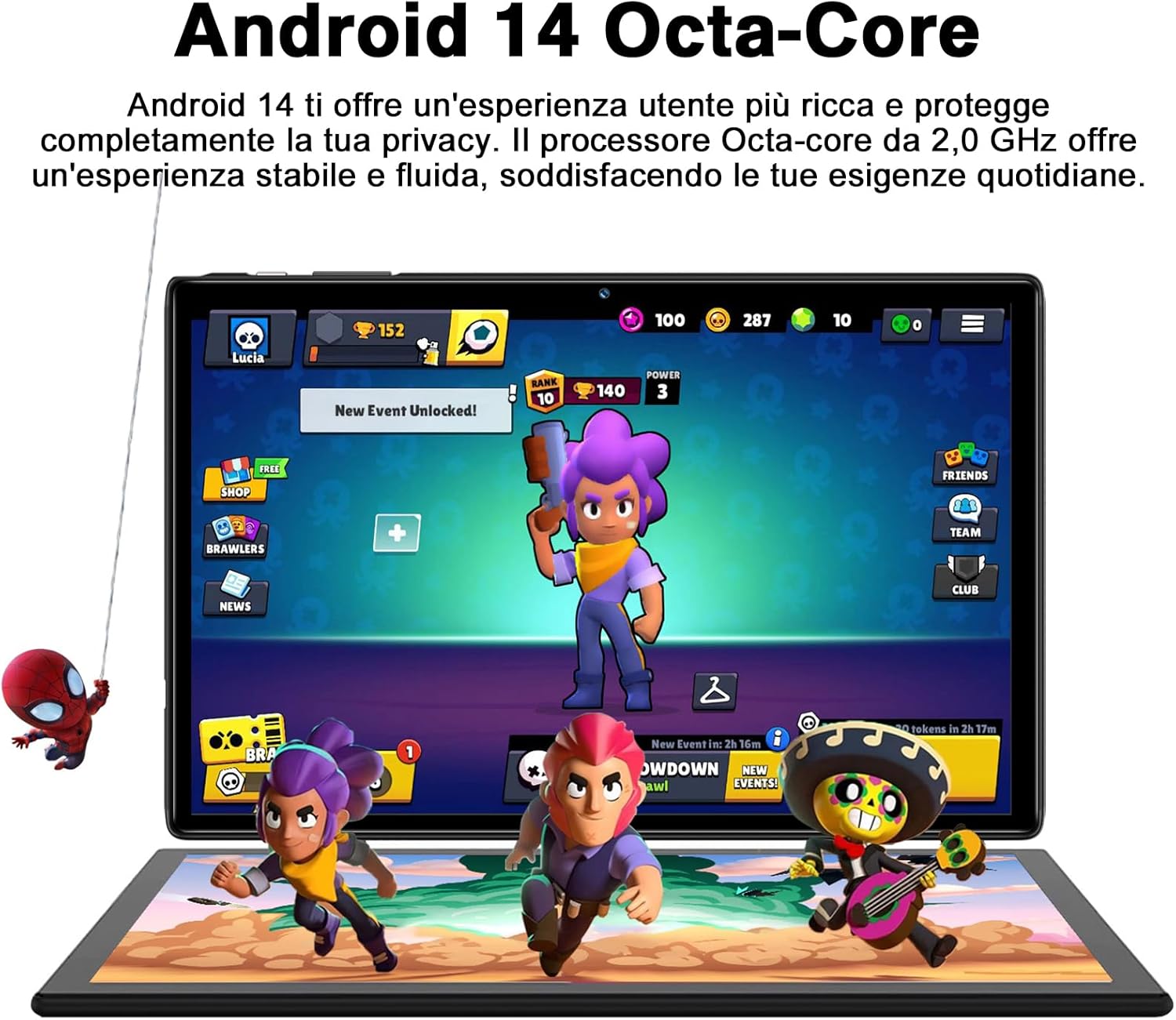
Figure 5.1: Android 14 Interface with Gaming Example
5.2 디스플레이 기능
The 10.1-inch IPS display provides clear visuals and rich colors.
- IPS 기술: 다양한 혜택 제공 view각도와 정확한 색상 재현.
- WideVine L1 Support: Enables high-definition video streaming (up to 1280p) from platforms like YouTube and Netflix.

Figure 5.2: Displaying Apps on the IPS Screen
5.3 카메라 사용
The tablet is equipped with a 5 MP front camera and an 8 MP rear camera for photos and video calls.
- 홈 화면이나 앱 서랍에서 카메라 앱을 엽니다.
- 카메라 아이콘을 사용하여 전면 카메라와 후면 카메라를 전환합니다.
- 셔터 버튼을 탭하여 사진을 찍거나 비디오 녹화를 시작/중지하세요.
- Explore various camera modes and editing options within the app.
5.4 연결성
- 와이파이: Supports 2.4GHz and 5GHz Wi-Fi for fast and stable internet connection. Access Wi-Fi settings via 설정 > 네트워크 및 인터넷 > 인터넷.
- 블루투스 5.0 : Connect to Bluetooth headphones, speakers, printers, and other devices. Manage connections via 설정 > 연결된 장치 > 블루투스.
- OTG(온더고): Use the included OTG adapter to connect USB flash drives, external hard drives, or other USB peripherals.
- GPS: 내비게이션 및 위치 기반 서비스를 위한 통합 GPS 기능.
- FM 라디오 : Built-in FM receiver for listening to radio broadcasts.
5.5 접근성 기능
The tablet includes features to assist users with different needs:
- 말하기 선택: 활성화되면 (설정 > 접근성 > 말하기 선택), you can tap text on the screen, and the tablet will read it aloud.
- 음성 안내 지원: Provides spoken feedback for all actions and screen elements, allowing navigation without visual input. Supports Braille displays via Bluetooth. Enable via 설정 > 접근성 > 토크백.
5.6 File 옮기다
쉽게 이체할 수 있어요 files between your tablet and other devices like computers or mobile phones.
- USB를 통해: Connect the tablet to a computer using the Type-C data cable. On the tablet, select "File transfer" from the USB connection options in the notification panel.
- 블루투스를 통해: Pair with another Bluetooth-enabled device and use the file sharing option.
6. 유지관리
6.1 청소
태블릿을 닦을 때는 부드럽고 보풀이 없는 천을 사용하세요. 잘 지워지지 않는 얼룩은 가볍게 닦아내세요.amp천에 물이나 화면 세척제를 묻혀 닦아주세요. 강한 화학 물질이나 연마재는 사용하지 마세요.
6.2 배터리 관리
8000mAh 배터리는 장시간 사용을 가능하게 합니다. 배터리 수명을 연장하려면 다음을 참고하세요.
- 극한의 온도를 피하세요.
- 배터리가 자주 완전히 방전되지 않도록 하세요.
- 정품 충전기와 케이블을 사용하세요.
- 백그라운드에서 실행 중인 사용하지 않는 앱을 닫습니다.
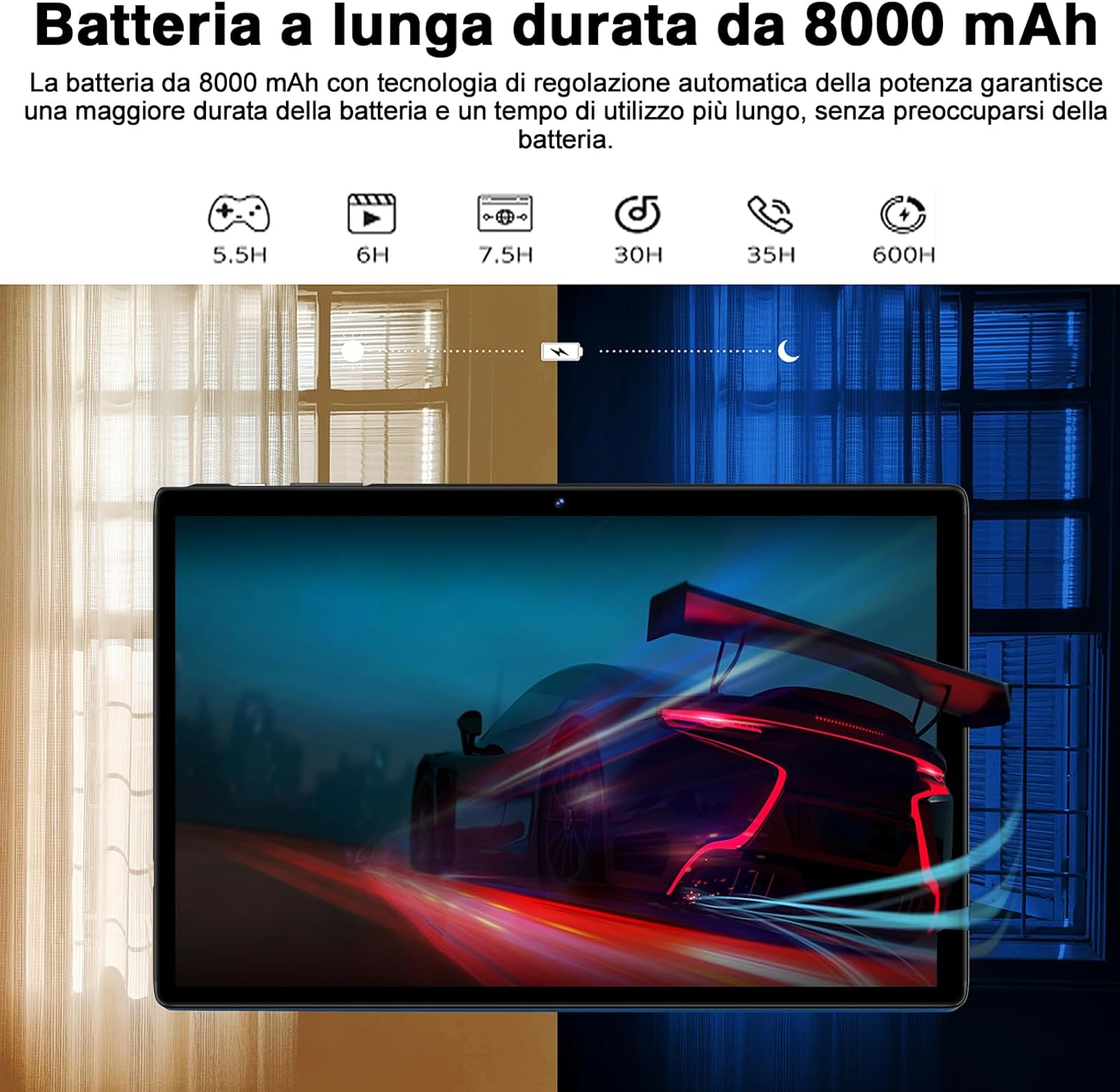
Figure 6.1: 8000mAh Battery Life Overview
6.3 소프트웨어 업데이트
최적의 성능과 보안을 유지하려면 정기적으로 시스템 업데이트를 확인하십시오. 다음 링크로 이동하세요. 설정 > 체계 > 시스템 업데이트.
7. 문제 해결
| 문제 | 가능한 원인 / 해결책 |
|---|---|
| 태블릿이 켜지지 않습니다. | Battery might be depleted. Connect the charger and try again after a few minutes. If it still doesn't turn on, press and hold the power button for 10-15 seconds to force a restart. |
| Wi-Fi 연결 문제. | Ensure Wi-Fi is enabled. Restart your router and the tablet. Forget the network and reconnect. Check if other devices can connect to the same Wi-Fi. |
| 앱이 충돌하거나 정지됩니다. | Close background apps. Clear the app's cache (Settings > Apps > [App Name] > Storage & cache > Clear cache). Update the app to the latest version. Restart the tablet. |
| 성능이 느립니다. | 사용하지 않는 앱을 닫으세요. 캐시와 임시 파일을 삭제하세요. files. Uninstall unnecessary apps. Ensure sufficient storage space. Restart the tablet regularly. |
| Bluetooth 장치가 페어링되지 않습니다. | Ensure Bluetooth is enabled on both devices. Put the accessory in pairing mode. Make sure devices are within range. Restart both devices. |
8. 사양
| 특징 | 세부 사항 |
|---|---|
| 상표 | 수아트 |
| 모델 | S10 |
| 운영 체제 | 안드로이드 14 |
| 프로세서 | Octa-Core, 2.0 GHz (Unisoc) |
| 숫양 | 22 GB (6GB physical + 16GB expansion) |
| 내부 저장소(ROM) | 128GB (XNUMX기가바이트) |
| 확장 가능한 스토리지 | MicroSD 카드를 통해 최대 1TB까지 지원 |
| 배터리 용량 | 8000mAh |
| 디스플레이 유형 | IPS |
| 화면 크기 | 10.1인치 |
| 디스플레이 해상도 | 1280 x 800 픽셀 |
| 전면 카메라 | 5 MP |
| 후방 카메라 | 8 MP |
| 와이파이 | 2.4 GHz + 5 GHz (802.11ax) |
| 블루투스 | 블루투스 5.0 |
| 인터페이스 | Type-C, MicroSD Card Slot |
| 특별 기능 | GMS Certified, WideVine L1, OTG, FM Receiver, GPS |
| 치수(길이 x 너비 x 높이) | 24.31 x 0.99 x 16.1cm |
| 무게 | 480그램 |
9. 보증 및 지원
9.1 보증 정보
SUAAT offers a 2-year European standard warranty for each tablet PC. This warranty covers manufacturing defects and ensures your product functions as intended under normal use.
9.2 고객 지원
SUAAT has over 15 years of experience in tablet manufacturing and sales, backed by a professional technical support and assistance team. We are committed to providing excellent pre-sales advice and after-sales service, including product technical support.
If you require any assistance or have questions, please do not hesitate to contact us. We aim to respond within 24 hours and provide satisfactory service.
For support, please refer to the contact information provided on the product packaging or SUAAT's official web대지.
10. 중요한 안전 정보
- 태블릿을 극한의 온도, 직사광선 또는 높은 습도에 노출시키지 마세요.
- 태블릿을 떨어뜨리거나 심한 충격을 주지 마십시오.
- 태블릿을 직접 분해하거나 수리하지 마십시오. 그렇게 하면 보증이 무효화됩니다.
- Use only original or certified compatible chargers and accessories.
- 정제를 물이나 기타 액체로부터 멀리 보관하십시오.
- 태블릿과 배터리는 현지 규정에 따라 책임감 있게 폐기하십시오.


