1. 서론
This manual provides essential information for the proper use and care of your SUAAT S3 10-inch Android 14 Tablet. Please read this manual thoroughly before operating the device to ensure optimal performance and longevity. Keep this manual for future reference.
2. 패키지 내용
아래 나열된 모든 품목이 패키지에 포함되어 있는지 확인하세요. 품목이 누락되었거나 손상된 경우 고객 지원팀에 문의하세요.
- SUAAT S3 정제
- 태블릿 케이스
- 스크린 프로텍터 필름
- 건반
- 생쥐
- Type-C to USB Adapter (OTG)
- C타입 케이블
- European Standard Charger
- SIM 이젝터 핀
- 사용자 설명서

이미지 2.1: All items included in the SUAAT S3 Tablet package.
3. 제품 오버view
The SUAAT S3 tablet features a sleek design with a 10-inch display and a robust set of accessories to enhance your user experience.

이미지 3.1: SUAAT S3 Tablet and its accessories.
주요 특징:
- 운영 체제: 안드로이드 14
- 프로세서: Octa-core 1.8 GHz (A523)
- 숫양: 20GB (실물 6GB + 확장 14GB)
- 집시 남자: 128GB
- 표시하다: 10.1인치 IPS, 1280 x 800 픽셀
- 연결성: Dual-band WiFi (2.4G/5G), Bluetooth 5.0
- 배터리: 6000mAh
- 인증: GMS Certified, Widevine L1
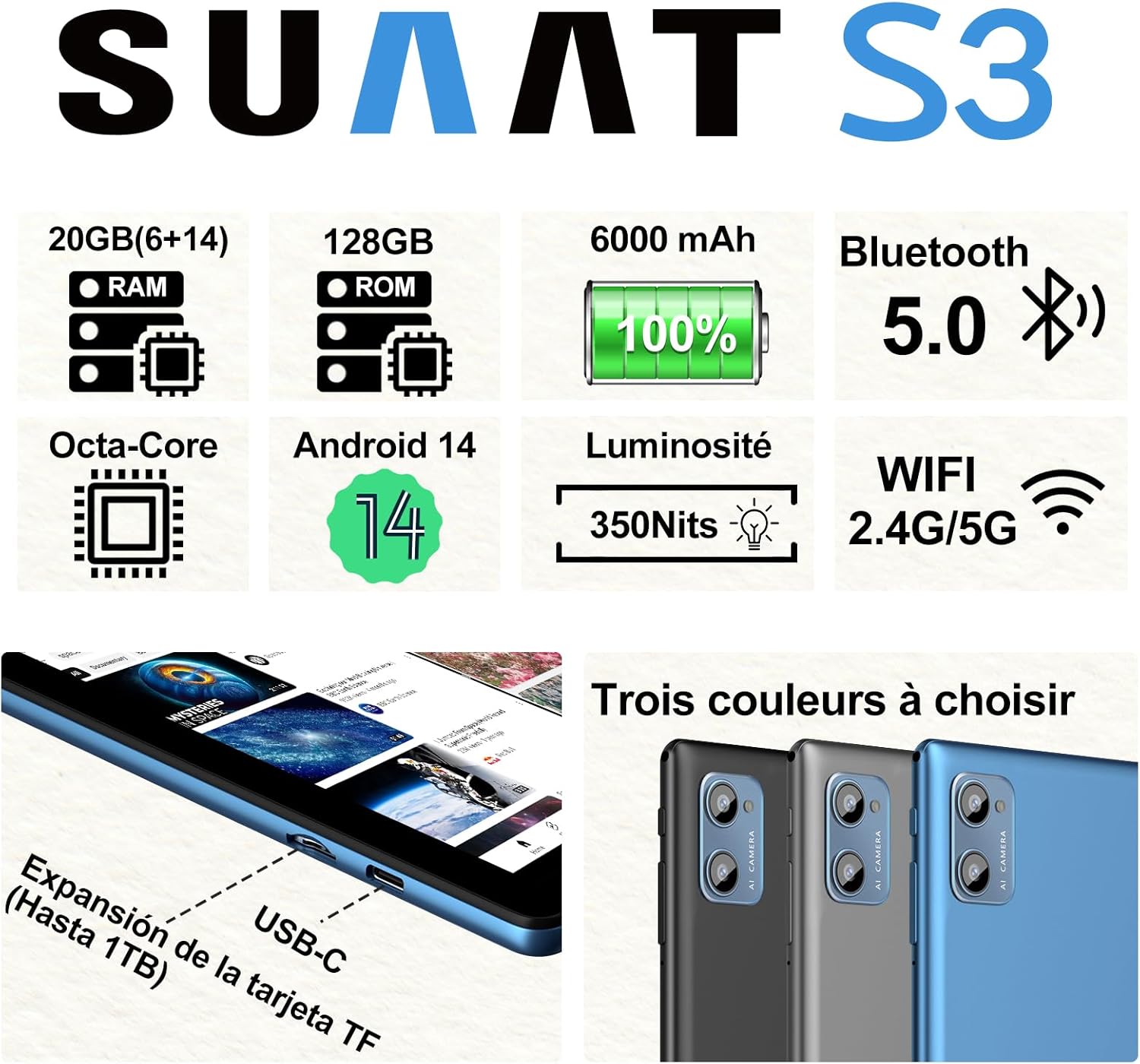
이미지 3.2: SUAAT S3 Tablet key specifications.
4. 초기 설정
4.1 태블릿 충전
Before first use, fully charge the tablet using the provided Type-C cable and European standard charger. The charging port is located on the side of the tablet.

이미지 4.1: Tablet charging via USB-C.
4.2 전원 켜기/끄기
- 전원을 켜려면: 화면이 켜질 때까지 전원 버튼을 길게 누릅니다.
- 전원을 끄려면: 전원 버튼을 길게 누른 다음, 화면에 나오는 옵션에서 '전원 끄기'를 선택하세요.
- 재시작하기 위해: 전원 버튼을 길게 누른 다음 옵션에서 '다시 시작'을 선택합니다.
4.3 초기 구성
Upon first power-on, follow the on-screen prompts to set up your tablet. This includes selecting your language, connecting to a Wi-Fi network, setting up your Google account, and configuring security options.
5. 사용 설명서
5.1 안드로이드 14 기능
Your SUAAT S3 tablet runs on Android 14, offering enhanced privacy, customization, and productivity features:
- 보호자 관리: Manage screen time, app access, and content filters for children.
- Multi-Account Mode: 별도의 사용자 계정을 생성하세요files for different users, each with their own apps, settings, and data.
- 분할 화면 모드: Use two applications simultaneously by dividing the screen.
- 사용자 정의 테마: Personalize your tablet's appearance with various themes and wallpapers.
- 위젯 : Add calendar, weather, and other widgets to your home screen for quick information access.

이미지 5.1: Tablet in split-screen mode.
5.2 기본 탐색
- 홈 화면: 홈 화면 간에 이동하려면 왼쪽이나 오른쪽으로 살짝 밀어주세요.
- 앱 서랍: 설치된 모든 애플리케이션에 접근하려면 화면 하단에서 위로 살짝 밀어주세요.
- 알림 및 빠른 설정: 화면 상단에서 아래로 스와이프하여 view 알림 및 빠른 설정 토글에 액세스합니다.
- 최근 앱: Tap the square navigation button (or swipe up and hold from the bottom if using gesture navigation) to see recently opened applications.
6. 연결성
6.1 Wi-Fi 연결
The tablet supports dual-band Wi-Fi (2.4G and 5G) for faster and more stable internet connectivity.
- 이동하다 설정 > 네트워크 및 인터넷 > 와이파이.
- Wi-Fi 전환 On.
- 목록에서 원하는 네트워크를 선택하고 필요한 경우 비밀번호를 입력하세요.
6.2 블루투스 장치
Connect Bluetooth accessories like the included keyboard and mouse, or headphones, using Bluetooth 5.0.
- 이동하다 설정 > 연결된 장치 > 블루투스.
- 블루투스 전환 On.
- Bluetooth 장치가 페어링 모드인지 확인하세요.
- '사용 가능한 기기' 목록에서 페어링할 기기를 선택하세요.
6.3 헤드폰 잭
A 3.5mm headphone jack is provided for wired audio connections.
7. Display and Multimedia
7.1 10.1-inch IPS Display
The tablet features a 10.1-inch IPS display with a resolution of 1280 x 800 pixels, offering clear and vibrant visuals with wide view각도를 나타냅니다.

이미지 7.1: 10.1-inch IPS Display.
7.2 Widevine L1 지원
With Widevine L1 support, the tablet can stream high-definition content from popular streaming services, providing a clear and immersive view경험.
7.3 GMS Certification
The tablet is GMS (Google Mobile Services) certified, ensuring full access to the Google Play Store and all Google applications, along with robust security and privacy features.
8. 저장 및 성능
8.1 RAM and ROM
The SUAAT S3 comes with 20GB of RAM (6GB physical + 14GB virtual expansion) and 128GB of internal storage (ROM). This ample memory allows for smooth multitasking and storage of numerous applications, videos, images, and files.

이미지 8.1: 태블릿 쇼크asing large memory for apps and media.
8.2 Octa-Core Processor
Equipped with an Octa-core 1.8 GHz A523 processor, the tablet delivers stable and responsive performance for everyday tasks, gaming, and multimedia consumption.
8.3 확장형 저장공간
The tablet supports expandable storage via a TF (microSD) card, allowing you to increase storage capacity up to 1TB for even more fileS와 미디어.
9. 배터리 관리
9.1 배터리 용량
The SUAAT S3 is powered by a 6000 mAh battery, providing extended usage time. Actual battery life may vary based on usage patterns and settings.
9.2 충전 지침
- 태블릿과 함께 제공된 정품 충전기와 케이블만 사용하십시오.
- Avoid exposing the tablet to extreme temperatures during charging.
- Do not leave the tablet charging for excessively long periods after it has reached 100% to prolong battery health.
10. 유지관리
10.1 태블릿 청소
- 부드럽고 보푸라기가 없는 천을 사용하여 태블릿의 화면과 본체를 닦으세요.
- 완고한 얼룩의 경우 약간 damp천에 물이나 화면 세척제를 묻혀 닦으세요. 강한 화학 물질은 피하세요.
- 청소하기 전에 태블릿의 전원이 꺼져 있고 전원 플러그가 뽑혀 있는지 확인하십시오.
10.2 보관
When not in use for extended periods, store the tablet in a cool, dry place. Avoid direct sunlight and extreme temperatures.
10.3 소프트웨어 업데이트
태블릿에 최신 기능, 보안 패치 및 성능 향상이 적용되도록 정기적으로 소프트웨어 업데이트를 확인하고 설치하세요. 자세한 내용은 다음 링크를 참조하세요. 설정 > 체계 > 시스템 업데이트.
11. 문제 해결
If you encounter issues with your SUAAT S3 tablet, refer to the following common solutions:
| 문제 | 가능한 해결책 |
|---|---|
| 태블릿 전원이 켜지지 않습니다 | 배터리가 충전되었는지 확인하세요. 충전기를 연결하고 몇 분 정도 기다린 후 다시 전원을 켜보세요. |
| 화면이 반응하지 않습니다 | 태블릿을 다시 시작하세요. 문제가 지속되면 공장 초기화를 수행하세요(데이터가 손실됩니다). |
| Wi-Fi에 연결할 수 없습니다 | 설정에서 Wi-Fi가 활성화되어 있는지 확인하세요. 공유기를 재시작하세요. 비밀번호를 정확하게 입력했는지 확인하세요. |
| Bluetooth 장치가 페어링되지 않음 | Ensure Bluetooth is enabled on both devices and the accessory is in pairing mode. Try restarting both devices. |
| 앱이 충돌하거나 속도가 느려집니다 | 백그라운드 앱을 종료하세요. 앱 캐시를 삭제하세요(설정 > 앱 > [앱 이름] > 저장공간 > 캐시 삭제). 충분한 저장 공간이 있는지 확인하세요. |
| 배터리가 빨리 소모됩니다 | Reduce screen brightness. Disable unused features like Wi-Fi or Bluetooth. Close background apps. Check for power-intensive apps. |
If these solutions do not resolve the issue, please contact SUAAT customer support.
12. 사양
| 특징 | 세부 사항 |
|---|---|
| 상표 | 수아트 |
| 모델 번호 | S3 |
| 운영 체제 | 안드로이드 14 |
| 프로세서 | A523 Octa-core 1.8 GHz |
| 숫양 | 20 GB (6GB installed) |
| 저장 장치(ROM) | 128GB (XNUMX기가바이트) |
| 확장 가능한 스토리지 | TF 카드를 통해 최대 1TB까지 지원 |
| 화면 크기 | 10.1 인치 |
| 화면 해상도 | 1280 x 800 픽셀 |
| 무선 연결 | Wi-Fi (802.11n, 2.4G/5G Dual-band) |
| 블루투스 | 블루투스 5.0 |
| 커넥터 유형 | USB-C |
| 헤드폰 잭 | 3.5mm |
| 배터리 용량 | 6000mAh |
| 치수(길이 x 너비 x 높이) | 17 x 12 x 0.8cm |
| 무게 | 1.28킬로그램 |
| 포함된 액세서리 | Keyboard, Mouse, Protective Case, Screen Protector |
13. 보증 및 지원
SUAAT provides professional technical support and customer service for your S3 tablet. If you require assistance, have questions, or encounter any issues not covered in this manual, please contact our customer support team. Refer to your purchase documentation for specific warranty terms and contact information.


