소개
Welcome to the SenseFlow SF101S Smart Wi-Fi Waterless Ultrasonic Essential Oil Diffuser. This innovative device utilizes PureMist Natural Atomization Technology to deliver a pure, authentic fragrance experience without the need for water or heat. Designed for convenience and efficiency, it provides up to 120 days of continuous fragrance, making it ideal for homes, hotels, and various other spaces. This manual will guide you through the setup, operation, and maintenance of your new diffuser to ensure optimal performance and enjoyment.

Figure 1: SenseFlow SF101S Diffuser with its accompanying mobile application interface.
주요 특징
- PureMist Natural Atomization Technology: Utilizes precision-engineered ceramic discs and driver chips for direct atomization of essential oils, preserving natural scent without water or heat.
- Waterless & Ultra-Quiet Operation: No water needed, eliminating the need for cleaning and ensuring silent diffusion.
- 스마트 Wi-Fi 연결: Control fragrance intensity and set schedules via the SenseFlow App.
- 광범위한 적용 범위: Effectively covers areas up to 1000 sq. ft.
- 오래 지속되는 향기: Provides up to 120 days of continuous scent with a single 30ml refill.
- 100% Plant-Based & Safe: Refills are made from pure, plant-based essential oils, free from additives and harsh chemicals, making them pet-safe.
- Built-in Ambient Night Light: Offers a subtle glow for added convenience in low-light environments.

Figure 2: The SF101S diffuser in operation, highlighting its waterless and no-heating technology.
패키지 내용
Upon opening your SenseFlow SF101S package, please ensure all the following items are present:
- 1 x SenseFlow SF101 Space Fragrance Diffuser
- 1 x 30ml Fragrance Refill (Cedarwood Citrus Veil)
- 1 x Cotton Swab
- 1 x 사용자 매뉴얼(이 문서)
설정
Follow these steps to set up your SenseFlow SF101S diffuser:
- 풀다: Carefully remove the diffuser and fragrance refill from the packaging.
- Prepare Refill: Remove the cap from the 30ml fragrance refill bottle. Ensure the wick is securely attached to the bottle.
- 리필 삽입: Gently insert the fragrance refill bottle into the bottom of the diffuser unit. Align the wick with the opening in the diffuser.
- 플러그인: Plug the diffuser directly into a standard wall outlet. The device is designed to be compact and fit discreetly.
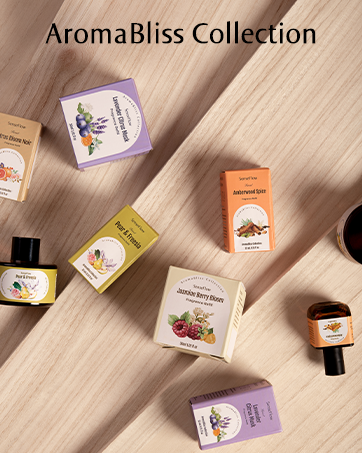
Figure 3: Proper insertion of the fragrance refill into the diffuser unit.
Video 1: Official SenseFlow Smart Essential Oil Diffuser setup and operation guide. This video demonstrates how to install the fragrance refill and activate the diffuser.
작동 지침
Your SenseFlow SF101S diffuser offers both manual control and smart control via the SenseFlow App.
수동 조작
The diffuser has a power button and indicator lights on the front. Press the power button to cycle through different intensity levels:
- 낮은: One indicator light.
- 중간: Two indicator lights.
- 높은: 3개의 표시등.
- 다시 누르면 꺼집니다.

Figure 4: The SenseFlow app provides comprehensive control over your diffuser settings.
Using the SenseFlow App (Wi-Fi Control)
For advanced control and customization, download the SenseFlow App from your smartphone's app store. Follow the in-app instructions to connect your diffuser to your Wi-Fi network.
- 강도 조정: The app allows for finer control with 10 adjustable intensity levels to perfectly match your preference.
- 일정 설정: Program specific release times for the fragrance, tailoring the aroma to your daily routine. You can set the diffuser to run continuously or on a custom schedule.
- 야간 조명 제어: Turn the built-in ambient night light on or off directly from the app.
- 원격 제어: Control your diffuser from anywhere with an internet connection.
Coverage and Placement
The SenseFlow SF101S diffuser is designed to cover up to 1000 sq. ft., making it suitable for various room sizes and types. The actual scent intensity may vary depending on the type of essential oil and individual perception.
- Small Spaces (100-250 sq. ft.): Ideal for bathrooms, powder rooms, mudrooms, or laundry rooms. Use on lower intensity settings (e.g., Level 1, sprays every 10 min).
- Medium Spaces (250-650 sq. ft.): Suitable for bedrooms, kitchens, or studios. Adjust intensity to medium levels (e.g., Level 2-3, sprays every 6-10 min).
- Large Spaces (650-1000 sq. ft.): Effective for open-concept living areas, hotel lobbies, or larger studios. Use on higher intensity settings (e.g., Level 4, sprays every 1-2 min).

Figure 5: Recommended coverage areas and intensity levels for different room sizes.
Consider placing the diffuser in a central location within the desired area for optimal scent distribution. For larger homes, multiple units may be used for consistent fragrance throughout.
유지
주요 장점 중 하나tages of the SenseFlow SF101S is its minimal maintenance requirements due to its waterless design.
- No Water Needed: Unlike traditional diffusers, there is no water tank to fill or clean, preventing mold and mildew buildup.
- 청소가 필요 없음: The direct atomization process means no residue buildup, eliminating the need for regular cleaning of internal components.
- 리필 교체: Replace the 30ml fragrance refill bottle when empty. Simply pull out the old bottle and insert a new one. Ensure the wick is properly seated.
- 외부 청소: Occasionally wipe the exterior of the diffuser with a soft, dry cloth to remove dust. Do not use harsh chemicals or abrasive materials.

Figure 6: A variety of SenseFlow plant-based fragrance refills available for your diffuser.
안전 정보
고객님의 안전이 최우선입니다. 다음 지침을 준수해 주시기 바랍니다.
- 실내 전용: Do not use the diffuser outdoors or in damp 환경.
- 손이 닿지 않는 곳에 보관하세요: Store the diffuser and fragrance refills out of reach of children and pets.
- No Ingestion: Do not ingest essential oils. In case of accidental ingestion, seek medical attention immediately.
- 접촉을 피하다: Avoid direct contact of essential oils with skin or eyes. If contact occurs, rinse thoroughly with water.
- 통풍: Ensure adequate ventilation in the room where the diffuser is operating.
- 사용하지 않을 때는 플러그를 뽑아두세요: Unplug the diffuser from the wall outlet when not in use for extended periods or during cleaning.
- No Heating Element: The diffuser operates without a heating element, reducing fire hazards.
- Plant-Based & Pet-Safe: SenseFlow essential oils are 100% plant-based and free from harmful additives, making them safe for use around pets and children when used as directed.

Figure 7: The diffuser features a built-in ambient night light, providing a subtle glow for nighttime use.
문제 해결
If you encounter any issues with your SenseFlow SF101S diffuser, please refer to the table below for common problems and their solutions.
| 문제 | 가능한 원인 | 해결책 |
|---|---|---|
| No mist/scent output | Fragrance refill is empty or wick is not properly seated. | Replace the fragrance refill. Ensure the wick is fully inserted and aligned. |
| 장치 전원이 켜지지 않음 | 플러그가 제대로 꽂혀 있지 않거나 전원 콘센트에 문제가 있습니다. | Ensure the diffuser is securely plugged into a working electrical outlet. Try a different outlet. |
| 약한 향 출력 | Low intensity setting or large room size. | Increase the intensity setting via the button or SenseFlow App. Consider adding another diffuser for larger spaces. |
| 앱 연결 문제 | Wi-Fi signal weak or incorrect network settings. | Ensure your Wi-Fi is stable and the diffuser is within range. Re-pair the device with the app if necessary. Check app permissions. |
| 비정상적인 소음 | 내부 구성 요소 문제. | Unplug the device and plug it back in. If the noise persists, contact customer support. |
명세서
| 특징 | 세부 사항 |
|---|---|
| 모델 번호 | SF101S |
| 상표 | 센스플로우 |
| 전원 | 전기 플러그인 |
| 향기 지속 시간 | Up to 120 Days (per 30ml refill) |
| 적용 범위 | 최대 1000제곱피트 |
| 품목 무게 | 12 온스 |
| 패키지 크기 | 5.2 x 4.72 x 2.95 인치 |
| 원산지 | 중국 |
| 필요한 배터리 | 아니요 |
보증 및 고객 지원
SenseFlow is committed to providing high-quality products and excellent customer service.
- 보증: Your SenseFlow SF101S Space Fragrance Diffuser comes with a 1-year quality warranty. An additional 6-month warranty is available upon product registration.
- 고객 지원: For any questions, concerns, or technical assistance, please contact SenseFlow customer support. We offer 24/7 support to ensure your satisfaction.
- 연락처 정보: Please refer to the SenseFlow website or the product packaging for the most up-to-date contact details.

