소개
Thank you for choosing the CHEREEKI Wireless Gamepad for PS-4. This controller is designed to enhance your gaming experience on PS-4, PS4 Slim, and PS4 Pro consoles, offering precise control, immersive feedback, and comfortable design. This manual provides detailed instructions on setting up, operating, maintaining, and troubleshooting your new gamepad.

Image: The CHEREEKI Wireless Gamepad in white, showcasin인체공학적 디자인입니다.
제품 끝view
Familiarize yourself with the various components and buttons of your CHEREEKI Wireless Gamepad.
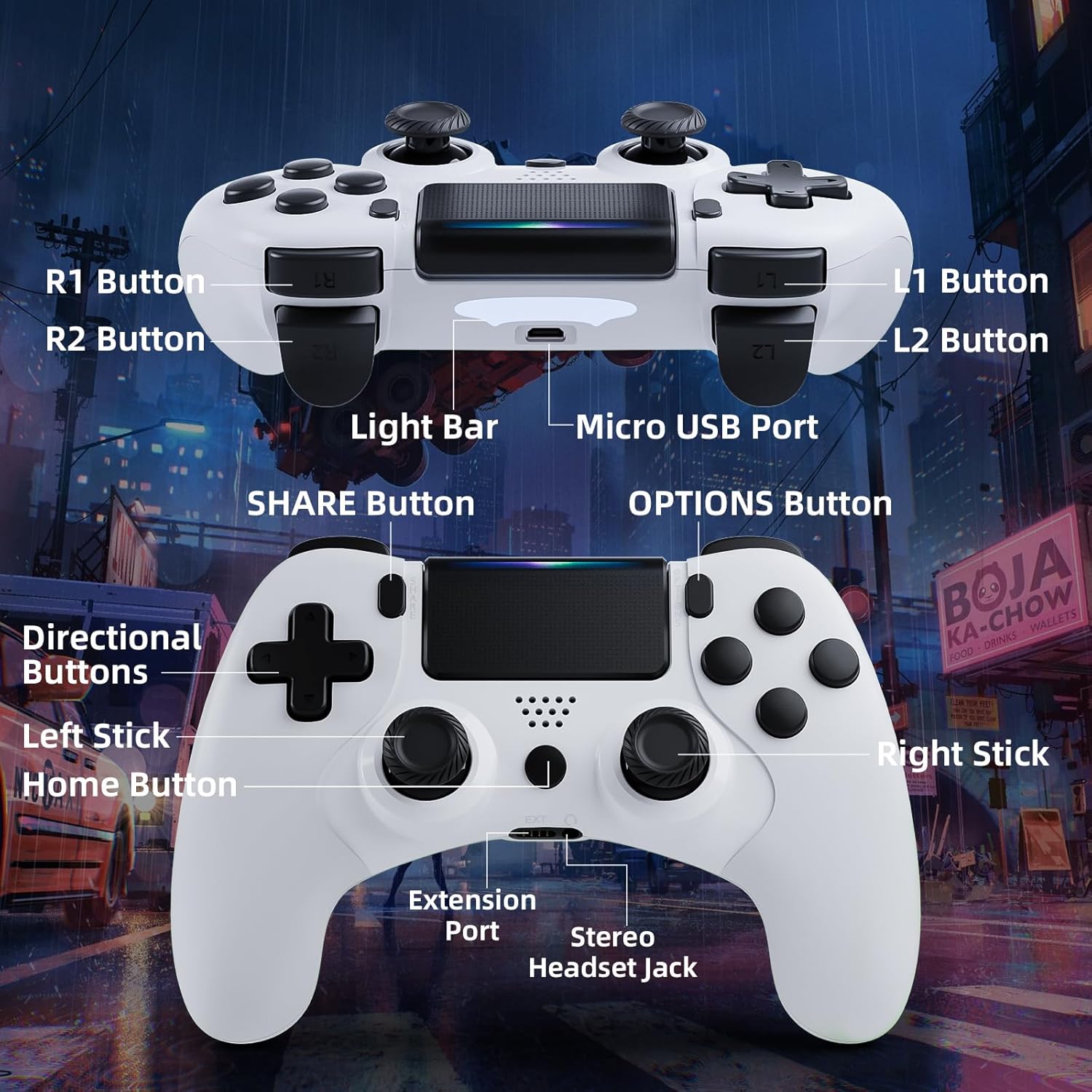
Image: Detailed diagram of the CHEREEKI Wireless Gamepad, highlighting its various buttons and ports for easy identification.
컨트롤러 구성 요소:
- R1 버튼: Right shoulder button.
- R2 버튼: 오른쪽 트리거 버튼.
- L1 버튼: Left shoulder button.
- L2 버튼: 왼쪽 방아쇠 버튼.
- 라이트 바: Indicates controller status and player number.
- 마이크로 USB 포트: For charging and initial wired connection.
- 공유 버튼: For sharing gameplay videos and screenshots.
- 옵션 버튼: 게임 내 메뉴 및 옵션에 액세스합니다.
- 방향 버튼(D-패드): 방향 입력용.
- 왼쪽 스틱: Analog stick for movement.
- 홈 버튼: PS button, for turning on/off the console and accessing the PS menu.
- 오른쪽 스틱: Analog stick for camera control or aiming.
- 확장 포트: For compatible accessories.
- 스테레오 헤드셋 잭: 헤드셋 연결용입니다.
설정
1. 초기 연결 및 페어링
The controller must be connected via USB cable for the first time to pair with your PS-4 console. This establishes the connection for future wireless use.
- Ensure your PS-4 console is powered on.
- Connect the Micro USB cable to the controller's Micro USB Port and the other end to a USB port on your PS-4 console.
- 를 누르세요 홈 버튼 (PS button) on the controller. The light bar will flash and then glow steadily, indicating successful pairing.
- 페어링이 완료되면 USB 케이블을 분리하여 컨트롤러를 무선으로 사용할 수 있습니다.
2. 게임패드 충전
The CHEREEKI Wireless Gamepad features a built-in 600 mAh rechargeable battery.
- Connect the controller to your PS-4 console or a standard USB charger using the Micro USB cable.
- The light bar will slowly pulse orange while charging.
- 완전 충전에는 일반적으로 2~3시간이 소요됩니다.
- 완전히 충전되면 라이트 바가 꺼집니다.
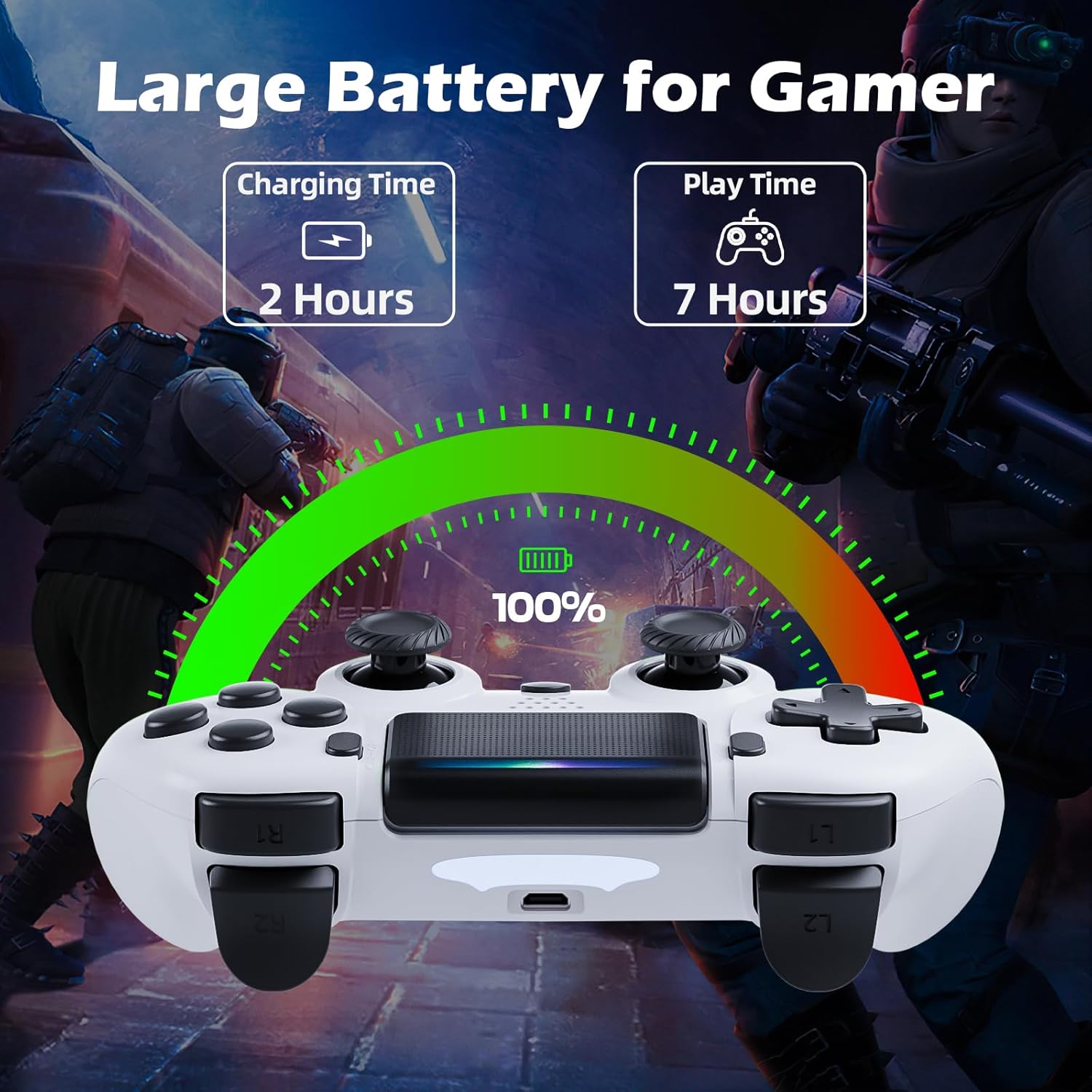
Image: Illustration showing the controller's charging time of 2 hours and play time of 7 hours on a full charge.
3. 호환성
This controller is compatible with PS-4, PS4 Slim, and PS4 Pro consoles.

Image: Visual representation of the controller's wide compatibility with PS4, PS4 Slim, and PS4 Pro consoles.
작동 지침
1. 기본 제어
The gamepad features standard PS-4 button layouts for intuitive gameplay.
- 아날로그 스틱: Use the Left Stick for character movement and the Right Stick for camera control or aiming.
- 방향 버튼(D-패드): For precise directional input in menus or specific game actions.
- 액션 버튼(삼각형, 원, 엑스, 사각형): Perform in-game actions as defined by the game.
- Shoulder and Trigger Buttons (L1, L2, R1, R2): Used for various actions like shooting, aiming, or interacting.
2. Motion Sensor (Gyro) Control
The built-in 6-axis motion sensor allows for intuitive control by tilting and rotating the controller.
- In supported games, you can use motion control for actions like steering, aiming, or adjusting view각도를 나타냅니다.
- Experiment with tilting the controller to achieve faster turns, adjust viewing angles, or aim more accurately.

Image: Illustration demonstrating the Gyro Motion Control feature, allowing for faster turning, viewing angle adjustment, and accurate aiming.
3. Double Vibration Feedback
Experience immersive gameplay with the dual motor vibration feature, providing tactile feedback for in-game events.
- The controller will vibrate to simulate impacts, explosions, and other in-game sensations.
- Vibration intensity may vary based on game design.

Image: Illustration of the Double Motor Vibration feature, showing the internal motors that provide immersive haptic feedback during gameplay.
4. 터치패드 기능
The integrated touchpad allows for new ways to interact with games and navigate menus.
- Tap, swipe, or click the touchpad as required by specific games or system functions.
5. 공유 버튼
The SHARE button allows you to easily share your gameplay moments.
- 를 누르세요 공유 버튼 to access the Share menu, where you can upload screenshots or video clips to social media, or start a broadcast.
6. Stereo Headset Jack
Connect your compatible 3.5mm headset to the Stereo Headset Jack for in-game audio and voice chat.
- Plug your headset into the port located at the bottom of the controller.
- Adjust audio settings via the PS-4 system menu.
7. 인체공학적 디자인
The controller is designed for comfort during extended gaming sessions.

Image: Depiction of the controller's ergonomic design, showing how it comfortably fits the shape of the hand for prolonged use.
유지
Proper care will extend the life of your CHEREEKI Wireless Gamepad.
- 청소: 부드럽고 마른 천을 사용하여 컨트롤러를 닦으세요. 잘 지워지지 않는 오염의 경우, 가볍게 두드리세요.amp천에 물을 묻혀 닦으세요. 강한 화학 물질이나 연마성 세제는 사용하지 마세요.
- 저장: 컨트롤러는 직사광선과 극한의 온도를 피해 서늘하고 건조한 곳에 보관하세요.
- 배터리 관리 : To maintain battery health, avoid fully discharging the controller frequently. If storing for a long period, charge the battery to about 50% every few months.
- 손질: Avoid dropping the controller or exposing it to excessive force, which can damage internal components.
문제 해결
If you encounter issues with your gamepad, refer to the following common problems and solutions.
| 문제 | 가능한 원인 | 해결책 |
|---|---|---|
| Controller does not connect wirelessly or connection is unstable. | Not properly paired; too far from console; interference. |
|
| Controller does not charge or holds charge for a short time. | Faulty cable; power source issue; battery degradation. |
|
| 버튼이 반응하지 않거나 붙어 있습니다. | Debris under buttons; physical damage. |
|
| 진동 피드백이 없습니다. | Vibration disabled in game/system settings; game does not support vibration. |
|
명세서
| 특징 | 세부 사항 |
|---|---|
| 모델 번호 | STK-4006L |
| 호환성 | PS-4, PS4 Slim, PS4 Pro |
| 연결성 | Wireless (Bluetooth), Wired (Micro USB) |
| 무선 범위 | 최대 8미터 |
| 배터리 유형 | 내장형 리튬 이온 |
| 배터리 용량 | 600mAh |
| 충전 시간 | 약 2-3시간 |
| 플레이 타임 | 최대 7시간 |
| 치수(길이 x 너비 x 높이) | 17.4 x 13 x 7.6cm (약 6.85 x 5.12 x 2.99인치) |
| 무게 | 210그램(약 0.46파운드) |
| 센서 | 6축 모션 센서(자이로스코프, 가속도계) |
| 진동 | 듀얼 모터 진동 |
| 입력/출력 | Touchpad, Stereo Headset Jack, Extension Port |
보증 및 지원
For warranty information, please refer to the documentation included with your purchase or visit the official CHEREEKI web사이트. 보증 약관은 지역 및 소매업체에 따라 다를 수 있습니다.
If you require technical support or have questions not covered in this manual, please contact the seller or CHEREEKI customer service through their official channels. Provide your model number (STK-4006L) and a detailed description of your issue for faster assistance.


