1. 제품 오버view
The ProtoArc EM11 NL is an ergonomic vertical mouse designed to provide a more natural and comfortable hand position, reducing wrist strain during extended computer use. It offers versatile connectivity options, including Bluetooth 5.0 and 2.4GHz USB-A, allowing connection to up to three devices simultaneously. Featuring a built-in rechargeable battery and adjustable DPI settings, this mouse is engineered for productivity and user well-being.
2. 상자 안에 무엇이 들어있나요?
- 프로토아크 충전식 블루투스 인체공학 마우스 1개
- 1 x 2.4G USB-A Receiver
- 1 x Type-C Charging Cable (for charging only)
- 1 x 사용자 설명서

3. 제품 특징
3.1 Ergonomic Vertical Design
The EM11 NL mouse features a unique ergonomic vertical design that positions your hand in a natural handshake posture. This design helps to keep your wrist straight, reducing discomfort and strain often associated with traditional horizontal mice. It promotes a relaxed forearm and wrist position, which can improve productivity and minimize the risk of repetitive strain injuries.


3.2 다중 장치 연결
The mouse supports dual Bluetooth 5.0 and 2.4G USB-A connectivity modes, enabling simultaneous connection to up to three different devices. This allows for seamless switching between a computer, PC, or laptop, enhancing workflow efficiency.

3.3 충전식 배터리
Equipped with a built-in 500mAh Li-Ion battery, the EM11 NL mouse can be conveniently recharged using the included Type-C cable. A single charge provides long-lasting battery life, supporting months of use on standby.

3.4 Adjustable DPI & High Performance
The mouse offers 1000/1600/2400 DPI levels, providing higher sensitivity and precise optical tracking. It includes back and forward buttons for easy navigation, though these are not programmable and not compatible with Mac OS systems.

3.5 Quiet Clicking
The left and right mouse buttons feature a silent click design, allowing you to focus on your work without disruptive noise. Note that the middle scroll wheel and the back/forward buttons do not have silent clicks.
4. 설정 및 설치
4.1 2.4G USB-A 수신기를 통한 연결
- Locate the 2.4G USB-A receiver stored in the compartment on the bottom of the mouse.
- USB-A 수신기를 컴퓨터의 사용 가능한 USB-A 포트에 꽂으세요.
- Turn on the mouse using the power switch located on the bottom. The mouse should automatically connect to your computer.
4.2 블루투스를 통한 연결
- 바닥의 전원 스위치를 사용하여 마우스를 켭니다.
- Press the 'Switch Button' on the bottom of the mouse to select either Bluetooth 1 (B1) or Bluetooth 2 (B2) mode. The corresponding indicator light will flash.
- 컴퓨터나 기기에서 Bluetooth 설정으로 이동하여 새 기기를 검색하세요.
- Select 'ProtoArc EM11 NL' from the list of available devices to pair.
- 페어링되면 표시등이 깜박임을 멈추고 계속 켜져 있습니다.
5. 사용 설명서
5.1 버튼 기능
The ProtoArc EM11 NL mouse is equipped with several buttons for intuitive control:
- 왼쪽 버튼: 표준 왼쪽 클릭 기능.
- 오른쪽 버튼: 표준 마우스 오른쪽 클릭 기능.
- 스크롤 휠: 세로 스크롤용입니다.
- DPI 버튼: DPI 설정(1000/1600/2400)을 순환합니다.
- 앞으로 버튼: 앞으로 이동합니다 web 브라우저/애플리케이션 (Mac OS와 호환되지 않음).
- 뒤로 버튼: 뒤로 탐색합니다 web 브라우저/애플리케이션 (Mac OS와 호환되지 않음).
- 스위치 버튼: Toggles between 2.4G, Bluetooth 1, and Bluetooth 2 connections.
- 전원 스위치: 마우스를 켜거나 끕니다.

5.2 DPI 조정
Press the DPI button (located near the scroll wheel) to cycle through the available sensitivity settings: 1000 DPI, 1600 DPI, and 2400 DPI. Select the setting that best suits your preference for cursor speed and precision.
5.3 장치 간 전환
To switch between connected devices, press the 'Switch Button' on the bottom of the mouse. The indicator light will change to reflect the currently active connection (2.4G, B1, or B2).
6. 충전
When the battery is low, the low-battery indicator light on the mouse will illuminate. Connect the included Type-C charging cable to the Type-C port on the front of the mouse and plug the other end into a USB power source (e.g., computer USB port, USB wall adapter). The Type-C cable is for charging only and does not support data transfer.

7. Hand Size Guide
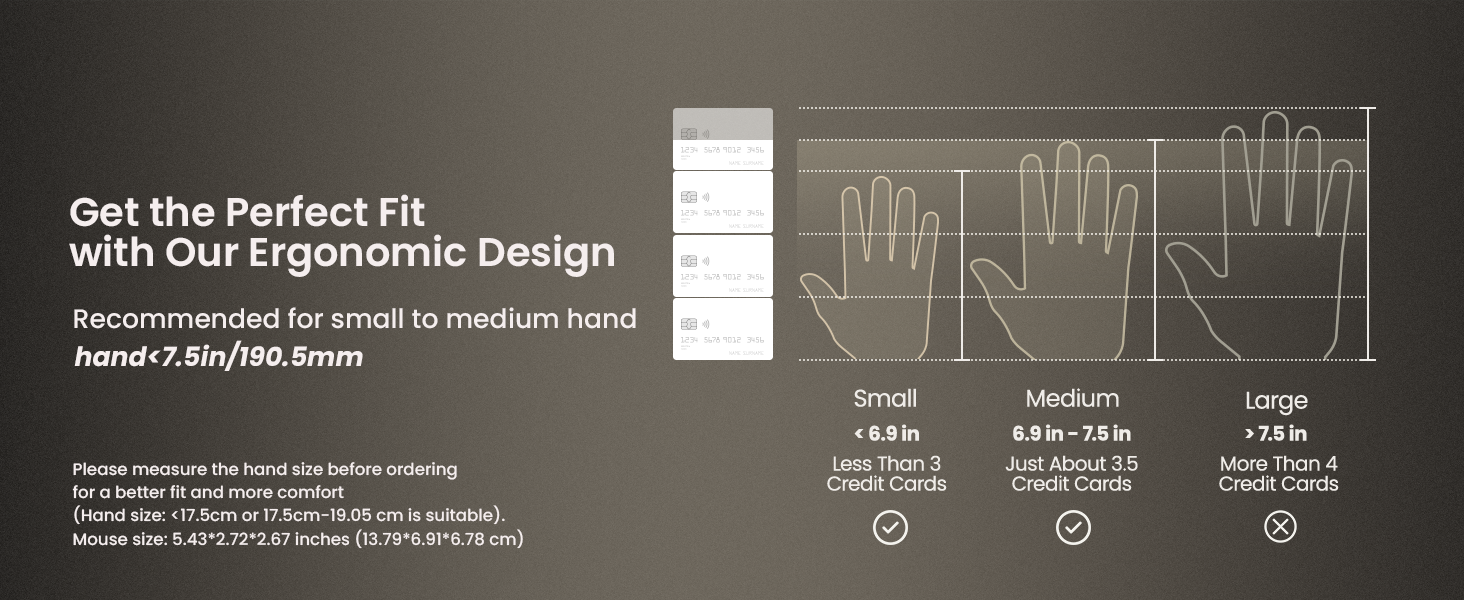
The ProtoArc EM11 NL mouse is specifically designed for small to medium-sized hands. For optimal comfort and ergonomic benefits, it is recommended for hand lengths under 7.5 inches (19.05 cm). Please measure your hand size before ordering to ensure a better fit.

8. 사양
| 특징 | 세부 사항 |
|---|---|
| 제품 치수 | 3.54 x 2.76 x 0.04 인치 |
| 품목 무게 | 10.2 온스 |
| 품목 모델 번호 | EM11 NL |
| 배터리 | 1 비표준 배터리(포함) |
| 연결 기술 | 2.4G USB-A Receiver, Bluetooth |
| 특별 기능 | Ergonomic Design, Multi-Device, Rechargeable, Vertical Design, Wireless |
| 움직임 감지 기술 | 광학 |
| 색상 | 하얀색 |
| 제조업체 | 프로토아크 |
9. 문제 해결
If you encounter any issues with your ProtoArc EM11 NL mouse, please try the following steps:
- 연결 문제: Ensure the mouse is turned on and fully charged. For 2.4G connection, verify the USB-A receiver is securely plugged into your device. For Bluetooth, ensure Bluetooth is enabled on your device and the mouse is in the correct pairing mode (B1 or B2). Try re-pairing the mouse.
- 응답 없음/느림 현상: Check for interference from other wireless devices. Ensure the mouse is within the effective range of your device. Try changing the DPI setting.
- 충전 문제: Ensure the Type-C cable is properly connected to both the mouse and a working USB power source. Try a different USB port or charging cable.
- Cursor Inaccuracy: Ensure the optical sensor on the bottom of the mouse is clean and free from obstructions. Use the mouse on a suitable surface.
10. 보증 및 지원
보증 정보 및 기술 지원에 대해서는 ProtoArc 공식 웹사이트를 참조하십시오. web사이트를 방문하거나 고객 서비스에 직접 문의하세요. 보증 청구에 대비해 구매 증빙 자료로 구매 영수증을 보관하세요.