1. 서론
This manual provides essential information for the proper setup, operation, and maintenance of your Azeyou 10.1-inch Android 14 Tablet, model AT1016U5. Please read this manual thoroughly before using your device to ensure optimal performance and safety.

이미지 1.1: 앞면과 뒷면 view of the Azeyou 10.1-inch Android 14 Tablet.
2. 안전 정보
To prevent damage to your device or injury to yourself and others, observe the following precautions:
- 태블릿을 극한의 온도, 직사광선 또는 높은 습도에 노출시키지 마세요.
- 태블릿을 떨어뜨리거나 강한 충격을 가하지 마십시오.
- Use only the charger and accessories provided or approved by Azeyou.
- 정제를 물이나 기타 액체로부터 멀리 보관하십시오.
- 태블릿을 직접 분해하거나 수리하려고 하지 마십시오. 도움이 필요하시면 고객 지원팀에 문의하십시오.
- 태블릿과 배터리는 현지 규정에 따라 책임감 있게 폐기하십시오.
3. 패키지 내용
패키지에 모든 품목이 들어 있는지 확인하세요.
- 1x Azeyou Android 14 Tablet
- 1x TYPE C Cable
- 1x Tablet Adaptor
- 1x 사용자 설명서

Image 3.1: Contents included in the Azeyou Tablet package.
4. 제품 오버view
Familiarize yourself with the physical components and controls of your Azeyou Tablet.
4.1. 물리적 배치

Image 4.1: Diagram showing the location of ports and buttons on the Azeyou Tablet.
- 전원/잠금 버튼: Press to turn on/off the tablet or to lock/unlock the screen.
- 볼륨 버튼: 오디오 볼륨을 조절합니다.
- 핀홀 재설정: Use a thin pin to reset the device if it becomes unresponsive.
- USB 타입-C 포트: 충전 및 데이터 전송용입니다.
- 마이크로 SD 카드 슬롯: Insert a Micro SD card for expandable storage (up to 1TB, not included).
- 카메라: Front (5MP) and Rear (8MP) cameras for photos and video calls.
- 스피커: Dual multimedia box speakers for audio output.
4.2. 주요 특징
- 운영 체제: 안드로이드 14
- 프로세서: 2.0 GHz Octa-Core Processor (Allwinner A523)
- 표시하다: 10.1인치 IPS 터치스크린, 1280x800 해상도
- 메모리: 8GB RAM (물리적 4GB + 가상 4GB)
- 저장: 128GB ROM, expandable up to 1TB via TF card
- 배터리: 6000mAh 리튬 폴리머
- 연결성: Wi-Fi 6(802.11a/b/g/n/ac), 블루투스 5.0
- 카메라: 전면 5MP, 후면 8MP
- 추가의: GMS certified, Widevine L1 support

Image 4.2: Visual representation of the tablet's core features including OS, memory, cameras, and connectivity.
5. 설정
5.1. 배터리 충전
Before first use, fully charge the tablet. Connect the provided USB Type-C cable to the tablet's charging port and the other end to the tablet adaptor. Plug the adaptor into a power outlet. The charging indicator will show the charging status. A full charge typically takes approximately 1.5 hours.
5.2. 전원 켜기 / 끄기
- 전원을 켜려면: Press and hold the Power/Lock button until the Azeyou logo appears on the screen.
- 전원을 끄려면: Press and hold the Power/Lock button until the power options menu appears. Select "Power off" and confirm.
- 재시작하기 위해: 전원 옵션 메뉴에서 "다시 시작"을 선택합니다.
5.3. 초기 설정
처음 전원을 켜면 화면의 지시에 따라 태블릿을 구성하세요.
- 언어를 선택하세요.
- Wi-Fi 네트워크에 연결합니다.
- Google 계정으로 로그인하거나 새 계정을 만드세요. Google Play 스토어에서 앱을 다운로드하려면 이 과정이 필요합니다.
- Review 이용약관에 동의하세요.
- 보안을 위해 화면 잠금(PIN, 패턴 또는 비밀번호)을 설정하세요.
5.4. 마이크로 SD 카드 삽입
To expand storage, insert a Micro SD card (not included) into the Micro SD card slot. Gently push the card until it clicks into place. Ensure the tablet is powered off before inserting or removing the card.
6. 사용 설명서
6.1. 안드로이드 14 탐색하기
Your tablet runs on Android 14, offering enhanced privacy controls and a user-friendly interface. Use touch gestures to navigate:
- 수도꼭지: 항목을 선택하세요.
- 강타: 화면이나 목록을 스크롤합니다.
- 꼬집기: 이미지 확대/축소 및 web 페이지.
- 길게 누르기 : 상황에 맞는 메뉴에 접근하거나 아이콘을 이동합니다.
6.2. Wi-Fi 및 블루투스 연결
Access the Quick Settings panel by swiping down from the top of the screen to enable or disable Wi-Fi and Bluetooth. For detailed settings, go to 설정 > 네트워크 및 인터넷 or 설정 > 연결된 기기.
6.3. 애플리케이션 설치
The Google Play Store is pre-installed. Tap the Play Store icon to browse and download applications. A Google account is required for this process.
6.4. 카메라 사용
Open the Camera app to take photos or record videos. The tablet features a 5MP front camera and an 8MP rear camera. Tap the screen to focus and press the shutter button to capture.

이미지 6.1: Examples of camera usage and dual camera setup on the Azeyou Tablet.
6.5. Display and Eye Protection
The 10.1-inch IPS display offers a 1280x800 resolution. It includes low blue light technology to reduce eye strain. Adjust display settings under 설정 > 디스플레이.

Image 6.2: The 10.1-inch IPS display of the Azeyou Tablet.
6.6. 배터리 관리
The 6000mAh battery provides approximately 6 hours of mixed usage. To optimize battery life, reduce screen brightness, disable Wi-Fi/Bluetooth when not in use, and close unused applications.

Image 6.3: Battery capacity and estimated usage times for the Azeyou Tablet.
7. 유지관리
7.1. 태블릿 청소
Use a soft, lint-free cloth to clean the screen and body of the tablet. Do not use abrasive cleaners or solvents, as they may damage the surfaces.
7.2. 소프트웨어 업데이트
태블릿에 최신 기능과 보안 패치가 적용되도록 정기적으로 시스템 업데이트를 확인하세요. 다음 링크로 이동하세요. 설정 > 시스템 > 시스템 업데이트.
7.3. 스토리지 관리
불필요한 것을 정기적으로 정리하세요 files and uninstall unused apps to maintain optimal performance. You can manage storage under 설정 > 저장소.
8. 문제 해결
태블릿에 문제가 발생하면 다음의 일반적인 해결 방법을 참조하세요.
| 문제 | 해결책 |
|---|---|
| 태블릿 전원이 켜지지 않습니다 | Ensure the battery is charged. Connect the charger and wait a few minutes before attempting to power on again. If unresponsive, use a thin pin to press the Reset pinhole. |
| 화면이 반응하지 않습니다 | Restart the tablet by holding the Power/Lock button. If unresponsive, use the Reset pinhole. |
| Wi-Fi에 연결할 수 없습니다 | Ensure Wi-Fi is enabled in settings. Check if the router is working correctly. Try forgetting the network and reconnecting. |
| 앱이 충돌하거나 속도가 느려집니다 | Close background applications. Clear app cache (Settings > Apps > [App Name] > Storage & cache). Ensure sufficient storage space. Restart the tablet. |
| 배터리가 빨리 소모됩니다 | Reduce screen brightness. Disable Wi-Fi, Bluetooth, and GPS when not in use. Close unused apps. Check battery usage in Settings > Battery. |
If the problem persists, please contact Azeyou customer support for further assistance.
9. 사양
Detailed technical specifications for the Azeyou 10.1-inch Android 14 Tablet (Model AT1016U5).
| 특징 | 사양 |
|---|---|
| 모델 번호 | AT1016U5 |
| 운영 체제 | 안드로이드 14 |
| 프로세서 | Octa-Core (Allwinner A523), 2 GHz |
| 숫양 | 8GB(물리적 4GB + 가상 4GB) |
| 내부 저장소 | 128GB (XNUMX기가바이트) |
| 확장 가능한 스토리지 | Up to 1 TB via Micro SD card (not included) |
| 화면 크기 | 10.1 인치 |
| 화면 해상도 | 1280x800 IPS |
| 후방 카메라 | 8 MP |
| 전면 카메라 | 5 MP |
| 배터리 용량 | 6000mAh 리튬 폴리머 |
| 평균 배터리 수명 | 6 Hours (mixed usage) |
| 무선 연결 | Wi-Fi 6(802.11a/b/g/n/ac) |
| 블루투스 | 블루투스 5.0 |
| 치수(길이x너비x높이) | 9.5 x 6.3 x 0.32 인치 |
| 품목 무게 | 1.68파운드 |
| 색상 | 회색 |
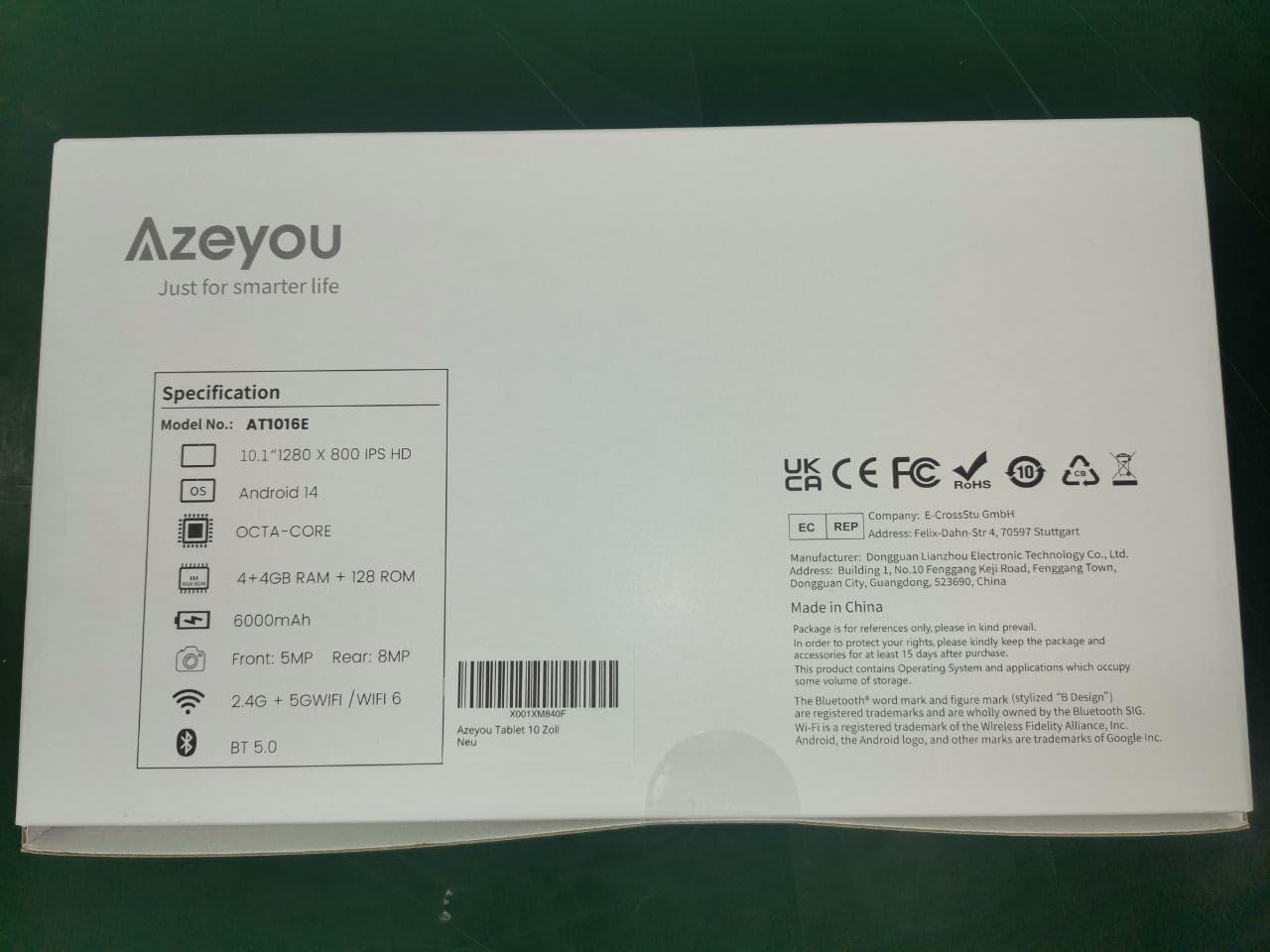
Image 9.1: Back of the product packaging displaying key specifications.
10. 보증 및 지원
Your Azeyou Tablet is covered by a manufacturer's warranty. For specific warranty terms and conditions, please refer to the documentation included with your purchase or visit the official Azeyou website. For technical support, troubleshooting assistance, or warranty claims, please contact Azeyou customer service.
자세한 정보와 지원은 다음에서 찾을 수 있습니다. Azeyou Brand Store.


