소개
The HyperX Cloud Mix Buds 2 are advanced gaming earbuds designed for versatile, low-latency wireless audio. They offer seamless connectivity across various platforms, including PC, PS5, PS4, Nintendo Switch, Android, and Steam Deck, through both a 2.4 GHz dongle and Bluetooth 5.3 LE Audio. Featuring Hybrid Active Noise Cancellation (ANC) and Ambient Sound Mode, these earbuds provide an immersive audio experience while allowing users to stay aware of their surroundings when needed. With up to 26 hours of battery life, they are built for extended use on the go.

Image: HyperX Cloud Mix Buds 2 earbuds resting in their open charging case, with a green indicator light visible.
제품 끝view 동영상
영상: 공식 제품 출시view of the HyperX Cloud Mix Buds 2, highlighting key features such as connectivity, noise cancellation, and design.
설정
상자 안에 무엇이 들어있나요?
- HyperX Cloud Mix Buds 2 Earbuds
- 무선 충전 케이스
- USB-C to USB-A 케이블
- 이어팁(3가지 사이즈: 소, 중, 대)
- 2.4GHz USB-C Dongle
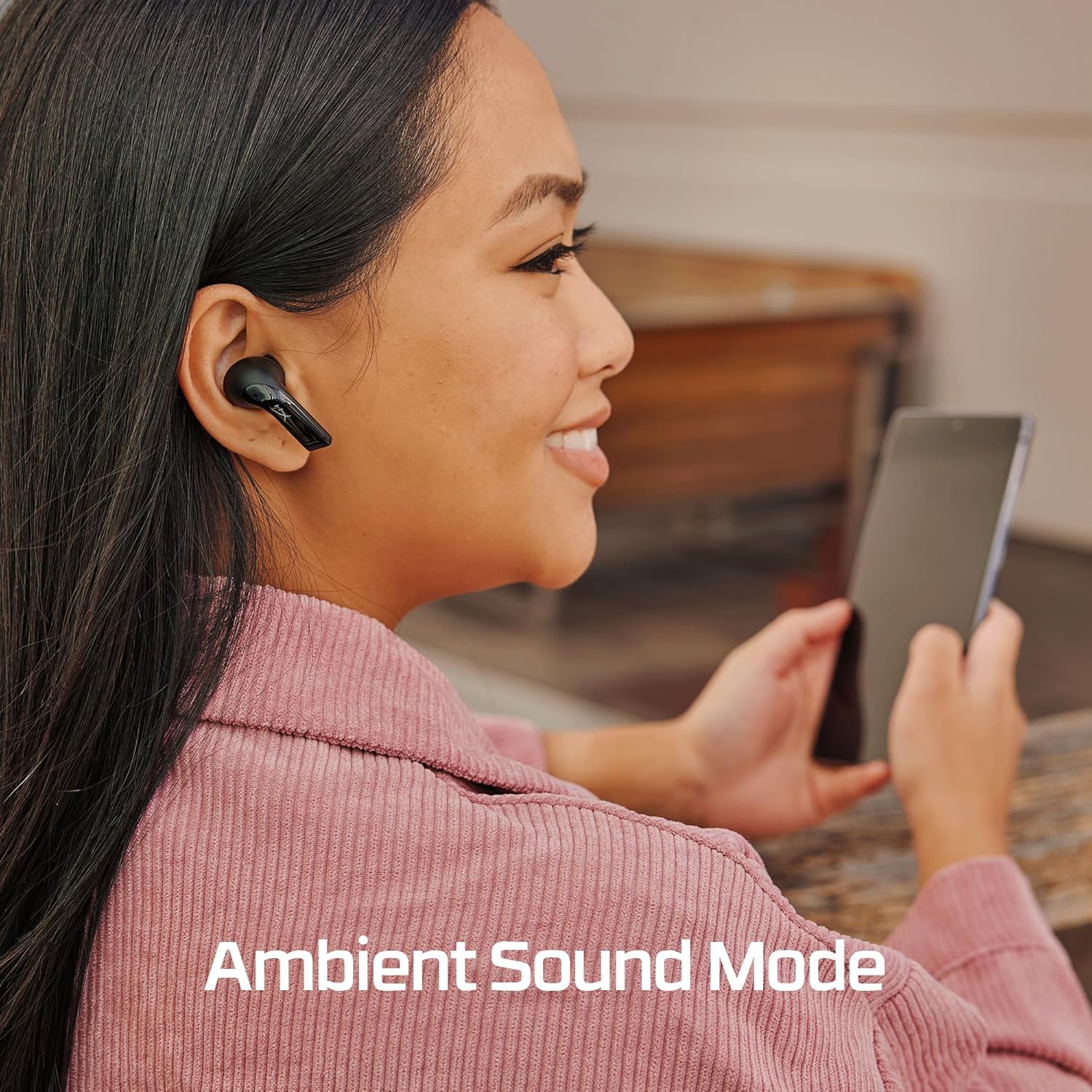
Image: A flat lay showing all included components: the earbuds, charging case, USB-C cable, 2.4GHz dongle, and three sets of ear tips.
충전 중
Before first use, fully charge the HyperX Cloud Mix Buds 2 and their charging case. Connect the included USB-C to USB-A cable to the charging case and a power source. The earbuds provide up to 7 hours of battery life, and the charging case extends this by an additional 19 hours, for a total of up to 26 hours of combined battery life.

Image: An illustration showing the earbud battery life (7 hours) and the additional charge provided by the case (19 hours), totaling 26 hours.
연결성
The Cloud Mix Buds 2 offer two primary connection methods:
2.4GHz USB-C Dongle (Ultra-Low Latency)
For the lowest latency gaming experience, use the included 2.4GHz USB-C dongle. Simply plug the dongle into a compatible USB-C port on your PC, PS5, PS4, Nintendo Switch, Android device, or Steam Deck. The earbuds will automatically connect to the dongle, providing a stable and responsive audio connection with latency as low as 20ms.
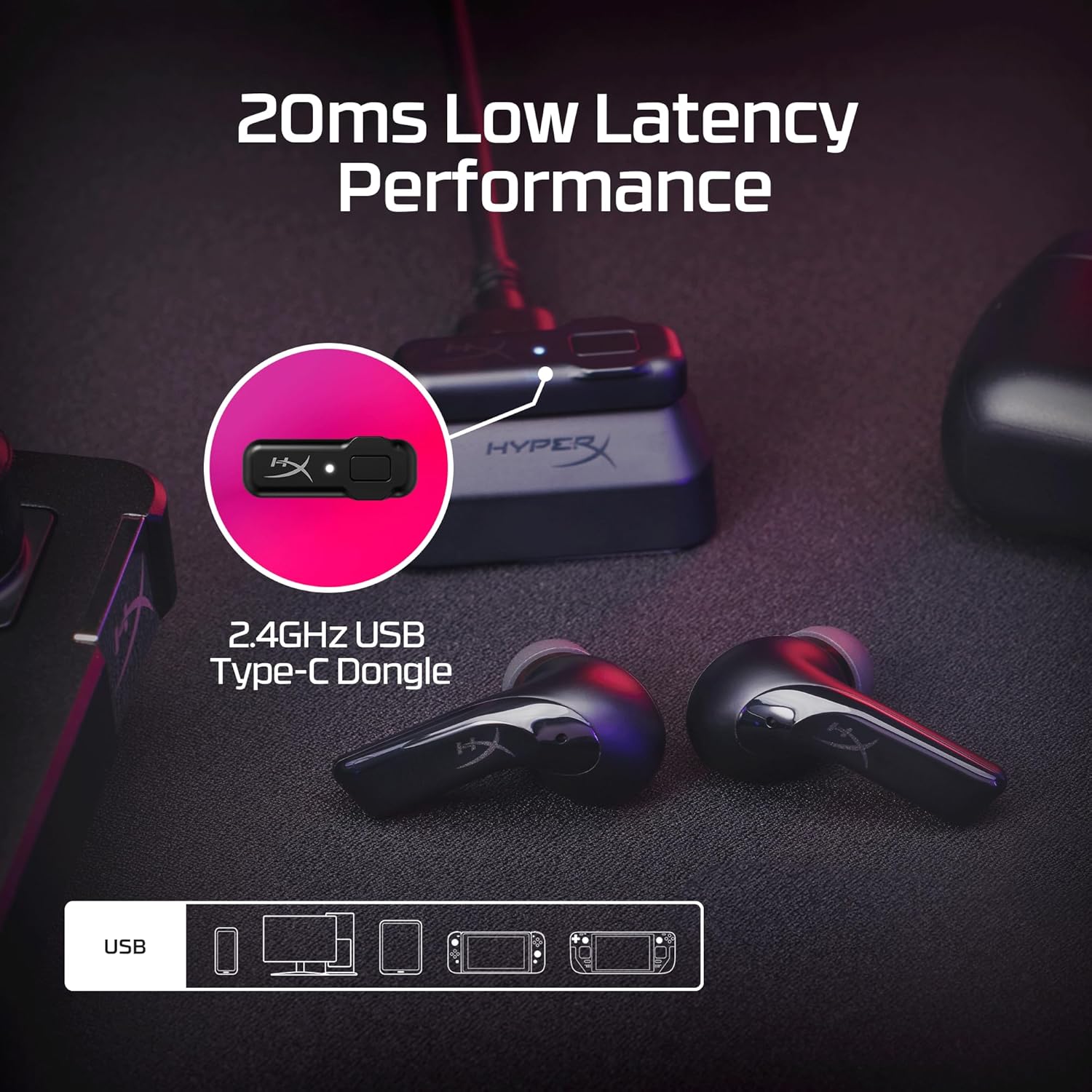
Image: The HyperX Cloud Mix Buds 2 earbuds and their 2.4GHz USB-C dongle, illustrating the ultra-low latency performance for gaming.
Bluetooth 5.3 LE Audio
For general use and mobile devices, connect via Bluetooth 5.3 LE Audio. This technology provides enhanced audio quality, longer battery life, and a more stable wireless connection. To pair, ensure the earbuds are in pairing mode (refer to the quick start guide for specific steps), then select 'HyperX Cloud Mix Buds 2' from your device's Bluetooth settings.

Image: A person smiling while playing a Nintendo Switch with HyperX Cloud Mix Buds 2 in their ears, demonstrating reliable wireless Bluetooth connectivity.
작동 지침
하이브리드 액티브 노이즈 캔슬링(ANC)
The Cloud Mix Buds 2 feature hybrid ANC technology to block out external noise, allowing for a more immersive audio experience. This is achieved through a combination of feed-forward and feedback microphones that monitor and cancel distracting sounds around you.

Image: A visual representation of how the HyperX Cloud Mix Buds 2 utilize feed-forward and feedback microphones for Hybrid Active Noise Cancellation, with sound waves being cancelled.
주변 사운드 모드
When you need to be aware of your surroundings or engage in conversations without removing the earbuds, activate Ambient Sound Mode. This mode allows background noise to pass through, keeping you connected to the world around you. Refer to the quick start guide for instructions on how to toggle between ANC and Ambient Sound Mode.

Image: A person smiling while using the HyperX Cloud Mix Buds 2, with text indicating 'Ambient Sound Mode', suggesting they can hear their surroundings.
마이크
Each earbud is equipped with two beamforming microphones and AI noise reduction technology. This ensures clear communication by focusing on your voice and minimizing distracting background noise during calls or in-game chat.

이미지: 투명한 view of the HyperX Cloud Mix Buds 2 earbud, highlighting the two beamforming microphones within each bud for clear communication.
오디오 품질
The Cloud Mix Buds 2 feature 9mm dynamic drivers that deliver signature HyperX sound, characterized by powerful bass, clear mid-range presence, and pristine highs. Audio profiles can be customized using the HyperX NGENUITY Software for a personalized listening experience.
통제 수단
The earbuds feature intuitive touch controls for managing audio playback, calls, and switching between ANC and Ambient Sound modes. Specific touch gestures and their functions can be found in the detailed quick start guide or customized via the HyperX NGENUITY software.
유지
청소
Regularly clean your earbuds and charging case to maintain optimal performance and hygiene. Use a soft, dry, lint-free cloth to wipe down the surfaces. For the ear tips, remove them from the earbuds and clean with a mild soap solution if necessary, ensuring they are completely dry before reattaching.
이어팁
The Cloud Mix Buds 2 come with three different ear tip sizes (Small, Medium, Large) to ensure a comfortable and secure fit. Experiment with different sizes to find the best seal for optimal sound quality and noise isolation. Properly fitted ear tips are crucial for effective ANC performance.
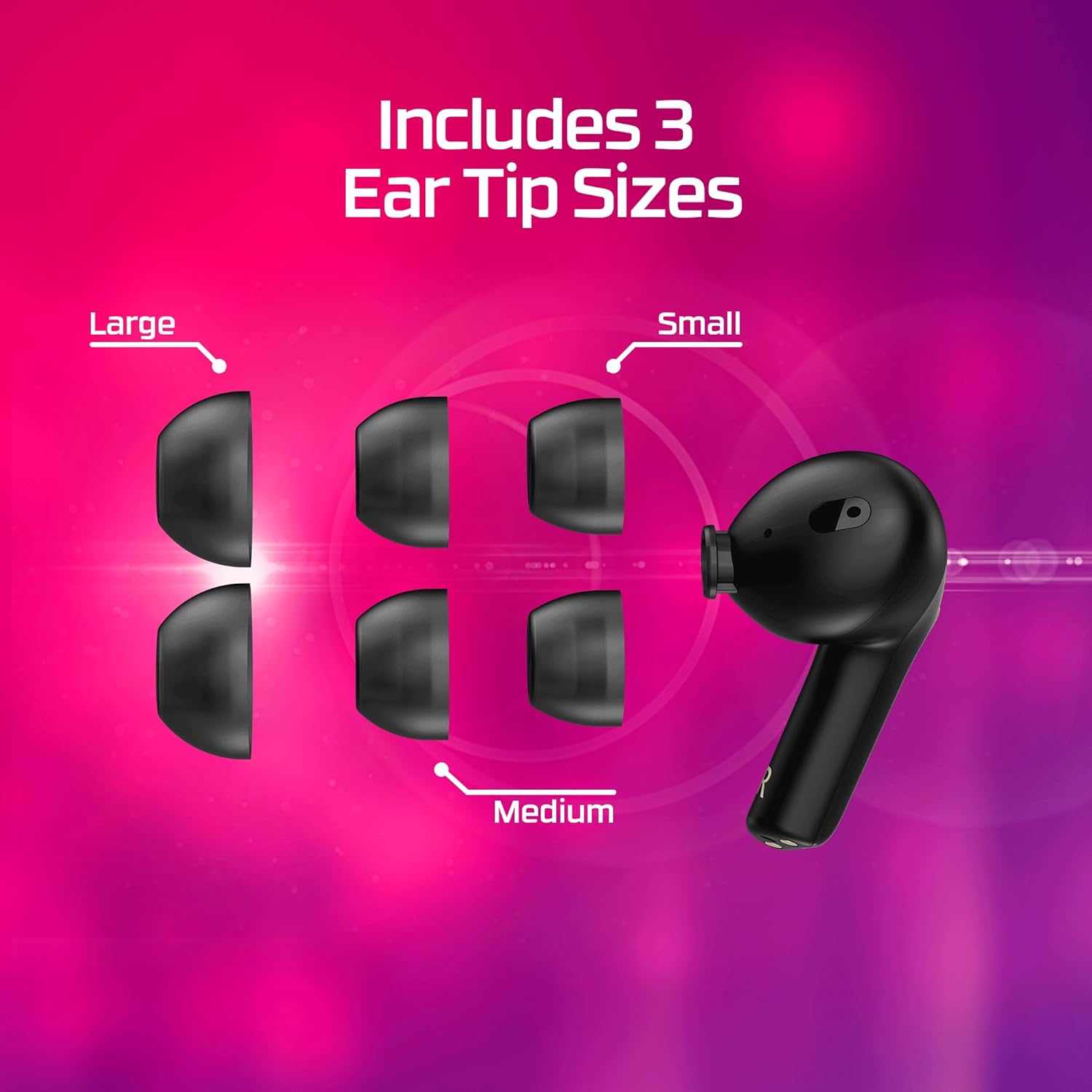
Image: A visual display of the three included ear tip sizes (Large, Small, Medium) alongside a HyperX Cloud Mix Buds 2 earbud, demonstrating the customization options for fit.
문제 해결
If you encounter issues with your HyperX Cloud Mix Buds 2, consider the following common troubleshooting steps:
- 오디오 없음/음질 불량: Ensure earbuds are charged and properly connected. Check device volume and audio output settings. Verify ear tip fit.
- 연결 문제: For 2.4GHz dongle, ensure it's securely plugged in. For Bluetooth, try re-pairing the earbuds. Ensure no interference from other wireless devices.
- ANC가 작동하지 않음: Ensure earbuds are properly seated in your ears and the correct ear tip size is used for a good seal. Check if ANC is enabled.
- 마이크 문제: Ensure microphones are not obstructed. Check device input settings.
- 배터리 수명이 예상보다 짧음: Battery life can vary with usage, especially with ANC enabled. Ensure full charge cycles.
For more detailed troubleshooting and advanced settings, refer to the HyperX NGENUITY software or the official HyperX support web대지.
명세서
| 특징 | 사양 |
|---|---|
| 모델명 | Mix Buds 2 |
| 연결 기술 | 무선(2.4GHz, 블루투스) |
| 무선 통신 기술 | 2.4GHz, 블루투스 5.3 |
| 소음 제어 | 하이브리드 노이즈 캔슬링 |
| 오디오 드라이버 유형 | 동적 드라이버 |
| 오디오 드라이버 크기 | 9 밀리미터 |
| 배터리 수명(이어버드) | 최대 7시간(ANC 꺼짐) |
| 배터리 수명(케이스 포함) | 최대 26시간 |
| 호환 장치 | 휴대폰, 게임 콘솔, 태블릿, 노트북, 데스크톱 |
| 제어 유형 | 미디어 제어 |
| 품목 무게 | 0.353온스(이어버드당) |
| 제품 치수 | 1.34 x 0.71 x 1.02 인치 |
| 제조업체 | 주식회사 HP |
| 원산지 | 중국 |
| 한국어: | 197192096307 |
보증 및 지원
Your HyperX Cloud Mix Buds 2 are covered by a manufacturer's warranty. Please refer to the warranty card included in your product packaging for specific terms and conditions, including warranty period and coverage details. For technical support, product registration, or to access the latest drivers and software (such as HyperX NGENUITY), please visit the official HyperX support web사이트를 방문하거나 고객 서비스에 문의하세요.
온라인 지원: Visit the HyperX official webFAQ, 문제 해결 가이드, 소프트웨어 다운로드 사이트입니다.
고객 서비스: Contact HyperX customer support for direct assistance with product issues or inquiries.


