1. 서론
Thank you for choosing the aigo SA03 Open Ear Earbuds. These wireless Bluetooth headphones feature a unique clip-on design, allowing you to enjoy audio while remaining aware of your surroundings. Designed for comfort and stability, they are suitable for various activities, including fitness and daily use. This manual provides detailed instructions for setup, operation, and maintenance to ensure optimal performance.
2. 패키지 내용
아래 나열된 모든 품목이 패키지에 포함되어 있는지 확인하세요.
- aigo SA03 Open Ear Earbuds (Left and Right)
- 무선 충전 케이스
- USB 충전 케이블(Type-C)
- 사용자 설명서
3. 제품 오버view
The aigo SA03 earbuds are designed for an open-ear listening experience, ensuring comfort and situational awareness. Each earbud is lightweight, weighing approximately 4.5 grams.

Figure 3.1: aigo SA03 Open Ear Earbuds and Charging Case.
The earbuds feature a dynamic audio driver for clear sound reproduction.

Figure 3.2: Internal components of an earbud, highlighting the 13mm dynamic audio driver.
4. 설정
4.1 이어버드와 케이스 충전
Before first use, fully charge the earbuds and the charging case. The charging case has a 500mAh battery capacity, providing extended playtime.
- 이어버드를 충전 케이스에 넣고 올바른 위치에 놓였는지 확인하세요.
- USB 충전 케이블을 케이스의 충전 포트와 전원에 연결하세요.
- The charging indicators on the case will illuminate to show charging status.
- 일반적으로 완전 충전에는 약 1.5시간이 걸립니다.
The fully charged case can provide up to 15 charges for the earbuds, offering a total playtime of up to 60 hours.

Figure 4.1: Charging case with battery life and capacity information.
4.2 블루투스 페어링
이 이어버드는 안정적이고 빠른 연결을 위해 블루투스 5.1 기술을 사용합니다.
- 이어버드가 충전되어 있는지 확인하세요.
- 충전 케이스를 여세요. 이어버드가 자동으로 페어링 모드로 진입합니다.
- 기기(스마트폰, 태블릿, 컴퓨터)에서 Bluetooth를 활성화하세요.
- 검색 available Bluetooth devices and select "aigo SA03" from the list.
- 연결되면 음성 안내로 페어링이 성공적으로 완료되었음을 확인할 수 있습니다.
The earbuds support automatic re-connection to the last paired device when removed from the case and Bluetooth is active on the device.

그림 4.2: 모바일 기기에서의 블루투스 페어링 과정.
5. 사용 설명서
5.1 이어버드 착용하기
The aigo SA03 earbuds feature an ergonomic clip-on design for a secure and comfortable fit. Adjust the earbuds to fit your ears properly to avoid discomfort during extended wear.

Figure 5.1: Ergonomic design and adjustment for comfortable fit.
These earbuds are designed to stay stable during physical activity, making them suitable for sports and workouts. They are also IP44 waterproof, offering protection against sweat and light splashes.

Figure 5.2: Earbuds worn during cycling, highlighting their secure fit for sports.
5.2 터치 컨트롤
The earbuds feature touch-sensitive controls for managing calls and media playback:
- 전화 받기/종료: 양쪽 이어버드를 한 번 탭하세요.
- 전화 거부: 양쪽 이어버드를 두 번 탭하세요.
- 음악 재생/일시 중지: 양쪽 이어버드를 한 번 탭하세요.
- 다음 트랙: 오른쪽 이어버드를 두 번 탭하세요.
- 이전 트랙 : 왼쪽 이어버드를 두 번 탭하세요.
- Voice Assistant 활성화 : 양쪽 이어버드를 세 번 탭하세요.
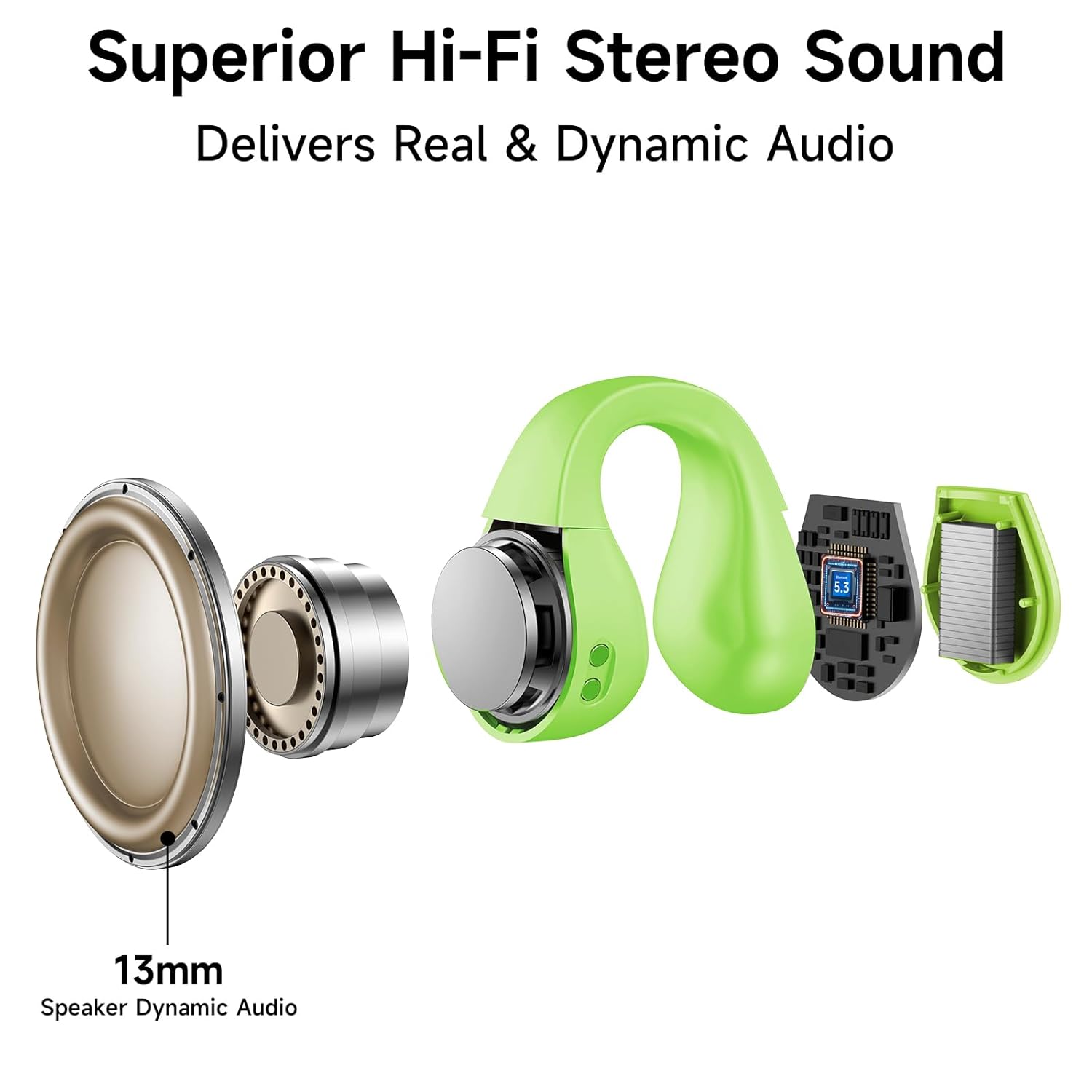
Figure 5.3: Smart Touch Control functions.
5.3 전화 걸기 및 받기
The built-in microphone provides clear audio for calls.
- 전화 받기 : 전화가 오면 이어버드 중 하나를 한 번 탭하세요.
- 통화 종료: 통화 중 이어버드 중 하나를 한 번 탭하세요.
- 전화 거부 : When a call comes in, double tap either earbud.
5.4 음악 감상
After pairing, you can play music from your connected device.
- 재생/일시 중지: 양쪽 이어버드를 한 번 탭하세요.
- 다음 트랙: 오른쪽 이어버드를 두 번 탭하세요.
- 이전 트랙 : 왼쪽 이어버드를 두 번 탭하세요.
6. 유지관리
6.1 청소
- 부드럽고 마른 보푸라기 없는 천으로 이어버드와 충전 케이스를 정기적으로 청소하세요.
- 연마재, 용제 또는 스프레이형 세척제 사용을 피하십시오.
- 이어폰과 케이스의 충전 접점이 깨끗하고 이물질이 없는지 확인하세요.
6.2 보관
- 사용하지 않을 때는 이어버드를 충전 케이스에 보관하여 보호하고 충전 상태를 유지하세요.
- 극한의 온도와 직사광선을 피해 서늘하고 건조한 곳에 보관하세요.
7. 문제 해결
| 문제 | 해결책 |
|---|---|
| 이어폰이 켜지지 않음 | 이어버드가 충전되어 있는지 확인하세요. 이어버드를 충전 케이스에 넣고 뚜껑을 닫았다가 다시 여세요. |
| 장치와 페어링할 수 없습니다 | Make sure Bluetooth is enabled on your device. Ensure earbuds are in pairing mode (open case). Forget previous pairings on your device and try again. |
| 소리가 나지 않거나 볼륨이 작음 | Check volume levels on both earbuds and your connected device. Ensure earbuds are properly connected. Try re-pairing. |
| 간헐적 연결 | Ensure your device is within the 32-foot operating distance. Avoid obstacles between earbuds and device. Check for interference from other wireless devices. |
| 이어폰이 충전되지 않음 | Verify the charging cable is securely connected to both the case and power source. Ensure charging contacts on earbuds and case are clean. |
8. 사양
| 특징 | 세부 사항 |
|---|---|
| 모델 | SA03 |
| 연결 기술 | 무선(블루투스) |
| 블루투스 버전 | 5.1 |
| 오디오 드라이버 유형 | 다이내믹 드라이버(13mm) |
| 제어 유형 | 터치 컨트롤 |
| 충전 시간 | 약 1.5시간 |
| 배터리 수명(이어버드) | 최대 60시간(충전 케이스 사용 시) |
| 충전 케이스 용량 | 500mAh |
| 제품 무게 (이어폰 1개당) | 4.53g (0.16온스) |
| 방수 레벨 | IP44 방수 |
| 최대 작동 거리 | 32 피트 |
| 호환 장치 | Cellphones, Desktops, Gaming Consoles, Laptops, Car Audio Systems |
| 재료 | 아크릴로니트릴 부타디엔 스티렌(ABS) |
9. 보증 및 지원
보증 정보 및 고객 지원에 대한 문의는 구매 시 제공된 설명서를 참조하시거나 판매점에 문의해 주세요. 보증 청구를 위해 구매 증빙 자료를 보관해 주세요.


