소개
The GearLight S1000 LED Tactical Flashlight is a powerful and versatile illumination tool designed for a wide range of applications, from everyday tasks to outdoor adventures and emergency situations. Its robust construction and advanced features ensure reliable performance when you need it most.
This manual provides detailed instructions on how to set up, operate, maintain, and troubleshoot your S1000 flashlight to ensure optimal performance and longevity.
패키지 내용
Upon opening your GearLight S1000 package, please verify that all the following items are included:
- (2) GearLight S1000 LED Tactical Flashlights
- (2) Built-in Lithium-Ion Batteries (pre-installed)
- (2) 19-inch USB-C Charging Cables
- (2) Hand Straps
- (1) Holster
- (1) Operation Guide (this manual)
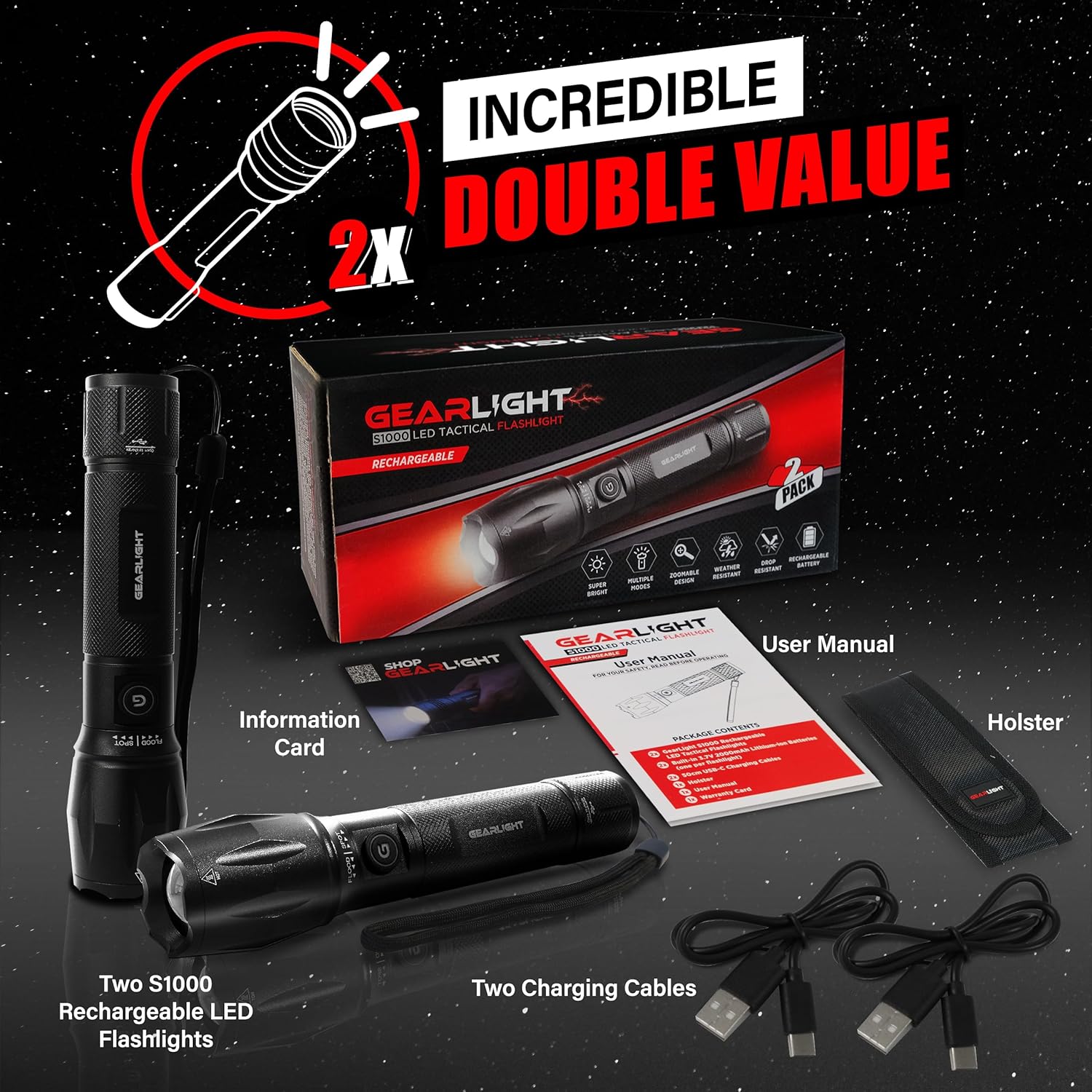
Figure 1: Included items in the GearLight S1000 2-Pack Rechargeable package.
주요 특징
- Bright & Rechargeable: The S1000 provides powerful illumination with multiple modes and a zoomable beam, powered by a CREE LED. It features a built-in rechargeable lithium-ion battery for long-lasting performance.
- 듀얼 버튼 디자인: Equipped with two power buttons—one on the side and one on the tail—for convenient operation and quick access in various situations.
- USB-C 고속 충전: Features a built-in 3.7V 2000mAh lithium-ion battery that charges quickly via USB-C, ensuring your flashlight is always ready.
- 가볍고 주머니에 쏙 들어가는 크기: Compact and easy to carry, fitting comfortably in a pocket, backpack, or glove compartment, making it ideal for travel and emergency kits.
- 내구성 및 내후성: Constructed from military-grade aluminum with an anti-roll body design. It is IPX4 water-resistant and can withstand drops up to 10 feet.

Figure 2: The S1000 flashlight providing powerful illumination in a dark environment.

그림 3: 상세 view of the S1000's durable construction and key design elements.

Figure 4: The S1000's resilience against water and impact.
설정 및 충전
The GearLight S1000 comes with a built-in rechargeable lithium-ion battery. Before first use, it is recommended to fully charge the flashlight.
- 충전 포트 찾기: Twist the tail end of the flashlight to reveal the USB-C charging port.
- 케이블 연결: Insert one end of the provided USB-C charging cable into the flashlight's port and the other end into a compatible USB power source (e.g., wall adapter, computer USB port, power bank).
- 충전 표시기: The charging indicator light (usually near the charging port or power button) will illuminate to show charging status. Refer to the flashlight's specific indicator behavior (e.g., red for charging, green for fully charged).
- 완전 충전: Allow the flashlight to charge until the indicator shows a full charge. Charging time may vary depending on the power source.
- Secure the Port: Once charging is complete, remove the USB-C cable and twist the tail end back to cover and protect the charging port from dust and water.
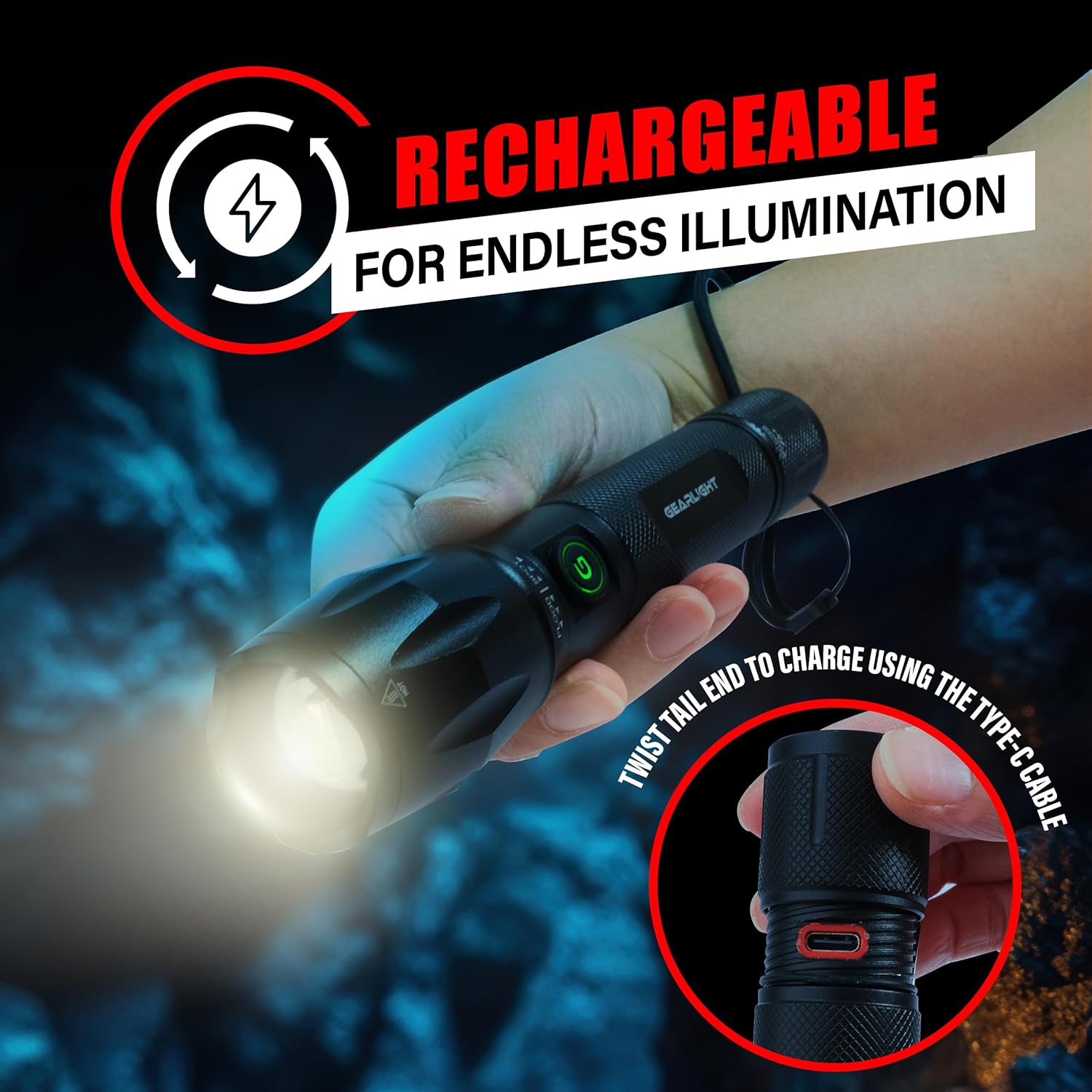
Figure 5: Accessing the USB-C charging port by twisting the tail end.
작동 지침
The S1000 flashlight features a dual-button design and multiple lighting modes for various needs.
전원 켜기/끄기
- 측면 버튼: Press the side power button to turn the flashlight ON or OFF.
- Tail Button: Press the tail cap button to turn the flashlight ON or OFF. This button often provides momentary on/off functionality with a half-press.
조명 모드 변경
The S1000 offers 5 lighting modes: High, Medium, Low, Strobe, and SOS.
- With the flashlight ON, quickly press the side power button repeatedly to cycle through the modes: High → Medium → Low → Strobe → SOS → High.
- Alternatively, with the flashlight ON, lightly tap the tail cap button (without fully clicking) to cycle through the modes. A full click will turn the flashlight off.
줌 기능
The S1000 features a zoomable beam to adjust between a wide floodlight and a focused spotlight.
- To adjust the beam, simply push or pull the head of the flashlight forward or backward.
- Pulling the head forward will narrow the beam for a focused spotlight.
- Pushing the head backward will widen the beam for a broad floodlight.
유지
Proper maintenance ensures the longevity and optimal performance of your GearLight S1000 flashlight.
- 청소: 손전등 본체를 부드러운 천으로 닦으세요.amp cloth. Do not use abrasive cleaners or solvents. Keep the lens clean for maximum light output.
- 매끄럽게 하기: Periodically apply a thin layer of silicone grease to the O-rings and screw threads (e.g., tail cap threads) to maintain water resistance and smooth operation.
- 저장: Store the flashlight in a cool, dry place away from direct sunlight and extreme temperatures. If storing for extended periods, ensure the battery is partially charged (around 50%) to preserve battery health. Recharge every 3-6 months if not in use.
- 분해를 피하십시오: Do not attempt to disassemble the sealed head or other components beyond what is necessary for charging or basic cleaning, as this may void the warranty and damage the flashlight.
문제 해결
If you encounter issues with your GearLight S1000 flashlight, try the following solutions:
| 문제 | 가능한 원인 | 해결책 |
|---|---|---|
| 손전등이 켜지지 않습니다. | 배터리가 소진되었습니다. 느슨한 꼬리 모자. 내부 부품이 손상되었습니다. | 배터리를 완전히 충전하십시오. 꼬리 캡을 단단히 조이세요. 문제가 지속되면 고객 지원팀에 문의하십시오. |
| 빛이 어둡거나 깜빡입니다. | 배터리가 부족합니다. Dirty lens or contacts. | 배터리를 충전하세요. Clean the lens and ensure contacts are free of debris. |
| 모드를 변경할 수 없습니다. | 잘못된 버튼 누름. 소프트웨어 오류. | Ensure quick, successive presses of the side button or light taps of the tail button. Try turning off and on again. |
| 충전 표시등이 작동하지 않습니다. | 케이블 또는 전원 공급 장치에 문제가 있습니다. 충전 포트 막힘. | 다른 USB-C 케이블과 전원을 사용해 보세요. 충전 포트에 이물질이 있는지 확인하십시오. |
명세서
| 특징 | 세부 사항 |
|---|---|
| 모델 | S1000 |
| 광원 유형 | LED (CREE) |
| 전원 | 배터리 구동(충전식) |
| 배터리 유형 | Built-in 3.7V 2000mAh Lithium-Ion |
| 충전 포트 | USB-C |
| 재료 | Military-Grade Aluminum |
| 방수 레벨 | IPX4 방수 |
| 낙하 저항 | 최대 10피트 |
| 제품 치수 | 6.1인치 깊이 x 1.57인치 너비 x 1.57인치 높이 |
| 품목 무게 | 1.1파운드(2팩 기준) |
| 한국어: | 850021168520 |
보증 및 지원
For warranty information, technical support, or any inquiries regarding your GearLight S1000 flashlight, please visit the official GearLight web사이트를 방문하거나 고객 서비스에 직접 문의하세요.
또한 방문할 수 있습니다 GearLight Store on Amazon 자세한 제품 정보와 지원 리소스를 확인하세요.


