1. 서론
Thank you for choosing the Vangoa 61-Key Electric Piano Keyboard and 3/4 Acoustic Guitar bundle. This manual provides essential information for the safe and effective setup, operation, and maintenance of your new instruments. Please read this manual thoroughly before use and retain it for future reference.
This bundle includes a versatile 61-key electric piano keyboard with lighted keys and various learning features, alongside a 3/4 size steel-string acoustic guitar, offering a comprehensive musical experience for beginners and enthusiasts.
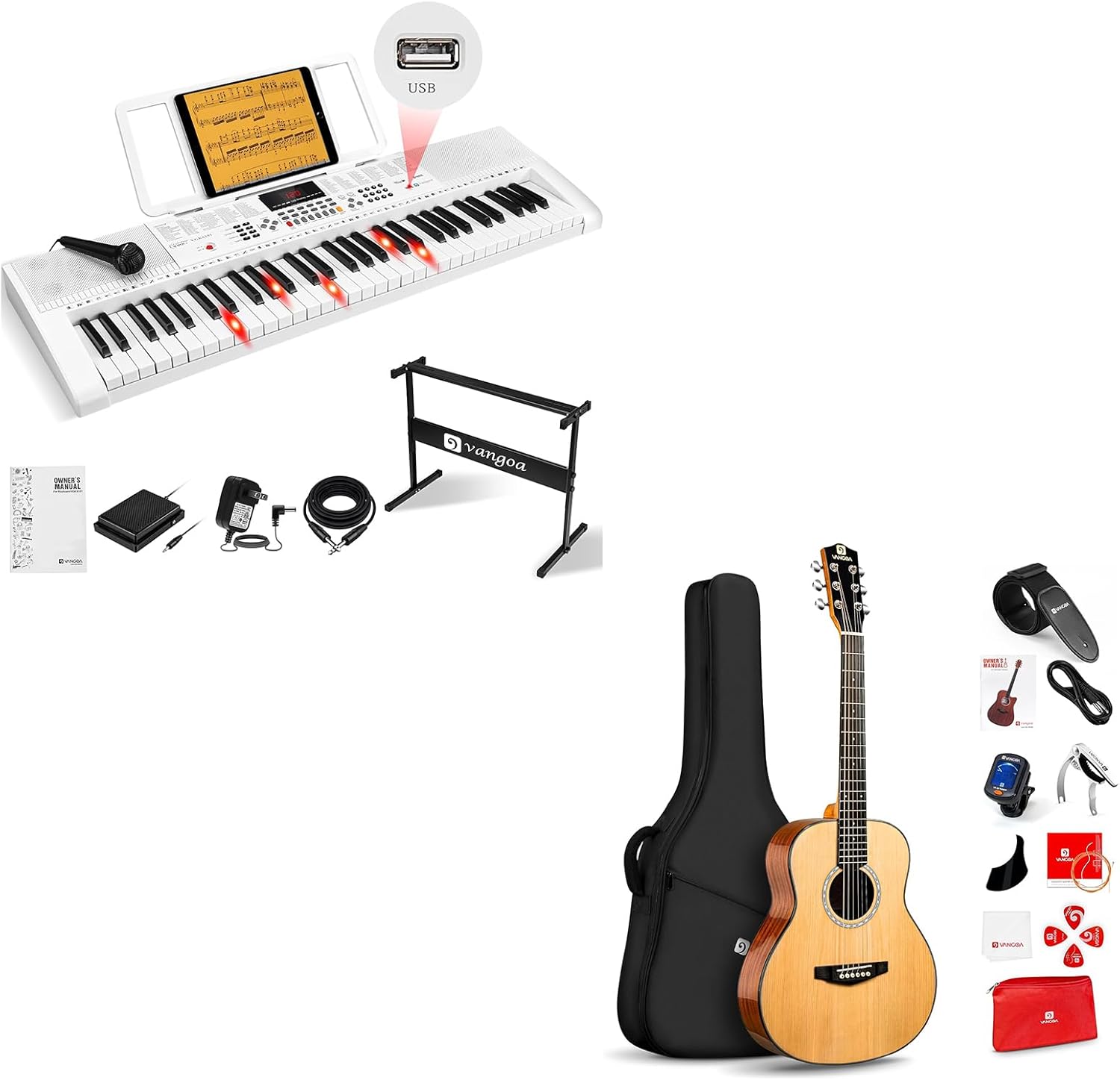
Image 1.1: The Vangoa 61-Key Electric Piano Keyboard and 3/4 Acoustic Guitar bundle, showcasing both instruments and their respective accessories.
2. 안전 정보
안전한 작동을 보장하고 손상을 방지하려면 다음 예방 조치를 준수하세요.
- 전원 공급 장치: Use only the specified power adapter for the electric piano. Ensure the voltage는 귀하의 지역 전원 공급 장치와 일치합니다.
- 물과 습기: Keep both instruments away from water, moisture, and high humidity. Do not operate with wet hands.
- 열원: Avoid placing instruments near heat sources such as radiators, stoves, or direct sunlight.
- 통풍: Ensure adequate ventilation for the electric piano to prevent overheating. Do not block ventilation openings.
- 청소: Disconnect the electric piano from the power supply before cleaning. Use a soft, dry cloth.
- 어린이들: Adult supervision is recommended when children are using the instruments. Small parts may pose a choking hazard.
- 손질: Handle both instruments with care. Avoid dropping or subjecting them to strong impacts.
3. 패키지 내용
아래 나열된 모든 품목이 패키지에 포함되어 있는지 확인하세요.
3.1. Electric Piano Keyboard Components
- Vangoa 61-Key Electric Piano Keyboard
- 전원 어댑터
- Music Stand (integrated or detachable)
- 키보드 스탠드
- 서스테인 페달
- 마이크로폰
- 오디오 케이블
- 사용 설명서 (본 문서)

Image 3.1: The Vangoa 61-Key Electric Piano Keyboard shown with its power adapter, sustain pedal, microphone, audio cable, keyboard stand, and user manual.
3.2. Acoustic Guitar Components
- Vangoa 3/4 Steel-String Acoustic Guitar
- 기그백
- 기타 스트랩
- 디지털 튜너
- 카포
- Picks (various)
- 추가 현 세트
- 청소용 천
- 사용자 설명서

Image 3.2: The Vangoa 3/4 Acoustic Guitar displayed with its gig bag, strap, digital tuner, capo, picks, and other accessories.
4. 설정
4.1. Electric Piano Keyboard Setup
- 짐 풀기: 키보드와 모든 액세서리를 포장에서 조심스럽게 꺼내세요.
- Keyboard Stand Assembly: Assemble the included keyboard stand according to its separate instructions. Place the keyboard securely on the stand.
- 전원 연결: Connect the power adapter to the DC IN jack on the back of the keyboard, then plug the adapter into a standard electrical outlet.
- 서스테인 페달: Insert the sustain pedal cable into the SUSTAIN jack.
- 마이크로폰: Connect the microphone to the MIC IN jack.
- 오디오 출력: 외부용 amplification, connect an audio cable from the AUDIO OUT jack to an amp라이터 또는 스피커 시스템.
4.2. Acoustic Guitar Setup
- 짐 풀기: Remove the guitar from its gig bag.
- 튜닝 : Use the included digital tuner to tune the guitar strings. Attach the tuner to the headstock. Pluck each string individually and adjust the tuning pegs until the tuner indicates the correct pitch (E-A-D-G-B-e from thickest to thinnest string).
- 스트랩 부착: If desired, attach the guitar strap to the strap buttons located at the base of the guitar body and near the neck joint.

이미지 4.1: 클로즈업 view of the guitar's headstock, highlighting the sealed geared tuning pegs designed for stable and precise tuning.
5. 사용 설명서
5.1. Electric Piano Keyboard Operation

이미지 5.1: 자세한 view of the Vangoa keyboard's control panel, showing the LED display, number keypad, and buttons for tones, rhythms, demo songs, USB, pitch bend, and recording functions.
- 전원 켜기/끄기: 키보드를 켜거나 끄려면 POWER 버튼을 누르세요.
- 볼륨 조절: Use the VOLUME knob or buttons to adjust the overall sound level.
- Selecting Tones (Voices): Press the TONE button, then use the number keypad or +/- buttons to select from 600 available instrument sounds.
- 리듬 선택하기: Press the RHYTHM button, then use the number keypad or +/- buttons to select from 400 accompaniment styles. Press START/STOP to begin or end the rhythm.
- 데모 곡: Press the DEMO button to play through the 50 built-in demo songs. Use the +/- buttons to select a specific song.
- Lighted Keys Feature: The keyboard features LED lighted keys that illuminate during demo songs or teaching modes to guide your playing.
- Teaching Modes: The keyboard offers 3 teaching modes to assist beginners. Refer to the specific instructions on the keyboard's display for mode selection and usage.
- 듀얼 키보드 모드: This feature allows two players to use the keyboard simultaneously, splitting it into two independent sections. Consult the keyboard's display for activation.
- 녹음 및 재생: Use the RECORD button to start recording your performance and PLAYBACK to listen to your recorded track.
- USB 연결: The USB port allows for connection to a computer or a USB flash drive for expanded accompaniment options or MIDI functionality.
- 기타 특징: Explore functions like Sustain, Vibrato, Chord modes, EQ settings, and Percussion options using the dedicated buttons on the control panel.

Image 5.2: A user engaging with the Vangoa keyboard, illustrating its various learning and performance features such as teaching modes, dual keyboard functionality, auto chord, microphone input, light-up guide, and silent performance via headphones.

Image 5.3: Two individuals playing the Vangoa keyboard simultaneously, demonstrating the dual keyboard mode which allows for shared musical experiences.

Image 5.4: A USB flash drive being inserted into the Vangoa keyboard's USB port, illustrating its capability for expanded accompaniment and data transfer.
5.2. Acoustic Guitar Operation
- 기타를 잡고 있는 모습: Sit comfortably and rest the guitar on your lap, or stand with the strap over your shoulder.
- 스트러밍: Use a pick or your fingers to strum the strings over the soundhole.
- Fretting Notes: Press down on the strings behind the frets with your left-hand fingers to produce different notes.
- Using the Capo: A capo can be placed across the fretboard to raise the pitch of all strings simultaneously, allowing you to play in different keys without changing chord shapes.
6. 유지관리
- 청소: Use a soft, dry, lint-free cloth to wipe down both instruments. For the keyboard, ensure it is unplugged. Avoid abrasive cleaners or solvents.
- String Care (Guitar): Wipe guitar strings after each use to remove oils and dirt, which can prolong string life. Replace strings when they become dull, corroded, or break.
- 저장: Store instruments in a cool, dry place away from extreme temperatures and humidity. Use the gig bag for the guitar to protect it from dust and minor impacts.
- 운송: When transporting, ensure instruments are securely packed to prevent damage.
7. 문제 해결
| 문제 | 가능한 원인 | 해결책 |
|---|---|---|
| 키보드에서 소리가 나지 않습니다. | Power off; Volume too low; Headphones connected; External speakers off. | Ensure power is on; Increase volume; Disconnect headphones; Turn on external speakers. |
| 키가 켜지지 않음 | Not in teaching/demo mode; Feature disabled. | Select a teaching mode or demo song; Check keyboard settings to enable lighted keys. |
| Guitar sounds out of tune | Strings stretched; Tuning pegs slipped. | Retune the guitar using the digital tuner. New strings may require frequent tuning initially. |
| Buzzing sound from guitar strings | Improper fretting; Action too low; Worn frets. | Ensure fingers are pressing firmly behind the fret; If persistent, consult a guitar technician. |
8. 사양
8.1. Vangoa 61-Key Electric Piano Keyboard
- 키의 개수: 61
- 특별 기능: Lighted Keys, Portable
- 스킬 레벨 : 초보자
- Tones/Voices: 600
- 리듬: 400
- 데모 곡: 50
- Percussions: 8
- 연결성: USB, 3.5mm Jack (Auxiliary, Microphone, Headphone)
- 전원: 코드식 전기
- 내장 스피커: 2 x 5W
- 모델 번호: 4089a686-9a6d-4bae-b32d-bec01bbb36f5
8.2. Vangoa 3/4 Steel-String Acoustic Guitar

Image 8.1: A visual representation of the Vangoa 3/4 acoustic guitar, detailing its dimensions and construction materials.
- 크기: 36 Inch (3/4 size)
- 본체 소재 : Sapele wood
- 목 소재: 오코우메
- 프렛 수: 21 화씨
- 핑거보드 소재: High-density tech wood
- Bridge Material: Engineer wood
- Nut and Saddle Material: 뼈
- Fret Material: White Copper
- 문자열: Steel-String
9. 보증 및 지원
Vangoa products are designed for quality and performance. For information regarding warranty coverage, technical support, or service inquiries, please refer to the warranty card included with your product or visit the official Vangoa web사이트. 보증 청구를 위해 구매 증빙 자료를 보관해 주세요.


