1. 중요한 안전 정보
Please read all instructions carefully before using the SANSUI ES-24C1 monitor. Keep this manual for future reference.
- Do not expose the monitor to rain or moisture to prevent fire or electric shock hazards.
- 모니터를 열지 마세요asing. 내부에는 사용자가 수리할 수 있는 부품이 없습니다. 모든 수리는 자격을 갖춘 기술자에게 맡기십시오.
- 모니터가 떨어지지 않도록 안정적이고 평평한 표면에 놓으세요.
- 모니터 주변의 통풍이 잘 되도록 하십시오. 통풍구를 막지 마십시오.
- 모니터와 함께 제공된 전원 어댑터만 사용하세요.
- 번개가 칠 때나 장기간 사용하지 않을 때는 모니터의 플러그를 콘센트에서 뽑아 두세요.
2. 패키지 내용
패키지에 모든 품목이 들어 있는지 확인하세요.
- SANSUI ES-24C1 24-inch Curved Monitor
- 모니터 스탠드(베이스 및 넥)
- 전원 어댑터
- HDMI 케이블
- 사용자 설명서
3. 제품 오버view
The SANSUI ES-24C1 is a 24-inch Full HD (1920x1080) curved monitor featuring a 100Hz refresh rate, 1ms MPRT response time, and built-in speakers. It is designed for both home and office use, offering a 1500R curvature for an immersive view경험.

이미지: 이상view of the SANSUI ES-24C1 monitor highlighting its key features and curved design.

Image: Summary of the monitor's main features including 100Hz, 1ms MPRT, USB Type-C, HDR, 100% sRGB, 3000:1 contrast, 250 Nits, built-in speakers, and VESA mount.
포트 및 컨트롤

이미지: 클로즈업 view of the monitor's rear ports, including HDMI, USB Type-C, and Audio Out.
- USB 타입-C: 1 port for video input (does not support charging).
- HDMI 1.4 : 1 port for video input.
- 3.5mm 오디오 잭: 외부 헤드폰이나 스피커를 연결하는 데 사용합니다.
- DC 입력 : 전원 입력 포트.
- Five-Way Joystick: Located on the back for OSD menu navigation.
4. 설정
4.1 모니터 조립
모니터 스탠드를 조립하려면 다음 단계를 따르세요.
- 스탠드 넥을 모니터 패널에 부착합니다.
- Secure the stand base to the neck.
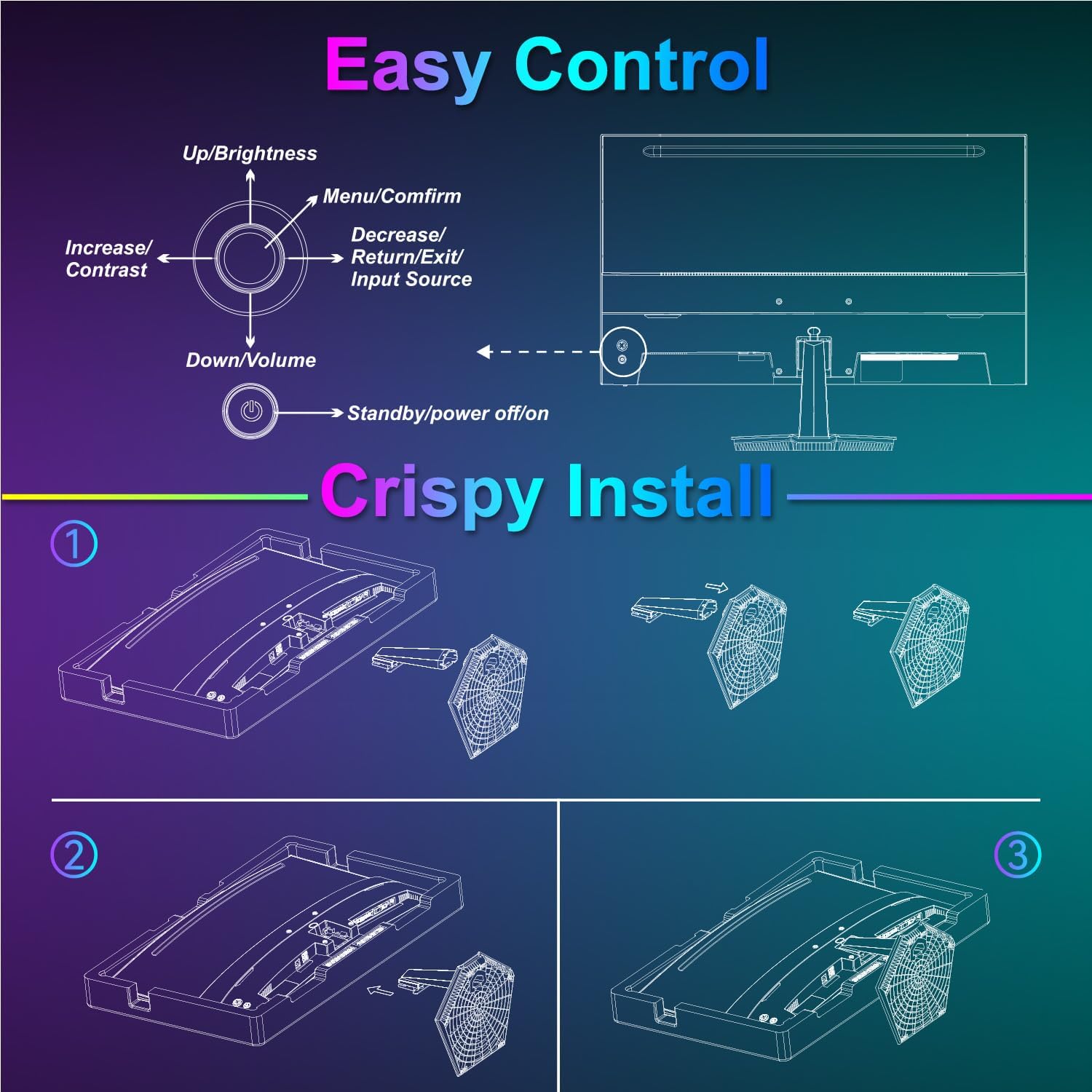
Image: Diagram illustrating the step-by-step assembly of the monitor stand.
4.2 장치에 연결하기
Connect your monitor to a computer or other video source using the appropriate cable.
- HDMI : Connect one end of the HDMI cable to the monitor's HDMI port and the other end to your device's HDMI output.
- USB 타입-C: Connect one end of the USB Type-C cable to the monitor's USB Type-C port and the other end to your device's compatible USB Type-C output.
- 오디오: If using external audio devices, connect them to the 3.5mm audio jack.

Image: Visual representation of various devices connecting to the monitor via HDMI and USB Type-C.
4.3 전원 켜기/끄기
Connect the power adapter to the monitor's DC IN port and then plug it into a power outlet. Press the power button located on the back of the monitor to turn it on or off.
5. 사용 설명서
5.1 OSD 메뉴 탐색
The On-Screen Display (OSD) menu is controlled using the five-way joystick on the back of the monitor. Press the joystick to open the menu, then move it up/down/left/right to navigate and select options.

Image: Diagram showing the five-way joystick and its functions for OSD menu navigation.
5.2 디스플레이 설정
Adjust various display parameters to optimize your view경험.
- 밝기/대비: 전반적인 밝기와 대비 수준을 조정합니다.
- 색상 설정: 색온도, 색조 및 채도를 세밀하게 조정하세요.
- HDR: Enable or disable High Dynamic Range for enhanced contrast and color.
- Low Blue Light/Anti-Flicker: 장시간 사용 시 눈의 피로를 줄여줍니다.
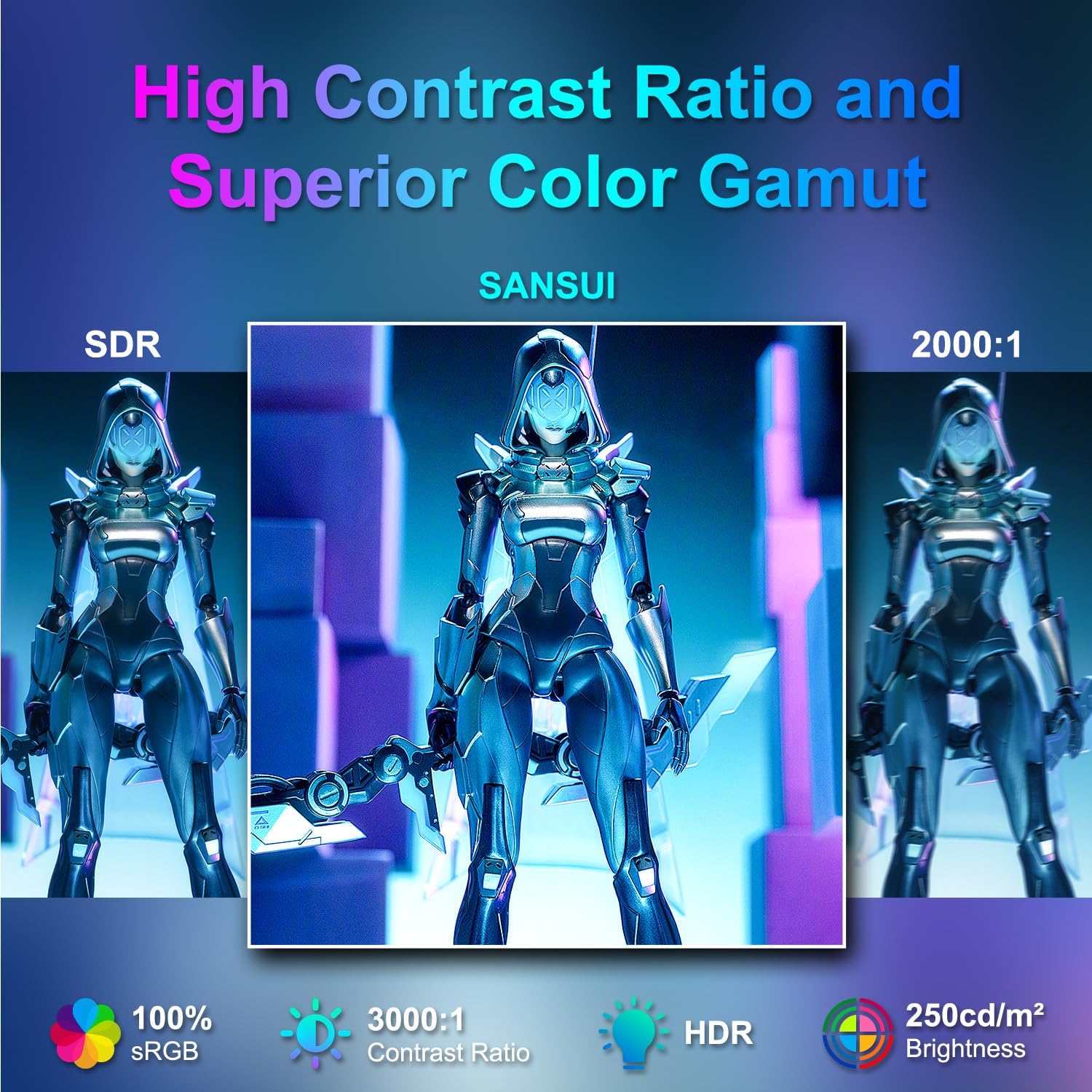
Image: Visual comparison demonstrating high contrast ratio and superior color gamut of the SANSUI monitor.

Image: Highlights of display features like 3000:1 contrast ratio, 100% sRGB, and 250 Nits brightness.

Image: Comparison of display quality with and without HDR enabled.

Image: Illustration of Low Blue Light and Flicker-Free technologies for reduced visual fatigue.
5.3 게임 기능
The ES-24C1 monitor includes features optimized for gaming performance.
- 100Hz 재생률: 더욱 부드러운 움직임과 입력 지연 감소를 제공합니다.
- 1ms MPRT 응답 시간: 모션 블러와 고스트 현상을 최소화합니다.
- 적응 동기화: 모니터의 새로 고침률과 GPU의 프레임률을 동기화하여 화면 찢김 및 끊김 현상을 제거합니다.
- 게임 모드: Pre-set display modes optimized for different game genres (e.g., FPS, RTS, RPG).
- AI 크로스헤어: An on-screen crosshair overlay for improved aiming accuracy.
- 게임 타이머: 게임 내 이벤트를 추적하는 화면 타이머.

Image: Demonstrates the difference in smoothness between 60Hz, 75Hz, and 100Hz refresh rates, highlighting low blue light and Adaptive FreeSync.

Image: Illustrates the benefits of 100Hz refresh rate and 1ms MPRT response time in reducing screen tearing and improving fluidity.
5.4 Multi-Window Modes (PIP/PBP)
The monitor supports Picture-in-Picture (PIP) and Picture-by-Picture (PBP) modes, allowing you to view content from multiple input sources simultaneously.
- PBP(사진별): Divides the screen into two halves, displaying content from two different sources side-by-side.
- PIP(Picture-in-Picture): Displays content from a secondary source in a smaller window overlaid on the main display.

이미지: 전amples of Duplicated Mode, Second Screen Mode, and Single Display Screen Mode for enhanced productivity.
6. 유지관리
6.1 청소
- 청소하기 전에는 항상 모니터의 플러그를 뽑으세요.
- 부드럽고 보풀이 없는 천을 살짝 사용하십시오. dampened with water or a mild, non-abrasive cleaner specifically designed for electronics.
- 세척제를 화면에 직접 뿌리지 마세요.
6.2 관리
- 모니터나 케이블 위에 무거운 물건을 올려놓지 마세요.
- 모니터를 직사광선, 열원 및 극한 온도로부터 멀리하십시오.
- Do not expose the monitor to strong magnetic fields.
7. 문제 해결
If you encounter issues with your SANSUI ES-24C1 monitor, refer to the following common problems and solutions:
- 전원 없음: 전원 어댑터가 모니터와 작동하는 콘센트에 제대로 연결되어 있는지 확인하십시오. 전원 표시등이 켜져 있는지 확인하십시오.
- 신호 없음: Verify that the video cable (HDMI or USB Type-C) is correctly connected to both the monitor and your device. Ensure the correct input source is selected in the OSD menu.
- 화면 깜빡임: 비디오 케이블에 손상이나 연결 불량이 있는지 확인하십시오. 다른 비디오 케이블이나 포트를 사용해 보십시오. 그래픽 카드 드라이버가 최신 버전인지 확인하십시오.
- 이미지 품질이 좋지 않음: Adjust brightness, contrast, and color settings in the OSD menu. Ensure the display resolution and refresh rate are set correctly in your device's display settings.
- 스피커에서 소리가 나지 않습니다: Check the volume settings on both the monitor and your connected device. Ensure the audio cable (if used) is properly connected.
8. 사양
Detailed technical specifications for the SANSUI ES-24C1 24-inch Curved Monitor:
| 특징 | 사양 |
|---|---|
| 모델 번호 | ES-24C1 |
| 화면 크기 | 24인치 |
| 패널 유형 | 곡선형(1500R) |
| 해결 | 1920 x 1080 (풀HD) |
| 새로 고침 빈도 | 100Hz |
| 응답 시간 | 1ms(MPRT) |
| 대비율 | 3000시 1분 |
| 명도 | 250 Nits |
| 디스플레이 색상 | 16.7만 |
| 색상 영역 | 100% sRGB |
| View잉 각도 | 178°(수평/수직) |
| 비디오 입력 | 1x HDMI 1.4, 1x USB Type-C |
| 오디오 출력 | 1x 3.5mm 오디오 잭 |
| 스피커 | 2W 내장 스피커 2개 |
| VESA 마운트 | 75 x 75mm |
| 기울기 조정 | -5° ~ 15° |
| 제품 치수 | 21 x 38 x 49 인치 |
| 품목 무게 | 7.78파운드 |

Image: Detailed dimensions and ergonomic features like 178° wide viewing angle and -5°~15° tilt.

Image: Visual representation of the 178° wide view잉 각도.

Image: Tips for VESA mounting (75x75mm, M4*8mm screw size) and tilt adjustment.

이미지: 후면 view of the monitor detailing port locations and key specifications.
9. 보증 및 지원
SANSUI provides a limited warranty for this product. For detailed warranty information, please refer to the warranty card included in your package or visit the official SANSUI website. For technical support or service inquiries, please contact SANSUI customer service.
온라인 지원: 아마존에서 산수이 스토어를 방문하세요
10. 공식 제품 영상
Watch the official product video for a visual guide to the SANSUI ES-24C1 monitor's features and benefits.
Video: SANSUI 24" 100Hz Curved Monitor USB C with Speakers. This video provides an overview of the monitor's design, key features, and connectivity options.


