소개
This manual provides detailed instructions for the setup, operation, maintenance, and troubleshooting of your OBSBOT Tail Air Bundle. This bundle includes the OBSBOT Tail Air 4K smart streaming PTZ camera, a SanDisk Extreme 128 GB microSDXC card, and a Pearstone Standard Series HDMI to HDMI High-Speed Ethernet Cable.
The OBSBOT Tail Air is designed to provide high-quality video capture and streaming with advanced AI tracking capabilities, making it suitable for remote work, content creation, and conference environments.
상자 안에 무엇이 들어있나요?
아래 나열된 모든 품목이 패키지에 들어 있는지 확인하세요.
- 1x OBSBOT Tail Air Camera (OSB-2108-CW)
- 1x 보관 케이스
- 1x USB-C Male to Dual USB-C Female Splitter
- 1x USB-C 케이블
- USB-C-USB-A 어댑터 1개
- 1x SanDisk Extreme 128 GB microSDXC Card (SDSQXA1-128G-AN6MA)
- 1x Pearstone Standard Series HDMI to HDMI High-Speed Ethernet Cable (PEHDA106), 6'
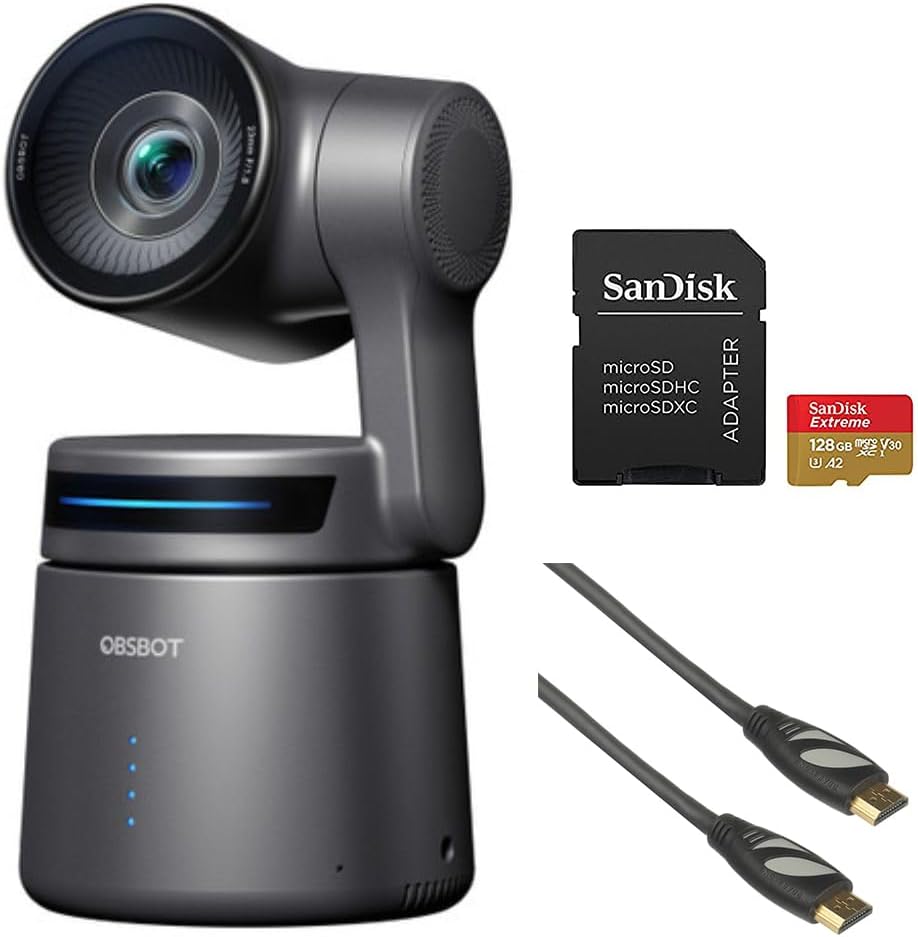
Image: Contents of the OBSBOT Tail Air Bundle, showing the camera, SanDisk Extreme 128 GB microSDXC card, and Pearstone 6' HDMI cable.
설정
1. 카메라 배치
Place the OBSBOT Tail Air camera on a stable, flat surface or mount it on a compatible tripod. Ensure the camera has a clear line of sight to the area you intend to capture.
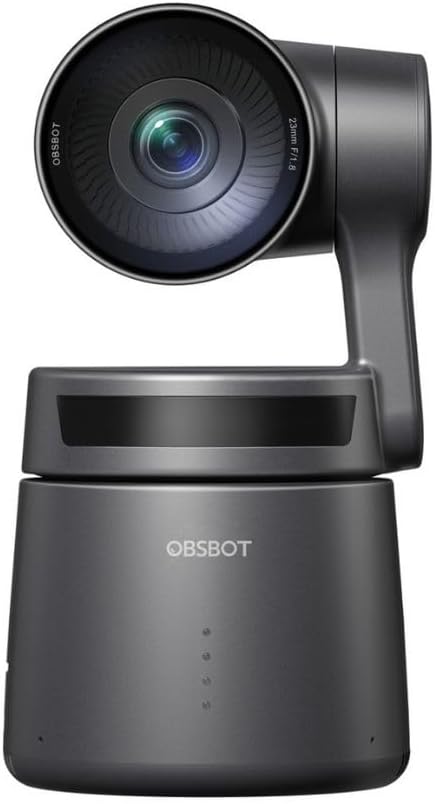
이미지: 앞면 view of the OBSBOT Tail Air camera, showing the lens and base.
2. 전원 연결
- USB-C 케이블을 카메라의 USB-C 포트에 연결하세요.
- Connect the other end of the USB-C cable to a power source (e.g., a USB wall adapter or computer USB port). Use the provided USB-C to USB-A adapter if your power source only has USB-A ports.
- The camera's indicator lights will illuminate upon successful power connection.

Image: OBSBOT Tail Air camera with its blue indicator lights active, signifying power or operational status.
3. MicroSD 카드 설치
To enable local recording, insert the SanDisk Extreme 128 GB microSDXC card into the camera's microSD card slot. Ensure the card is inserted with the correct orientation until it clicks into place.

Image: SanDisk Extreme 128 GB microSDXC card, suitable for high-speed data storage.
4. 연결 옵션
The OBSBOT Tail Air offers multiple connectivity options:
- USB: Connect the camera to a computer via USB-C for use as a webcam or for data transfer.
- HDMI : Use the Pearstone HDMI cable to connect the camera's micro-HDMI output to a display or capture card for high-quality video output.
- Ethernet/PoE: For network connectivity and Power over Ethernet (PoE), an optional adapter is required. This enables NDI|HX3 support for professional streaming setups.
- 와이파이: Connect the camera to your wireless network for remote control and streaming via the OBSBOT app.

이미지: 후면 view of the OBSBOT Tail Air camera, highlighting its various connectivity ports including USB-C and micro-HDMI.

Image: Pearstone Standard Series HDMI to HDMI High-Speed Ethernet Cable, 6 feet in length.
Operating the OBSBOT Tail Air
1. 초기 전원 켜기
Once powered, the camera will perform a self-calibration. The lens will pan and tilt to its home position. Wait for the indicator lights to stabilize before proceeding.
2. OBSBOT App Control
For full control and advanced features, download the official OBSBOT app on your smartphone or tablet. Connect the camera to the app via Wi-Fi or USB.
- 원격 제어: Pan, tilt, and zoom the camera remotely.
- AI 추적: Activate and manage AI human, animal, or object tracking.
- 제스처 컨트롤 2.0: Learn and utilize various hand gestures for quick control of tracking, recording, and zoom.
- 설정: Adjust video resolution (up to 4K), frame rate, exposure, white balance, and other camera parameters.
3. AI Tracking Features
The Tail Air features advanced AI tracking:
- 인간 추적: Automatically follows a designated person, keeping them centered in the frame.
- Animal Tracking: Capable of tracking pets or other animals.
- 객체 추적: Can track specific objects, useful for demonstrations or product showcases.
To activate tracking, use the OBSBOT app or specific gesture controls.
4. 녹화 및 스트리밍
- 로컬 녹음: 비디오 푸tage can be recorded directly to the inserted microSD card.
- 라이브 스트리밍: The camera supports direct streaming to platforms via the OBSBOT app or through NDI|HX3 (with optional adapter) for professional broadcast setups.
- 오디오 입력: Utilize the 3.5mm audio input jack for external microphone connection to enhance audio quality.
유지
1. 청소
- 부드럽고 마른 천을 사용하여 카메라 본체를 청소하세요.
- 렌즈를 닦을 때는 렌즈 전용 세척용 천과 세척액을 사용하십시오. 연마성 재질은 사용하지 마십시오.
- 강한 세제나 용제를 사용하지 마십시오.
2. 보관
When not in use, store the camera in its provided storage case in a cool, dry place, away from direct sunlight and extreme temperatures.
3. 펌웨어 업데이트
Regularly check for firmware updates via the OBSBOT app to ensure optimal performance and access to new features. Follow the app's instructions carefully during updates.
문제 해결
| 문제 | 가능한 원인 | 해결책 |
|---|---|---|
| 카메라 전원이 켜지지 않습니다. | Loose power connection; faulty cable/adapter; insufficient power source. | Check all cable connections. Try a different USB port or power adapter. Ensure power source meets camera requirements. |
| AI 추적 기능이 작동하지 않습니다. | Poor lighting; subject too far/close; camera obstruction; AI tracking not activated. | Ensure adequate lighting. Position subject within optimal range (1-5 meters). Clear any obstructions. Activate tracking via the OBSBOT app or gesture. |
| MicroSD 카드가 인식되지 않습니다. | 카드가 제대로 삽입되지 않았습니다. 카드가 손상되었습니다. 호환되지 않는 카드입니다. | Reinsert the card. Try formatting the card (this will erase data). Ensure the card is a genuine SanDisk Extreme 128 GB microSDXC or similar compatible card. |
| HDMI를 통한 비디오 출력이 없습니다. | HDMI cable faulty; display input not selected; camera not in video output mode. | Check the Pearstone HDMI cable for damage. Ensure the display is set to the correct HDMI input. Verify camera settings in the OBSBOT app. |
| 앱 연결 문제. | Wi-Fi interference; incorrect network; camera not discoverable. | Ensure camera and device are on the same Wi-Fi network. Restart both camera and app. Check for app updates. |
명세서
| 특징 | 세부 사항 |
|---|---|
| 모델 | OBSBOT Tail Air (OSB-2108-CW) |
| 감지기 | 1/1.8" CMOS 8MP |
| 비디오 캡처 해상도 | 최대 4K |
| 연결 기술 | USB-C, Micro-HDMI, Wi-Fi, Ethernet (with optional adapter) |
| 오디오 입력 | 3.5mm 잭 |
| 추적 | AI Human/Animal/Object Tracking |
| 제어 | Gesture Control 2.0, OBSBOT App |
| 저장 | MicroSDXC (SanDisk Extreme 128 GB included) |
| 한국어: | 810160682202 |
보증 및 지원
For warranty information and technical support, please refer to the official OBSBOT web사이트에서 확인하거나 고객 서비스에 직접 문의하세요. 구매 증빙 자료로 구매 영수증을 보관하세요.
OBSBOT Official Web대지: www.obsbot.com


