제품 끝view
The CILICO CT180-BT is an AI Bluetooth Candy & Meat Thermometer designed for precise temperature monitoring in various cooking applications, including candy making, BBQ, deep frying, and liquids. It features a digital instant reading display, an 8-inch long probe, and is Type-C rechargeable. The thermometer integrates with a dedicated mobile application for smart alerts and customizable presets, ensuring optimal cooking results.

Figure 1: CILICO CT180-BT Thermometer and its accompanying mobile application interface.
상자 안에 무엇이 들어있나요?
Upon opening the product packaging, verify that all the following components are included:
- CILICO CT180-BT Thermometer Unit with 8-inch Probe
- Adjustable Probe Clip (1 HOLDER)
- USB Type-C 충전 케이블
- Protective Storage Tube for Thermometer
- 사용 설명서
Video 1: This video demonstrates the unboxing process of the CILICO CT180-BT thermometer, showcasing all included components such as the thermometer unit, probe clip, USB-C charging cable, and protective storage tube.
설정
1. Powering On the Thermometer
To power on the thermometer, press and hold the 켜기/끄기 button located on the device. The digital display will illuminate and show the current temperature reading. A short press of the 켜기/끄기 button will light up the backlight.
2. Downloading the HeatMaster App
For full functionality and smart features, download the "HeatMaster: CandyAlert" application. It is available on both Google Play Store for Android devices and the Apple App Store for iOS devices.

Figure 2: HeatMaster app interface showing real-time temperature monitoring and app download options.
3. 블루투스로 연결하기
Once the app is installed, open it and ensure your device's Bluetooth is enabled. The app will guide you through the connection process. Tap the Bluetooth icon (usually a plus sign) in the top right corner of the app to connect to your CT180-BT thermometer. The connection should be established quickly.
비디오 2: 이 비디오는 다음을 제공합니다.view of the HeatMaster app features, including Bluetooth connectivity, setting high and low temperature alerts, pre-alert settings, and monitoring temperature changes in real-time.
4. Attaching the Probe Clip
The included adjustable probe clip can be used to secure the thermometer's probe to the rim of a pot or pan, allowing for hands-free monitoring during cooking. This ensures the probe remains at the desired depth for accurate readings.
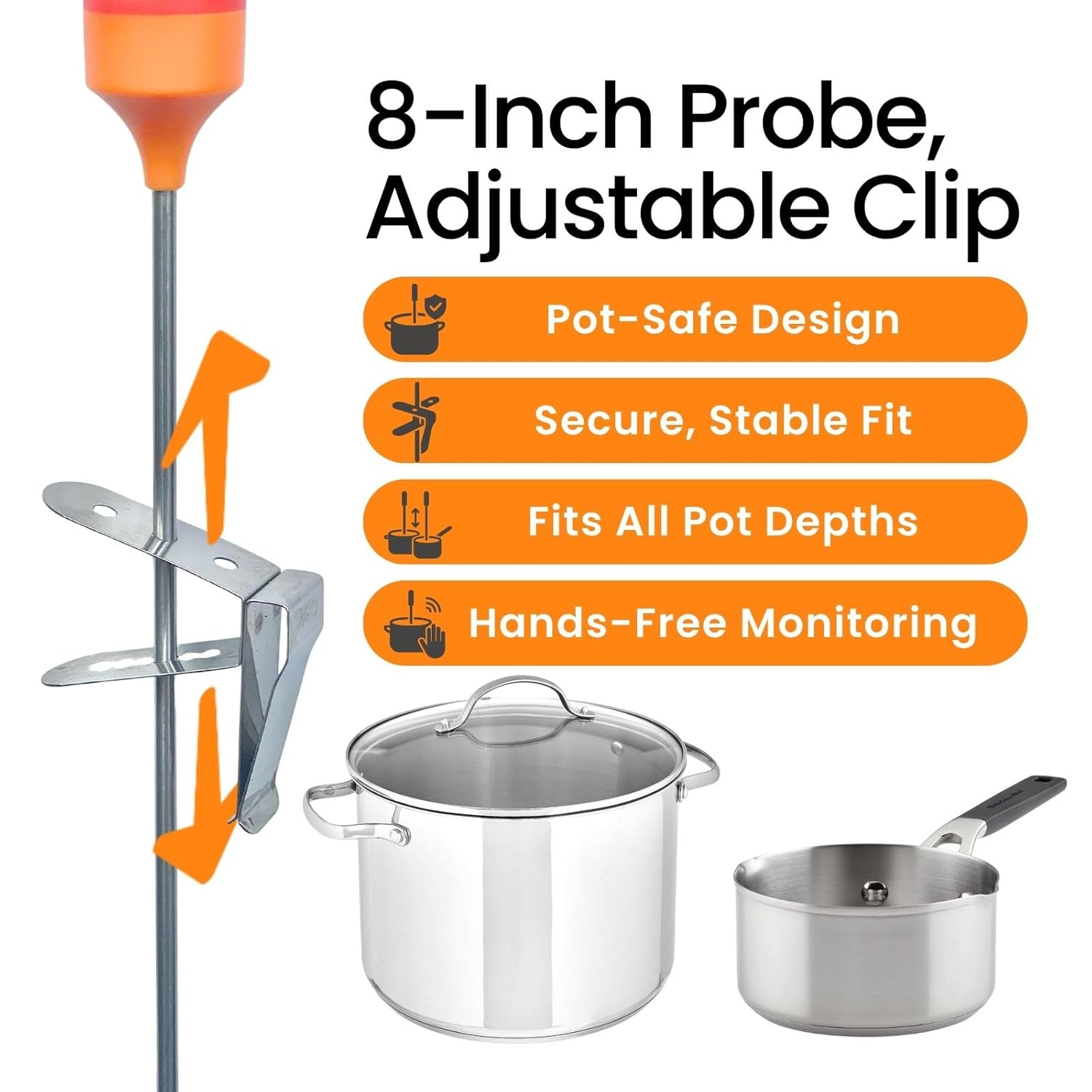
Figure 3: The adjustable probe clip attached to the thermometer probe, ready for use with cookware.
작동 지침
1. Direct Temperature Measurement
Insert the 8-inch stainless steel probe into the food or liquid you wish to measure. The digital display on the thermometer will show an instant reading within 3 seconds. You can switch between Celsius (°C) and Fahrenheit (°F) by pressing the 화씨/섭씨 단추.
2. App-Based Monitoring and Alerts
The HeatMaster app allows for real-time temperature monitoring from up to 33 feet (10 meters) away via Bluetooth. The app interface visually indicates the temperature status (heating, cooling, or target reached) with color changes.
Setting Presets and Custom Temperatures
The app comes preloaded with over 20 USDA-recommended temperature presets for various meats and 6 candy-making stages. You can also add fully customizable temperature settings. To set an alert, navigate to the "Alarms" section in the app. You can set a high target temperature (Target 1) and an optional low target temperature (Target 2). The app will provide pre-alerts when the temperature is within 9°F (5°C) or 18°F (10°C) of your target, and a final notification when the set temperature is reached.

Figure 4: HeatMaster app displaying a wide range of temperature presets for different food types.
AI Assistant for Temperature Settings
The HeatMaster app features an integrated AI Assistant. You can use natural language to describe what you want to cook, and the AI will suggest a suitable name and temperature for a new preset. This feature also provides in-depth answers to cooking temperature-related questions.

Figure 5: The AI Assistant feature within the HeatMaster app, allowing for intelligent temperature suggestions.
Temperature History Recording
The app automatically records temperature data, allowing you to review past cooking sessions. This feature can help you refine your cooking techniques and ensure consistent results.

Figure 6: Temperature history and session details viewable within the HeatMaster app.
3. 다양한 응용 분야
The CT180-BT thermometer is designed for a wide range of culinary uses:
- Candy Making: Monitor precise sugar syrup temperatures for various candy stag에스.
- BBQ & Grilling: Ensure meats are cooked to the perfect doneness.
- 튀김: Maintain optimal oil temperatures for crispy results.
- 액체: Accurately measure temperatures for milk, water, and other beverages.

그림 7: 예amples of the thermometer's versatile use in candy making, grilling, and deep frying.
유지
Proper maintenance ensures the longevity and accuracy of your CILICO CT180-BT thermometer:
- 프로브 청소: Rinse the stainless steel probe under running water immediately after use. Wipe it dry with a paper towel or soft cloth.
- 몰입을 피하십시오: Do not fully immerse the thermometer's main unit in water. While splash-proof, it is not designed for full submersion.
- 열 노출: Avoid exposing the thermometer unit to direct heat or placing it on hot surfaces, as this can damage internal components.
- 활발한: Do not use the stainless steel probe to stir food, as this can bend or damage the probe.
- Physical Shocks: Handle the device with care. Avoid dropping it or subjecting it to sudden impacts.
- 충전 중: Recharge the thermometer using the provided Type-C USB cable when the battery is low.
문제 해결
If you encounter issues with your CILICO CT180-BT thermometer, refer to the following common problems and solutions:
| 문제 | 원인 | 해결책 |
|---|---|---|
| 고기가 과하게/덜 익힌 것 | Probe not inserted correctly into the thickest part of the meat. | Ensure the probe is inserted into the thickest part of the meat, avoiding bone or fat. |
| Bluetooth device won't connect | Bluetooth connection issues through system settings. | Check your phone's Bluetooth settings. Ensure the thermometer is powered on and within range. |
| App won't connect to thermometer | Previous connection issues or app glitch. | Disconnect and "forget" the device in your phone's Bluetooth settings. Reconnect through the HeatMaster app. |
| No alarm sound from app | Phone's "Do Not Disturb" mode is active or volume is low. App running in background. | Ensure "Do Not Disturb" mode is off and phone volume is turned up. If app is in background, you may receive a push notification instead of an audible alarm. |
명세서
- 모델 번호: CT180-BT
- 온도 범위: -40°F ~ 572°F(-40°C ~ 300°C)
- 정확성: ± 0.9 ° F (± 0.5 ° C)
- 응답 시간: 3초
- 프로브 길이: 8인치
- 연결성: 블루투스
- 전원: 1 Lithium Polymer battery (included), Type-C rechargeable
- 충전 시간: 약 1.5시간
- 방수 등급: IPX5(방수)
- 재료: Stainless Steel (probe)
- 특별 기능: Alarm, App Companion, Fast Reading System, Rechargeable, Auto Off, AI Assistant
- 치수: 12.91 x 1.77 x 1.73인치(패키지)
- 무게: 3.21온스(포장)

Figure 8: Detailed dimensions of the CILICO CT180-BT thermometer.
보증 및 지원
CILICO provides a warranty for the CT180-BT thermometer against defects in materials and workmanship. For specific warranty terms and conditions, please refer to the warranty information provided in the product packaging or contact CILICO customer support.
For any questions, technical assistance, or support, please contact CILICO customer service. 24/7 customer support is available to assist you with device setup, app features, temperature monitoring, troubleshooting, and maintenance tips.
연락처 정보:
- 이메일: support@cilico.store
- Web대지: CILICO Official Amazon Store


