1. 서론
Thank you for choosing the MageGee MK-Storm Mechanical Gaming Keyboard. This 104-key wired keyboard is designed for an enhanced typing and gaming experience, featuring durable brown switches, blue backlighting, and anti-ghosting technology. This manual provides essential information for setup, operation, and maintenance to ensure optimal performance.
2. 주요 특징
- Blue Backlit Gaming Keyboard: Features 20 different backlit modes, 5 brightness levels, and 5 speed adjustments. The backlight can be easily turned off.
- Mechanical Brown Switches: Offers moderate trigger key travel and force, suitable for both typing and gaming. Provides tactile feedback with a slight sound.
- Anti-Ghosting Keyboard: All 104 keys have individual switches with full N-key rollover, ensuring faster response and simultaneous key presses without conflict.
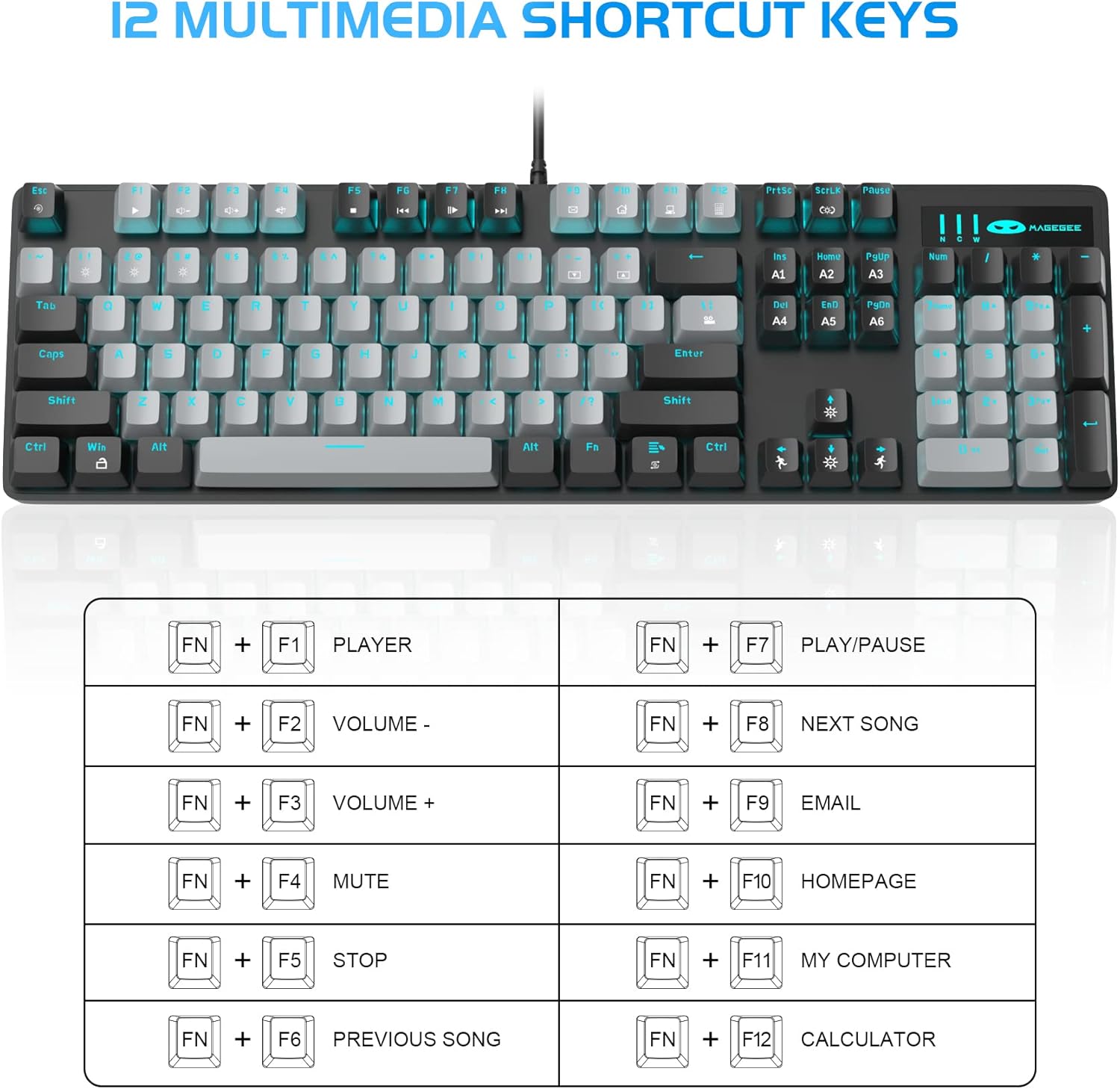
- 12 Multimedia Combination Keys: Quick operations via FN+ F1~F12 for media control and office functions.
- 인체공학적 디자인: Premium metal panel construction for stability. Ergonomic key layout and two-step adjustable feet for comfortable typing angles.
- 폭넓은 호환성: USB wired connection compatible with Windows 2000/Vista/Win7/Win8/Win10/MAC/Linux.

3. 패키지 내용
The MageGee MK-Storm Mechanical Gaming Keyboard package includes the following items:
- MageGee Mechanical Gaming Keyboard (MK-Storm)
- USB Wired Cable (attached to keyboard)
- 키캡 풀러 도구
- 16 Extra Keycaps (color scheme varies by keyboard variant)
- 사용자 설명서
4. 설정
- 키보드 연결: Plug the USB connector of the keyboard cable into an available USB port on your computer (PC, laptop, or desktop).
- 드라이버 설치: 이 키보드는 플러그 앤 플레이 방식입니다. 운영 체제에서 필요한 드라이버를 자동으로 감지하고 설치합니다. 기본적인 기능을 사용하기 위해 추가적인 소프트웨어를 설치할 필요는 일반적으로 없습니다.
- 키보드 각도 조정: Flip out the two-step feet on the underside of the keyboard to adjust the typing angle to your preference.

5. 사용 설명서
5.1 백라이트 제어
The MK-Storm keyboard features a single blue backlight with multiple modes and adjustable settings.
- 백라이트 모드 변경: 누르다 FN + INS 20가지 백라이트 모드를 순환하며 사용할 수 있습니다.
- 밝기 조정: 누르다 FN + ↑ (Up Arrow) to increase brightness (5 levels). Press FN + ↓ (아래쪽 화살표)를 눌러 밝기를 낮추세요.
- 속도 조정: 누르다 FN + ← (Left Arrow) to decrease animation speed (5 levels). Press FN + → (오른쪽 화살표)를 눌러 애니메이션 속도를 높입니다.
- 백라이트 끄기: The backlight can be turned off by cycling through the brightness levels until it is off, or by selecting a mode that has no illumination.

5.2 멀티미디어 키
Access multimedia and system functions quickly using the FN key in combination with the F1-F12 keys.
| 키 조합 | 기능 |
|---|---|
| FN + F1 | 플레이어 |
| FN + F2 | 볼륨- |
| FN + F3 | 볼륨 + |
| FN + F4 | 무음 |
| FN + F5 | 멈추다 |
| FN + F6 | 이전 노래 |
| FN + F7 | 재생/일시정지 |
| FN + F8 | 다음 노래 |
| FN + F9 | 이메일 |
| FN + F10 | 홈페이지 |
| FN + F11 | 내 컴퓨터 |
| FN + F12 | 계산자 |
5.3 커스텀 프로files (If applicable)
The keyboard supports custom lighting profiles. Refer to the manufacturer's website or included software (if any) for detailed instructions on programming and saving custom lighting zones or key assignments. Once programmed, these profiles can often be accessed directly from the keyboard using FN key combinations (e.g., FN+1, FN+2, FN+3 for different profile에스).
6. 사용자 정의
The MageGee MK-Storm keyboard allows for customization of keycaps and switches.
- 키캡 교체: Use the included keycap puller tool to carefully remove existing keycaps. Align the new keycap with the switch stem and press down gently until it clicks into place.
- 스위치 교체: The keyboard comes with extra brown switches. To replace a switch, first remove the keycap. Then, use a switch puller (not included, but often similar to a keycap puller) to gently extract the switch from the PCB. Insert the new switch, ensuring the pins align correctly, and press firmly until it seats properly.


7. 유지관리
- 청소: The floating keys design makes cleaning easier. Use a soft brush or compressed air to remove dust and debris from between the keycaps. For stubborn dirt, remove keycaps using the provided tool and wipe the keyboard surface with a slightly damp cloth. Ensure the keyboard is disconnected before cleaning.
- 저장: 키보드를 직사광선과 극한의 온도를 피해 건조하고 서늘한 곳에 보관하세요.
- 케이블 관리: 손상을 방지하려면 USB 케이블을 과도하게 구부리거나 비틀지 마세요.
8. 문제 해결
- 키보드가 응답하지 않음:
- USB 케이블이 키보드와 컴퓨터에 모두 단단히 꽂혀 있는지 확인하세요.
- 키보드를 컴퓨터의 다른 USB 포트에 연결해 보세요.
- 컴퓨터를 다시 시작하세요.
- 시스템 특정 문제를 배제하기 위해 다른 컴퓨터에서 키보드를 테스트해 보세요.
- 백라이트가 작동하지 않음/잘못됨:
- Ensure the backlight is not turned off (FN + ↓ to increase brightness).
- Cycle through backlight modes using FN + INS.
- Check if any specific software is interfering with the lighting settings.
- 키가 등록되지 않음:
- 해당 키 주변을 청소하여 스위치 작동을 방해하는 이물질이 없는지 확인하십시오.
- If a specific switch is faulty, consider replacing it with one of the spare switches provided, following the customization instructions.
9. 사양
| 특징 | 세부 사항 |
|---|---|
| 상표 | 메이지 |
| 모델 번호 | MK-Storm |
| 키 레이아웃 | 104키(풀사이즈) |
| 스위치 유형 | Mechanical Brown Switches |
| 백라이트 | Blue Backlit (20 modes, 5 brightness, 5 speed) |
| 연결성 | USB 유선 |
| 안티 고스팅 | 전체 N키 롤오버 |
| 멀티미디어 키 | 12 (FN + F1-F12) |
| 재료 | Metal Panel Construction |
| 호환 장치 | 노트북, PC |
| 운영 체제 | Windows 2000/Vista/Win7/Win8/Win10/MAC/Linux |
| 품목 무게 | 2.77파운드 |
| 패키지 크기 | 17.63 x 12.36 x 1.89 인치 |

10. 보증 및 지원
For warranty information, technical support, or any product-related inquiries, please contact MageGee customer service through the retailer where the product was purchased or visit the official MageGee web대지. 보증 청구를 위해 구매 영수증을 보관하십시오.


