소개
Thank you for choosing the Oakcastle HIFI150 Stereo System. This manual provides essential information for setting up, operating, and maintaining your device. Please read it thoroughly before use and retain it for future reference.
안전 정보
안전한 작동을 보장하고 손상을 방지하려면 다음 안전 예방 조치를 준수하세요.
- 본 제품을 비, 습기 또는 극한의 온도에 노출시키지 마십시오.
- c를 열지 마세요asing. 모든 서비스는 자격을 갖춘 담당자에게 의뢰하세요.
- 장치 주변의 환기가 잘 되도록 하세요. 환기구를 막지 마세요.
- 장치와 함께 제공된 전원 어댑터만 사용하십시오.
- Keep the unit away from heat sources such as radiators, stoves, or other heat-producing appliances.
- 마른 천으로만 기기를 청소하십시오.
패키지 내용
패키지에 모든 품목이 들어 있는지 확인하세요.
- Oakcastle HIFI150 Stereo System
- 원격 제어
- 원격 제어용 배터리
- 전원 케이블
- 사용자 설명서
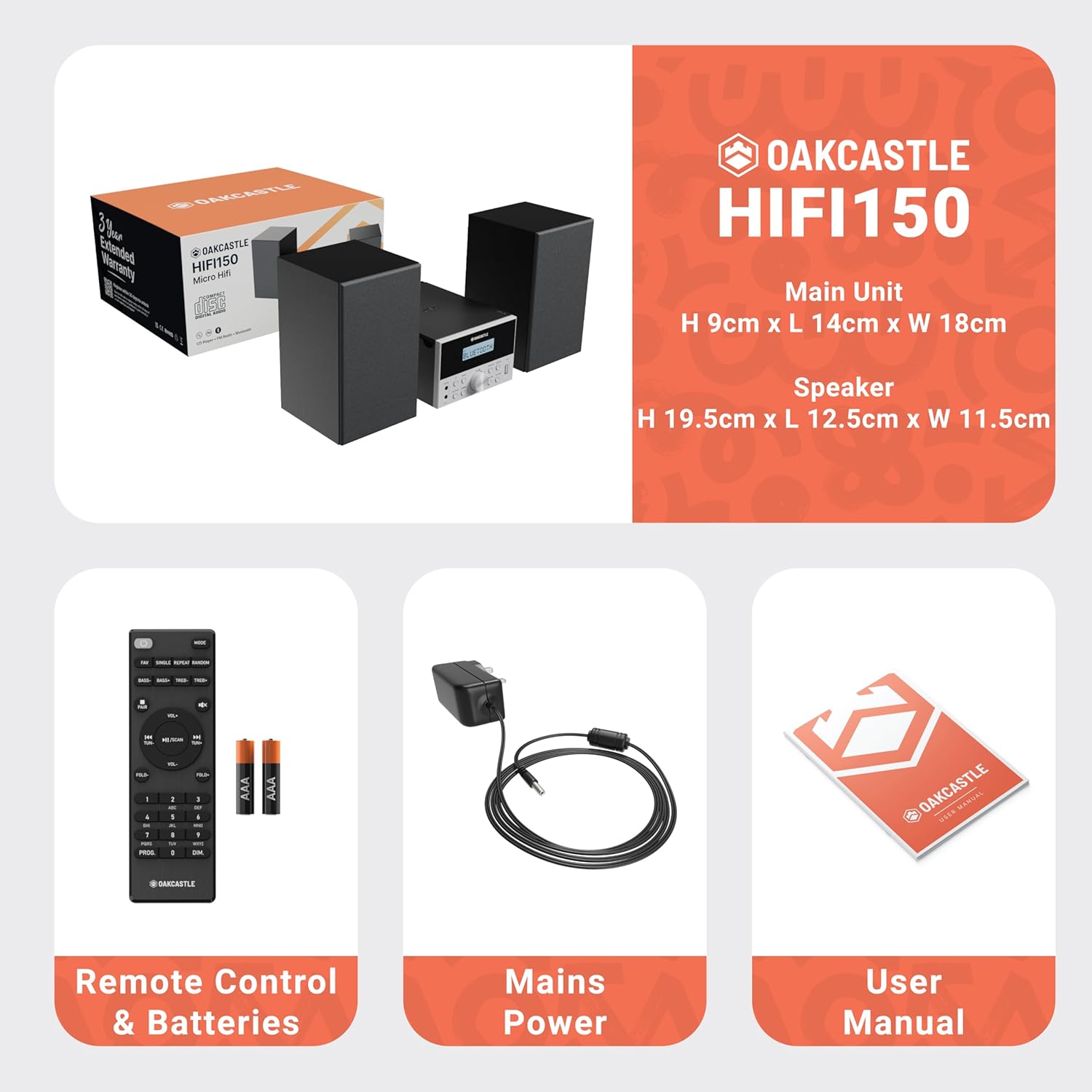
Image: The Oakcastle HIFI150 package contents, showing the main unit, two speakers, remote control with batteries, power adapter, and user manual.
제품 끝view
The Oakcastle HIFI150 features a compact design with intuitive controls and multiple connectivity options.
전면 패널 컨트롤 및 디스플레이

Image: A close-up of the Oakcastle HIFI150 main unit's front panel, highlighting the digital display, central volume knob, mode selection buttons, and front-facing AUX In and USB ports. The display shows 'BLUETOOTH'.
- 표시하다: 현재 모드, 트랙 정보 및 무선 주파수를 표시합니다.
- 전원 버튼: 장치를 켜거나 끕니다.
- 모드 버튼: Cycles through input sources (CD, FM, Bluetooth, AUX, USB).
- 볼륨 노브: 마스터 볼륨을 조정합니다.
- 재생/일시 정지 버튼: CD, USB 및 블루투스 재생을 제어합니다.
- 건너뛰기/튜닝 버튼: 트랙을 탐색하거나 라디오 주파수를 조정합니다.
- AUX 입력 포트: 3.5mm 케이블을 통해 외부 오디오 장치를 연결합니다.
- USB 포트: 오디오 재생을 위해 fileUSB 드라이브에서 s.
후면 패널 연결
The rear panel includes connections for speakers and power.
설정
1. 스피커 연결
Connect the included speakers to the speaker terminals on the rear of the main unit. Ensure correct polarity (red to red, black to black) for optimal sound quality.
2. 전원 연결
Plug the power cable into the AC inlet on the rear of the main unit, then plug the other end into a standard wall outlet.
작동 지침
전원 켜기/끄기
를 누르세요 힘 전면 패널이나 리모컨의 버튼을 눌러 장치를 켜거나 끕니다.
모드 선택
를 누르세요 방법 button on the front panel or remote control repeatedly to cycle through the available input sources: CD, FM 라디오, 블루투스, 보조, 그리고 USB.
블루투스 동작
- 선택하다 블루투스 mode using the Mode button. The display will show 'BLUETOOTH' and the unit will enter pairing mode.
- 스마트폰이나 다른 블루투스 기기에서 블루투스를 켜고 사용 가능한 기기를 검색하세요.
- Select 'OAKCASTLE HIFI150' from the list. Once connected, the unit will confirm the connection.
- You can now stream audio wirelessly from your device to the HIFI150.
CD 재생

Image: The Oakcastle HIFI150 with its top-loading CD player mechanism open, revealing a compact disc placed inside. The display shows 'CD'.
- CD 수납공간 커버를 엽니다.
- Place a CD (MP3, CD, WMA, or CD-R format) onto the spindle with the label side facing up.
- CD 수납 공간 커버를 닫습니다.
- 선택하다 CD mode. The unit will read the disc and begin playback automatically.
- 재생/일시 정지 및 건너뛰기 버튼을 사용하여 재생을 제어합니다.
FM 라디오 작동

Image: The Oakcastle HIFI150 main unit with its telescopic antenna extended, displaying an FM radio frequency on its screen. The unit is placed between two speakers.
- 선택하다 FM 라디오 방법.
- 더 나은 수신을 위해 망원 안테나를 확장하세요.
- 자동 스캔: Press and hold the Play/Pause button to automatically scan and save available FM stations (up to 30 presets).
- 수동 조정 : Use the Skip/Tune buttons to manually adjust the frequency.
- 프리셋 불러오기: Use the 'FAV/PROG' button on the remote to cycle through saved stations.
USB 재생
- 전면 패널의 USB 포트에 USB 드라이브를 삽입합니다.
- 선택하다 USB mode. The unit will automatically detect and begin playing compatible audio file(MP3, WMA).
- 재생/일시 정지 및 건너뛰기 버튼을 사용하여 재생을 제어합니다.
AUX 입력
- 외부 오디오 장치(예: MP3 플레이어, 스마트폰)를 연결하세요. 보조 port on the front panel using a 3.5mm audio cable (not included).
- 선택하다 보조 방법.
- 연결된 외부 장치에서 재생을 제어합니다.
볼륨 조절
회전하다 볼륨 노브 전면 패널을 사용하거나 다음을 사용하십시오. 볼륨+/- 리모컨의 버튼을 눌러 사운드 레벨을 조절합니다.
원격 제어 사용
The included remote control provides full functionality for the HIFI150. Ensure batteries are correctly inserted. Point the remote control towards the front panel of the main unit for optimal response.
유지
청소
- 부드럽고 마른 천으로 제품을 닦아주세요.
- 연마성 세척제, 왁스 또는 용제는 마감재를 손상시킬 수 있으므로 사용하지 마십시오.
저장
장기간 사용하지 않을 경우 전원 콘센트에서 플러그를 뽑고 서늘하고 건조한 곳에 보관하십시오.
문제 해결
If you encounter issues with your HIFI150, please refer to the following common problems and solutions:
| 문제 | 가능한 원인 | 해결책 |
|---|---|---|
| 전원이 없습니다 | 전원 케이블이 연결되지 않았습니다. 전원 콘센트에 결함이 있습니다. | 전원 케이블이 제대로 연결되어 있는지 확인하세요. 다른 전원 콘센트를 사용해 보세요. |
| 소리가 나지 않습니다 | Volume too low; Incorrect input mode; Speakers not connected | Increase volume; Select correct input mode; Check speaker connections. |
| CD가 재생되지 않습니다 | CD inserted incorrectly; Disc scratched/dirty; Incorrect format | Reinsert CD correctly; Clean or replace disc; Ensure disc is compatible (MP3, CD, WMA, CD-R). |
| 블루투스가 연결되지 않습니다 | Bluetooth mode not selected; Device too far; Device already connected to another unit | 블루투스 모드를 선택하세요. 기기를 더 가까이 이동하세요. 다른 기기와의 연결을 해제하고 다시 시도하세요. |
| FM 수신 불량 | 안테나가 펼쳐지지 않음; 신호 약함 | Fully extend the telescopic antenna; Try repositioning the unit. |
명세서
| 모델 번호 | 1000002971 |
| 상표 | 오크캐슬 |
| 연결성 | 블루투스 5.2, USB, AUX |
| 오디오 출력 | 20와트 |
| 지원되는 미디어 | CD, MP3, WMA, CD-R, USB |
| 라디오 | FM Radio with 30 Presets |
| 호환 장치 | MP3 플레이어, 스마트폰, 태블릿 |
| 캐비닛 소재 | 목재 |
| 색상 | 검은색 |
| 품목 치수(L x W x H) | 13.7 x 17.8 x 9cm |
| 품목 무게 | 2 킬로그램 |
보증 및 지원
The Oakcastle HIFI150 comes with an extended 3-year warranty. Registration is required to activate the full warranty period. Please refer to the warranty card included in your package or visit the official Oakcastle website for registration details and support information.
For technical assistance or further inquiries, please contact Oakcastle customer support through their official channels.


