1. 서론
This manual provides essential instructions for the safe and efficient operation, setup, maintenance, and troubleshooting of your Elation Professional Magmatic Magma Fog 1500IP-II Fog Machine. Please read this manual thoroughly before operating the device to ensure proper function and to prevent damage or injury. Keep this manual for future reference.
The Magma Fog 1500IP-II is a high-performance, 1500W water-based fog machine designed for professional applications. It features an IP67 rating, making it suitable for outdoor use, and offers a maximum output of 60,000 cubic feet per minute (CFM). Control options include an onboard LCD touchscreen and DMX-512/RDM.
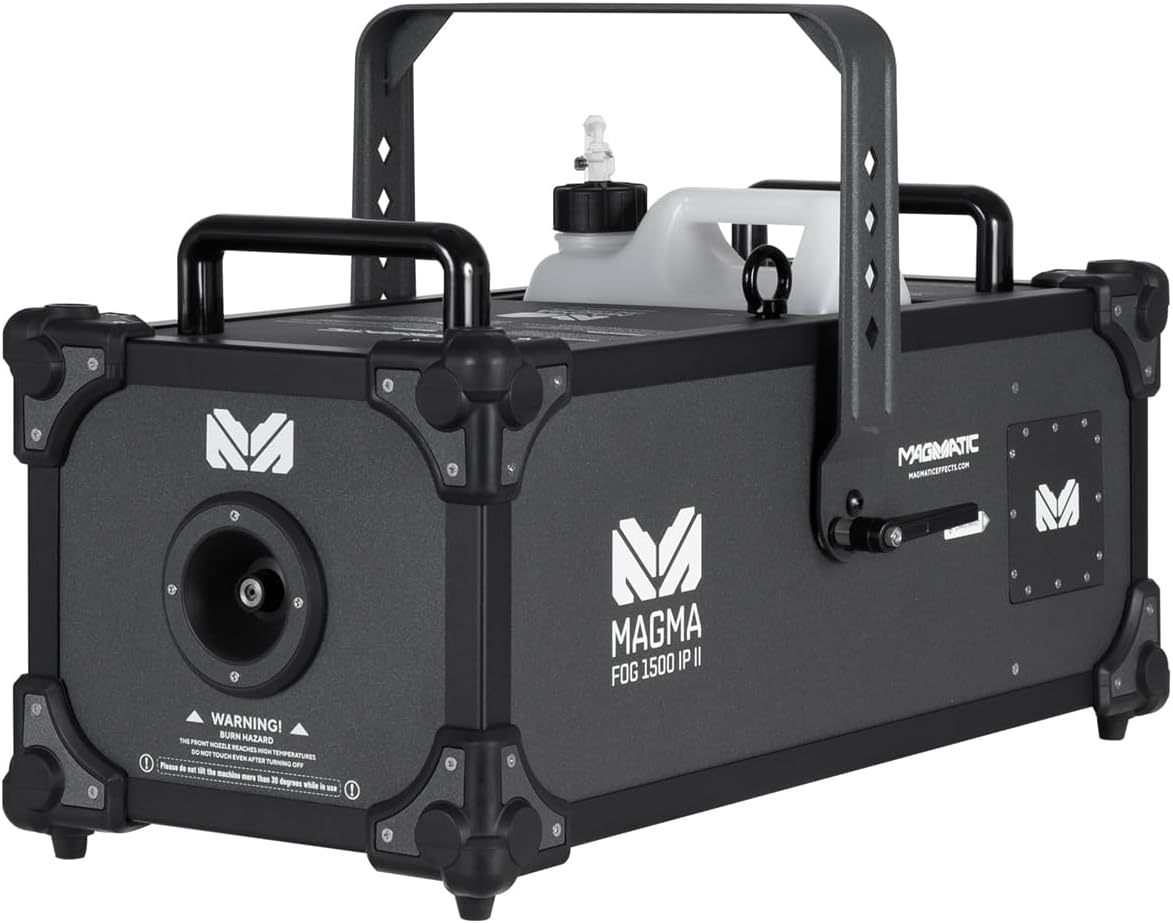
그림 1.1: 전면 view of the Magmatic Magma Fog 1500IP-II Fog Machine, showcasing its robust design and integrated fluid tank.
2. 안전 정보
Always observe the following safety precautions to reduce the risk of electrical shock, fire, or personal injury.
- 전기 안전: 기기가 올바른 전압의 접지형 전원 콘센트에 연결되어 있는지 확인하십시오.tage (120V, 60Hz). Disconnect power before performing any maintenance or cleaning.
- 화상 위험: The front nozzle and surrounding areas become extremely hot during operation. WARNING! BURN HAZARD! THE FRONT NOZZLE REACHES HIGH TEMPERATURES. DO NOT TOUCH NOZZLE AFTER POWERING OFF. Allow sufficient cooling time (at least 30 minutes) after use.
- Fluid Safety: Use only approved water-based fog fluid. Do not ingest fog fluid. In case of contact with skin or eyes, rinse thoroughly with water. Keep out of reach of children.
- 통풍: Ensure adequate ventilation around the machine. Do not block air vents.
- 놓기: Do not tilt the machine more than 30 degrees while in use. Place the machine on a stable, level surface. Keep flammable materials away from the unit.
- 야외 사용: The unit is IP67 rated for outdoor use, but ensure all connections are properly sealed and protected from direct water spray into openings.

그림 2.1: 전면 view highlighting the burn hazard warning label near the fog output nozzle. Always observe this warning.
3. 제품 오버view
The Magma Fog 1500IP-II is engineered for reliability and performance. Key components include:
- Fog Output Nozzle: 안개가 발생하는 전면부에 위치해 있습니다.
- 유체 탱크: A 5-liter (1.32 gallon) removable tank for fog fluid.
- 제어판: Onboard LCD touchscreen for direct control and settings adjustment.
- 전원 입력: IP65 locking power connector.
- DMX 입/출력: IP65 locking 5-pin XLR connectors for DMX-512 and RDM control.
- 원격 입력: For optional wired or wireless remote control.
- 손잡이: Two heavy-duty handles for transport.
- 교수형 브래킷: For truss mounting applications.

그림 3.1: 후면 view of the unit, displaying the LCD touchscreen control panel, power input, DMX connections, and remote input.
4. 설정
4.1 풀기
- Carefully remove the fog machine from its packaging.
- Inspect the unit for any signs of damage during shipping. Contact your dealer immediately if damage is found.
- 향후 운송 또는 보관을 위해 원래 포장재를 보관하십시오.
4.2 Fluid Tank Installation and Filling
- Locate the fluid tank compartment on the top of the unit.
- Remove the empty fluid tank.
- 탱크를 채우십시오. Magmatic brand water-based fog fluid only. Using other fluid types may damage the unit and void the warranty.
- Securely replace the fluid tank, ensuring the fluid hose is properly submerged and connected.
4.3 전원 연결
- Connect the supplied IP65 locking power cable to the power input on the rear of the unit.
- Connect the other end of the power cable to a suitable grounded electrical outlet (120V, 60Hz).
4.4 DMX 연결(선택 사항)
- For DMX control, connect a 5-pin DMX cable from your DMX controller to the DMX IN port on the fog machine.
- To daisy-chain multiple units, connect a DMX cable from the DMX OUT port of the first unit to the DMX IN port of the next unit.
- Ensure all DMX cables are IP65 rated for outdoor use if applicable.
4.5 장착
The unit includes a hanging bracket for truss mounting. Ensure the mounting surface or truss system can safely support the weight of the unit (74.3 lbs / 33.7 kg) and any accessories. Use appropriate clamps and safety cables (not included) for secure installation.
5. 사용 설명서
5.1 전원 켜기 및 예열
- After connecting power, the unit will begin its initial warm-up sequence.
- The thermally protected heat exchanger requires approximately 14 minutes to reach optimal operating temperature.
- The LCD touchscreen will display the warm-up status. The unit is ready for operation once the status indicates 'Ready'.
5.2 Onboard LCD Touchscreen Control
The intuitive LCD touchscreen allows direct control over various functions:
- Manual Fog Output: Activate fog output manually.
- 타이머 설정 : Program timed fog bursts and intervals.
- 볼륨 조절: Adjust the fog output intensity.
- DMX 주소 : Set the DMX start address for remote control.
- 시스템 정보: View operational data and status.
5.3 DMX-512 and RDM Control
The Magma Fog 1500IP-II supports DMX-512 and RDM (Remote Device Management) for integration into professional lighting and effects systems. Refer to the DMX chart in the appendix (if provided separately) for specific channel assignments and control values. RDM allows for remote configuration and monitoring of the device.
5.4 Optional Remote Control
The unit is compatible with optional wired and wireless remote controls (sold separately). Connect the remote to the 'REMOTE IN' port on the rear of the unit. Consult the remote control's manual for specific operating instructions.
6. 유지관리
Regular maintenance ensures optimal performance and extends the lifespan of your fog machine.
6.1 청소
- 외부: 외부를 닦으세요asing는 부드러운 d로 발음합니다.amp 천. 연마성 세척제나 용매를 사용하지 마십시오.
- 대통 주둥이: Periodically check the fog nozzle for any blockages. If necessary, gently clean with a small brush after the unit has completely cooled.
- 유체 시스템: It is recommended to run a cleaning solution (specifically designed for fog machines) through the system every 200 hours of operation or before long periods of storage to prevent clogs.
6.2 Fluid Handling and Storage
- Always store fog fluid in a cool, dark place, away from direct sunlight and extreme temperatures.
- Ensure the fluid tank is securely capped when not in use.
- If storing the machine for an extended period (more than 30 days), empty the fluid tank and run a cleaning solution through the system.
7. 문제 해결
This section addresses common issues you might encounter. If a problem persists, contact qualified service personnel.
| 문제 | 가능한 원인 | 해결책 |
|---|---|---|
| 안개 출력 없음 | No power; insufficient warm-up; empty fluid tank; clogged nozzle/pump | Check power connection; wait for 'Ready' status; refill fluid tank; clean nozzle/run cleaning solution. |
| 약한 안개 출력 | Low fluid level; partial clog; incorrect fluid type; low operating temperature | Refill fluid; run cleaning solution; ensure correct fluid; allow full warm-up. |
| DMX 제어가 작동하지 않습니다 | Incorrect DMX address; faulty DMX cable; DMX controller issue | Verify DMX address on unit and controller; test DMX cable; check DMX controller settings. |
| 전원이 켜지지 않습니다 | No power from outlet; faulty power cable; internal fuse blown | Check power source; test power cable; consult service technician for fuse replacement. |
8. 사양
Detailed technical specifications for the Magmatic Magma Fog 1500IP-II.
| 특징 | 사양 |
|---|---|
| 품목 모델 번호 | MSF047 |
| 전력 소비 | 1500와트 |
| 출력 볼륨 | 60,000 CFM (cu ft/min) |
| 워밍업 시간 | 약 14분 |
| 유체 소비율 | 6.76 oz (200 ml/min) |
| 유체 탱크 용량 | 5리터(1.32갤런) |
| 제어 | Onboard LCD Touchscreen, DMX-512, RDM, Optional Wired/Wireless Remote |
| IP 등급 | IP67 |
| 치수(길이 x 너비 x 높이) | 25.5 x 14.6 x 16.2인치(64.8 x 37.1 x 41.1cm) |
| 품목 무게 | 74.3파운드(33.7kg) |
| 하우징 소재 | Durable Aluminum |
9. 보증 및 지원
For warranty information and technical support, please refer to the official Elation Professional web웹사이트를 방문하거나 공인 대리점에 문의하세요. 보증 청구를 위해 구매 증빙 자료로 구매 영수증을 보관하세요.
Elation Professional Customer Support: 도움이 필요하면 방문하세요 www.elationlighting.com/support 또는 지역 대리점에 문의하십시오.


