소개
This manual provides essential information for the safe and effective use of your Vangoa 61-Key Light-Up Keyboard Piano and Kids Electric Guitar. Please read these instructions thoroughly before operating the instruments and retain them for future reference.
안전 정보
- 전원 공급 장치: 지정된 전원 어댑터만 사용하세요. 볼륨을 확인하세요.tage matches your local power supply. Unplug the instruments during lightning storms or when unused for extended periods.
- 물과 습기: Do not expose the instruments to water or excessive moisture. Avoid placing liquid-filled containers near them.
- 통풍: Do not block ventilation openings. Ensure adequate airflow around the instruments.
- 놓기: Place the instruments on a stable, flat surface. Avoid extreme temperatures, direct sunlight, or heat sources.
- 청소: 마른 부드러운 천으로만 닦으십시오. 액체 세제나 스프레이형 세척제를 사용하지 마십시오.
- 어린이들: Adult supervision is recommended for young children operating these instruments. Small parts may pose a choking hazard.
패키지 내용
패키지에 모든 품목이 들어 있는지 확인하세요.
Vangoa 61-Key Light-Up Keyboard Piano
- 61-Key Light-Up Keyboard Piano
- 마이크로폰
- 전원 어댑터(AC)
- 오디오 케이블
- 사용 설명서
Vangoa Kids Electric Guitar
- 30-inch Electric Guitar
- 미니 Amp리퍼(Amp)
- 기타 가방
- 조율사
- 카포
- 견장
- 선택
- 악기 케이블
- 사용자 설명서

Image: Vangoa 61-Key Light-Up Keyboard Piano with included microphone, power adapter, audio cable, and owner's manual.

Image: Vangoa 30-inch Kids Electric Guitar in blue with included guitar bag, mini amplifier, tuner, capo, strap, picks, and cable.
설정
Keyboard Piano Setup
- 전원 연결: Connect the AC power adapter to the DC 9V input jack on the back of the keyboard. Plug the adapter into a standard wall outlet. Alternatively, the keyboard can be powered via USB.
- 마이크 연결: Insert the microphone plug into the designated microphone input jack.
- 헤드폰 연결: 개인 연습 시에는 헤드폰 출력 잭에 헤드폰을 연결하십시오.
- 전원 켜기: Press the 'Power' button to turn on the keyboard. The LED display will illuminate.

Image: Close-up of the Vangoa 61-Key Light-Up Keyboard Piano's control panel and lighted keys, showing the LED display and various function buttons.
Electric Guitar Setup
- 스트랩 부착: Attach the guitar strap to the strap buttons located on the body of the guitar.
- Amplifier 연결: Connect one end of the instrument cable to the output jack on the guitar and the other end to the input jack on the mini amp리퍼.
- Amp리파이어 파워: 확인하십시오 amplifier has batteries installed or is connected to its power source (if applicable) and turn it on.
- 튜닝 : Use the included tuner to accurately tune the guitar strings. Pluck each string individually and adjust the tuning pegs until the tuner indicates the correct pitch.
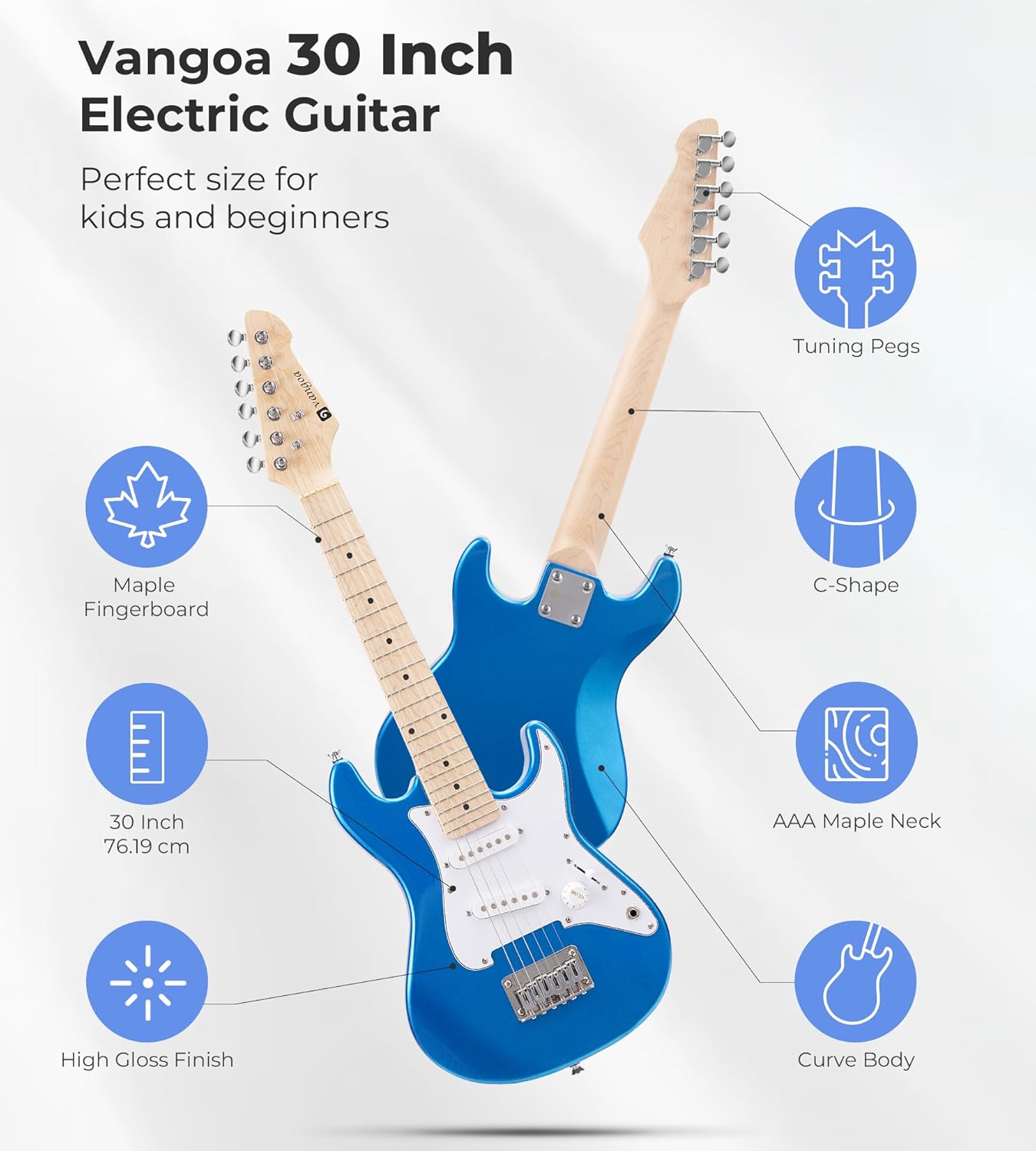
Image: Diagram illustrating the features of the Vangoa 30-inch Electric Guitar, including tuning pegs, maple fingerboard, C-shape neck, AAA maple neck, 30-inch size, and high gloss finish.
작동 지침
Keyboard Piano Operation
- 전원 켜기/끄기: 를 누르세요 힘 키보드를 켜거나 끄는 버튼입니다.
- 볼륨 조절: 사용하세요 용량 전체 음량을 조절하는 노브 또는 버튼.
- 조명이 켜진 키: The keyboard features lighted keys to assist beginners in learning melodies. Follow the illuminated keys during demo songs or learning modes.
- Timbres (Voices): Select from 350 built-in timbres to change the instrument sound. Refer to the keyboard's panel for timbre selection buttons or number input.
- 리듬: Choose from 350 rhythms to add a backing track to your playing. Adjust the tempo as desired.
- 데모 곡: Play one of the 30 demo songs to hear examples or practice along.
- Percussions: Access 61 percussion sounds for rhythmic accompaniment.
- Vibrato & Sustain: 전용을 사용하세요 비브라토 그리고 입다 buttons to add effects to your sound.
- 녹음 및 재생: The keyboard allows you to record your performances and play them back. Consult the manual for specific recording and playback button functions.

Image: Diagram showing the rich functions of the Vangoa keyboard, including 350 Timbres, 350 Rhythms, 30 Demo Songs, 8 Percussions, Sustain & Vibrato, Dual Keyboard, Microphone Gift, Headphone Connectable, and Recording & Playback.
Electric Guitar Operation
- 볼륨 노브: Adjust the output volume of the guitar using the 용량 knob on the guitar body.
- 3-Way Switch (Pickup Selector): The guitar features S-S (Single-Single) pickups. Use the 3-way switch to select different pickup configurations, which alters the tonal quality of the sound. Experiment with positions to find your preferred tone.
- 재생 중: Hold the guitar comfortably. Use a pick or your fingers to pluck or strum the strings. Practice basic chords and scales.

Image: Close-up of the Vangoa Electric Guitar's S-S pickups, stable bridge, volume knob, and 3-way switch, highlighting the controls for tone adjustment.
유지
- 청소: Wipe down the instruments regularly with a soft, dry, lint-free cloth. For the guitar, clean the strings after each use to prolong their life.
- 저장: Store the instruments in a cool, dry place away from direct sunlight, extreme temperatures, and humidity. Use the provided guitar bag for protection.
- String Replacement (Guitar): Guitar strings will eventually wear out and break. Replace them with appropriate gauge strings when necessary.
- Battery Replacement (Amp/Tuner): If the mini amplifier or tuner uses batteries, replace them when power is low.
문제 해결
키보드 피아노
- 소리 없음:
- Ensure the power adapter is securely connected and the keyboard is turned on.
- 볼륨 레벨을 확인하세요.
- If headphones are connected, sound will only come through them. Disconnect headphones if you want sound from the speakers.
- 키에 불이 들어오지 않음:
- Ensure the lighted key feature is enabled (if applicable, refer to specific button on keyboard).
- This feature typically works during learning modes or demo songs.
일렉트릭 기타
- 소리가 나지 않음 Amp정수기:
- Ensure the guitar and amplifier are both turned on.
- 악기 케이블이 기타와 앰프에 제대로 연결되어 있는지 확인하십시오. amp리퍼.
- 확인하다 amplifier's volume is turned up.
- 확인하세요 amplifier's power source (batteries or power adapter).
- 음질 불량/잡음 발생:
- 모든 케이블 연결부가 단단히 고정되었는지 확인하십시오.
- Check the guitar's volume and tone knobs.
- 케이블 불량 여부를 확인하기 위해 다른 악기 케이블을 사용해 보세요.
- 기타가 제대로 조율되었는지 확인하세요.
명세서
| 특징 | 설명 |
|---|---|
| 상표 | 방고아 |
| 모델 번호 | a26993f1-5e81-430c-9ad0-9f6e39259b0c |
| Keyboard Number of Keys | 61 |
| 키보드 특수 기능 | Lighted Keys, Weighted Keys |
| Keyboard Timbres | 350 |
| Keyboard Rhythms | 350 |
| Keyboard Demo Songs | 30 |
| 키보드 타악기 | 61 |
| 키보드 연결 | USB |
| 키보드 전원 공급 장치 | Corded Electric (AC, USB) |
| 기타 사이즈 | 30인치 |
| Guitar Neck Material | Canadian C-shaped Maple |
| Guitar Fingerboard Material | 메이플 |
| 기타 픽업 | SS (싱글-싱글) |
| 기술 수준 | 초보자 |
| 연령대 | 어린이 |
보증 정보
Vangoa products are designed and manufactured to high-quality standards. This product is covered by a manufacturer's warranty against defects in materials and workmanship. Please refer to the specific warranty terms provided with your purchase documentation or contact Vangoa customer support for details. Keep your proof of purchase for warranty claims.
고객 지원
For technical assistance, troubleshooting, or warranty inquiries, please contact Vangoa customer support. You can typically find contact information on the Vangoa official web해당 사이트를 통해서나 제품을 구매한 소매업체를 통해서도 구매가 가능합니다.
방문하세요 Vangoa Store on Amazon 자세한 정보 및 지원 리소스를 확인하세요.


