1. 서론
The LSC Smart Connect Solar IP Camera is designed to provide reliable outdoor surveillance with the convenience of solar power. This camera offers 1080p video recording, two-way audio, and night vision capabilities up to 10 meters. It integrates seamlessly with the LSC Smart Connect app, allowing for remote monitoring and control. Key features include a light and sound alarm, flash function, and privacy mode to enhance security.
This manual provides essential information for the proper setup, operation, and maintenance of your LSC Smart Connect Solar IP Camera, ensuring optimal performance and longevity.
2. 패키지 내용 및 설정
설치를 시작하기 전에 모든 구성품이 있는지, 손상되지 않았는지 확인하십시오.

이미지 2.1: The LSC Smart Connect Solar IP Camera packaging, showing the camera, solar panel, and app interface. This image represents the complete product package as received.
2.1 구성 요소view
The package typically includes the LSC Smart Connect Solar IP Camera unit, a solar panel for continuous power, and mounting accessories.
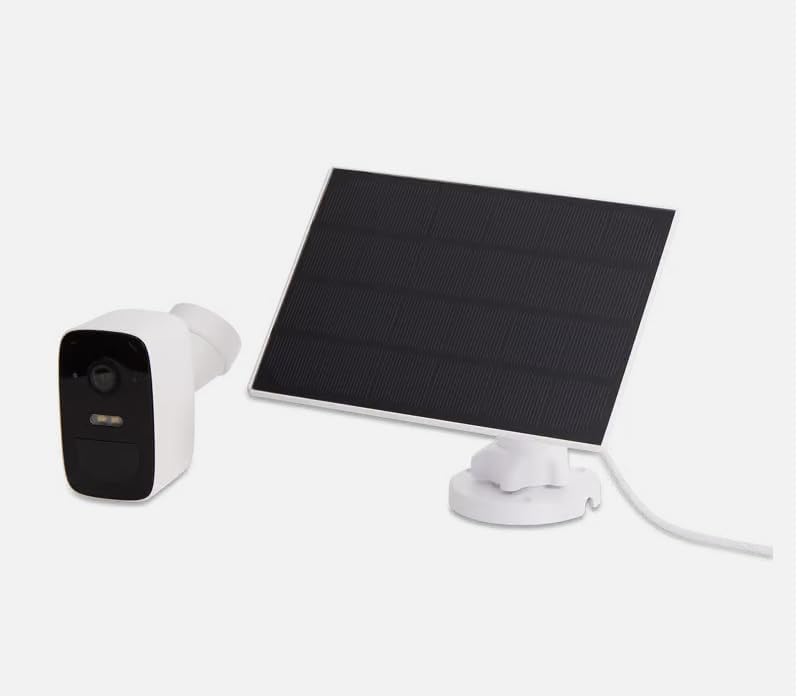
이미지 2.2: The LSC Smart Connect Solar IP Camera shown alongside its separate solar panel. This illustrates the two main components of the surveillance system.
2.2 초기 설정 단계
- 앱 다운로드: Download the "LSC Smart Connect" app from your smartphone's app store (iOS or Android).
- 계정 생성: 앱을 열고 새 계정을 등록하거나 이미 계정이 있다면 로그인하세요.
- 카메라 전원 켜기: Ensure the camera is charged or connected to the solar panel. The camera should enter pairing mode (indicated by an LED light).
- 장치 추가: In the app, select "Add Device" or the "+" icon. Follow the on-screen instructions to connect the camera to your 2.4GHz Wi-Fi network. Ensure your Wi-Fi signal is strong at the installation location.
- 설치: Choose a suitable outdoor location for the camera and solar panel. The solar panel should receive direct sunlight for most of the day. Use the provided screws and mounting brackets for secure installation. The camera supports wall mounting.
For detailed mounting instructions, refer to the quick start guide included in your product packaging.
3. 사용 설명서
Once your camera is set up and connected, you can begin monitoring and utilizing its features through the LSC Smart Connect app.
- 살다 View: 앱을 열고 카메라를 선택하세요 view 라이브 피드.
- 양방향 오디오 : Use the microphone icon in the app to speak through the camera and the speaker icon to hear audio from the camera's vicinity.
- 야간 투시경: The camera automatically switches to night vision in low-light conditions, providing clear images up to 10 meters.
- 모션 감지 및 경고: Configure motion detection sensitivity and set up push notifications to receive alerts on your smartphone when activity is detected.
- 알람 기능: Activate the light and sound alarm or flash function via the app to deter intruders.
- 녹음 및 재생: The camera supports local storage (e.g., microSD card, not included) or cloud storage (subscription may be required) for recording. Access recorded footag앱의 재생 기능을 통해.
- 개인정보 보호 모드: Utilize the privacy function to temporarily disable recording and live view for specific periods.
4. 유지관리
Regular maintenance ensures the optimal performance and longevity of your LSC Smart Connect Solar IP Camera.
- 청소: 카메라 렌즈와 태양 전지 패널을 부드러운 천으로 주기적으로 청소하십시오.amp 먼지, 오물, 이물질을 제거하는 데 천을 사용하십시오. 연마성 세제는 사용하지 마십시오.
- 태양광 패널 효율성: Ensure the solar panel is free from obstructions (e.g., leaves, snow) that could block sunlight and reduce charging efficiency.
- 펌웨어 업데이트: Check the LSC Smart Connect app regularly for firmware updates. Keeping the camera's firmware updated ensures access to the latest features and security enhancements.
- 연결 확인: Periodically verify the Wi-Fi connection strength and camera status in the app.
5. 문제 해결
If you encounter issues with your LSC Smart Connect Solar IP Camera, refer to the following common troubleshooting steps:
- 카메라 오프라인:
- 카메라 설치 위치에서 Wi-Fi 신호 강도를 확인하세요.
- Ensure the camera is receiving adequate power from the solar panel or is sufficiently charged.
- Wi-Fi 라우터와 카메라를 다시 시작하세요.
- 카메라가 2.4GHz Wi-Fi 네트워크에 연결되어 있는지 확인하십시오.
- 이미지 품질이 좋지 않음:
- 카메라 렌즈를 청소하세요.
- 렌즈 앞에 장애물이 없는지 확인하세요.
- 인터넷 연결 속도를 확인하세요.
- 동작 감지가 작동하지 않음:
- Verify motion detection settings in the app (sensitivity, detection zones).
- Ensure notifications are enabled on your smartphone and in the app.
- 배터리가 충전되지 않음:
- 태양광 패널이 깨끗하고 직사광선을 받고 있는지 확인하세요.
- 태양광 패널과 카메라의 연결 상태를 확인하십시오.
If issues persist, consult the LSC Smart Connect app's help section or the manufacturer's support resources.
6. 사양
| 특징 | 사양 |
|---|---|
| 비디오 녹화 해상도 | 1080p |
| 색상 | 블랙/화이트 |
| 무선 통신 기술 | 와이파이(2.4GHz) |
| 설치 유형 | 나사식/벽면 장착형 |
| 나이트 비전 범위 | 10 미터 |
| 품목 치수(L x W x H) | 15 x 6 x 15cm |
| 제조업체 | LSC |
| 모델 번호 | 3203968 |
| ASIN | B0D899HFXL |
| 권장 제품 사용 | 야외 보안 |
| 연결 기술 | 무선 전화 |
| 호환 장치 | 스마트폰 |
| 컨트롤러 유형 | SmartThings (via LSC Smart Connect App) |
| 실내/실외 사용 | 집 밖의 |
7. 보증 및 지원
For warranty information, please refer to the documentation included with your purchase or contact the retailer/manufacturer directly. Typically, products come with a limited warranty covering manufacturing defects.
For technical support, frequently asked questions, or further assistance, please visit the official LSC Smart Connect website or utilize the support section within the LSC Smart Connect mobile application.
온라인 리소스:
- LSC Smart Connect App (available on iOS App Store and Google Play Store)
- Manufacturer's Official Website (for product updates and support)


