제품 끝view
The Motocaddy New M5 GPS DHC Electric Cart is an advanced electric caddy designed to enhance your golf experience. It features a super-responsive crystal-clear 3.5" touchscreen display providing fast and accurate GPS data for over 40,000 courses. This model includes automatic Downhill Control (DHC), all-terrain tires, and an electronic parking brake for superior control on varied terrain. It also boasts a revolutionary CLICK ‘N’ CONNECT cable-free battery system and offers Bluetooth smartphone alerts and super-fast Wi-Fi updates.

Image: The Motocaddy M5 GPS DHC Electric Caddy Cart shown with a golf bag and the included ball markers.
설정 및 조립
Before first use, ensure the battery is fully charged. The M5 GPS DHC features a compact folding design for easy transport and storage.
Unfolding the Caddy
- Place the folded caddy on a flat, stable surface.
- Release the main frame latch (refer to diagram in manual for exact location).
- Extend the handle upwards until it locks into place.
- Unfold the rear wheels and ensure they are securely locked.
- Extend the front wheel assembly.
배터리 설치 및 충전
The M5 GPS DHC utilizes a CLICK ‘N’ CONNECT cable-free battery system.
- Locate the battery compartment on the caddy frame.
- Insert the battery firmly into the compartment until it clicks into place. The cable-free design ensures automatic connection.
- To charge, locate the pop-up charging port on the battery compartment. Connect the provided charger to the port and a power outlet.
- The battery automatically disconnects when the caddy is folded, preserving battery life.
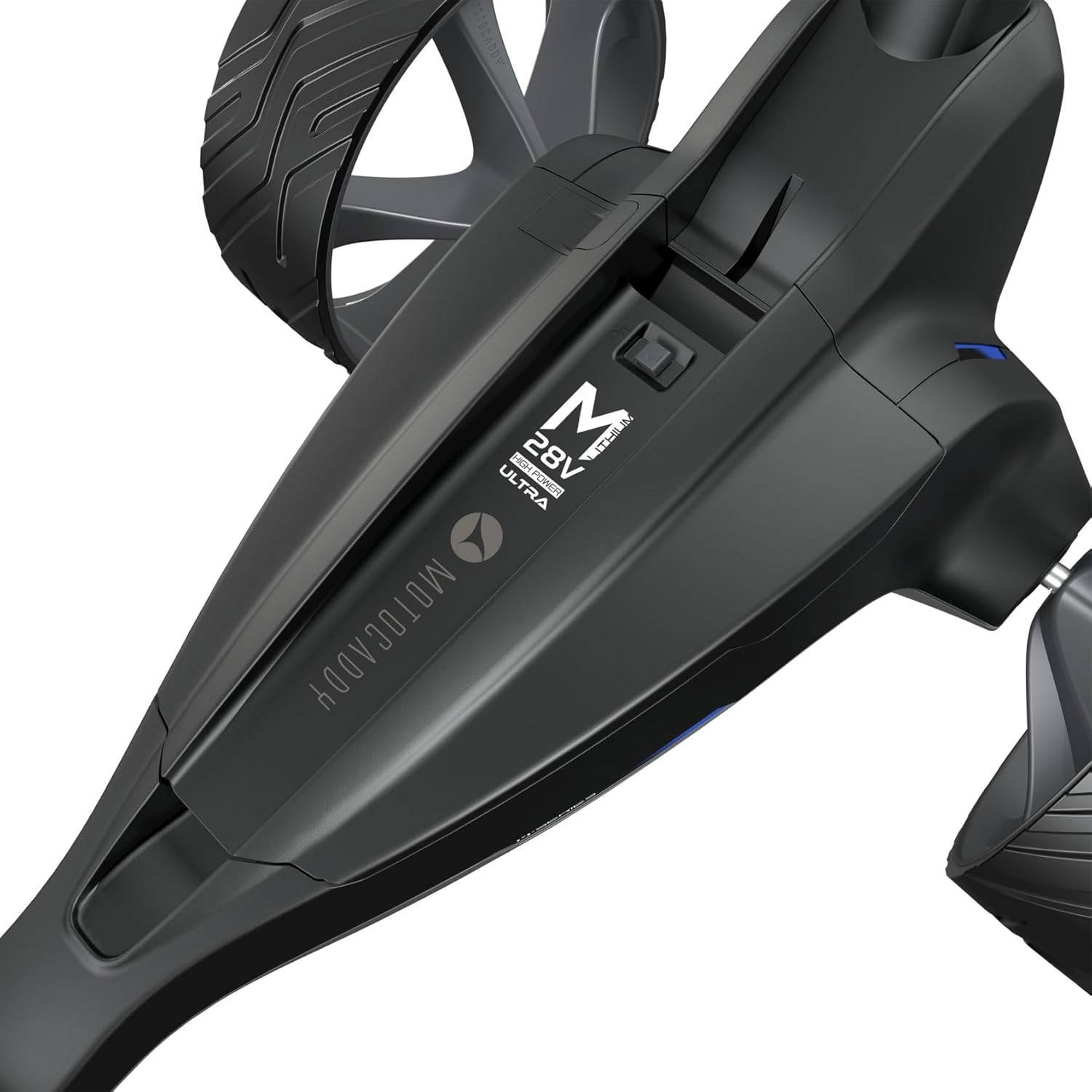
이미지: 클로즈업 view of the battery compartment on the Motocaddy M5 GPS DHC, highlighting the cable-free battery slot.
Operating the Motocaddy M5 GPS DHC
Touchscreen Display and GPS Functions
The 3.5-inch LCD touchscreen provides intuitive control and access to various features.
- GPS 네비게이션: Access accurate distances to the front, middle, and back of the green for over 40,000 pre-loaded courses.
- 위험 정보: View details on course hazards to plan your shots effectively.
- 다이나믹 그린 View: Utilize the drag-and-drop pin feature for precise yardage to the flag.
- Shot Measurement: Track the distance of your shots.
- Round Timer: Monitor your pace of play.
- Smartphone Alerts: Receive Bluetooth-powered notifications directly on the caddy's screen.
- 와이파이 업데이트: Ensure your caddy's software and course data are always up-to-date with super-fast Wi-Fi updates.

이미지: 자세한 view of the Motocaddy M5 GPS DHC's 3.5-inch touchscreen, showing GPS information and controls.
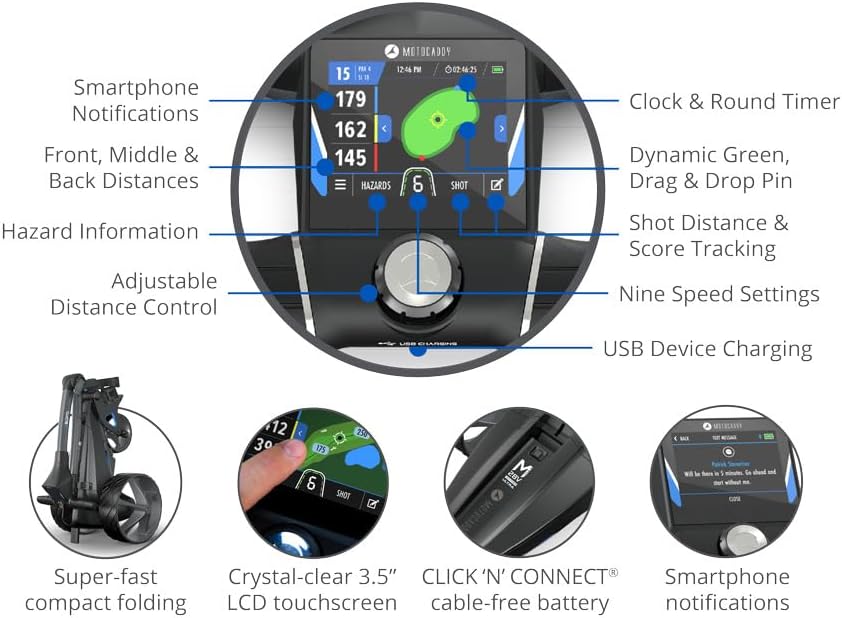
Image: An illustrative diagram highlighting various features accessible via the touchscreen, including smartphone notifications, distances, hazard info, adjustable distance control, nine speed settings, shot distance & score tracking, dynamic green, drag & drop pin, and USB device charging.
Downhill Control (DHC) and Electronic Parking Brake
The DHC feature automatically regulates the caddy's speed when moving downhill, providing hands-free control and preventing it from running away. The electronic parking brake ensures the caddy remains stationary on slopes, both uphill and downhill.
Video: A demonstration of the Motocaddy M5 GPS DHC, showcasing its features including the automatic Downhill Control and touchscreen interface. This video is provided by the seller, AMBA7.
주요 특징
- 통합 GPS: Fast, accurate, high-performance GPS with pre-loaded data for over 40,000 golf courses worldwide.
- 3.5인치 터치스크린 디스플레이: Crystal-clear, super-responsive display for easy navigation and control, usable in all weather conditions.
- 다운힐 컨트롤(DHC): Automatically regulates speed on inclines for effortless control.
- Electronic Parking Brake: Holds the caddy securely on any slope.
- CLICK ‘N’ CONNECT Battery: Revolutionary cable-free battery with auto-disconnect and pop-up charging port for convenience.
- Smartphone Alerts: Receive notifications from your phone directly on the caddy's screen via Bluetooth.
- Wi-Fi 연결: Enables super-fast over-the-air updates for software and course data.
- Performance Plan Compatibility: Upgrade for full-hole mapping, detailed green views, and performance tracking (6-month free trial included).
- 손잡이 높이 조절 가능: Ergonomic handle grips with adjustable height for comfortable use.
- USB 충전 포트 : Convenient port for charging your devices on the go.
- 모든 지형 타이어: 로우프로file tires designed for various course conditions.
- 컴팩트 폴딩: Super-fast compact folding mechanism for easy storage and transport.

Image: A comprehensive diagram illustrating key features such as adjustable bag supports, Easilock compatibility, cable-free Lithium battery, battery auto-disconnect, auto-open stand, whisper-quiet 230W motor, High Power 28V system, super-fast compact folding, adjustable handle height, USB port, nine speed settings, and 3.5" touchscreen.
포함된 액세서리
This bundle includes a range of useful accessories to complement your Motocaddy M5 GPS DHC Electric Caddy:
- 우산 홀더
- 스코어카드 소지자
- 음료 홀더
- 장치 받침대
- 5 Ball Markers
- 1 Magnetic Hat Clip

Image: A visual representation of the included accessories: Cell Phone Cradle, Scorecard Holder, Umbrella Holder, and Drink Holder, attached to the caddy's accessory station.
유지 보수 및 관리
To ensure the longevity and optimal performance of your Motocaddy M5 GPS DHC, follow these maintenance guidelines:
- 청소: After each use, wipe down the caddy with a damp 천으로 먼지와 이물질을 제거하세요. 연마성 세제나 용제는 사용하지 마세요.
- 배터리 관리 : Always fully charge the battery after each round. Store the battery in a cool, dry place when not in use. Do not leave the battery fully discharged for extended periods.
- 저장: Store the caddy in a dry environment, away from extreme temperatures. Ensure it is folded correctly to prevent damage.
- 휠 유지 관리: Regularly check the wheels for any debris or wear. Clean the wheel axles if necessary.
문제 해결
If you encounter any issues with your Motocaddy M5 GPS DHC, please refer to the following common troubleshooting steps:
- Caddy Not Powering On:
- Ensure the battery is fully charged and correctly inserted into the CLICK ‘N’ CONNECT port.
- 배터리나 충전 포트에 눈에 띄는 손상이 있는지 확인하십시오.
- GPS 신호 수신 불가:
- 당신이 깨끗한 열린 공간에 있는지 확인하십시오 view 하늘의.
- Verify that the GPS feature is enabled in the caddy's settings.
- Perform a Wi-Fi update to ensure the latest course data is installed.
- Downhill Control Not Engaging:
- Confirm that the DHC feature is active.
- 바퀴나 모터 주변에 장애물이 있는지 확인하십시오.
- 터치스크린이 반응하지 않음:
- 화면이 깨끗하고 건조한지 확인하세요.
- Restart the caddy by powering it off and on again.
문제가 지속되는 경우 고객 지원팀에 문의하세요.
기술 사양
| 특징 | 사양 |
|---|---|
| 모델명 | Motocaddy New M5 GPS DHC |
| 디스플레이 크기 | 3.5 인치 |
| 화면 유형 | LCD 터치 스크린 |
| 음성 명령 | 터치스크린 인터페이스 |
| 연결 기술 | 블루투스, Wi-Fi |
| 지도 유형 | Topographical (Full-hole mapping with Performance Plan) |
| 모터 파워 | Whisper-quiet 230W motor |
| 배터리 유형 | Cable-free Lithium (CLICK ‘N’ CONNECT) |
| 장착 유형 | 패널 실장 |
| 스포츠 | 골프 |
보증 정보
The Motocaddy New M5 GPS DHC Electric Caddy Cart comes with a 2년 제조사 보증. This warranty covers defects in materials and workmanship under normal use. Please retain your proof of purchase for warranty claims. For full terms and conditions, refer to the official Motocaddy web사이트를 방문하거나 고객 지원팀에 문의하세요.
고객 지원
For further assistance, technical support, or warranty inquiries, please contact AMBA7 customer service. You can typically find contact information on the manufacturer's official web사이트나 구매처를 통해 구매하세요.
Please have your product model number (Motocaddy New M5 GPS DHC) and serial number ready when contacting support.


