소개
The Mytrix Tac Master Wireless Gaming Headset is designed to provide a high-quality audio experience for gaming across multiple platforms. Featuring 2.4GHz lossless wireless technology, Bluetooth 5.3, and a 3.5mm wired connection, this headset offers versatile connectivity, low latency, and immersive surround sound. The detachable noise-canceling microphone ensures clear communication, while the ergonomic design and long battery life provide comfort for extended use.
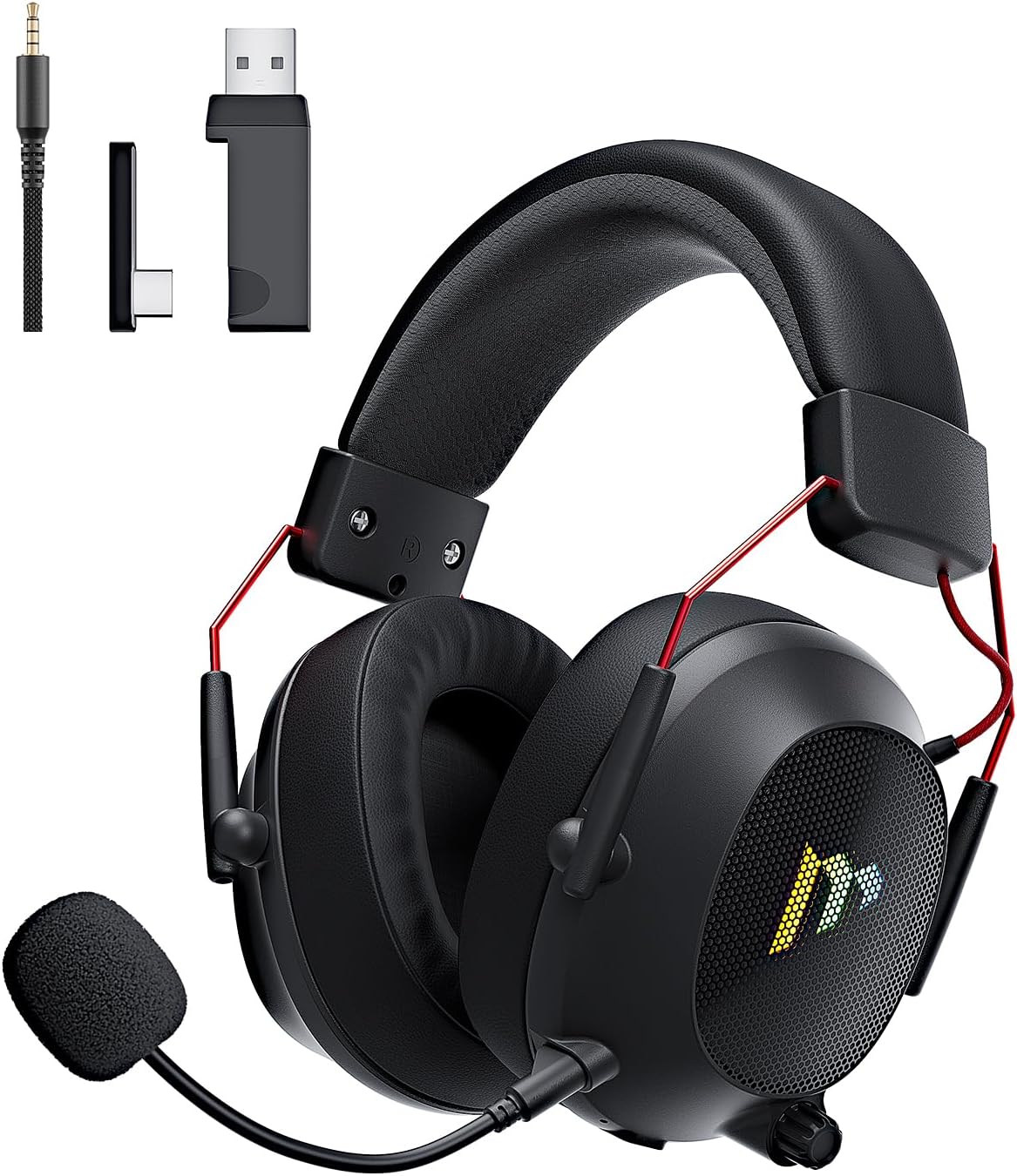
Image: The Mytrix Tac Master Wireless Gaming Headset, showcasing its sleek black design with red accents, detachable microphone, and included USB dongle and Type-C adapter.
패키지 내용
아래 나열된 모든 품목이 패키지에 포함되어 있는지 확인하세요.
- Mytrix Tac Master Wireless Gaming Headset
- 탈착식 노이즈 캔슬링 마이크
- 2.4GHz USB-A 무선 동글
- USB Type-C Transmitter
- 3.5mm 오디오 케이블
- USB 충전 케이블(USB-A-USB-C)
- 사용 설명서 (본 문서)
Headset Controls and Components
Familiarize yourself with the various controls and components of your Mytrix Tac Master headset:

Image: Diagram illustrating the location and function of controls on the Mytrix Tac Master headset, including power button, volume wheel, microphone mute button, and mode switch.
- 전원 버튼: Press and hold for 3 seconds to turn on/off. Single press to pause/play audio.
- 모드 버튼(M): Single press to toggle microphone on/off. Double press to switch between Bluetooth and 2.4G wireless modes. Press and hold for 3 seconds to turn RGB lights on/off.
- 볼륨 휠: Rotate up to increase volume, rotate down to decrease volume.
- 마이크 포트: 탈착식 마이크를 부착하기 위한 것입니다.
- 3.5mm 오디오 잭: 유선 연결용.
- USB-C 충전 포트: 헤드셋을 충전합니다.
- RGB 조명: 이어컵에 위치해 있습니다.
설정
1. 헤드셋 충전
Before first use, fully charge the headset. Connect the USB charging cable to the headset's USB-C port and the other end to a USB power source (e.g., computer USB port, USB wall adapter). The LED indicator will show charging status and turn off when fully charged. A full charge takes approximately 3 hours and provides up to 48 hours of battery life.

Image: Visual representation of the headset's long-lasting battery life, indicating approximately 50 hours of use and a 3-hour charging time.
2. 마이크 부착
Insert the detachable microphone into the microphone port on the left earcup. Ensure it is securely seated. The microphone is flexible and omni-directional, allowing for angle adjustment.
3. 연결 옵션
The Mytrix Tac Master headset offers multiple connection methods for broad compatibility:

Image: Diagram illustrating the four connection modes: 2.4GHz Dongle (USB-A and USB-C), Bluetooth 5.3, and 3.5mm Wired, along with compatible devices for each mode.
3.1. 2.4GHz Wireless Connection (Recommended for PC, PS4, PS5, Switch Docked Mode)
- Identify the appropriate dongle for your device:
- For devices with a USB-A port (PC, PS4, PS5, Switch Docked): Use the 2.4GHz USB-A dongle.
- For devices with a USB-C port (Switch Handheld, Laptops, Tablets): Use the USB Type-C transmitter.
- Plug the selected 2.4GHz dongle/transmitter into an available USB port on your device.
- 헤드셋의 전원 버튼을 3초 동안 길게 눌러 전원을 켜세요.
- Ensure the headset is in 2.4GHz mode. If not, double-press the 'M' button to switch modes until the headset connects to the dongle. The headset will automatically pair with the dongle.
- On your device, select the headset as the audio output and input device.
3.2. Bluetooth 5.3 Connection (Recommended for Mobile Phones, Tablets, Laptops)
- 헤드셋의 전원 버튼을 3초 동안 길게 눌러 전원을 켜세요.
- Double-press the 'M' button to switch the headset to Bluetooth pairing mode. The LED indicator will flash, indicating it's ready to pair.
- On your device, enable Bluetooth and search for "Mytrix Tac Master" in the list of available devices.
- Select "Mytrix Tac Master" to connect. Once connected, the LED indicator will stop flashing.
3.3. 3.5mm Wired Connection (Recommended for Xbox, Game Console Controllers, Devices without USB/Bluetooth)
- 3.5mm 오디오 케이블의 한쪽 끝을 헤드셋의 3.5mm 잭에 연결하십시오.
- Connect the other end of the 3.5mm audio cable to the audio jack on your device (e.g., Xbox controller, phone).
- In wired mode, the headset's microphone and RGB lighting functions are not active.
작동 지침
전원 켜기/끄기
- 전원을 켜려면: Press and hold the Power button for approximately 3 seconds until the headset powers on.
- 전원을 끄려면: Press and hold the Power button for approximately 3 seconds until the headset powers off.
볼륨 조절
- 볼륨 증가: Rotate the Volume wheel upwards.
- 볼륨 감소: Rotate the Volume wheel downwards.
마이크 제어
- 마이크 음소거/음소거 해제: Single press the 'M' button.
- The detachable microphone features noise cancellation for clear voice chat.
RGB 조명 제어
- Turn RGB Lights On/Off: Press and hold the 'M' button for approximately 3 seconds.
오디오 재생 제어
- 오디오 재생/일시정지: 전원 버튼을 한 번 누르세요.
서라운드 사운드
The headset features 7.1 stereo surround sound for an immersive audio experience, allowing for precise positioning of sound details in games.

이미지: 폭발된 view of the headset's 50mm drivers, illustrating the components that contribute to its 7.1 stereo surround sound capability.
유지
- 청소: Use a soft, dry cloth to clean the headset. Do not use abrasive cleaners or solvents. For earcups, gently wipe with a damp 천으로 닦아내고 사용하기 전에 완전히 자연 건조시키세요.
- 저장: 헤드셋은 직사광선과 극한 온도 변화를 피해 서늘하고 건조한 곳에 보관하십시오. 장기간 보관할 경우 배터리 수명 유지를 위해 배터리를 약 50% 정도 충전해 두십시오.
- 배터리 관리 : Avoid fully discharging the battery frequently. Charge the headset regularly, even if not in constant use, to maintain battery longevity.
- 마이크 관리: Handle the detachable microphone gently. Avoid excessive bending or twisting.
문제 해결
| 문제 | 가능한 원인 | 해결책 |
|---|---|---|
| 헤드셋에서 소리가 나지 않습니다. | Headset not powered on, low battery, incorrect audio output selected, connection issue. | Ensure headset is powered on and charged. Check device's audio settings to confirm "Mytrix Tac Master" is selected as output. Re-establish 2.4GHz or Bluetooth connection. For wired mode, ensure cable is fully inserted. |
| 마이크가 작동하지 않습니다. | Microphone muted, not properly attached, incorrect audio input selected, wired mode limitation. | Single press the 'M' button to unmute. Ensure microphone is securely attached. Check device's audio settings to confirm "Mytrix Tac Master" is selected as input. Note: Microphone does not function in 3.5mm wired mode. |
| 2.4GHz 무선으로 연결할 수 없습니다. | Dongle not recognized, headset not in 2.4GHz mode, interference. | Ensure dongle is fully inserted into a working USB port. Double-press 'M' button to switch headset to 2.4GHz mode. Try a different USB port. Move closer to the dongle to reduce interference. |
| Bluetooth를 통해 연결할 수 없습니다. | 헤드셋이 페어링 모드가 아니며, 기기에서 블루투스가 비활성화되어 있고, 이미 다른 기기에 연결되어 있습니다. | Double-press 'M' button to enter Bluetooth pairing mode (LED flashes). Ensure Bluetooth is enabled on your device. Disconnect from other Bluetooth devices if necessary. |
| RGB 조명이 작동하지 않습니다. | Lights turned off, low battery, wired mode limitation. | Press and hold the 'M' button for 3 seconds to toggle RGB lights. Ensure headset has sufficient battery. Note: RGB lights do not function in 3.5mm wired mode. |
명세서
| 특징 | 세부 사항 |
|---|---|
| 모델명 | Gaming Headset (G901) |
| 연결 기술 | 2.4GHz 무선, 블루투스 5.3, 3.5mm 유선 |
| 헤드폰 잭 | 3.5 mm 잭 |
| 무선 범위 | Up to 50 feet (in open spaces) |
| 숨어 있음 | ≤20ms (2.4GHz) |
| 오디오 드라이버 유형 | 50mm 다이나믹 드라이버 |
| 사운드 기능 | 7.1 Stereo Surround Sound |
| 마이크로폰 | Detachable, Omni-directional, Noise-Canceling |
| 배터리 수명 | 최대 48시간 |
| 충전 시간 | 약 3시간 |
| 배터리 유형 | 1개의 리튬 이온 배터리(포함) |
| 이어피스 모양 | 귀 위 |
| 특별 기능 | Ergonomic Design, RGB Lighting, Foldable & Portable |
| 제품 치수 | 5.91 x 3.94 x 5.91 인치 |
| 품목 무게 | 13.4 온스 |
| 제조업체 | 미트릭스 |
보증 및 지원
Mytrix products are manufactured to high quality standards. For information regarding warranty coverage, technical support, or service inquiries, please refer to the warranty card included with your product or visit the official Mytrix website. You may also contact Mytrix customer support directly for assistance with your Tac Master Gaming Headset.
추가 지원이 필요하면 다음을 방문하세요. 아마존에서 Mytrix 스토어를 만나보세요.
중요한 안전 정보
- 헤드셋을 극한의 온도, 습도 또는 액체에 노출시키지 마십시오.
- 헤드셋을 떨어뜨리거나 강한 충격을 주지 마십시오.
- 헤드셋을 직접 분해하거나 수리하지 마십시오. 그렇게 하면 보증이 무효화됩니다.
- 청력 손상을 예방하려면 적당한 음량으로 들으십시오. 큰 소리에 장시간 노출되면 영구적인 청력 손실이 발생할 수 있습니다.
- 어린이의 손이 닿지 않는 곳에 보관하세요.


