1. 서론
This manual provides detailed instructions for the MESWAO 15.6 Inch Android 14 Tablet, model MES-B3. It covers essential information regarding product features, setup, operation, maintenance, and troubleshooting to ensure optimal performance and user experience. Please read this manual thoroughly before using your device.
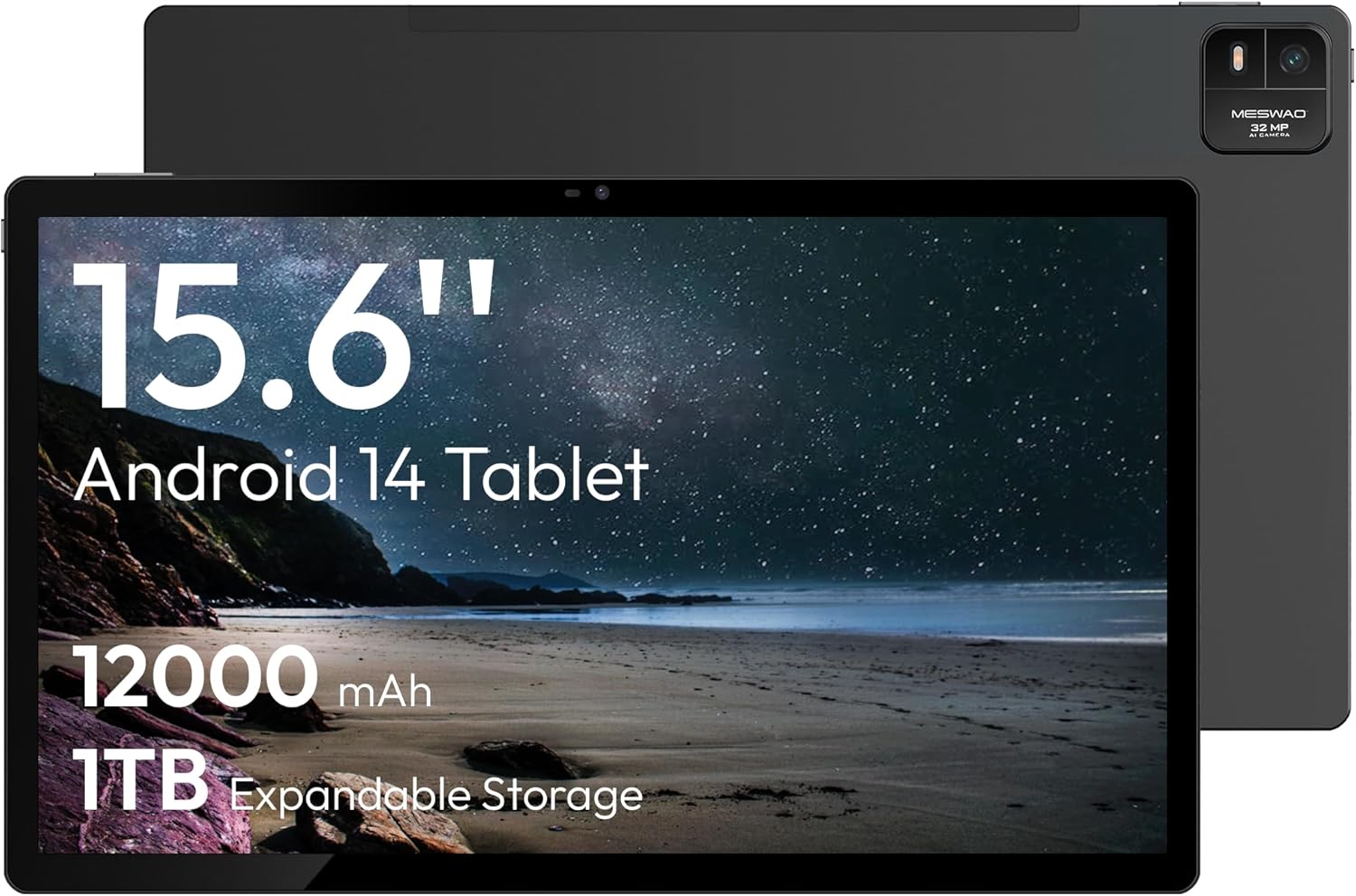
Figure 1.1: MESWAO 15.6 Inch Android 14 Tablet. This image displays the front and back view of the tablet, highlighting its large screen and rear camera module.
2. 안전 정보
기기 손상이나 본인 또는 타인의 부상을 방지하기 위해 다음 예방 조치를 준수하십시오.
- 태블릿을 극한의 온도, 직사광선 또는 높은 습도에 노출시키지 마세요.
- 태블릿을 떨어뜨리거나 심한 충격을 주지 마십시오.
- 승인된 충전기와 액세서리만 사용하세요.
- Do not attempt to disassemble or repair the tablet yourself.
- 정제를 물이나 기타 액체로부터 멀리 보관하십시오.
- Observe all local regulations regarding the use of electronic devices.
3. 패키지 내용
패키지에 모든 품목이 들어 있는지 확인하세요.
- 15.6-inch Tablet x1
- 15W 충전기 1개
- Type-C to 3.5mm Adapter x1
- USB-A to Type-C Adapter x1
- Stuck Pin x1 (for SIM/TF card tray)
4. 디바이스 오버view
MESWAO 태블릿의 물리적 구성 요소를 숙지하십시오.
4.1. 신체적 특징
- 전면 카메라: Located at the top center of the screen when held horizontally.
- 플래시가 장착된 후면 카메라: Located on the back, typically in a corner.
- 전원 버튼: Usually on the side, used to power on/off or wake/sleep the device.
- 볼륨 버튼: 오디오 레벨을 조정합니다.
- USB-C 포트: 충전 및 데이터 전송용입니다.
- TF 카드 슬롯 : 확장 가능한 저장 공간.
- 스피커: Quad speakers with 8 sound chambers for audio output.

그림 4.1: 이상view of MESWAO Tablet's physical features. This image illustrates the location of stereo speakers, power and volume buttons, front camera, rear camera with flashlight, Type-C port, and TF card slot.
5. 설정
5.1. 초기 충전
Before first use, fully charge the tablet using the provided 15W charger and USB-C cable. Connect the charger to the USB-C port on the tablet and plug it into a power outlet. The battery indicator on the screen will show charging progress.

Figure 5.1: Tablet charging illustration. This image shows the tablet connected to a charger, displaying a charging icon and indicating 100% charge in 3.5 hours.
5.2. 전원 켜기 / 끄기
- 전원을 켜려면: MESWAO 로고가 나타날 때까지 전원 버튼을 길게 누르세요.
- 전원을 끄려면: 전원 옵션 메뉴가 나타날 때까지 전원 버튼을 길게 누른 다음 "전원 끄기"를 선택합니다.
- 잠들기/깨어나기: 전원 버튼을 짧게 누릅니다.
5.3. 초기 구성
처음 전원을 켤 때 화면에 나타나는 안내에 따라 태블릿을 설정하십시오.
- 원하는 언어를 선택하세요.
- Wi-Fi 네트워크에 연결합니다.
- Google 계정으로 로그인하거나 새 계정을 만드세요.
- Review 이용약관에 동의하세요.
- 화면 잠금(PIN, 패턴 또는 비밀번호)을 설정합니다.
5.4. TF 카드 삽입
To expand storage, insert a TF (microSD) card:
- 태블릿 측면에서 TF 카드 슬롯을 찾으세요.
- Use the provided stuck pin to gently eject the card tray.
- Place the TF card into the tray with the gold contacts facing down.
- 트레이를 태블릿에 조심스럽게 다시 삽입하세요.

Figure 5.2: Tablet storage capabilities. This image highlights the 128GB ROM and support for up to 1TB expandable storage via TF card.
6. 사용 설명서
6.1. 기본 탐색
The MESWAO tablet uses Android 14, offering intuitive touch-based navigation:
- 수도꼭지: 항목을 선택하거나 애플리케이션을 엽니다.
- 강타: 화면이나 목록을 스크롤합니다.
- 핀치 투 줌: 화면의 내용을 확대하거나 축소하세요.
- 길게 누르기 : 상황에 맞는 메뉴에 접근하거나 아이콘을 이동합니다.

Figure 6.1: Android 14 operating system interface. This image displays various application icons and highlights features like smooth multitasking, parental control, and enhanced privacy.
6.2. Wi-Fi에 연결하기
- 이동하다 설정 > 네트워크 및 인터넷 > 와이파이.
- Wi-Fi 전환 On.
- 목록에서 원하는 네트워크를 선택하세요.
- 메시지가 표시되면 비밀번호를 입력한 다음 탭하세요. 연결하다.
6.3. 애플리케이션 관리
- 앱 설치: Download from the Google Play Store.
- 앱 제거: Long-press an app icon, then drag it to "Uninstall" or go to 설정 > 앱.
- 앱 닫기: Swipe up from the bottom of the screen and swipe away the app card.
6.4. 카메라 사용
The tablet features a 32MP rear camera with flash and a 5MP front camera.
- 열기 카메라 애플리케이션.
- 셔터 버튼을 탭하여 사진을 촬영하세요.
- 카메라 전환 아이콘을 사용하여 전면 카메라와 후면 카메라를 전환합니다.
- Access settings for flash, modes, and other options.
6.5. 배터리 관리
12000mAh 배터리는 장시간 사용을 가능하게 합니다. 배터리 수명을 최적화하려면 다음을 수행하십시오.
- 화면 밝기를 조정합니다.
- 사용하지 않는 애플리케이션을 닫습니다.
- 배터리 절약 모드를 활성화하세요 설정 > 배터리.
6.6. 연결성
- 블루투스: Pair with wireless headphones, speakers, or other devices via 설정 > 연결된 장치 > 블루투스.
- USB-C : 컴퓨터에 연결 file transfer or use with compatible USB-C accessories.
- 무선 스크린 캐스팅: Share your tablet's screen to a compatible smart TV or monitor. Access this feature from the Quick Settings panel or 설정 > 연결된 장치 > 깁스.
6.7. 사운드 설정
Adjust volume and audio output options:
- Use the physical volume buttons on the side of the tablet.
- Access detailed settings in 설정 > 소리 & 진동.
- The tablet supports multiple audio options, including USB-C audio and 3.5mm via the provided adapter.
7. 유지관리
7.1. 태블릿 청소
태블릿을 닦을 때는 부드럽고 보풀이 없는 천을 사용하세요. 잘 지워지지 않는 얼룩은 가볍게 닦아내세요.amp천에 물이나 전자제품용 화면 클리너를 묻혀 닦아주세요. 강한 화학 물질이나 연마재는 사용하지 마세요.
7.2. 소프트웨어 업데이트
최적의 성능, 보안 및 새로운 기능에 대한 액세스를 보장하려면 소프트웨어 업데이트를 정기적으로 확인하고 설치하세요. 설정 > 체계 > 시스템 업데이트.
7.3. 스토리지 관리
성능을 유지하려면 태블릿의 저장 공간을 주기적으로 관리하세요.
- 불필요한 앱을 삭제하세요 files.
- 크게 이동 files to the TF card or cloud storage.
- 앱의 캐시 데이터를 지웁니다. 설정 > 앱 > [앱 이름] > 저장소 및 캐시.
8. 문제 해결
다음의 일반적인 문제와 해결책을 참조하세요.
| 문제 | 해결책 |
|---|---|
| 태블릿의 전원이 켜지지 않습니다. | 배터리가 충전되었는지 확인하세요. 충전기를 연결하고 몇 분 정도 기다린 후 다시 전원을 켜보세요. |
| Wi-Fi에 연결할 수 없습니다. | Check if Wi-Fi is enabled. Verify the Wi-Fi password. Restart your router and the tablet. |
| 앱이 충돌하거나 정지됩니다. | Close background apps. Clear the app's cache. Restart the tablet. Ensure the app is updated. |
| 성능이 느립니다. | Free up storage space. Close unused apps. Restart the tablet. |
| 배터리가 빨리 소모됩니다. | Reduce screen brightness. Disable unused features like Bluetooth or GPS. Close background apps. Check battery usage in settings. |
9. 사양
Key technical specifications for the MESWAO 15.6 Inch Android 14 Tablet (MES-B3):
| 특징 | 세부 사항 |
|---|---|
| 상표 | 메스와오 |
| 모델명 | MES-B3 |
| 운영 체제 | 안드로이드 14 |
| 화면 크기 | 15.6 인치 |
| 화면 해상도 | 1920 x 1080 픽셀 (IPS HD) |
| 프로세서 | Octa-Core (MediaTek Helio G99, up to 2.2 GHz) |
| 그래픽 코프로세서 | 말리-G57 |
| RAM (Memory Storage Capacity) | 6GB (DDR3 SDRAM) |
| Internal Storage (Flash Memory Size) | 128GB (XNUMX기가바이트) |
| 확장 가능한 스토리지 | TF 카드를 통해 최대 1TB |
| 후면 카메라 해상도 | 32 MP |
| 전면 카메라 해상도 | 5 MP |
| 배터리 용량 | 12000mAh |
| 평균 배터리 수명 | 12시간 |
| 무선형 | 802.11a/b/g/n/ac (Wi-Fi 5) |
| 색상 | 회색 |
| 품목 무게 | 2.35파운드 |
| 제품 크기(LxWxH) | 14.53 x 8.78 x 0.43 인치 |

Figure 9.1: Processor and performance details. This image highlights the Helio G99 Octa-Core chipset, 6nm process, 950MHz GPU, and smooth gaming/streaming capabilities.
10. 보증 및 지원
10.1. 보증 정보
The MESWAO 15.6 Inch Android 14 Tablet comes with a 12개월 보증 제조상의 결함에 대한 보증입니다. 보증 청구를 위해 구매 증빙 서류를 보관해 주세요.
10.2. 고객 지원
For technical assistance, troubleshooting, or warranty inquiries, please contact MESWAO customer support. They offer 24시간 고객 지원 그리고 가지고있다 local service centers in the US, EU, and Japan.
- 연락 방법: Refer to the contact information provided with your product packaging or visit the official MESWAO web대지.
- 문제 해결: Issues reported are typically responded to within 24 hours, with problems resolved or replaced according to policy.

Figure 10.1: MESWAO customer support and warranty details. This image highlights the 12-month warranty, 24-hour customer support, local after-sales centers, and quick response flow.


