1. 시작하기
1.1 패키지 내용
패키지에 모든 품목이 들어 있는지 확인하세요.
- DOOGEE S Punk Rugged Smartphone
- USB-C 케이블
- 전원 어댑터
- 사용 설명서 (본 문서)
 Image: The DOOGEE S Punk Rugged Smartphone with its included accessories.
1.2 SIM 카드 및 저장 카드 설치
The DOOGEE S Punk supports two Nano SIM cards or one Nano SIM card and one TF (microSD) card for expanded storage up to 1TB.
- 기기 측면에서 SIM 카드 트레이를 찾으세요.
- SIM 꺼내기 도구를 트레이 옆에 있는 작은 구멍에 넣어서 엽니다.
- 트레이에 있는 그림을 참고하여 나노 SIM 카드 및/또는 TF 카드를 트레이에 넣으세요.
- 트레이를 휴대폰 본체와 딱 맞을 때까지 조심스럽게 슬롯에 밀어 넣습니다.
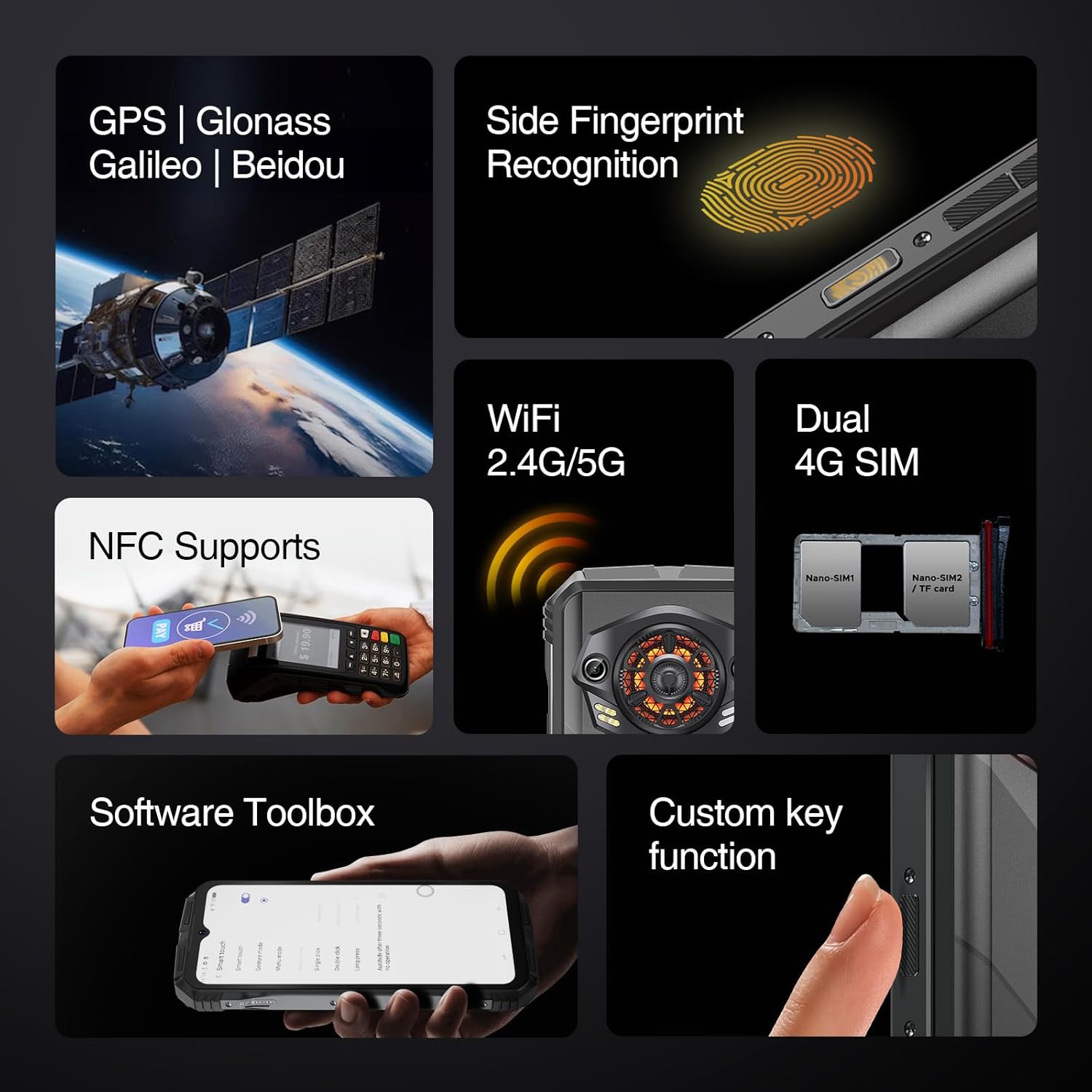 Image: The side of the DOOGEE S Punk, illustrating the SIM card tray and other external features.
1.3 초기 충전 및 전원 켜기
Before first use, fully charge your device. The phone features a 10800mAh battery and supports 33W fast charging.
- Connect the USB-C cable to the phone's charging port and the power adapter.
- 전원 어댑터를 벽면 콘센트에 꽂으세요.
- Once sufficiently charged, press and hold the Power button (located on the side) until the DOOGEE logo appears.
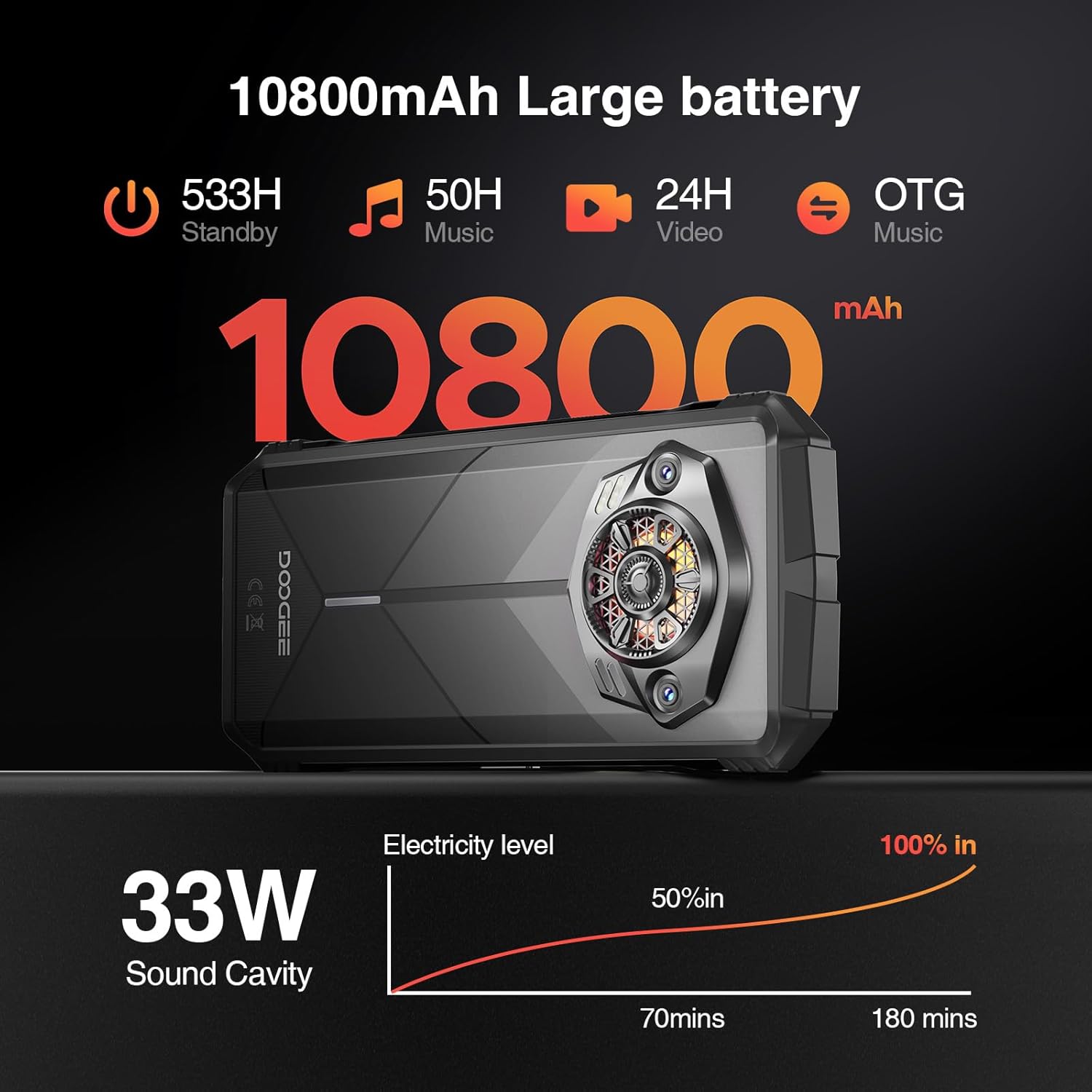 Image: Visual representation of the DOOGEE S Punk's 10800mAh battery capacity and 33W fast charging capability.
2. 스마트폰 작동
2.1 디스플레이 및 사용자 인터페이스
The DOOGEE S Punk features a 6.58-inch FHD+ IPS display with a resolution of 1080 x 2408 pixels and 400 nits brightness. It operates on Android 14, providing a user-friendly interface.
 Image: Details of the DOOGEE S Punk's 6.58-inch FHD+ display, highlighting resolution and brightness.
2.2 성능 및 스토리지
Equipped with an Octa-core processor, 16GB RAM (6GB physical + 10GB virtual), and 256GB internal storage, expandable up to 1TB with a TF card, the device ensures smooth multitasking and amp응용 프로그램과 미디어를 위한 공간입니다.
 Image: Illustration of the DOOGEE S Punk's 16GB RAM and 256GB ROM, with expansion capabilities.
2.3 카메라 기능
Capture moments with the 50MP AI main camera and 16MP front camera. Various shooting modes are available, including panorama, portrait, macro, and beauty mode.
 이미지: 이상view of the DOOGEE S Punk's 50MP main camera and 16MP front camera capabilities.
2.4 Audio and Intelligent Lights
The device features a 4.0W super speaker with 126 dB volume and 34mm large-amplitude speakers, providing clear audio. Intelligent Interaction Lights on the rear can be customized for notifications, music, and charging status.
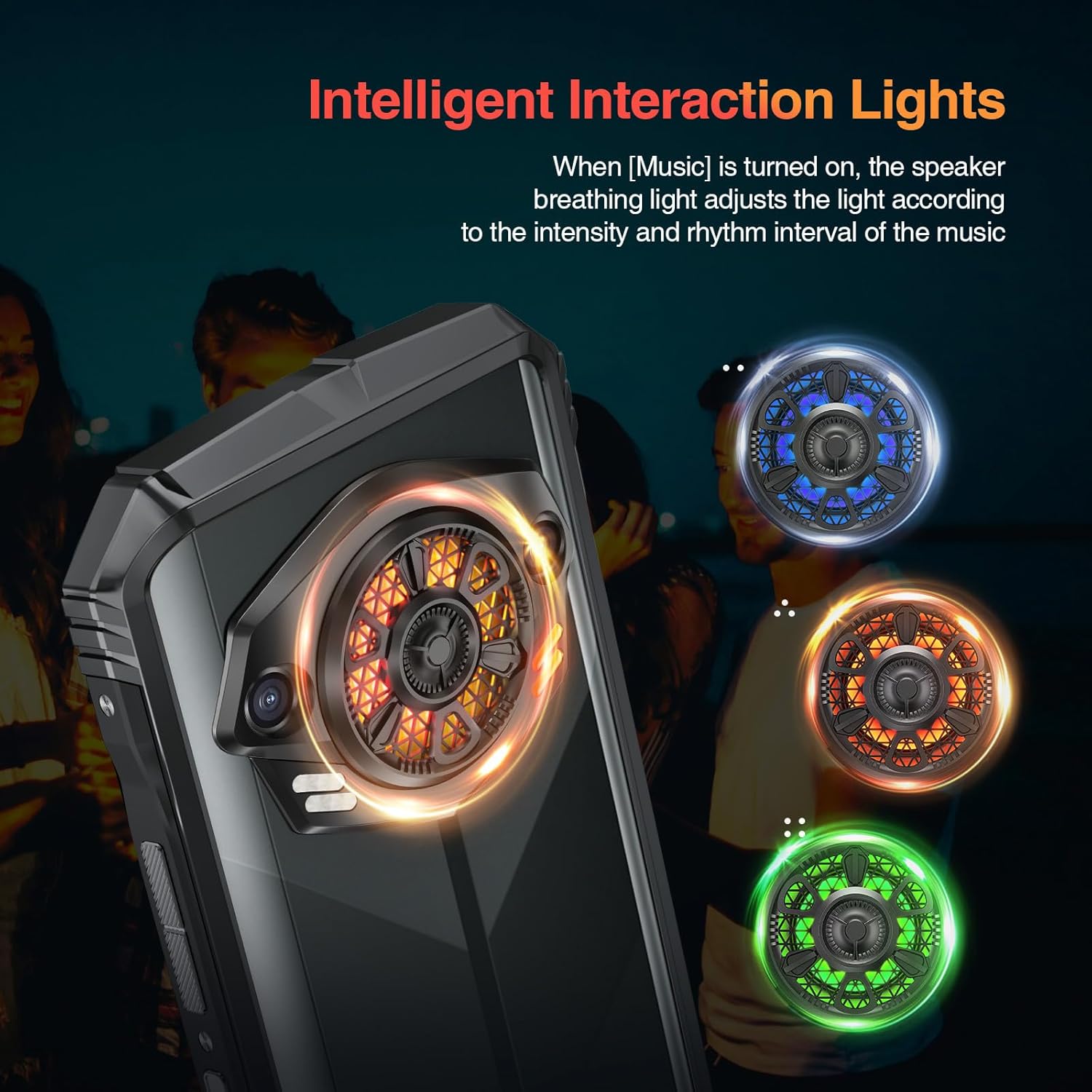 Image: The Intelligent Interaction Lights on the back of the DOOGEE S Punk, showing various color options.
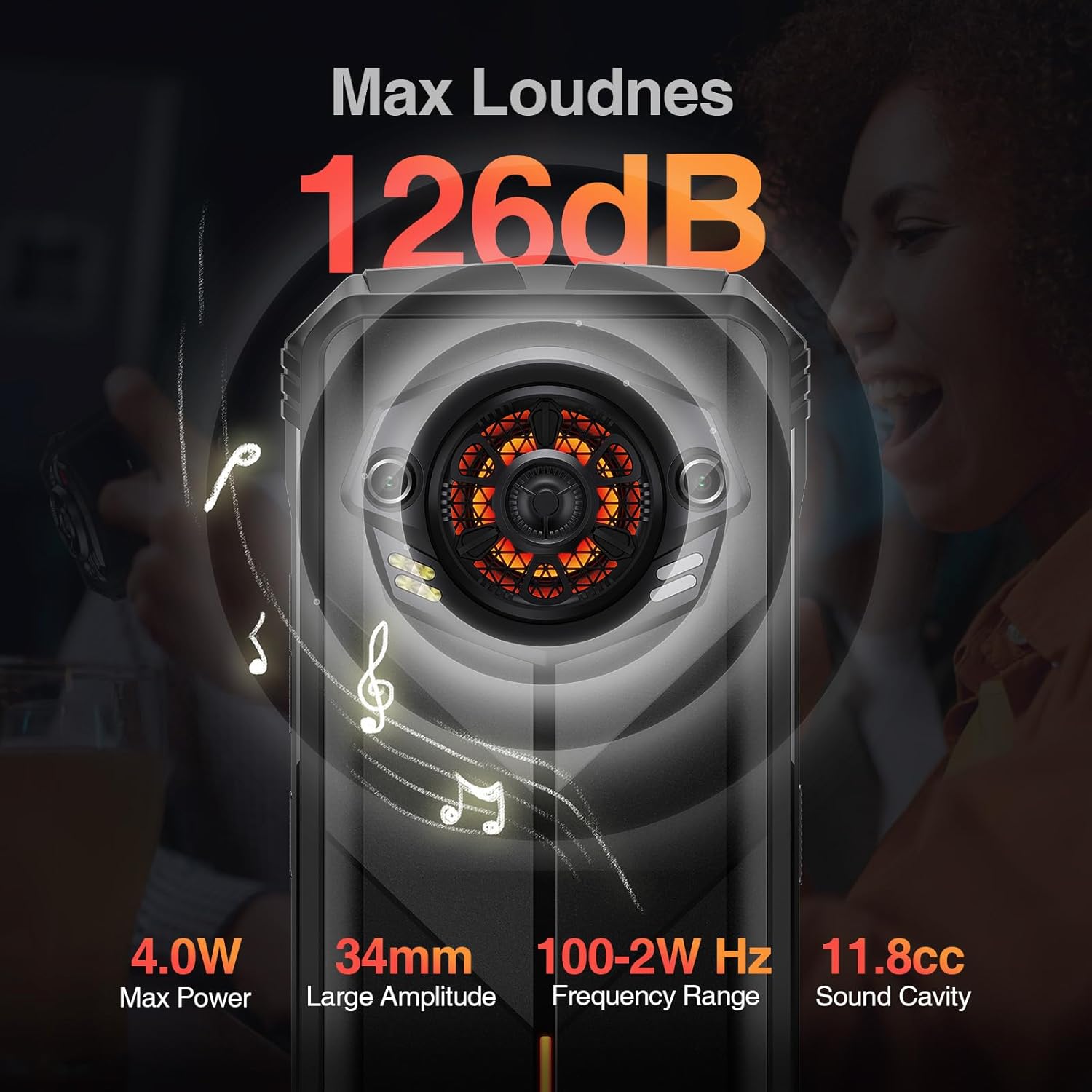 Image: Diagram illustrating the powerful 126dB super speaker of the DOOGEE S Punk.
2.5 연결성 및 보안
The S Punk supports 4G Dual SIM, Wi-Fi (2.4G/5G), Bluetooth, NFC, OTG, and GPS (GPS, GLONASS, Galileo, Beidou). For security, it includes face unlock and fingerprint recognition.
Video: Demonstrating the 4G Dual SIM and multi-functional features of the DOOGEE S Punk.
3. 유지관리 및 내구성
The DOOGEE S Punk is designed for durability and is certified IP68, IP69K, and MIL-STD-810H. This means it is waterproof up to 1.5 meters for 30 minutes, fully dustproof, and can withstand drops from up to 1.5 meters. It operates reliably in temperatures from -20°C to 55°C.
Video: Highlighting the ruggedness and reliability of the DOOGEE S Punk, including its IP68, IP69K, and MIL-STD-810H certifications.
영상: 쇼크asing the DOOGEE S Punk as a suitable device for outdoor activities and explorers.
4. 문제 해결
This section addresses common issues you might encounter with your DOOGEE S Punk smartphone.
4.1 장치 전원이 켜지지 않음
- 배터리 잔량 확인: Ensure the phone has sufficient charge. Connect it to the charger and wait a few minutes before attempting to power on.
- 하드 리셋: Press and hold the Power button for approximately 10-15 seconds to perform a hard reset.
4.2 네트워크 신호 불량
- SIM 카드 확인: SIM 카드가 올바르게 삽입되고 활성화되었는지 확인하세요.
- 네트워크 설정: Go to Settings > Network & internet > Mobile network and verify that your preferred network type is selected.
- 위치: 네트워크 서비스가 더 좋은 지역으로 이동하세요.
4.3 애플리케이션 충돌 또는 멈춤 현상
- 장치 재시작: A simple restart can resolve many software issues.
- 캐시 지우기: 설정 > 앱 > [앱 이름] > 저장소 및 캐시 > 캐시 지우기로 이동합니다.
- Update Apps/System: Ensure all applications and the Android operating system are updated to their latest versions.
4.4 스피커 문제
- 볼륨 확인: 볼륨이 최대로 설정되어 있고 음소거 상태가 아닌지 확인하세요.
- 장애물: Verify that the speaker grille is not blocked by debris or a case.
- 다시 시작: Restart the phone to reset audio drivers.
5. 사양
| 특징 | 세부 사항 |
|---|---|
| 모델명 | S Punk |
| 상표 | 두기 |
| 운영 체제 | 안드로이드 14 |
| 설치된 RAM 메모리 크기 | 16GB (XNUMX기가바이트) |
| 메모리 저장 용량 | 256GB(최대 1TB까지 확장 가능) |
| 화면 크기 | 6.58 인치 |
| 해결 | 1080 x 2408 |
| 새로 고침 빈도 | 60Hz |
| 배터리 용량 | 10800mAh |
| 빠른 충전 | 33와트 |
| 후방 카메라 | 50MP AI 메인 카메라 |
| 전면 카메라 | 16MP |
| 연결 기술 | 블루투스, NFC, Wi-Fi, 4G, 듀얼 SIM |
| GPS | GPS, GLONASS, 갈릴레오, 베이두 |
| 내구성 | IP68/IP69K 방수 및 방진, MIL-STD-810H 낙하 방지 |
| 작동 온도 | -20°C ~ 55°C |
| 품목 무게 | 9.2 온스(262그램) |
| 치수 | 7.56 x 4.13 x 2.28 인치 |
6. 보증 및 지원
The DOOGEE S Punk smartphone comes with a 1-year free warranty. For any issues or support needs, please contact DOOGEE customer service. You are also entitled to a 30-day no-reason refund from the purchase date.
For further assistance, visit the official DOOGEE web사이트를 방문하거나 지원 채널에 문의하세요.


