소개
The Beghelli Salvalavita SLV20 Plus is a mobile phone specifically designed for seniors, prioritizing ease of use, safety, and clear communication. It features large backlit keys, a high-volume speaker, a bright 2.8-inch color display, and a dedicated SOS button for emergencies. This manual provides detailed instructions to help you set up, operate, and maintain your device.
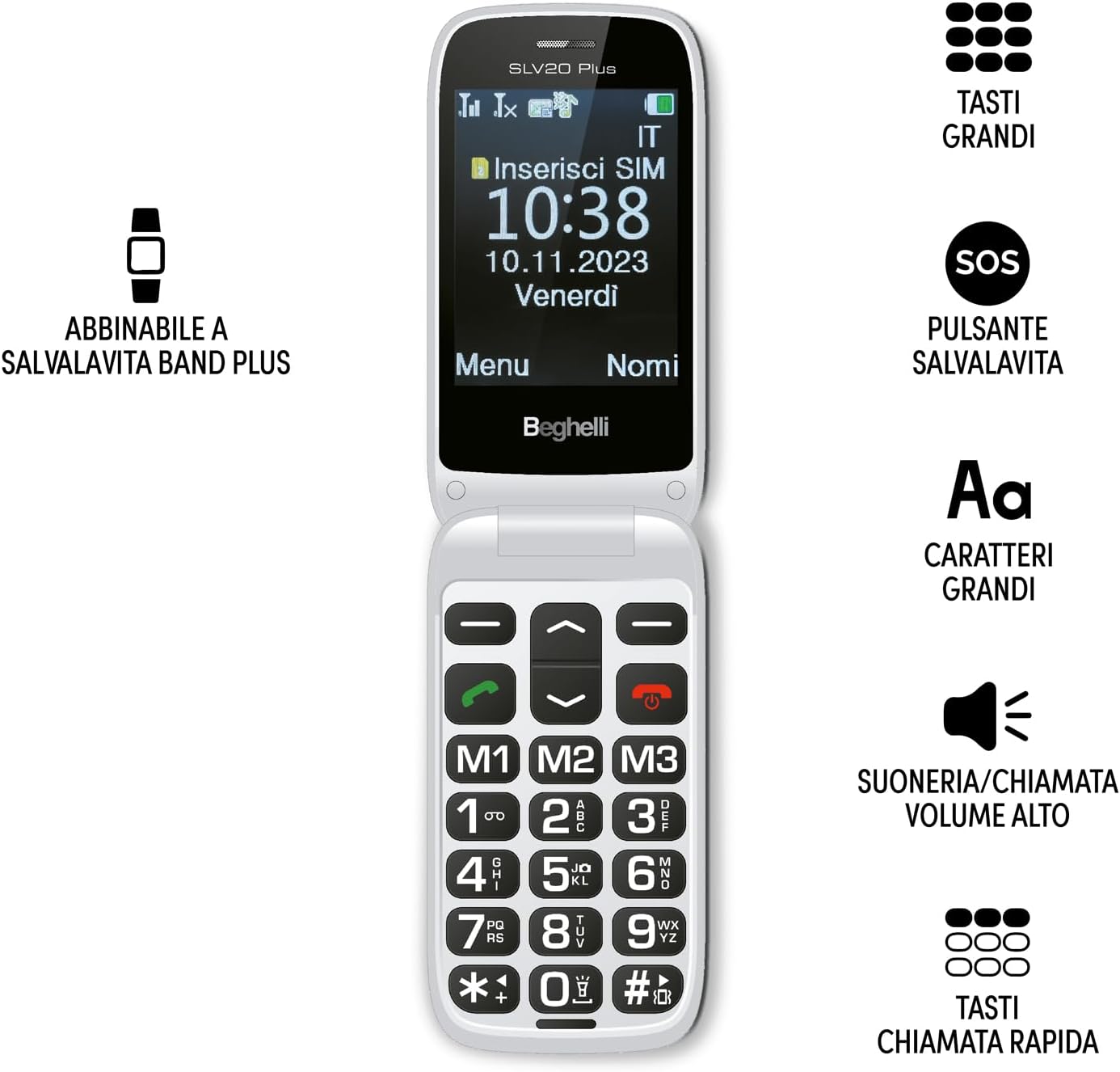
Image: The Beghelli Salvalavita SLV20 Plus, shown open to highlight its large, easy-to-read keys and clear display, designed for user convenience.
설정
1. 언박싱 및 구성품
시작하기 전에 패키지에 모든 구성 요소가 들어 있는지 확인하세요.
- Beghelli Salvalavita SLV20 Plus Mobile Phone
- 충전식 리튬이온 배터리
- 충전베이스
- 전원 어댑터
- 사용 설명서 (본 문서)

Image: The included charging base and power adapter for the Beghelli Salvalavita SLV20 Plus, facilitating easy and convenient recharging.
2. SIM 카드 설치
- 휴대전화 전원을 끄고 뒷면 커버를 제거하세요.
- SIM 카드 슬롯을 찾습니다.
- Insert your activated SIM card into the slot, ensuring the gold contacts face downwards and the cut corner aligns correctly.
- SIM 카드가 제자리에 딸깍 소리가 날 때까지 살짝 밀어 넣으세요.
- 뒷면 덮개를 교체하십시오.
3. 배터리 설치 및 충전
- With the back cover removed, insert the rechargeable Lithium-ion battery into its compartment, aligning the contacts.
- 뒷면 덮개를 교체하십시오.
- 전원 어댑터를 충전대에 연결하세요.
- Place the phone into the charging base. Ensure the phone is correctly seated and the charging indicator appears on the screen.
- For first use, charge the phone for at least 4 hours to ensure optimal battery performance.
4. 초기 전원 켜기
Press and hold the Power/End Call button (usually marked with a red phone icon) until the screen lights up and the Beghelli logo appears. The phone will then guide you through any initial setup steps, such as setting the language or time.
작동 지침
1. 기본 전화 기능
- 전화 걸기: Dial the desired number using the large keypad and press the Green Call button.
- 전화 받기: 전화벨이 울리면 초록색 통화 버튼을 눌러 받으세요.
- 통화 종료: 빨간색 통화 종료 버튼을 누르세요.
- 볼륨 조절: Use the dedicated volume keys on the side of the phone during a call or to adjust ringtone volume. The phone features high volume for clear audio.
- SMS 보내기: Navigate to the 'Messages' menu, select 'New Message', type your text using the keypad, and select the recipient from your contacts or enter a number.
2. SOS Button Functionality
The SOS button is a critical safety feature. In an emergency, press and hold the SOS button located on the back of the phone for a few seconds. The phone will automatically:
- Initiate calls to up to 5 pre-programmed emergency numbers in sequence until one is answered.
- Send a pre-set emergency SMS message to these same 5 numbers.
SOS 번호 프로그래밍: Refer to the phone's settings menu under 'SOS Settings' to add or modify emergency contact numbers and the emergency SMS message.
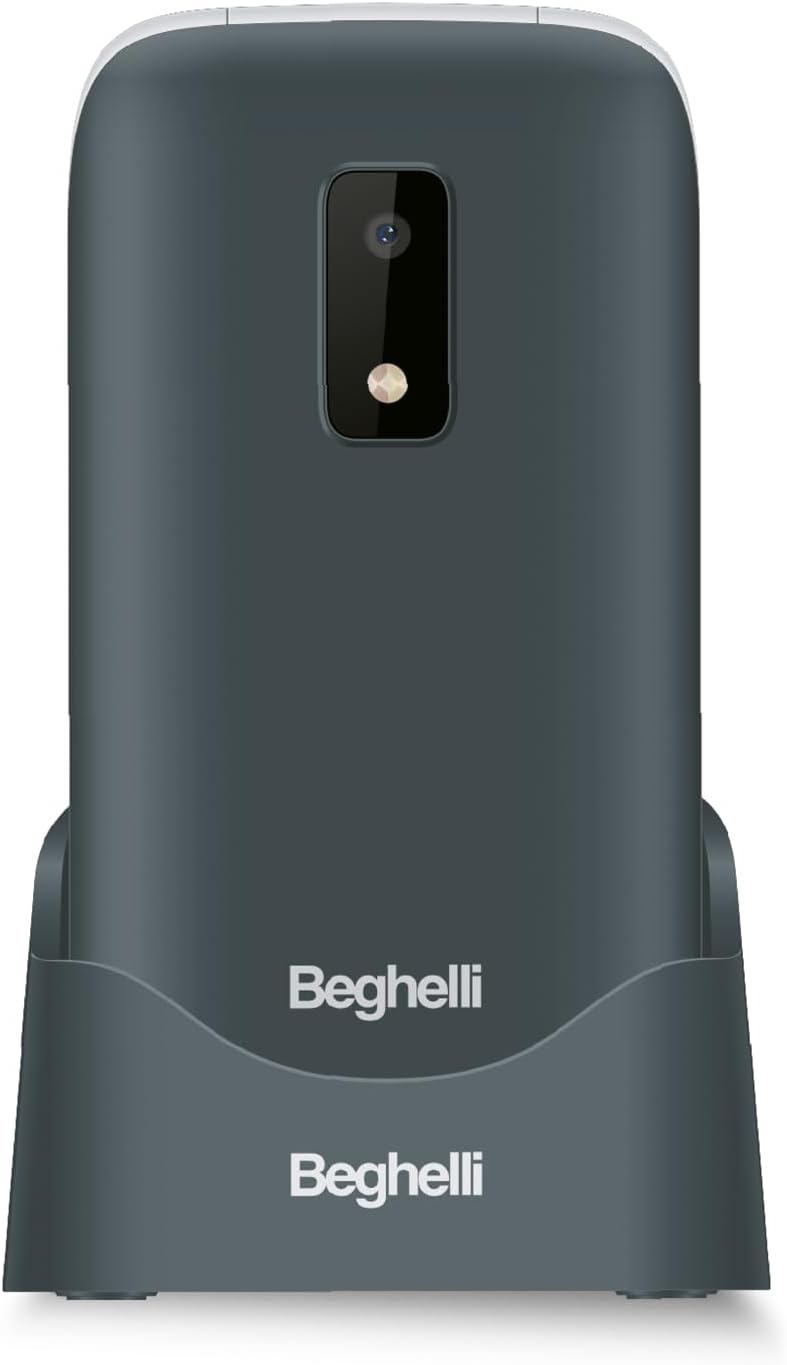
이미지: 후면 view of the Beghelli Salvalavita SLV20 Plus, highlighting the prominent SOS button and integrated camera, designed for quick access to emergency features.
3. Quick Dial Keys (M1, M2, M3)
The M1, M2, and M3 keys allow for quick dialing of frequently contacted numbers. To program these keys:
- '설정' 메뉴로 이동하세요.
- Select 'Speed Dial' or 'Quick Dial Settings'.
- Choose M1, M2, or M3 and assign a contact from your phonebook or enter a new number.
- Once programmed, simply press and hold the M1, M2, or M3 key to dial the assigned number.
4. 추가 기능
- 카메라: Access the camera from the main menu to take photos. Photos are saved to the phone's memory or an inserted SD card (if applicable).
- 플래시: Activate the built-in flashlight via a dedicated button or menu option for convenience in low-light conditions.
- FM 라디오 : Tune into your favorite FM radio stations. Headphones may be required to act as an antenna.
5. Optional Salvalavita 24/7 Service
The Beghelli Salvalavita SLV20 Plus can be connected to the optional Salvalavita 24/7 Center service. This service provides constant support and protection by connecting your SOS button directly to a monitoring center. For more information on subscribing to this service, please refer to the documentation provided with the service or visit the official Beghelli web대지.
유지
- 청소: 부드럽고 마른 천으로 휴대폰 외부를 닦으세요. 액체 세척제나 연마성 재질은 사용하지 마세요.
- 배터리 관리 : 배터리 수명을 연장하려면 극한의 온도 변화를 피하십시오. 휴대전화를 완전히 방전된 상태로 장시간 방치하지 마십시오.
- 저장: If storing the phone for a long time, charge the battery to about 50% and store it in a cool, dry place.
문제 해결
| 문제 | 가능한 해결책 |
|---|---|
| 전화기가 켜지지 않습니다. | 배터리가 올바르게 삽입되어 충전되었는지 확인하십시오. 휴대폰을 충전기에 연결하고 다시 시도하십시오. |
| 네트워크 신호가 없습니다. | Check if the SIM card is properly inserted. Ensure you are in an area with network coverage. Contact your service provider if the issue persists. |
| Cannot hear calls clearly. | Adjust the call volume using the side keys. Ensure the speaker is not obstructed. |
| SOS 버튼이 작동하지 않습니다. | Verify that emergency numbers are correctly programmed in the SOS settings. Ensure the phone has network signal. |
If you encounter issues not listed here or if the suggested solutions do not resolve the problem, please contact Beghelli customer support for assistance.
명세서
| 특징 | 세부 사항 |
|---|---|
| 모델 번호 | SLV20 Plus |
| 치수(길이 x 너비 x 높이) | 10.9 x 5.5 x 1.9cm |
| 무게 | 100그램 |
| 배터리 유형 | 1 리튬이온(포함) |
| 디스플레이 크기 | 2.8인치 |
| 주요 특징 | Large Backlit Keys, SOS Button, High Volume, Flashlight, FM Radio, Camera, Quick Dial Keys |
보증 및 지원
The Beghelli Salvalavita SLV20 Plus typically comes with a manufacturer's warranty. Please refer to the warranty card included in your product packaging for specific terms and conditions. Generally, spare parts availability is indicated for 2 years from the date of purchase.
In case of product defects or issues, a refund or replacement policy is usually available for 30 days from the purchase date, subject to retailer terms.
For technical support, service, or warranty claims, please contact Beghelli customer service through their official website or the contact information provided in your product documentation. Always have your model number (SLV20 Plus) and proof of purchase ready when contacting support.


