소개
This manual provides detailed instructions for setting up, operating, and maintaining your Ajazz AK820MAX 75% Mechanical Keyboard. Please read this manual thoroughly before using the product to ensure optimal performance and longevity.
제품 특징
- TFT Smart Display & Knob: Features a high-definition TFT color screen displaying time, connectivity modes, battery status, and custom GIF animations. The integrated knob allows for quick adjustments.
- 가스켓 구조 및 PCB 단일 키 슬롯팅: Designed with a gasket structure and 1.2mm thick PCB single key slotting for enhanced resilience, stability, and a softer, more elastic typing feel. Multiple internal fillings reduce noise for a pure and pleasant sound.
- 3중 모드 연결: Supports wireless connectivity via Bluetooth 5.1, 2.4GHz, or a wired Type-C USB cable. Easily switch between modes for efficient multitasking across various devices.
- 오래 지속되는 배터리: Equipped with an 8000mAh battery for extended use without frequent recharging.
- RGB Backlighting with Music Rhythm: Offers 20 customizable backlighting effects, including a mode that synchronizes with music playback.
- 75% Hot-Swappable Layout: A compact 75% layout saves desktop space. The 3/5-pin PCB mounting design allows for easy hot-swapping of mechanical switches, enabling customization of typing preferences.
패키지 내용
상자를 뜯을 때 다음 품목이 모두 들어 있는지 확인하세요.
- Ajazz AK820MAX Mechanical Keyboard
- USB Type-C 케이블
- 사용자 설명서

Image: The Ajazz AK820MAX keyboard, USB-C cable, and user manual as they appear when unboxed.
설정
- 키보드 충전: Connect the provided USB Type-C cable to the keyboard's Type-C port and the other end to a USB power source (e.g., computer, wall adapter). The TFT display will indicate charging status.
- 키보드 각도 조절하기: Flip the keyboard over and extend the adjustable feet on the underside to achieve your preferred typing angle.
- Selecting Connectivity Mode:
- 유선 모드 : Connect the USB Type-C cable to your computer. The keyboard will automatically switch to wired mode.
- 2.4GHz 무선 모드: Locate the 2.4GHz receiver (usually stored in a slot on the keyboard's underside). Plug the receiver into an available USB port on your computer. Switch the mode selector on the keyboard to 2.4G.
- 블루투스 모드 : Switch the mode selector on the keyboard to BT. On your device (PC, laptop, tablet), search for Bluetooth devices and select "AK820MAX" to pair.

이미지: 측면 view of the keyboard highlighting the USB-C port and switches for selecting wired, 2.4G, or Bluetooth connectivity modes.

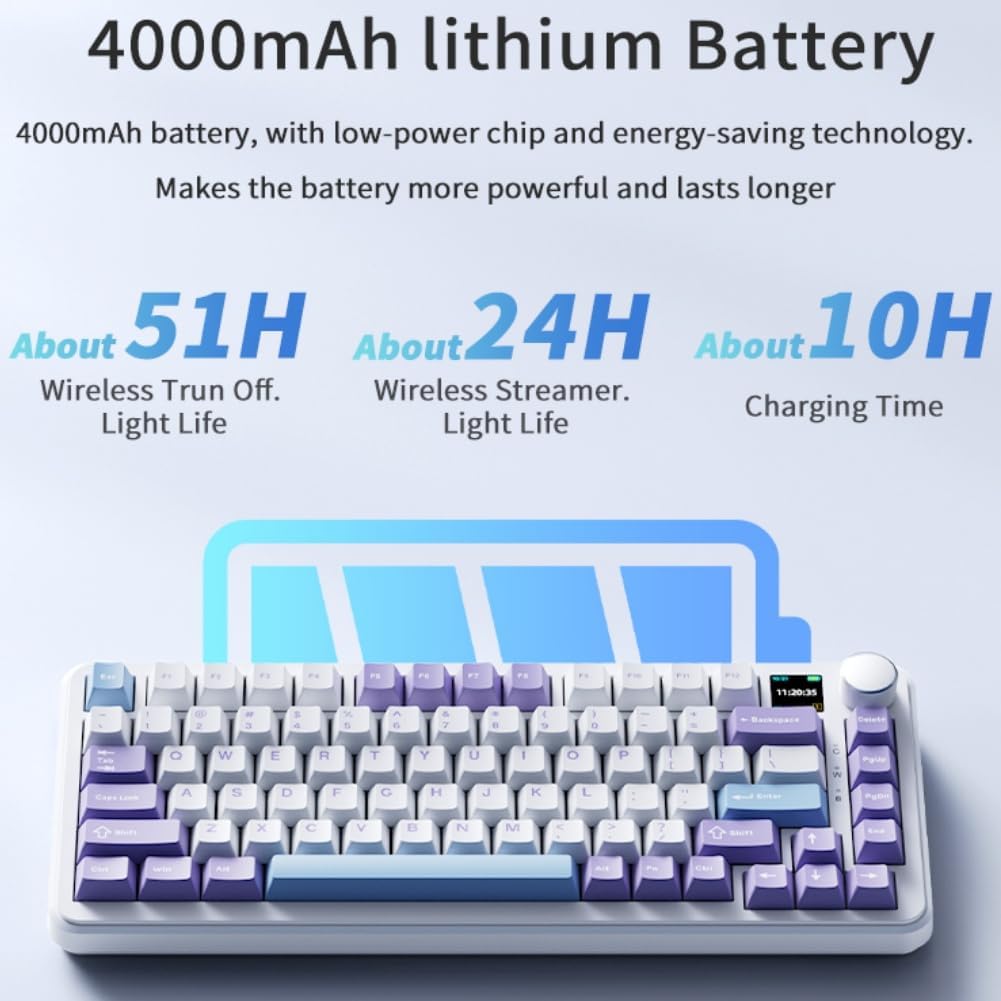
Image: The keyboard displaying battery life information on its TFT screen, indicating approximate usage times for wireless with lights off and wireless streamer light life, along with charging time.
작동 지침
TFT Smart Display and Knob Functions
The integrated TFT color screen and multi-function knob provide quick access to various settings:
- 손잡이 회전: Rotate the knob to navigate through menu options or adjust values (e.g., brightness, speed).
- 노브 프레스: 다이얼을 눌러 선택을 확정하거나 메뉴에 들어가세요.
- 표시 정보 : The screen shows current time, active connectivity mode (wired, 2.4G, BT), and battery level.
- Custom GIF Animations: The display supports custom colorful GIF animations. Refer to the software for customization options.

Image: A close-up of the keyboard's 0.85-inch TFT color screen, illustrating its capability to display settings such as backlight brightness, speed, color, and effect modes.
RGB 백라이트 제어
The keyboard features 20 backlighting effects. Use the knob or dedicated function keys (refer to the keyboard's keycap legends or software) to:
- 조명 효과를 변경합니다.
- 밝기 수준을 조정합니다.
- 애니메이션 속도를 수정하세요.
- 특정 색상을 선택하세요.
- Activate music rhythm mode, where lighting fluctuates with audio.
핫 스와핑 스위치
The AK820MAX supports hot-swappable mechanical switches, allowing you to change switches without soldering.
- 키캡 풀러를 사용하여 키캡을 조심스럽게 제거하세요.
- 스위치 풀러를 사용하여 PCB에서 스위치를 조심스럽게 분리하십시오.
- 새 스위치의 핀을 PCB의 구멍에 맞추고 딸깍 소리가 나면서 제자리에 들어갈 때까지 단단히 누르세요. 핀이 구부러지지 않았는지 확인하세요.
- 키캡을 교체하세요.
이미지: 클로즈업 view of the keyboard's hot-swappable key switches, demonstrating the ease with which switches can be changed to customize typing preferences.

이미지: 자세한 view of the keyboard's PCB, showcasing the 1.2mm thick single key slot design for improved switch stability and feel.

Image: A diagram illustrating the internal gasket structure of the keyboard, which contributes to a softer and more elastic typing experience.

Image: A cross-section diagram detailing the five-layer internal filling, including silicone bottom pad, IXPE switch pad, and PET voice actor pad, designed to reduce noise and produce a pure sound.
유지
- 청소: 부드럽고 마른 천으로 키보드 표면을 닦으십시오. 더욱 깨끗하게 청소하려면 키캡을 제거하고 압축 공기를 사용하여 먼지를 제거하십시오.
- 스위치 케어: Avoid spilling liquids on the keyboard. If a switch feels inconsistent, it may need to be replaced or lubricated.
- 저장: 키보드는 직사광선과 극한의 온도를 피해 시원하고 건조한 곳에 보관하세요.
문제 해결
- 키보드가 응답하지 않음:
- 키보드가 충전되어 있는지 확인하세요.
- Check the connectivity mode switch (wired, 2.4G, BT) matches your connection type.
- 2.4GHz 대역의 경우 수신기가 제대로 연결되어 있는지 확인하십시오.
- For Bluetooth, ensure the keyboard is paired and within range. Try re-pairing.
- 무선 문제를 배제하려면 USB-C 케이블을 통해 연결해보세요.
- RGB 조명이 작동하지 않음/잘못됨:
- Check brightness settings using the knob or software.
- Ensure the keyboard software is up to date.
- Reset lighting effects to default via software or keyboard shortcuts (refer to specific key combinations if available).
- 키가 등록되지 않음:
- If a specific key is not working, try hot-swapping the switch with a known working one to determine if the switch or PCB socket is faulty.
- 키캡이 제대로 끼워졌는지 확인하세요.
명세서
| 특징 | 세부 사항 |
|---|---|
| 모델 번호 | AK820MAX |
| 공들여 나열한 것 | 75% (81개 키) |
| 연결성 | Bluetooth 5.1, 2.4GHz 무선, USB Type-C 유선 |
| 스위치 유형 | Hot-swappable Mechanical (Avocado Switch) |
| 백라이트 | RGB (20 effects, music rhythm) |
| 표시하다 | 0.85-inch TFT Color Smart Display |
| 배터리 용량 | 8000mAh 리튬 폴리머(충전식) |
| 호환 장치 | PC, 노트북, 태블릿 |
| 치수 | 15.75 x 6.89 x 2.71 인치 |
| 품목 무게 | 2.75파운드 |
| 제조업체 | 오드팔토이 |
보증 및 지원
For warranty information and technical support, please refer to the warranty card included with your product or contact the manufacturer directly. You can also visit the official Ajazz webFAQ 및 추가 리소스는 해당 사이트에서 확인하세요.
Manufacturer: Odpaltoy
Contact: Please refer to the contact information provided in the product packaging or on the manufacturer's official web지원 문의 사이트입니다.


