1. 서론
이 설명서는 Black 제품의 설치, 작동, 유지 관리 및 문제 해결에 필요한 필수 정보를 제공합니다.view Color 8 Android smartphone. Please read this manual thoroughly to ensure proper use and to maximize the device's capabilities.
2. 상자 안에 무엇이 들어있나요?
제품 포장에 모든 품목이 들어 있는지 확인하세요.
- 검은색view 컬러 8 스마트폰
- 전화 케이스
- 전원 어댑터
- SIM 트레이 이젝터
- 스크린 보호 필름(사전 적용 또는 포함)

이미지: 검정색view Color 8 smartphone shown with its standard accessories, including a clear phone case and a gift box representing other items.
3. 디바이스 오버view
자신이 소유한 블랙 제품의 물리적 구성 요소를 숙지하십시오.view Color 8 smartphone.

이미지: 상세 view 검은색의view Color 8's side, highlighting the 3-card slot for SIM and MicroSD, the 3.5mm audio jack, and the Smart-K box speaker. Icons also indicate GPS, Face ID, and Fingerprint ID features.
4. 설정
4.1 SIM Card & MicroSD Installation
블랙view Color 8 supports dual Nano SIM cards and one MicroSD/TF card for expanded storage. Use the provided SIM tray ejector tool to open the tray.
- Locate the SIM tray slot on the side of your phone.
- SIM 트레이 꺼내기 도구를 트레이 옆에 있는 작은 구멍에 넣고 트레이가 튀어나올 때까지 살짝 누르세요.
- Place your Nano SIM cards and/or MicroSD card into the designated slots on the tray, ensuring correct orientation.
- 트레이를 조심스럽게 전화기에 다시 삽입하여 제자리에 고정되도록 합니다.

Image: Illustration of the three-card slot, demonstrating how to insert two SIM cards and one TF (MicroSD) card into the Blackview 색상 8.
4.2 초기 전원 켜기 및 충전
처음 사용하기 전에 기기를 완전히 충전하는 것이 좋습니다.
- Connect the provided power adapter to your phone's USB Type-C port.
- Plug the adapter into a power outlet. The charging indicator will appear on the screen.
- To power on, press and hold the Power button (located on the side) until the Blackview 로고가 나타납니다.
- 화면의 안내에 따라 언어 선택, Wi-Fi 연결, Google 계정 설정을 포함한 초기 설정을 완료하세요.

이미지: 내부 view 검은색의view Color 8, emphasizing the large 6000mAh battery and the 18W fast charging feature. Also shows the phone's slim profile and OTG support.
5. 장치 작동
5.1 기본 탐색
블랙view Color 8 operates on Android 13 with Doke OS 4.0, offering intuitive navigation through gestures or on-screen buttons.
- 홈 화면: 왼쪽 또는 오른쪽으로 스와이프하여 앱과 위젯의 다른 페이지에 접근하세요.
- 앱 서랍: 화면 하단에서 위로 스와이프하여 view 설치된 모든 응용 프로그램.
- 알림 및 빠른 설정: 화면 상단에서 아래로 살짝 밀어 알림과 빠른 설정 토글에 접근하세요.
5.2 디스플레이 기능
The device features a large 6.75-inch HD+ display with a 90Hz refresh rate for a smooth visual experience.
- 화면 크기: 6.75인치
- 새로 고침 빈도: 90Hz for fluid scrolling and animations.
- 명도: 다양한 조명 조건에서 선명한 시야를 확보할 수 있는 최대 450니트 밝기.
- 그림 물감: Supports 16.7 million colors for vibrant visuals.

이미지: 더 블랙view Color 8's display, illustrating its 6.75-inch size, 90Hz refresh rate, 450 nits brightness, and 16.7 million color support.
5.3 카메라 기능
Capture high-quality photos and videos with the 50MP main camera and 8MP front camera.
- 메인 카메라: 50MP resolution with JN1 sensor and Smart ISO for optimal color reproduction and low-light performance.
- 전면 카메라: 선명한 셀카를 위한 8MP.
- 사진 모드: Includes 360° Panorama Capture, Beauty Mode, Night Mode, HDR, Portrait, and Pro Mode.
- 비디오 녹화: Supports 1080P video recording.

Image: Visual representation of the Blackview Color 8's ArcSoft camera modes, including HDR for brilliance, Super Night for noise-less low-light shots, Portrait for subject focus, and Beauty for enhanced selfies.
5.4 성능 및 스토리지
블랙view Color 8 is equipped with an Octa-core processor and amp원활한 작동을 위한 메모리.
- 프로세서: 효율적인 멀티태스킹과 게임을 위한 옥타코어 프로세서.
- 숫양: 8GB RAM, expandable to 16GB with virtual memory.
- 내부 저장소: 256GB ROM.
- 확장 가능한 스토리지: 최대 2TB 용량의 마이크로 SD 카드를 지원합니다.

Image: A visual breakdown of the Blackview Color 8's processing power, showing the Octa-core CPU, 16GB RAM (expandable from 8GB), 256GB ROM, and up to 1TB expandable storage.
5.5 Operating System Features (Android 13 & Doke OS 4.0)
Experience enhanced privacy, improved UI, and additional functionalities with Android 13 and Doke OS 4.0.
- 개인정보 보호: Enhanced features to prevent privacy leakage.
- Per-App Language Preferences: 개별 애플리케이션에 대한 언어 설정을 사용자 지정할 수 있습니다.
- EasyShare 앱: Faster data transfer than wireless Bluetooth.
- 통화 녹음: Built-in functionality for recording calls.
- 운동 지수 추적: 신체 활동량을 모니터링하세요.
- 실시간 자막: 동영상에 실시간 자막을 제공합니다.
- 다이내믹 라이브 View: Quick access to alerts and ongoing activities.

이미지: 이상view of DokeOS 4.0 features on Android 13, showcasing the Health APP, real-time subtitle function, screen attention, and various privacy controls.

Image: The EasyShare App interface on the Blackview Color 8, demonstrating its capability for quick and easy file transfer between devices without relying on network connectivity.
5.6 연결성
The Color 8 offers robust connectivity options for communication and navigation.
- 회로망: Supports 4G FDD (B1/B2/B3/B4/B5/B7/B8/B12/B17/B20/B26/B28A/B28B/B66), 3G WCDMA (B1/B2/B4/B5/B8), and 2G GSM (850/900/1800/1900).
- 와이파이: 무선 인터넷 접속을 위해.
- 항해: Integrated GPS, Beidou, GLONASS, and Galileo for precise location services.

Image: A map graphic illustrating the multi-system navigation support (GPS, Glonass, Galileo, Beidou) for accurate positioning on the Blackview 색상 8.
5.7 보안 기능
Unlock your phone securely and conveniently.
- 지문 인식: 빠르고 안전한 접근을 위해 전원 버튼에 통합되어 있습니다.
- 얼굴 인식 잠금 해제: 얼굴 인식을 위해 전면 카메라를 사용합니다.

Image: A close-up of the Blackview Color 8's side, highlighting the power button which also functions as a fingerprint sensor for quick and secure unlocking.
6. 유지관리
6.1 배터리 관리
6000mAh 배터리는 장시간 사용을 가능하게 합니다. 배터리 수명을 최적화하려면 다음을 수행하십시오.
- 극한의 온도를 피하세요.
- Use the provided 18W fast charger for efficient charging.
- 필요에 따라 배터리 절약 모드를 활성화하세요.
- 사용하지 않는 백그라운드 애플리케이션을 닫습니다.
6.2 소프트웨어 업데이트
Regularly check for and install software updates to ensure optimal performance, security, and access to new features. Updates are typically found in the device's Settings menu under 'System' or 'About phone'.
6.3 청소 및 관리
- 부드럽고 보푸라기가 없는 천을 사용하여 화면과 본체를 닦으세요.
- 가혹한 화학물질이나 연마재의 사용은 피하세요.
- Keep the device away from excessive dust and moisture.
7. 문제 해결
이 섹션에서는 블랙박스 사용 중 발생할 수 있는 일반적인 문제에 대해 설명합니다.view 색상 8.
7.1 장치 전원이 켜지지 않음
- 배터리가 충전되어 있는지 확인하세요. 휴대폰을 충전기에 최소 15분 이상 연결해 두세요.
- 전원 버튼을 10~15초간 길게 눌러 강제로 다시 시작하세요.
7.2 네트워크 신호 불량
- 유심 카드가 제대로 삽입되었는지 확인하십시오.
- 네트워크 서비스가 더 좋은 지역으로 이동하세요.
- 장치를 다시 시작합니다.
- Verify that your carrier supports the phone's 4G bands (refer to specifications).
7.3 앱 충돌 또는 정지
- Clear the cache and data for the problematic app in Settings > Apps.
- 앱이 최신 버전으로 업데이트되었는지 확인하세요.
- Free up storage space if your device is running low.
7.4 Fingerprint/Face ID Not Working
- Ensure your finger is clean and dry for fingerprint recognition.
- Ensure your face is well-lit and unobstructed for Face ID.
- Re-register your fingerprint or face in the Security settings.
8. 사양
블랙의 주요 기술 사양view Color 8 smartphone:
| 모델 번호 | TB-2024 |
| 운영 체제 | 안드로이드 13 (도크 OS 4.0) |
| 프로세서 | Octa-core (Unisoc T616) |
| 숫양 | 8GB (가상 RAM 16GB까지 확장 가능) |
| 내부 저장소 | 256GB 롬 |
| 확장 가능한 스토리지 | Up to 2TB MicroSD/TF card |
| 표시하다 | 6.75-inch HD+ (1600 x 720), 90Hz Refresh Rate, 450 nits brightness |
| 후방 카메라 | 50MP |
| 전면 카메라 | 8MP |
| 배터리 | 6000mAh, 18W 고속 충전 |
| SIM 카드 슬롯 | 3 (2 Nano SIM + 1 MicroSD) |
| 연결성 | 4G LTE, Wi-Fi, Bluetooth, GPS, GLONASS, Beidou, Galileo |
| 보안 | 지문 인식, 얼굴 인식 |
| 오디오 잭 | 3.5mm (XNUMXmm) |
| 치수 | 9.1mm Slim |
| 무게 | 214g |
9. 보증 및 지원
검은색view offers a comprehensive warranty for its products.
- 보증 기간: 올블랙view cellphones are guaranteed for 2 years from the date of purchase.
- 서비스: This includes a 24-month free repair warranty and lifetime technician support.
- 연락하다: For any issues or support inquiries, please contact Blackview customer service or the official flagship store.
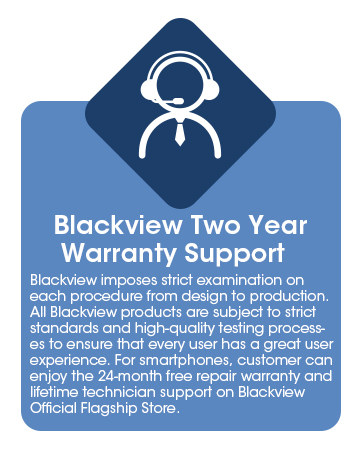
Image: Information graphic detailing Blackview's two-year warranty support, emphasizing strict quality examination and 24-month free repair service.


