1. 서론
This manual provides detailed instructions for the installation, operation, and maintenance of your darkFlash DPW90 ATX Mid-Tower PC Case. Please read this manual thoroughly before beginning assembly to ensure proper setup and optimal performance. This PC case is designed for enthusiasts seeking a blend of aesthetics, performance, and ease of use, featuring a unique back plug-in BTF motherboard compatibility and a full-view curved glass design.
2. 주요 특징
- 고급 후면 장착 마더보드 설계: Supports BTF motherboards for a streamlined interior and simplified cable management. Also compatible with standard ATX, M-ATX, and ITX motherboards.
- 혁신적인 곡면 유리 Views: Features a 270° panoramic tempered glass panel with a natural R-angle transition for a modern aesthetic.
- 향상된 냉각 효율: Optimized airflow with support for up to 10 fans and dual 360mm radiators, ensuring effective heat dissipation.
- Spacious Interior & Easy Installation: Accommodates high-end components, including large GPUs (up to 445mm length) and multiple storage options. The design facilitates hassle-free upgrades and maintenance.
- Type-C Port & Durable Materials: Equipped with a high-speed I/O panel featuring a Type-C interface for fast data transfer. Constructed from premium metal and tempered glass for durability.
3. 패키지 내용
Verify that all components are present before proceeding with installation. If any items are missing or damaged, please contact customer support.
- darkFlash DPW90 ATX Mid-Tower PC Case
- 120mm ARGB 팬 4개 (사전 설치됨)
- 부속품 상자 (나사, 스탠드오프, 케이블 타이 등)
- 사용 설명서 (본 문서)
4. 설정 및 설치
Follow these steps for assembling your PC components within the darkFlash DPW90 case.
4.1. 준비
- PC 케이스를 포장에서 꺼내 안정적이고 평평한 표면에 놓으세요.
- Remove the side panels by gently pulling them off. The curved glass panel is designed for quick removal.

Figure 1: Upgraded Design with Removable Panels
4.2. 마더보드 설치
The DPW90 supports both standard and back plug-in BTF motherboards.
- For Standard Motherboards (ATX, M-ATX, ITX): Secure your motherboard to the pre-installed standoffs using the provided screws.
- For Back Plug-in BTF Motherboards (ATX, M-ATX, ITX): Align the motherboard with the rear-mounted connectors and secure it. This design routes cables to the back of the case for a cleaner look.

Figure 2: Motherboard Compatibility
4.3. 팬 및 라디에이터 설치
The case supports extensive cooling configurations.
- The case comes with 4 pre-installed 120mm ARGB fans.
- It supports up to 10 fans in total.
- Dual 360mm liquid radiators can be installed for advanced cooling. Refer to the diagram for optimal placement.
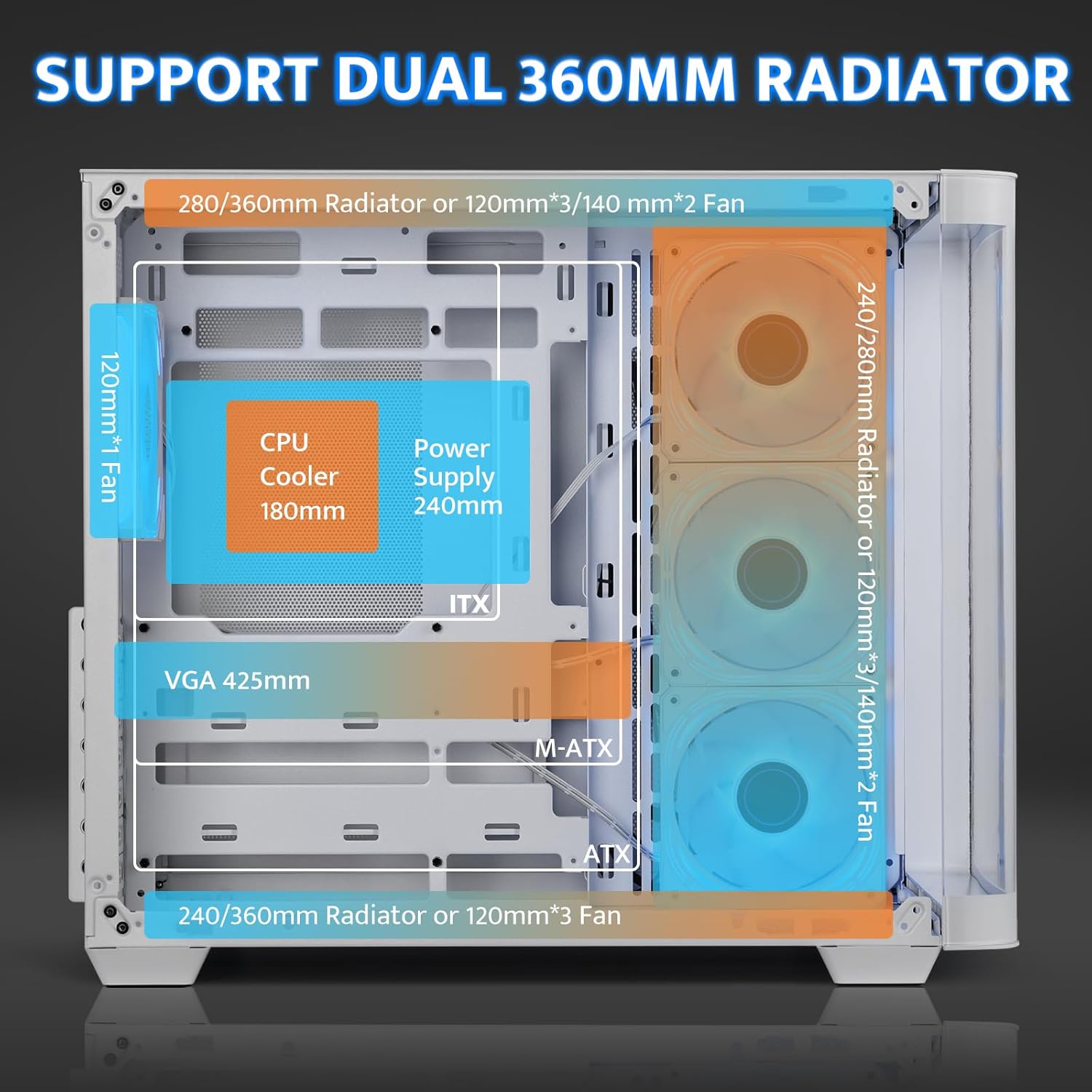
Figure 3: Cooling System Support
4.4. GPU and PSU Installation
- 그래픽 카드: The case accommodates GPUs up to 445mm in length. Utilize the 7 PCI slots for installation.
- PSU : Install the power supply unit (PSU) in the rear-mounted compartment. The maximum supported PSU length is 240mm.
4.5. 스토리지 설치
The multi-function bracket supports multiple storage drives.
- Install up to 3 x 2.5" SSDs and 2 x 3.5" HDDs.
- Ensure proper orientation for SATA and power connections, especially for 2.5" drives, to avoid re-installation.

Figure 4: Multi-Function Storage Bracket
4.6. 전면 I/O 패널 연결
메인보드 설명서에 따라 전면 패널 케이블을 메인보드에 연결하십시오.
- USB 3.0: 1포트
- USB 2.0: 1포트
- 타입 C : 1 port (1280MB/s)
- HD 오디오: Headphone and Microphone jacks
- 재설정 버튼
- LED 제어 버튼

Figure 5: High-Speed I/O Panel
5. 사용 설명서
5.1. 전원 켜기/끄기
Press the power button on the front I/O panel to turn your system on or off.
5.2. ARGB 팬 제어
The pre-installed ARGB fans feature a 5V 3Pin ARGB interface. Connect these to a compatible motherboard header or an external ARGB controller (not included) to customize lighting effects. The case includes an LED control button on the I/O panel for basic lighting adjustments if connected to a compatible hub.

Figure 6: Infinity Mirror ARGB Fans
6. 유지관리
6.1. 먼지 필터 청소
The darkFlash DPW90 includes magnetic dust filters to prevent dust buildup. Regularly remove and clean these filters to maintain optimal airflow and cooling performance.
- Gently pull off the magnetic dust filters located on the top and side panels.
- Clean the filters using compressed air or a soft brush.
- 필터를 다시 부착하세요.
6.2. 일반 청소
부드러운 d를 사용하세요amp cloth to clean the exterior surfaces of the case. Avoid abrasive cleaners or solvents that may damage the finish or tempered glass.
7. 문제 해결
이 섹션에서는 일반적으로 발생할 수 있는 문제에 대해 설명합니다.
7.1. Fans Not Spinning or RGB Not Working
- 연결 확인: Ensure all fan power cables and ARGB cables are securely connected to the motherboard or an ARGB controller.
- 전원: Some included fans may run directly off a SATA power connector. Verify this connection is secure.
- Software/BIOS Settings: If using a motherboard header, check your motherboard's BIOS/UEFI settings or companion software for fan speed and RGB control.
- RGB Hub: Note that an RGB Hub Controller is not included. If advanced control is desired, a separate controller may be needed.
7.2. Limited Space for Cable Management
- Utilize Rear Compartment: The back-mounted motherboard design provides space behind the motherboard tray for cable routing.
- 케이블 타이: Use the included cable ties to bundle and secure cables, optimizing space.
- Modular PSU: If upgrading, consider a modular power supply to reduce unnecessary cable clutter.
7.3. Difficulty Installing Storage Drives
- 2.5" Drive Orientation: For 2.5" SSDs, ensure the SATA data and power ports are facing upwards before securing them to the multi-function bracket.
- 설치 순서: Install 2.5" drives before 3.5" drives if space is constrained.
8. 사양
| 특징 | 사양 |
|---|---|
| 모델명 | DPW90 |
| 상표 | 다크플래시 |
| 케이스 유형 | 미드 타워 |
| 마더보드 호환성 | ATX, Micro ATX, ITX (BTF 후면 플러그인 포함) |
| 재료 | 금속, 강화 유리 |
| 색상 | 하얀색 |
| 제품 크기(LxWxH) | 11.22 x 18.11 x 15.6인치(285 x 460 x 398mm) |
| 품목 무게 | 18.9파운드 |
| CPU 쿨러 높이(최대) | 180mm |
| GPU 길이(최대) | 445mm |
| PSU 길이(최대) | 240mm |
| 냉각 방식 | 공기, 물 |
| 팬 지원 | Up to 10 fans (4 x 120mm ARGB pre-installed) |
| 라디에이터 지원 | Dual 360mm |
| 스토리지 베이 | 2.5인치 SSD 3개, 3.5인치 HDD 2개 |
| 전면 I / O 포트 | 1 x USB 3.0, 1 x USB 2.0, 1 x Type-C, HD Audio, Reset, LED |
9. 보증 및 지원
9.1. 보증 정보
darkFlash products are manufactured to high-quality standards. For specific warranty details regarding your DPW90 PC case, please refer to the warranty card included in your package or visit the official darkFlash web해당 사이트. 보증은 일반적으로 정상적인 사용 조건 하에서의 제조 결함에 적용됩니다.
9.2. 고객 지원
If you encounter any issues or have questions not covered in this manual, please contact darkFlash customer support through their official website or the retailer from whom you purchased the product. Have your product model (DPW90) and purchase information ready when contacting support.
For more information, visit the official darkFlash store: 아마존에서 darkFlash 스토어를 찾아보세요


