1. 서론
구매해주셔서 감사합니다asing the RORRY D15 4-in-1 Wireless Charging Station. This device is designed to simplify your charging experience by providing a centralized solution for your iPhone, Apple Watch, and AirPods, along with a detachable portable power bank. Please read this manual carefully before use to ensure proper operation and to maximize the product's lifespan.
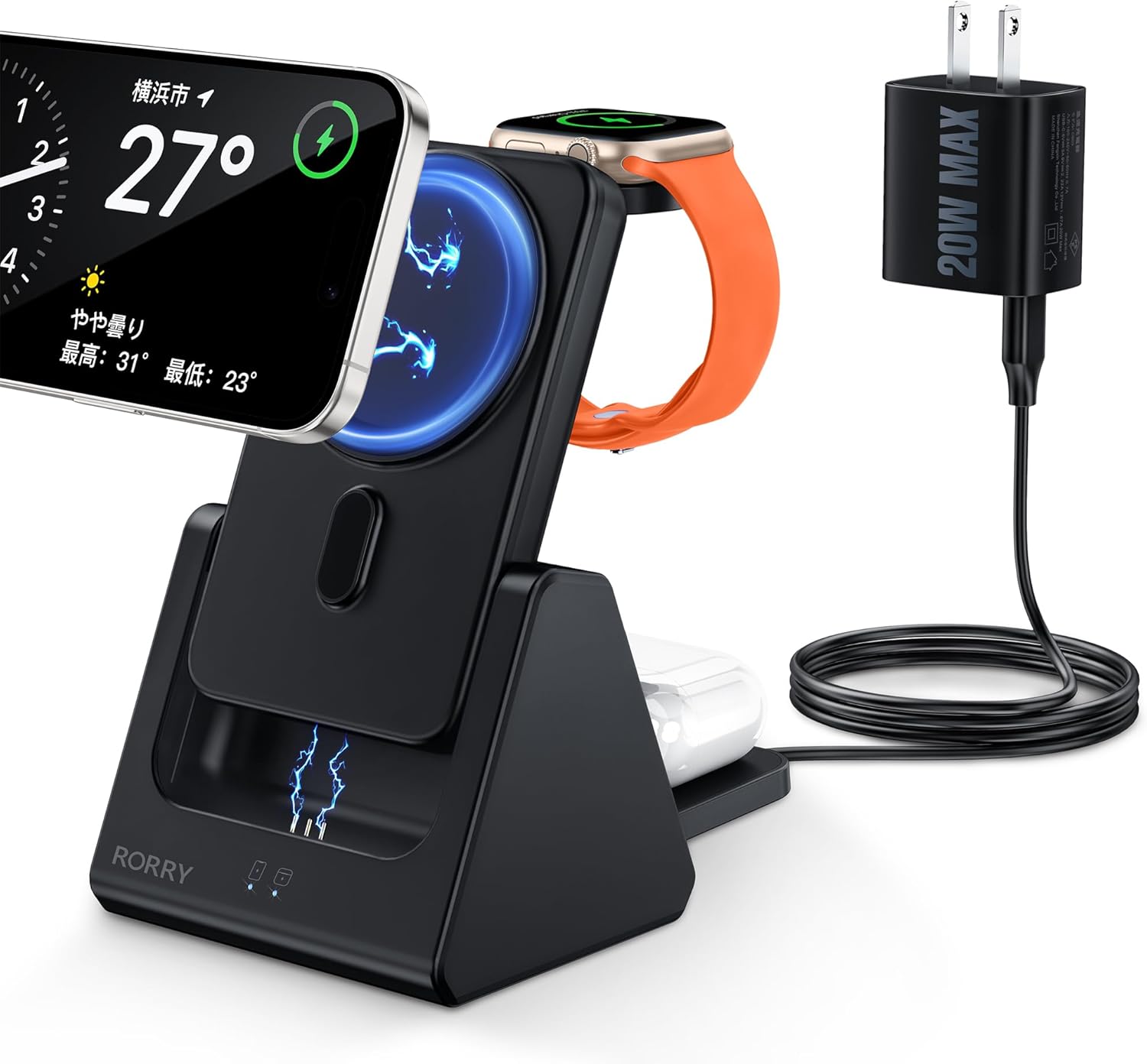
Image: The RORRY D15 charging station in use, simultaneously charging an iPhone, Apple Watch, and AirPods, powered by the included 20W adapter.
2. 패키지 내용
패키지에 모든 구성품이 들어 있는지 확인하십시오. 누락되거나 손상된 구성품이 있는 경우 고객 지원 센터로 문의하십시오.
- RORRY D15 4-in-1 무선 충전 스테이션
- Detachable 5000mAh Mobile Battery
- 20W 전원 어댑터
- USB Type-C 충전 케이블
- 마그네틱 링 (MagSafe와 호환되지 않는 기기용)
- 사용 설명서 (본 문서)

Image: An illustration of the RORRY D15 charging station and its complete set of accessories.
3. 제품 오버view
The RORRY D15 is a versatile charging solution designed for convenience and efficiency. It features a main charging station with dedicated spots for your iPhone, Apple Watch, and AirPods, plus a removable 5000mAh power bank for portable use. The triangular design ensures stability and a compact footprint on your desk.

이미지: 시각적 오버view of the RORRY D15's key features and charging capabilities.
4. 설정
- 전원 연결: Insert the USB Type-C cable into the charging station's input port and connect the other end to the included 20W power adapter. Plug the power adapter into a wall outlet.
- 놓기: Place the charging station on a flat, stable surface. The triangular design provides stability for your devices.
- Mobile Battery Insertion: Ensure the detachable mobile battery is correctly seated in its designated slot on the charging station.

Image: The stable triangular design of the RORRY D15, ideal for desktop use.
5. 사용 설명서
5.1 여러 기기를 동시에 충전하기
The RORRY D15 allows you to charge your iPhone, Apple Watch, and AirPods concurrently. Simply place each device on its respective charging area.

Image: The charging station actively charging an iPhone, Apple Watch, and AirPods.
5.2 Magnetic Wireless Charging (iPhone)
For MagSafe-compatible iPhones (iPhone 12 series and newer), simply align your device with the magnetic charging pad. The strong magnets will secure it in place, and charging will begin automatically. The charger supports up to 15W fast wireless charging for compatible models.
- 메모: For iPhone 8 through iPhone 11, a magnetic ring (included) or a MagSafe-compatible case is required for magnetic attachment and charging.
- Ensure your phone case is less than 3mm thick for optimal magnetic connection and charging efficiency.

Image: Magnetic wireless charging in action, with an iPhone securely attached and charging.
5.3 애플 워치 충전
Place your Apple Watch on the dedicated charging module. The module is designed to hold your watch securely and initiate charging automatically.

Image: Apple Watch charging on the RORRY D15, illustrating compatibility with various models.
5.4 AirPods Charging
Place your AirPods case (with wireless charging capability) on the designated flat charging pad at the base of the station. Charging will begin automatically.

Image: AirPods charging on the base pad of the RORRY D15.
5.5 Detachable Mobile Battery Usage
The 5000mAh mobile battery can be detached from the main station for portable charging. It features a foldable kickstand, allowing you to prop up your phone vertically or horizontally while charging on the go.
- 분리하려면: Gently pull the mobile battery upwards from its slot in the main station.
- 다시 연결하려면: Align the mobile battery with the slot and push it down until it clicks into place.
- Charging the Mobile Battery: The mobile battery charges when docked in the main station. It can also be charged directly via its Type-C port (up to 18W input).

Image: The detachable 5000mAh mobile battery, shown both integrated and separated, charging an iPhone and Apple Watch.

Image: The portable mobile battery attached to an iPhone, demonstrating its compact size and integrated kickstand.

Image: Methods for charging the detachable mobile battery.
6. 사양
| 모델 | 디15 |
| 상표 | 로리 |
| 색상 | 검은색 |
| 재료 | ABS |
| 연결성 | USB 타입-C |
| 입력 Voltage | 5 Volts (via 20W adapter) |
| 무선 출력(아이폰) | 최대 15W(MagSafe 호환) |
| 무선 출력(Apple Watch) | 2.5와트 |
| Wireless Output (AirPods) | 5W |
| Mobile Battery Capacity | 5000mAh |
| Mobile Battery Input/Output | Type-C bidirectional (Max 18W input) |
| 제품 치수 | 7.6 x 9.3 x 13.5cm |
| 제품 무게 | 270g |
| 안전 인증 | PSE Certified, Overcharge Protection, Over-discharge Protection, Overheat Protection, Short-circuit Protection |
| 호환 장치 | iPhone 16/16pro/16Pro Max/16Plus/15/15pro/15Pro Max/15 Plus/14/14 Pro/14 Pro Max/14 Plus/13/13 Mini/13 Pro/13 Pro max/12/12 Mini/12 Pro/12 Pro Max; iPhone 8/8 Plus/ X/XS/XS Max/XR/11/11 Pro/iPhone 11 Pro Max/iPhone SE (2nd Gen) (Magnetic ring or MagSafe case required for magnetic attachment on iPhone 8-11); Apple Watch Ultra/9/8/7/SE/6/5/4/3; AirPods 3/2/ Pro/Pro2 |
7. 안전 정보
To ensure safe operation and prolong the life of your RORRY D15 charging station, please observe the following safety guidelines:
- Use only the included 20W power adapter or a compatible 9V/12V power adapter.
- 장치를 직사광선이나 극한의 온도에 노출시키지 마십시오.
- 기기를 직접 분해, 개조하거나 수리하려고 하지 마세요.
- 기기를 물, 습기 및 인화성 물질로부터 멀리하십시오.
- 충전 스테이션을 사용하는 동안 주변에 적절한 환기가 이루어지도록 하십시오.
- The product is equipped with multiple safety features including overcharge, over-discharge, overheating, and short-circuit protection.

이미지: 이상view of the RORRY D15's safety protection features.
8. 유지관리
- Clean the charging surfaces regularly with a soft, dry cloth to ensure optimal contact and charging efficiency.
- 연마성 세척제나 용제를 사용하지 마십시오.
- 사용하지 않을 때는 장치를 서늘하고 건조한 곳에 보관하십시오.
- If the mobile battery is constantly kept in the station, it will always be fully charged. This may shorten the mobile battery's lifespan.
9. 문제 해결
- 장치가 충전되지 않음:
- Ensure the power adapter is securely plugged into a working outlet and the charging cable is firmly connected to the station.
- Verify that your device is correctly placed on the charging area and aligned with the coils.
- Remove any thick or metallic phone cases (cases thicker than 3mm may interfere with wireless charging).
- 기기와 충전 패드 사이에 이물질이 있는지 확인하세요.
- 기기를 재시작하고 다시 시도해 보세요.
- 느린 충전:
- Ensure you are using the included 20W power adapter or a compatible fast charging adapter (9V/12V output).
- 기기가 빠른 무선 충전을 지원하는지 확인하세요.
- 충전 중에는 기기를 장시간 사용하지 마세요.
- Device or charger getting hot:
- 무선 충전 중 약간의 열 발생은 정상입니다.
- If the device becomes excessively hot, remove it from the charger immediately.
- Ensure there are no foreign objects on the charging pad.
- 직사광선이나 더운 환경에서 충전하지 마세요.
- Magnetic attachment issues (for iPhone 8-11):
- Ensure a magnetic ring (included) is properly attached to your phone or case, or use a MagSafe-compatible case.
10. 보증 및 지원
The RORRY D15 Wireless Charging Station comes with a 1년 보증 구매일로부터. 본 보증은 정상적인 사용 중 발생한 제조상의 결함 및 고장에 적용됩니다.
If you encounter any issues or have questions regarding your product, please do not hesitate to contact RORRY customer support. Our team is available to assist you.
For support, please refer to the contact information provided on the product packaging or the official RORRY web대지.
Image: RORRY's after-sales service commitment, including warranty details.


