1. 중요한 안전 정보
Please read all safety instructions carefully before using the VETEK NPX108 camcorder. Keep this manual for future reference.
- 카메라를 물이나 습기에 노출시키지 마십시오.
- 극한의 온도를 피하세요.
- 카메라를 직접 분해하거나 수리하려고 하지 마십시오.
- 승인된 액세서리와 전원 어댑터만 사용하십시오.
- 어린이의 손이 닿지 않는 곳에 보관하세요.
2. 패키지 내용
패키지에 모든 품목이 들어 있는지 확인하세요.
- VETEK NPX108 4K Camcorder
- 휴대용 안정기
- 렌즈 후드
- 마이크로폰
- 필 라이트
- 64GB SD 카드
- 원격 제어
- DV-108 Battery (4500mAh)
- USB 케이블
- 충전기
- 카메라 가방
- 사용자 설명서

Image: The VETEK NPX108 camcorder with all included accessories, such as the handheld stabilizer, microphone, fill light, SD card, battery, cables, and carrying bag.

Image: A visual representation of the camcorder and its accessories, including microphone, remote control, LED lights, lens hood, battery, bag, 64GB SD card, data line, charger, and user manual.
3. 제품 오버view
3.1. 구성 요소 및 제어

Image: A multi-angle diagram of the camcorder highlighting key components such as Handle Charging Port, Battery, Video Button, Photo Button, Confirmation Button/Control Wheel, DISP Button, USB Interface/Camera Charging Port, MIC Interface, HDMI Interface, Lens, Power Button, Menu Button, Mode Button, Playback Button, SD Card Slot, Speaker, Handle Hot Shoe, Handle Video/Photo Button, Handle Digital Zoom, Camera Zoom, and Camera Hot Shoe.
The VETEK NPX108 camcorder features a 4.0-inch 270-degree rotating touchscreen for flexible viewing and control. It supports 4K Ultra HD 60FPS video resolution and 64MP image resolution, with 18X digital zoom.

Image: The VETEK NPX108 camcorder showcasing its 4K UHD capabilities, 64MP resolution, 270-degree rotating screen, and 3.0-inch HD touch screen.
4. 설정
4.1. 배터리 설치 및 충전
The camcorder uses a 4500mAh Lithium Polymer battery. Ensure the battery is fully charged before first use.
- 배터리 덮개를 엽니다.
- 배터리의 극성 표시를 보고 배터리를 삽입하십시오.
- 배터리 덮개를 단단히 닫으세요.
- Connect the USB cable to the camera's charging port and the charger, then plug into a power outlet. The camera supports recording while charging.

Image: The camcorder displaying a 93% battery charge on its screen, emphasizing its 4500mAh battery for longer shooting times.
4.2. SD 카드 설치
The camcorder comes with a 64GB SD card. Insert it correctly to store your recordings.
- 카메라에서 SD 카드 슬롯을 찾으세요.
- SD 카드의 금속 접촉면이 올바른 방향을 향하도록 하여 딸깍 소리가 나면서 제자리에 고정될 때까지 삽입하십시오.
- To remove, gently press the card until it ejects.
4.3. 액세서리 부착
Attach the included accessories for enhanced functionality.
- 휴대용 안정기: Attach the stabilizer to the bottom of the camera for improved stability, especially for low-angle shots. It includes zoom and shooting buttons for convenience.
- 마이크로폰: Connect the external microphone to the MIC interface for clearer audio recording, reducing background noise.
- 빛을 채우다: Mount the fill light onto the camera's hot shoe for additional illumination in low-light conditions. Adjust brightness and color temperature as needed.
- 렌즈 후드: Attach the lens hood to protect the lens from damage and improve image contrast by reducing glare.
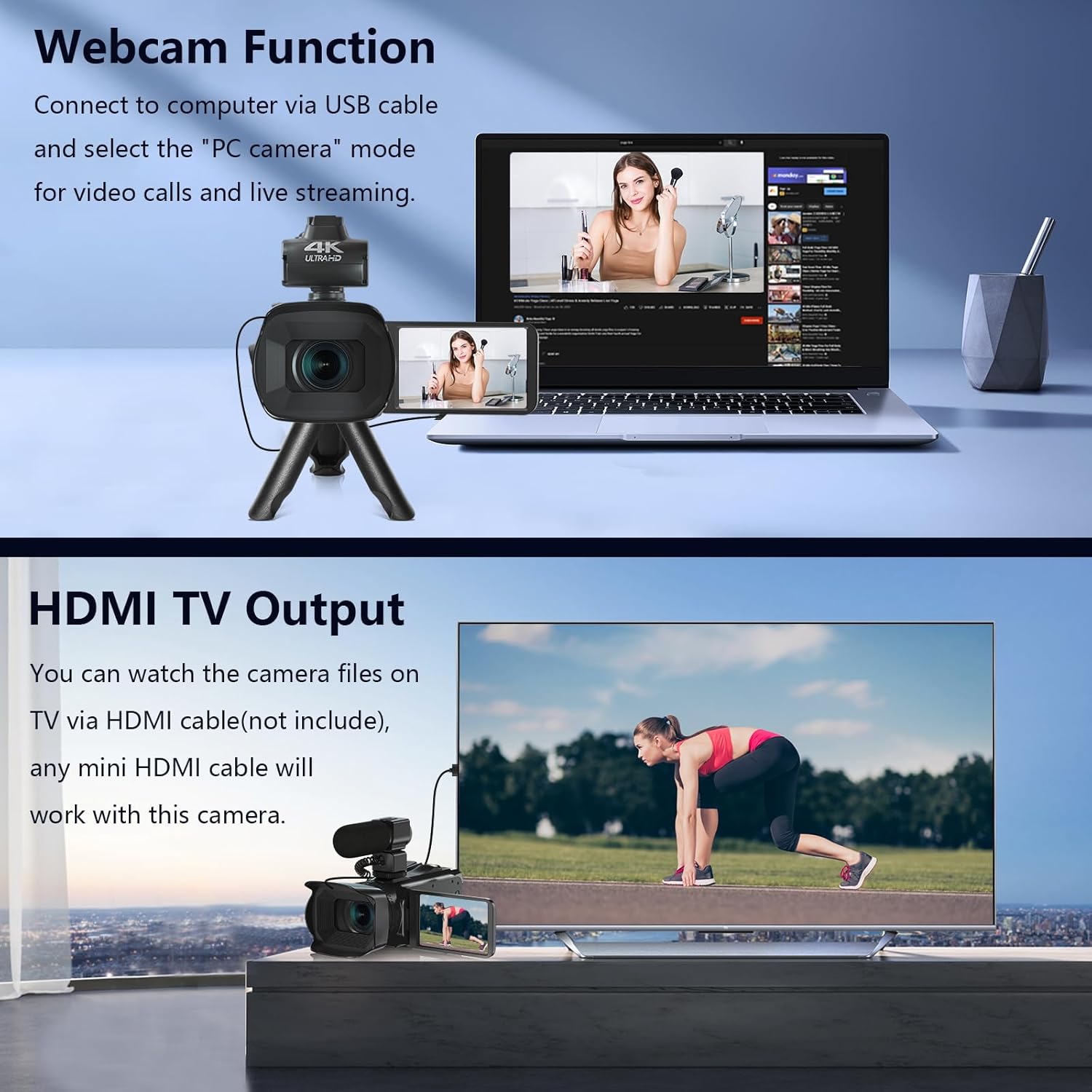
Image: The fill light accessory demonstrating its adjustable brightness (100%, 50%, 10%) and color temperature (3300K-5600K) settings, with examples of white light, white glow, and warm light.
5. 카메라 작동
5.1. 전원 켜기/끄기
Open the LCD screen to power on the camera. Close it to power off.
5.2. 기본 녹화 (비디오/사진)
Use the dedicated Video and Photo buttons to switch between modes and start/stop recording or capture images.
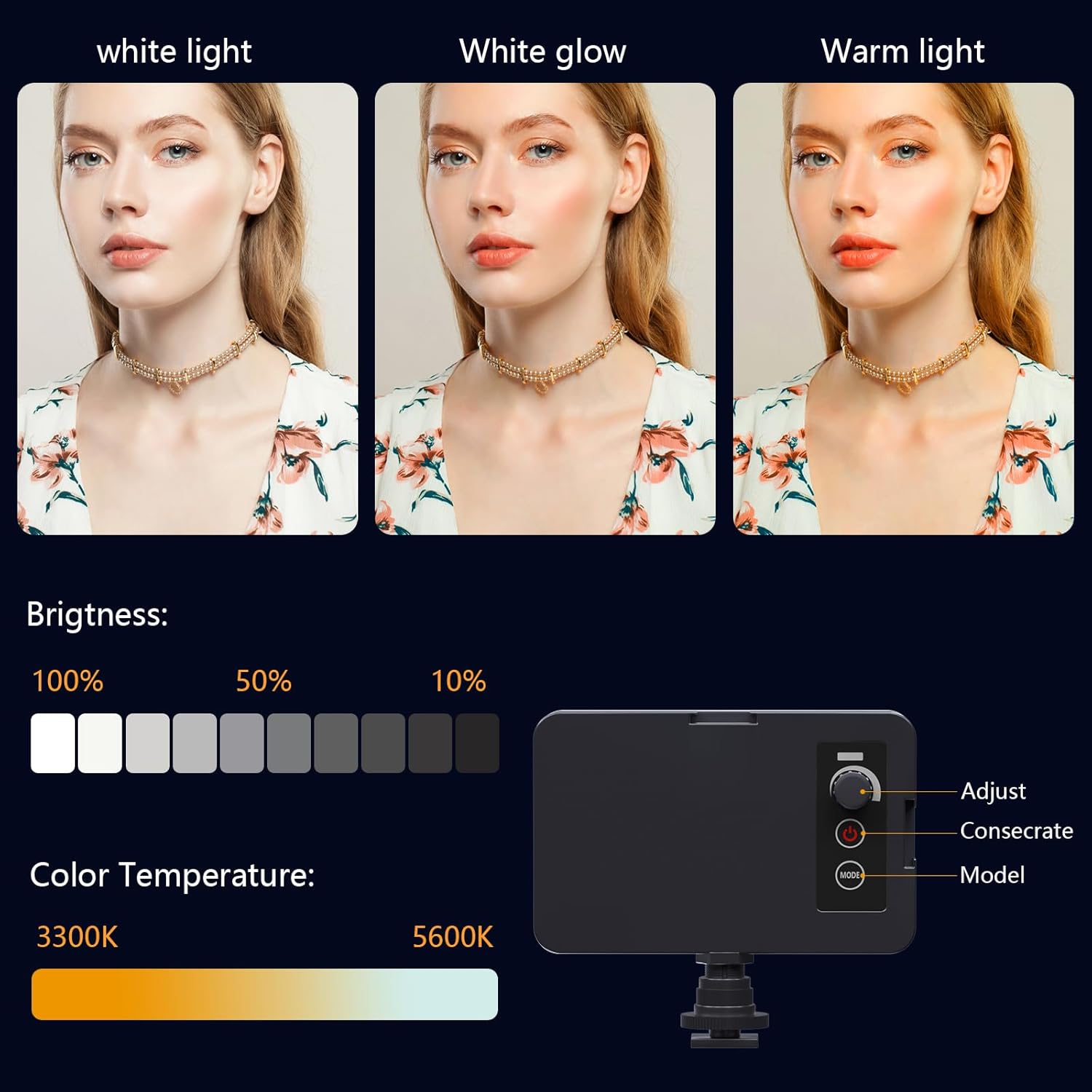
Image: The camcorder recording a 4K 60FPS video, with smaller inset images showing the effect of 18X, 16X, and 12X digital zoom on a subject.
5.3. 줌 기능
Use the zoom controls on the camera body or handheld stabilizer to adjust the 18X digital zoom.
5.4. 터치스크린 조작
Navigate menus and settings directly on the 4.0-inch touchscreen. The screen can rotate 270 degrees for versatile shooting angles.
5.5. 메뉴 설정
Press the Menu button to access various settings such as resolution, white balance, exposure, and metering mode. Use the control wheel or touchscreen to make selections.
5.6. Wi-Fi Connection and App Usage
Connect your smartphone to the camcorder via Wi-Fi to control it remotely and transfer files.
- Turn on Wi-Fi on the camcorder via the menu. The screen will display the Wi-Fi ID (e.g., 4K_WIFI) and password (e.g., 12345678), along with a QR code.
- Download the "IDC CAM" app by scanning the QR code or searching on your app store.
- On your smartphone, go to Wi-Fi settings and connect to the camcorder's Wi-Fi network using the provided password.
- Open the "IDC CAM" app. You can now view a live feed, control recording, and capture photos remotely.

Image: The camcorder's screen showing Wi-Fi ID, password, and a QR code for downloading the companion app, with smartphones connected via Wi-Fi in the background.
For a visual guide on Wi-Fi connection and app usage, watch this video:
Video: This video demonstrates how to connect the NPX108 digital video camera to Wi-Fi and use the companion app for remote control and file 관리.
5.7. Web캠 기능
캠코더는 다음과 같은 용도로 사용할 수 있습니다. webcam for video calls and live streaming.
- USB 케이블을 사용하여 캠코더를 컴퓨터에 연결합니다.
- On the camera's screen, select "PC CAM" mode.
- 이제 컴퓨터가 캠코더를 인식할 것입니다. web캠.
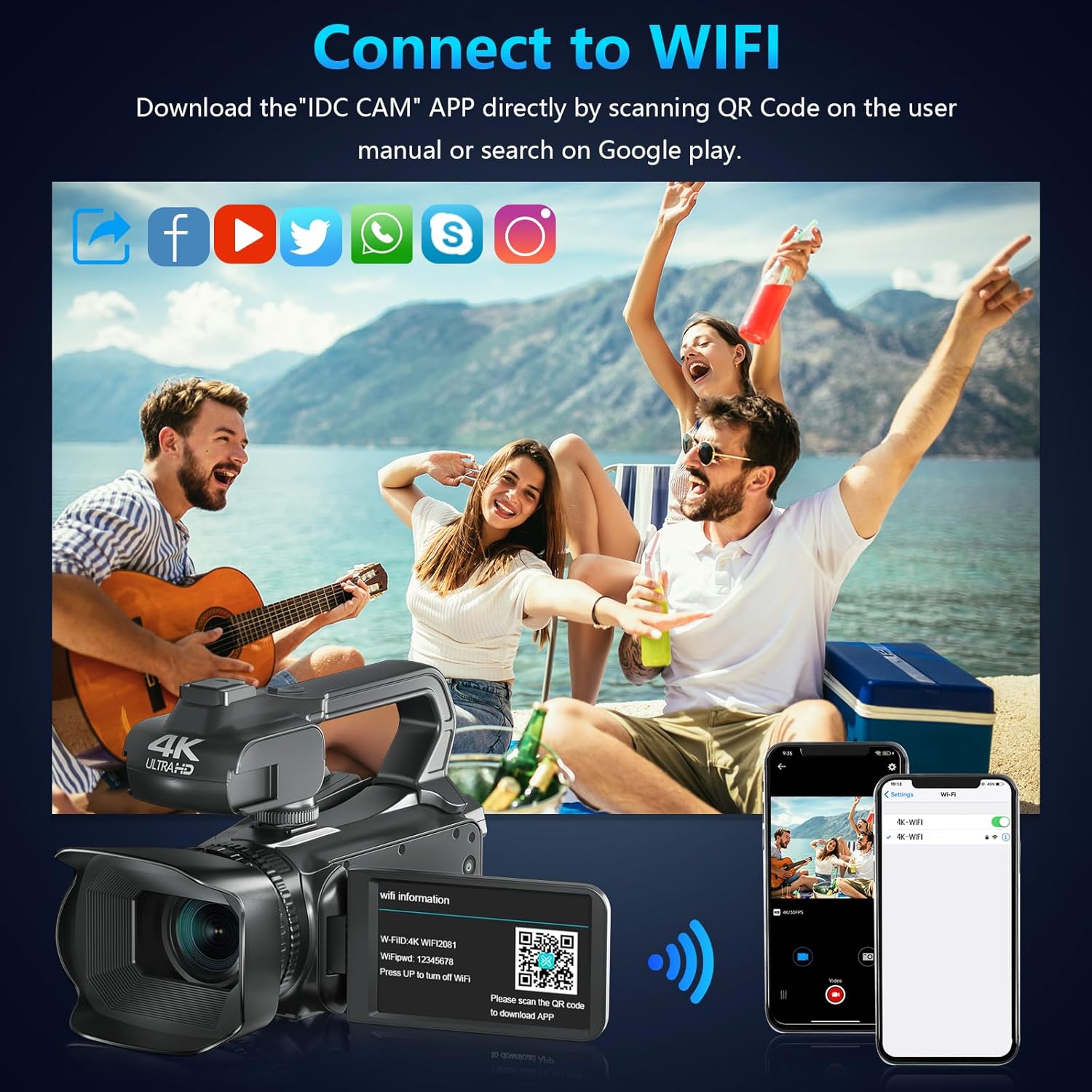
Image: The camcorder functioning as a webcam connected to a laptop, and also connected to a TV via HDMI for output.
5.8. HDMI TV Output
View your recorded videos and photos directly on a TV or monitor.
- Connect the camcorder to your TV using a mini HDMI cable (not included).
- TV에서 적절한 HDMI 입력을 선택합니다.
- The camera's display will now be mirrored on your TV.

Image: The camcorder connected to a laptop for live streaming (webcam mode) and to a TV via an HDMI cable for real-time view콘텐츠의 ing.
5.9. 특별 기능
- 충전 중 녹음: Continue recording even when the battery is low by connecting the charger.
- 느린: Capture dynamic scenes in slow motion.
- 타임 랩스 : Record events over an extended period and condense them into a short video.
- 셀프타이머: Set a delay before capturing a photo or starting a video.
- 흔들림 방지: 디지털 이미지 안정화 기능은 카메라 흔들림으로 인한 흐림 현상을 줄여줍니다.
- 야간 투시경: 선명한 음식을 캡처하세요tage 저조도 조건에서.

Image: A collage demonstrating various camcorder features: recording while charging, pause function, continuous shooting, and anti-shake stabilization.

Image: A sequence of three images illustrating the time-lapse recording feature, capturing the progression of a sunset over water.
6. 유지관리
6.1. 청소
- 부드럽고 마른 천을 사용하여 카메라 본체를 청소하세요.
- For the lens, use a lens cleaning cloth and specialized lens cleaning solution. Avoid touching the lens directly with your fingers.
- Clean the touchscreen with a microfiber cloth.
6.2. 보관
- When not in use, store the camera in its protective bag in a cool, dry place.
- 장시간 카메라를 사용하지 않을 경우에는 배터리를 제거하세요.
7. 문제 해결
| 문제 | 가능한 원인 | 해결책 |
|---|---|---|
| 카메라 전원이 켜지지 않습니다 | 배터리가 소진되었거나 잘못 삽입되었습니다. | 배터리를 충전하거나 올바르게 다시 삽입하십시오. |
| 영상 녹화/사진 촬영이 불가능합니다 | SD 카드가 가득 찼거나, 삽입되지 않았거나, 손상되었습니다. | Insert a new SD card, ensure it's properly inserted, or format the card (this will erase all data). |
| 영상/이미지 품질이 좋지 않음 | 렌즈가 더럽거나, 조명이 부족하거나, 설정이 잘못되었습니다. | Clean the lens, use the fill light, or adjust exposure/white balance settings. |
| Wi-Fi 연결 문제 | Incorrect password, app not installed, or distance too far. | Verify password, install "IDC CAM" app, ensure close proximity to camera. |
8. 사양
- 상표: 베텍
- 모델 번호: NPX108
- 비디오 캡처 해상도: 4K(60FPS)
- 이미지 해상도: 64MP
- 디지털 줌: 18X
- 화면 크기: 4.0 Inches (270-degree rotating touchscreen)
- 연결성: 와이파이, USB, HDMI
- 특별 기능: Auto Focus, Recording While Charging, Slow Motion, Time-Lapse, Webcam Function, Self-Timer, HD Output, External MIC Support, Handheld Stabilizer Support, Night Vision, Anti-Shake, Face Detection
- 배터리: 4500mAh 리튬 폴리머(포함)
- 저장: SD 카드 (64GB 포함)
- 품목 무게: 3.56파운드
- 제품 크기: 6.7 x 3.8 x 3.9 인치
9. 보증 및 지원
VETEK products are designed for quality and reliability. For any issues or inquiries, please refer to the following:
- 반품 정책: All products are eligible for a free return within 30 days of purchase.
- 고객 서비스: VETEK offers 24-hour customer service. Please contact us for assistance.
- 보호 계획: Extended protection plans are available for purchase (e.g., 2-Year Protection Plan, 3-Year Protection Plan, Complete Protect).

Image: The VETEK brand logo, representing quality and customer commitment.


