1. 서론
Thank you for choosing the Mibro Earbuds AC1 Wireless Earbuds. These earbuds combine an elegant design with exceptional audio performance, offering clear, immersive sound for your favorite music. With stable Bluetooth connectivity and a comfortable ergonomic fit, they are designed for convenience and quality audio on the go. This manual provides detailed instructions to help you get the most out of your new earbuds.
2. 안전 정보
Please read all safety instructions before using this product.
- 이어버드나 충전 케이스를 극한의 온도, 습도 또는 액체에 노출시키지 마세요.
- 기기를 떨어뜨리거나 충격을 주거나 분해하지 마십시오.
- 어린이와 애완동물의 접근을 차단하세요.
- 제공되거나 인증된 충전 케이블만 사용하세요.
- 높은 볼륨으로 장시간 청취하면 청력이 손상될 수 있습니다.
3. 패키지 내용
패키지에 모든 품목이 들어 있는지 확인하세요.
- Mibro Earbuds AC1 (Left and Right)
- 충전 케이스
- 충전 케이블
- 사용 설명서 (본 문서)
4. 제품 오버view
Familiarize yourself with the components of your Mibro Earbuds AC1.

그림 4.1: Mibro Earbuds AC1 removed from their open charging case, displaying the earbuds and the case.
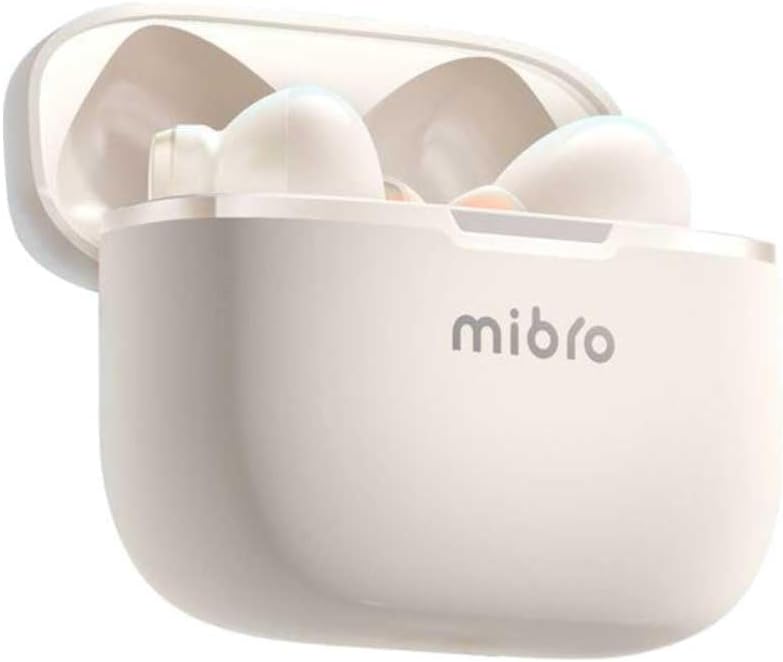
그림 4.2: Mibro Earbuds AC1 placed inside their open charging case, showing the compact design.
The earbuds feature an ergonomic design for a secure and comfortable fit. The charging case protects the earbuds and recharges them on the go.
5. 설정
5.1 이어버드와 케이스 충전
처음 사용하기 전에 이어버드와 충전 케이스를 완전히 충전하세요.
- 이어버드를 충전 케이스에 넣으세요.
- 충전 케이블을 케이스의 충전 포트와 USB 전원에 연결하세요.
- The indicator light on the case will show charging status. A full charge may take up to 1 day (Note: This is an unusual specification, typically measured in hours. Please refer to product packaging for precise charging time).
- 완전히 충전되면 케이블을 분리하세요.
5.2 블루투스 기기와 페어링
To connect your Mibro Earbuds AC1 to your smartphone or other Bluetooth-enabled device:
- 이어버드가 충전되어 있고 충전 케이스에 넣어져 있는지 확인하세요.
- 충전 케이스 뚜껑을 여세요. 이어버드가 자동으로 페어링 모드로 전환됩니다(표시등이 깜빡입니다).
- 기기에서 블루투스 설정으로 이동하여 블루투스를 켜세요.
- 검색 available devices and select "Mibro AC1" from the list.
- 연결이 완료되면 이어버드의 표시등이 깜빡임을 멈춥니다.
- 기기에서 Bluetooth가 활성화되어 있는 경우, 이어버드를 케이스에서 꺼내면 마지막으로 페어링된 기기에 자동으로 다시 연결됩니다.
6. 사용 설명서
6.1 전원 켜기/끄기
- 전원 켜기: 충전 케이스 뚜껑을 열거나 이어버드를 케이스에서 꺼내세요. 이어버드가 자동으로 켜집니다.
- 전원 끄기 : 이어버드를 충전 케이스에 다시 넣고 뚜껑을 닫으세요. 이어버드가 자동으로 전원이 꺼지고 충전이 시작됩니다.
6.2 음악 재생
Use the touch controls on the earbuds to manage music:
- 재생/일시 중지: 양쪽 이어버드를 한 번 탭하세요.
- 다음 트랙: 오른쪽 이어버드를 두 번 탭하세요.
- 이전 트랙 : 왼쪽 이어버드를 두 번 탭하세요.
6.3 통화 관리
터치 컨트롤로 전화 통화를 관리하세요:
- 전화 받기/종료: 양쪽 이어버드를 한 번 탭하세요.
- 전화 거부: 양쪽 이어버드를 2초 동안 길게 누릅니다.
6.4 소음 제거
The Mibro AC1 Earbuds feature noise cancellation. Specific controls for activating or deactivating this feature are typically managed via a long press or a specific tap sequence. Refer to the quick start guide included in your package for precise instructions, as these can vary.
7. 유지관리
7.1 청소
- 부드럽고 마른 보푸라기 없는 천으로 이어버드와 충전 케이스를 닦으세요.
- 연마성 세척제, 알코올, 화학 용제는 사용하지 마세요.
- 충전 접점이 깨끗하고 건조한지 확인하십시오.
7.2 보관
사용하지 않을 때는 이어버드를 충전 케이스에 넣어 보호하고 충전 상태를 유지하세요. 직사광선을 피해 서늘하고 건조한 곳에 보관하십시오.
8. 문제 해결
If you encounter issues with your Mibro Earbuds AC1, try the following solutions:
| 문제 | 해결책 |
|---|---|
| 이어폰이 페어링되지 않음 |
|
| 이어폰에서 소리가 나지 않음 |
|
| 이어폰이 충전되지 않음 |
|
9. 사양
| 특징 | 세부 사항 |
|---|---|
| 모델명 | XPEJ010WW (AC1) |
| 상표 | 미브로 |
| 연결 기술 | 무선(블루투스) |
| 특별 기능 | 소음 제거 |
| 색상 | 따뜻한 흰색 |
| 폼 팩터 | 인이어 |
| 재료 | 플라스틱 |
| 방수 레벨 | 방수가 아닙니다 |
| 충전 시간 | Up to 1 day (Note: This is an unusual specification, typically measured in hours. Please refer to product packaging for precise charging time.) |
10. 보증 및 지원
Mibro products are designed and manufactured to the highest quality standards. For detailed warranty information, please refer to the warranty card included with your purchase or visit the official Mibro web대지.
For further assistance, technical support, or to explore other Mibro products, please visit the 아마존에서 Mibro 스토어를 만나보세요.


