1. 서론
This manual provides instructions for the proper use and maintenance of your Vieta Pro VM-MF040BK Wireless ENC Lavalier Microphones. Please read this manual thoroughly before using the product to ensure optimal performance and longevity.
The Vieta Pro VM-MF040BK system includes two wireless lavalier microphones and a charging case, designed for high-quality audio recording with environmental noise cancellation (ENC). It offers broad compatibility with USB-C and Lightning devices.

Image 1.1: The Vieta Pro VM-MF040BK wireless microphone system, including two microphones and their charging case.
2. 패키지 내용
패키지에 모든 품목이 들어 있는지 확인하세요.
- 2 x Vieta Pro Wireless Lavalier Microphones
- 1 x 충전 케이스
- 1 x USB-C 수신기
- 1 x 번개 수신기
- 1 x USB 충전 케이블
- 사용 설명서 (본 문서)
3. 제품 오버view
3.1 마이크 기능
- 전원 버튼: 전원을 켜거나 끄려면 길게 누릅니다.
- 상태 표시등: 전원, 페어링 및 충전 상태를 나타냅니다.
- 클립: For attaching the microphone to clothing.
- 마이크 입력: 오디오를 캡처합니다.
- USB-C 충전 포트: For individual microphone charging (if not using case).
3.2 수신기 기능
- USB-C 커넥터 : For Android, Mac, and Windows devices.
- 라이트닝 커넥터: iOS 기기용.
- 상태 표시등: 연결 상태를 나타냅니다.
- Pass-through Charging Port: Allows charging of the connected device while the receiver is in use.
3.3 충전 케이스 특징
- 충전 슬롯: For storing and charging the microphones.
- USB-C 충전 포트: 케이스 자체를 충전하기 위해서입니다.
- 배터리 표시기: 충전 케이스의 배터리 잔량을 표시합니다.
4. 설정 및 연결
4.1 초기 충전
처음 사용하기 전에 마이크와 충전 케이스를 완전히 충전하십시오.
- Place both microphones into the charging slots within the charging case.
- Connect the charging case to a power source using the provided USB charging cable. The battery indicator on the case will show charging progress.
- The microphone indicator lights will illuminate during charging and turn off when fully charged.
A full charge provides up to 10 hours of continuous use for each microphone.
4.2 장치에 연결하기
- 마이크 전원 켜기: Take the microphones out of the charging case. They will automatically power on and enter pairing mode. The indicator light will flash.
- 수신기 연결: Identify the correct receiver for your device (USB-C for Android/Mac/Windows, Lightning for iOS). Plug the receiver directly into your device's charging/data port.
- 자동 페어링: The microphones will automatically pair with the receiver. Once paired, the indicator lights on both the microphones and the receiver will turn solid blue.
- 연결 확인: Open your recording application (e.g., camera app, voice recorder, podcast app) and ensure the audio input is recognized as the external microphone.
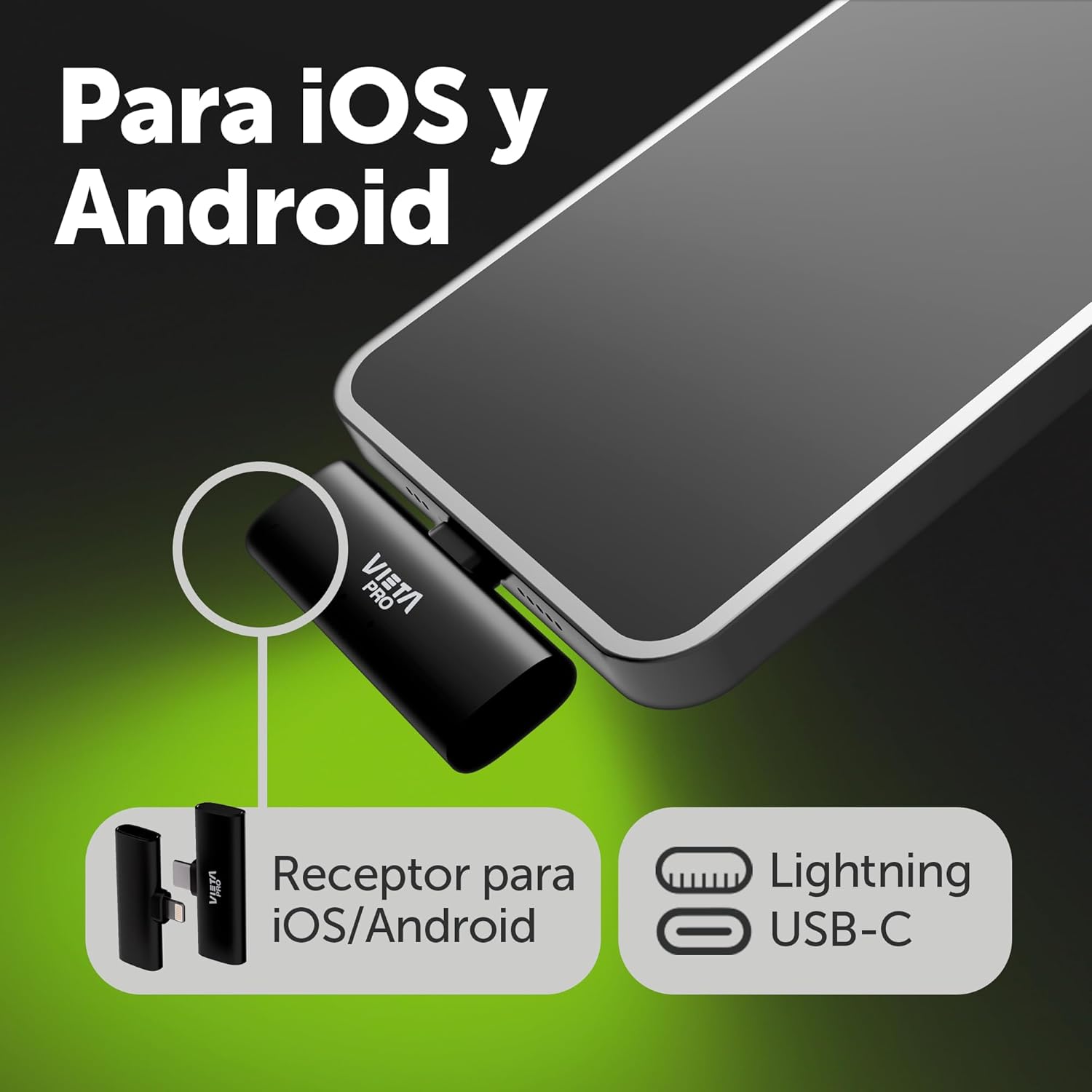
Image 4.2.1: The USB-C and Lightning receivers for broad device compatibility.

이미지 4.2.2: Example of the Lightning receiver connected to an iOS device.
5. 사용 설명서
5.1 마이크 착용
Attach the microphone to your clothing using the integrated clip. For optimal sound quality, position the microphone approximately 6-8 inches (15-20 cm) from your mouth, ideally on your lapel or collar.

Image 5.1.1: Proper placement of the lavalier microphone on clothing.
5.2 주변 소음 제거(ENC)
The microphones feature built-in ENC technology to reduce ambient background noise. This function is active by default to ensure clear voice capture in various environments.
5.3 게인 레벨 조정
The microphones offer 3 levels of gain adjustment. Refer to your device's recording software or the microphone's physical controls (if available, not explicitly detailed in product info) to adjust the input sensitivity. Start with a medium gain level and adjust as needed to prevent audio clipping or low volume.
5.4 오디오 모니터링
Some devices and applications allow real-time audio monitoring through headphones connected to the device while the microphone is in use. This feature helps ensure optimal sound quality during recording.
5.5 패스스루 충전
The receiver includes a pass-through charging port. This allows you to charge your connected mobile device (phone, tablet) simultaneously while using the microphone system, ensuring uninterrupted recording sessions.
6. 유지관리 및 관리
- 청소: Use a soft, dry cloth to clean the microphones and charging case. Do not use liquid cleaners or solvents.
- 저장: Store the microphones in their charging case when not in use to protect them and keep them charged. Store in a cool, dry place.
- 배터리 관리 : To prolong battery life, avoid fully discharging the batteries frequently. Charge regularly, even if not in constant use.
- 극한의 환경을 피하세요: 제품을 극심한 온도, 습도, 직사광선에 노출시키지 마세요.
7. 문제 해결
| 문제 | 가능한 원인 | 해결책 |
|---|---|---|
| Microphones not powering on | 배터리 부족 | Place microphones in the charging case and charge fully. |
| 사운드 녹음 없음 |
|
|
| Poor audio quality / excessive background noise |
|
|
| Limited transmission range | 장애물 또는 간섭 | Ensure a clear line of sight between the microphone and receiver. Avoid strong electromagnetic interference sources. The maximum range is 20 meters (65 feet). |
8. 사양
| 특징 | 세부 사항 |
|---|---|
| 모델 번호 | VM-MF040BK |
| 마이크 폼 팩터 | 라발리에 (클립형) |
| 연결 기술 | 무선 전화 |
| 커넥터 유형 | USB-C, 라이트닝 |
| 극성 패턴 | 단방향 |
| 주파수 응답 | 48 KHz (16-bit) |
| 특별 기능 | Environmental Noise Cancellation (ENC), 3 Gain Levels, Pass-through Charging |
| Battery Life (Microphone) | 마이크당 최대 10시간 |
| 전송 범위 | 최대 20미터(65피트) |
| 호환 장치 | Android Mobile, iOS Mobile, Mac, Windows |
| 전원 | 배터리 구동식 (리튬 이온 배터리 3개 포함) |
| 재료 | 수지 |
| 색상 | 검은색 |
9. 보증 및 지원
보증 정보 및 고객 지원은 구매 시 동봉된 설명서를 참조하거나 Vieta Pro 공식 웹사이트를 방문하십시오. web사이트. 보증 청구를 위해 구매 증빙 자료를 보관하세요.
For technical assistance or further inquiries, please contact Vieta Pro customer service.


