1. 서론
Thank you for choosing the VOLT PLUS TECH Dual USB-C + MicroUSB Switch Cable. This versatile cable is designed to provide efficient charging and high-speed data transfer for a wide range of devices, featuring both Micro USB and USB-C connectors. This manual provides essential information for setup, operation, maintenance, and troubleshooting to ensure optimal performance of your cable.
2. 주요 특징
- 보편적 인 호환성 : Equipped with both Micro USB and USB-C connectors, ensuring compatibility with a vast majority of modern devices.
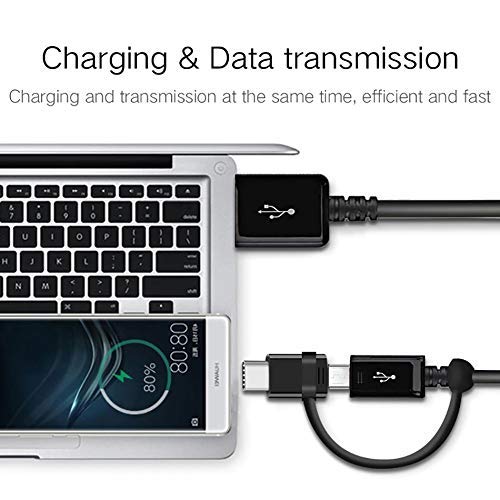
- 이중 기능: Supports both power delivery for charging and high-speed data transmission simultaneously.
- 빠른 충전 지원: Engineered to support various fast charging technologies, including Quick Charge (QC 3.0/2.0/1.0) and Power Delivery (PD) up to 25W, for compatible devices.
- 고속 데이터 전송: Utilizes USB 3.1 technology for rapid data synchronization between your device and computer.
- 내구성 있는 구조: Built with premium materials and advanced engineering for enhanced durability and a long lifespan, designed to withstand daily use.
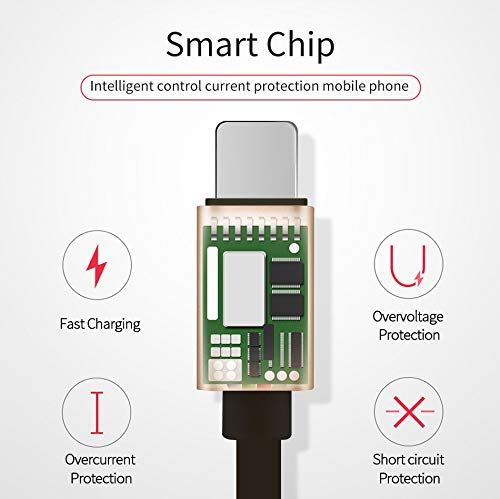
- Integrated Smart Chip: Features an intelligent circuit system for automatic device recognition and protection against overcharging, overcurrent, overvoltage 및 단락.

3. 설정 지침
Follow these steps to connect your VOLT PLUS TECH Dual USB-C + MicroUSB Switch Cable:
- Identify Device Connector: Determine whether your device requires a Micro USB or a USB-C connection. The cable features a switch tip design where the USB-C connector attaches over the Micro USB connector.
- 장치에 연결: Gently insert the appropriate connector (Micro USB or USB-C) into your device's charging/data port. Ensure a secure fit.
- Connect to Power Source or Computer: Insert the standard USB-A end of the cable into a compatible USB power adapter for charging, or into a USB port on your computer for both charging and data transfer.

4. 케이블 작동
4.1 장치 충전
Once connected as described in the Setup section, your device will begin charging. The cable supports fast charging when paired with a compatible fast charger and a device that supports fast charging protocols.
4.2 데이터 전송
To transfer data between your device and a computer:
- 케이블의 USB-A 끝을 컴퓨터의 USB 포트에 연결합니다.
- Connect the appropriate Micro USB or USB-C end to your mobile device.
- Your computer should recognize the connected device. You may need to select a 'File Transfer' or 'MTP' mode on your mobile device if prompted.
- You can now access your device's storage to copy files, photos, or videos. The cable's USB 3.1 support ensures efficient transfer speeds.
5. 관리 및 유지 보수
To ensure the longevity and optimal performance of your cable, please observe the following guidelines:
- 저장: Store the cable in a clean, dry environment away from direct sunlight and extreme temperatures.
- 손질: 케이블, 특히 커넥터 부근을 과도하게 구부리거나 비틀거나 잡아당기지 마십시오. 내부 손상을 방지할 수 있습니다.
- 청소: If necessary, gently wipe the cable and connectors with a soft, dry cloth. Do not use liquid cleaners or abrasive materials.
- 보호: 케이블을 물이나 다른 액체에 노출시키지 마세요.

6. 문제 해결
If you encounter issues with your cable, please refer to the following common problems and solutions:
- 장치가 충전되지 않음:
- Ensure both ends of the cable are securely plugged into the device and the power source.
- Verify that the power adapter or USB port is functional by testing with another cable or device.
- Check your device's charging port for any debris or damage.
- 느린 충전:
- Confirm that your power adapter supports fast charging (e.g., QC 3.0, PD) and provides sufficient wattage.
- Ensure your device itself is compatible with fast charging technology.
- 데이터 전송 문제:
- Make sure the cable is firmly connected to both your device and computer.
- On your mobile device, check if you have selected the correct USB connection mode (e.g., 'File Transfer' or 'MTP') when prompted.
- 컴퓨터의 다른 USB 포트에 케이블을 연결해보세요.
7. 사양
| 상표 | 볼트 플러스 기술 |
| 모델 번호 | VPT-2074 |
| 커넥터 유형 | 마이크로 USB, USB 유형 A, USB 유형 C |
| 케이블 유형 | USB Type-C / MicroUSB to USB-A |
| 호환 장치 | Android, iOS, Mac, Vivo Xplay5 Elite, Windows devices |
| 특별 기능 | Digital IC Chip, Heavy Duty, Lightweight, Multi-Functional, Tangle Free Cord |
| 패키지 크기 | 2 x 0.3 x 0.3 인치 |
| 품목 무게 | 1.4 온스 |

8. 보증 정보
For detailed warranty information regarding your VOLT PLUS TECH Dual USB-C + MicroUSB Switch Cable, please refer to the documentation included with your purchase or visit the official VOLT PLUS TECH web사이트. 보증 약관은 다를 수 있습니다.
9. 고객 지원
If you require further assistance or have questions not covered in this manual, please contact VOLT PLUS TECH customer support through their official website or the retailer from whom you purchased the product. Please have your model number (VPT-2074) and purchase details ready when contacting support.


