1. 서론
This manual provides essential information for the safe and effective use of the FLIR VP50-2 CAT IV Voltage Detector and the Klein Tools 6pc Ratcheting Magnetic Nut Driver Set. These tools are designed to assist electricians and technicians in electrical testing and hardware assembly. Please read this manual thoroughly before operation.

Figure 1.1: The FLIR VP50-2 Voltage Detector and Klein Tools 6pc Ratcheting Magnetic Nut Driver Set.
2. FLIR VP50-2 CAT IV Voltag전자 검출기
2.1. 제품 오버view
The FLIR VP50-2 is a non-contact AC voltage detector designed for reliable voltage presence verification. It features a bright flashlight and provides both vibration and audio alarms to alert users to live AC voltage. Its robust design ensures durability in demanding work environments.
2.2. 특징
- 비접촉 Voltage 감지: AC 볼륨 감지tag90V에서 1000V까지 직접 접촉 없이 전압을 변환합니다.
- Audible and Vibrating Alarms: Provides clear alerts when voltage가 감지되었습니다.
- 통합 손전등: 어두운 작업 공간을 밝혀 가시성을 향상시킵니다.
- 내구성 있는 구조: 최대 3미터 높이에서 떨어뜨려도 견딜 수 있습니다.
- 인체공학적 디자인: Features an anti-roll case for comfortable handling.
- 로우프로file 조사: Allows access to tight spaces for wire mapping and circuit tracing.
2.3. 설정
Before first use, ensure the device is powered and functional.
- 배터리 설치: Open the battery compartment (typically at the rear or base) and insert the required batteries, observing polarity.
- 전원 켜기: Press the power button to turn on the detector. A green LED indicator should illuminate, indicating readiness.
- 자가 진단: The device performs a self-test upon power-on. Ensure no error indicators are present.

그림 2.1: 전면 view of the FLIR VP50-2 Voltage Detector, showing the flashlight and power button.
2.4. 사용 설명서
Follow these steps for safe and accurate voltag전자 탐지:
- 전원 켜기: Press the power button to activate the detector.
- 손전등 작동: Press the flashlight button to turn the integrated flashlight on or off.
- 권tage 감지: Place the tip of the detector near the wire, outlet, or electrical component you wish to test. If AC voltage is present within the detection range (90-1000V), the detector will emit an audible alarm and vibrate. A red LED indicator will also illuminate.
- Verify Absence of Voltage: Always test on a known live circuit first, then the circuit to be tested, and then re-test the known live circuit to confirm the detector is functioning correctly.
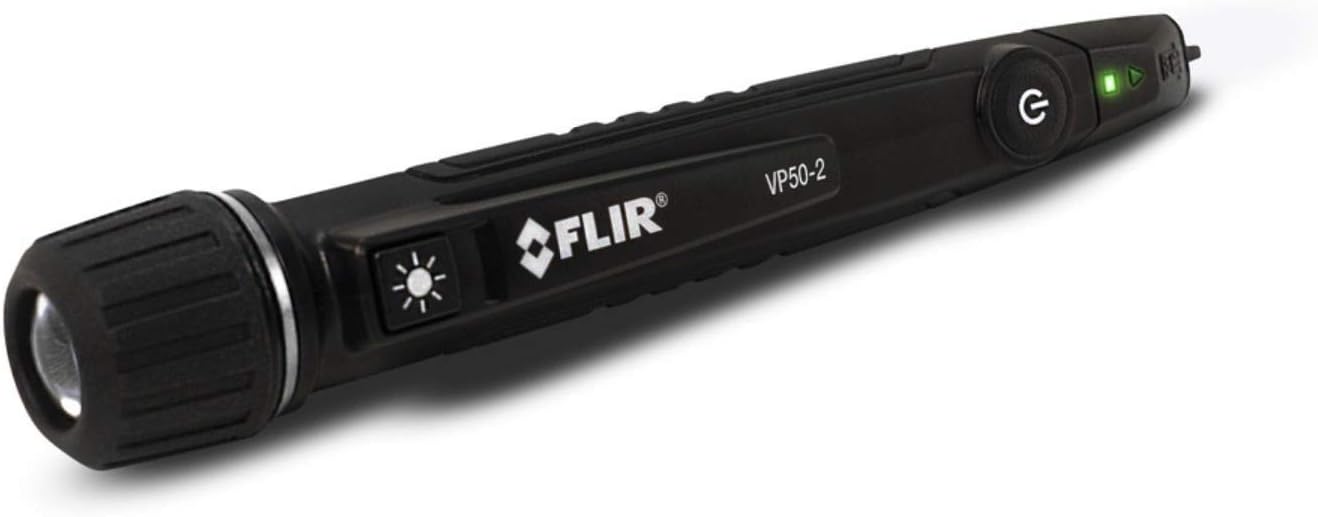
Figure 2.2: The FLIR VP50-2 Voltage Detector showing the green power indicator light.

Figure 2.3: The FLIR VP50-2 Voltage Detector with its integrated flashlight illuminating a dark area.
2.5. 유지관리
- 청소: 탐지기를 마른 깨끗한 천으로 닦으십시오. 연마성 세척제나 용제를 사용하지 마십시오.
- 저장: 직사광선과 극한 온도 변화를 피해 서늘하고 건조한 곳에 보관하십시오. 장기간 보관할 경우 배터리를 제거하십시오.
- 배터리 교체: Replace batteries when the low battery indicator appears or the device fails to power on.
2.6. 문제 해결
| 문제 | 가능한 원인 | 해결책 |
|---|---|---|
| 감지기가 켜지지 않습니다. | 배터리가 방전되었거나 잘못 설치되었습니다. | 배터리를 올바른 극성으로 교체하세요. |
| No alarm when voltage가 존재합니다. | 배터리가 부족합니다. 기기가 고장났습니다. | 배터리를 교체하십시오. 문제가 지속되면 고객 지원팀에 문의하십시오. |
| 거짓 경보. | 강한 전자기 간섭. | Move away from strong electrical fields; re-test. |
2.7. 사양
- 운영 볼륨tag전자 범위: 90V ~ 1000V AC
- 주파수 범위: 50/60Hz
- 작동 온도: -10°C ~ 50°C(14°F ~ 122°F)
- 보관 온도: -20°C ~ 60°C (-4°F ~ 140°F)
- 낙하 저항: 3미터(9.8피트)
- 안전 등급: 고양이 IV 1000V
- 전원: (Typically 2x AAA batteries, check device for exact type)
3. Klein Tools 6pc Ratcheting Magnetic Nut Driver Set
3.1. 제품 오버view
The Klein Tools 6pc Ratcheting Magnetic Nut Driver Set provides a versatile solution for fastening hex nuts and bolts. The set includes a comfortable ratcheting handle and six color-coded hollow nut drivers with strong rare-earth magnets for secure grip.
3.2. 특징
- 6 Piece Set: Includes common SAE hex sizes from 1/4 to 9/16 inches.
- Ratcheting Handle: Cushioned handle for enhanced comfort and control during repetitive tasks.
- 자석 팁: Strong rare-earth magnets securely hold fasteners.
- Hollow Shafts: Allow for fastening on long bolts.
- 색상으로 구분됨: Easy identification of nut driver sizes.
- 내구성 있는 구조: Made from high-grade impact steel.

Figure 3.1: The Klein Tools 6pc Ratcheting Magnetic Nut Driver Set with handle and individual drivers.
3.3. 사용 설명서
- 사이즈 선택: Choose the appropriate nut driver size for your fastener. The drivers are color-coded for quick identification.
- Insert into Handle: Insert the selected nut driver into the ratcheting handle. Ensure it is securely seated.
- 체결 장치 작동: Place the magnetic tip of the nut driver onto the hex nut or bolt. The magnet will help hold the fastener in place.
- Tighten/Loosen: Use the ratcheting mechanism on the handle to tighten or loosen the fastener. Adjust the ratcheting direction as needed.

Figure 3.2: A Klein Tools nut driver being used with an impact driver for fastening.
3.4. 유지관리
- 청소: Wipe the nut drivers and handle with a clean, dry cloth after use to remove dirt and debris.
- 저장: Store the set in its original case or a tool organizer to prevent loss and damage. Keep away from moisture.
- 점검: Periodically inspect the nut drivers for wear or damage. Replace any damaged components.
3.5. 사양
- Nut Driver Sizes (SAE): 1/4 inch, 5/16 inch, 3/8 inch, 7/16 inch, 1/2 inch, 9/16 inch
- 샤프트 길이: Approximately 5 inches (for extended reach)
- 재료: High-grade impact steel
- 자석 유형: Rare-earth magnets
4. 안전 정보
Always observe general safety precautions when working with electrical systems and tools.
- 개인 보호 장비(PPE): Always wear appropriate PPE, including safety glasses and insulated gloves, when working with electrical circuits.
- 회로 전원 차단: Whenever possible, de-energize circuits before working on them. Use the voltage detector to confirm circuits are de-energized.
- 검사 도구: Before each use, inspect both the voltage detector and nut drivers for any signs of damage. Do not use damaged tools.
- 적절한 사용: Use tools only for their intended purpose. Do not modify tools.
- 환경 조건: Be aware of your surroundings. Avoid using tools in wet conditions or explosive atmospheres unless specifically rated for such environments.
5. 보증 및 지원
For warranty information or technical support regarding the FLIR VP50-2 Voltage Detector, please refer to the documentation provided with the FLIR product or visit the official FLIR website. For the Klein Tools 6pc Ratcheting Magnetic Nut Driver Set, refer to Klein Tools' official resources.
구매 영수증을 보관하여 보증 청구에 대비하세요.


