TONOR 무선 마이크 시스템
Model: TW821 - Instruction Manual
소개
This manual provides detailed instructions for the setup, operation, and maintenance of your TONOR Wireless Microphones System (Model: TW821). This UHF wireless system offers stable signal transmission and clear audio quality, suitable for various applications including karaoke, public speaking, and live performances. Please read this manual thoroughly before use to ensure optimal performance and longevity of your device.
중요 참고 사항: The frequency range of this product is 902-928MHz. Before purchasing, please ensure the wireless frequency band you select works in your area.
안전 정보
- This system is not compatible with laptops, iPads, mobile phones, or AV receivers.
- Each handheld microphone or bodypack transmitter requires 2 AA batteries (not included).
- 배터리를 삽입할 때는 배터리의 극성을 올바르게 맞춰주세요.
- 극한의 온도, 습도 또는 직사광선에 장치를 노출하지 마십시오.
- 직접 분해하거나 수리하지 마십시오. 정비를 받으려면 자격을 갖춘 기술자에게 문의하십시오.
패키지 내용
다음 항목에 대한 상자를 체크해 주세요.
- 1 x 수신기
- 1 x 휴대용 마이크
- 바디팩 송신기 1개
- 1 x 헤드셋 마이크
- 1 x Lapel Microphone
- 1 x 6.35mm 오디오 케이블
- 1 x 전원 어댑터
- 1 x 사용자 설명서

Figure 1: All components included in the TONOR Wireless Microphones System package.
제품 끝view
UHF 무선 수신기

Figure 2: Front and back panels of the UHF Wireless Receiver.
- 전면 패널: Power switch, Channel A/B volume control knobs, LCD display for frequency and channel information.
- 후면 패널 : Antenna B, Mix output (6.35mm), Balanced XLR outputs (BAL B, BAL A), DC IN (power jack), Antenna A.
UHF 바디팩 송신기
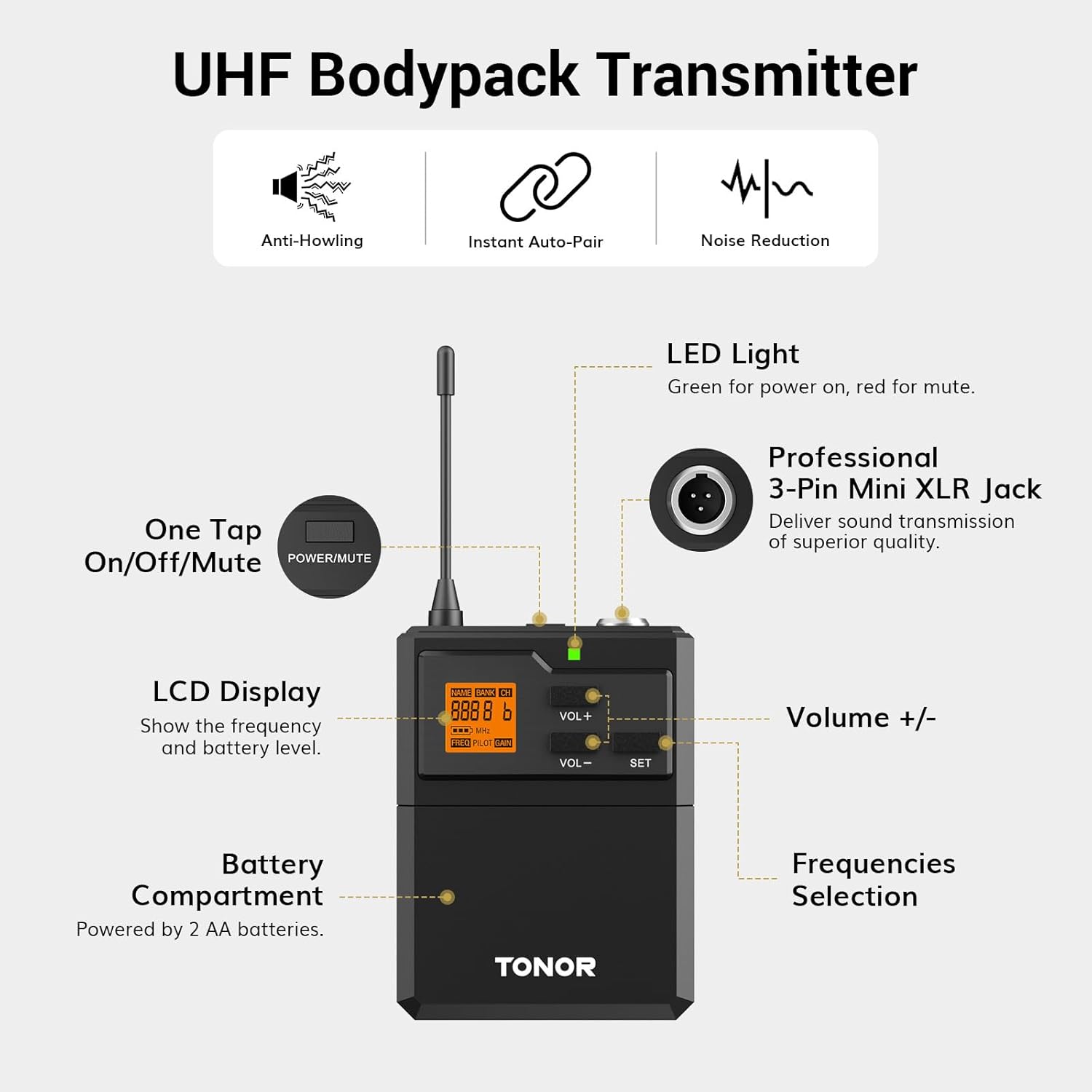
Figure 3: Diagram of the UHF Bodypack Transmitter features.
- 특징: One-tap On/Off/Mute button, LCD display (shows frequency and battery level), Volume +/- buttons, SET button for frequency selection, Antenna, Professional 3-Pin Mini XLR Jack for connecting headset/lapel mic, Battery Compartment (2 AA batteries).
UHF Handheld Wireless Microphone

Figure 4: Diagram of the UHF Handheld Wireless Microphone features.
- 특징: Rugged metal build, Shatter-resistant steel mic grille, High-quality cardioid dynamic capsule, All-metal housing, On/Off button, Channel switch button (inside battery compartment), Battery level and signal indicator on display.
설치 지침
1. 배터리 설치
- For Handheld Microphone: Unscrew the bottom part of the microphone to access the battery compartment. Insert 2 AA batteries, ensuring correct polarity.
- For Bodypack Transmitter: Open the battery compartment cover. Insert 2 AA batteries, ensuring correct polarity.
2. 수신기 연결
- Connect the provided power adapter to the DC IN port on the receiver and plug it into a power outlet.
- Connect the 6.35mm audio cable from the receiver's Mix output to your mixer, PA system, or speaker. For separate channel outputs, use XLR cables (not included) from BAL A and BAL B ports.
3. Initial Pairing & Frequency Adjustment
- The system is typically pre-paired from the factory. Simply power on the receiver, then power on your handheld microphone and bodypack transmitter. They should automatically connect.
- Each UHF microphone has 15 adjustable frequencies. Up to 15 sets can be used simultaneously without interference.
- To change frequency on Handheld Mic: Access the battery compartment and use the HI/LO button.
- To change frequency on Bodypack Transmitter: Use the SET button.
4. Re-pairing Microphones (Troubleshooting)
If microphones do not connect or experience interference, follow these steps to re-pair:
- 수신기를 끄세요.
- 모든 마이크/바디팩을 끄세요.
- Initiate pairing mode on the microphone/bodypack:
- For Handheld Mic: Hold the HI/LO button inside the battery compartment while turning on the power. The display will blink.
- For Bodypack: Turn on the mic and hold the SET button for 5 seconds until the display blinks.
- Turn on the receiver. Wait a few seconds for it to fully start.
- Pair the microphone/bodypack:
- For Handheld Mic: Press the HI/LO button once. The display will stop blinking.
- For Bodypack: Press the SET button.
- Repeat the process for each microphone/bodypack, ensuring only one is in pairing mode at a time.
- During this process, you can press the HI/LO or SET button to select a different frequency/channel. The mic and receiver will remember this setting.
시스템 작동
- 전원 켜기/끄기: Use the dedicated power buttons on the receiver, handheld microphone, and bodypack transmitter.
- 볼륨 조절: The receiver allows for separate volume control for each wireless microphone. The bodypack transmitter also has its own volume adjustment.
- 음소거 기능: The bodypack transmitter features a one-tap On/Off/Mute button.
Compatibility & Usage Scenarios
The TONOR Wireless Microphones System is designed for wide compatibility with various audio equipment and is ideal for diverse applications:
- 호환 장치: Outdoor speakers, Karaoke machines, Power amplifiers, Mixers, PA speaker systems.
- 추천 용도: Karaoke, Home KTV, Large parties, DJ sets, Weddings, Church services, Classroom presentations, Meetings.

Figure 5: The system's wide compatibility with various audio devices.

그림 6: 예amples of usage scenarios for the wireless microphone system.
명세서
| 특징 | 사양 |
|---|---|
| 모델명 | 티와이821 |
| 품목 무게 | 3.13 파운드 |
| 제품 치수 | 11.02 x 8.27 x 4.53 인치 |
| 마이크 폼 팩터 | Handheld, Headset, Lavalier |
| 전원 | Battery Powered (2 AA batteries per mic/bodypack) |
| 재료 | 금속 |
| 채널 수 | 2 (with 15 adjustable frequencies per mic) |
| 주파수 범위 | 902-928MHz |
| 전송 범위 | 200 ft (in open spaces) |
| 극성 패턴 | 단방향 |
문제 해결
- 소리 없음: Ensure all microphones/bodypacks are turned on and paired. Check battery levels. Verify receiver is powered on and connected to an audio system.
- Signal Interference/Noise: Change the frequency of the affected microphone/bodypack. Ensure the receiving distance does not exceed the maximum range (200ft).
- Microphone/Bodypack Cannot Be Paired: Check if batteries are installed correctly. Follow the re-pairing steps in the Setup Instructions.
- Unstable Receiver Frequency (when using multiple groups): Each microphone or bodypack needs to be set with a unique frequency to avoid interference. Follow the re-pairing steps to set specific frequencies for each unit.
보증 및 지원
TONOR provides a 2-year warranty for its products. For after-sales service, free replacement for products that are NOT damaged resulting from accidents, alteration, misuse, negligence, or abuse is offered. If exceeding 30 days of Amazon return policy, you can still contact support through the TONORDirect US store.
For further assistance, please refer to the contact information provided in your product's user manual or visit the official TONOR web대지.


