소개
This manual provides comprehensive instructions for the safe and effective use of your OVUTEK Professional Smart Scale. Please read this manual thoroughly before first use and retain it for future reference.

Image: The OVUTEK Professional Smart Scale, showcasing its sleek design and digital display, alongside a smartphone and smartwatch demonstrating app integration and data synchronization.
제품 특징
- Measures 14 body metrics including Weight, BMI, Body Fat, Muscle Mass, Body Water, Visceral Fat, Bone Mass, Skeletal Muscle, Subcutaneous Fat, Metabolic Age, Protein, BMR, and Fat-Free Body Weight.
- 높은 정확도: Measures to 0.1lb (0.05kg).
- Large 5.33-inch all-in-one color display.
- Maximum weight capacity: 450 lbs (205 kg / 32 st).
- Syncs with popular fitness apps like Google Fit, Fitbit, and Apple Health.
- Supports unlimited users with individual data tracking.
- Equipped with upgraded ITO technology and shatterproof glass for durability.
- Includes 4*AAA batteries, providing approximately 12 months of use.
- Features specialized modes: Zero-current Mode (for pregnant users), Athletes Mode, and Family Mode.
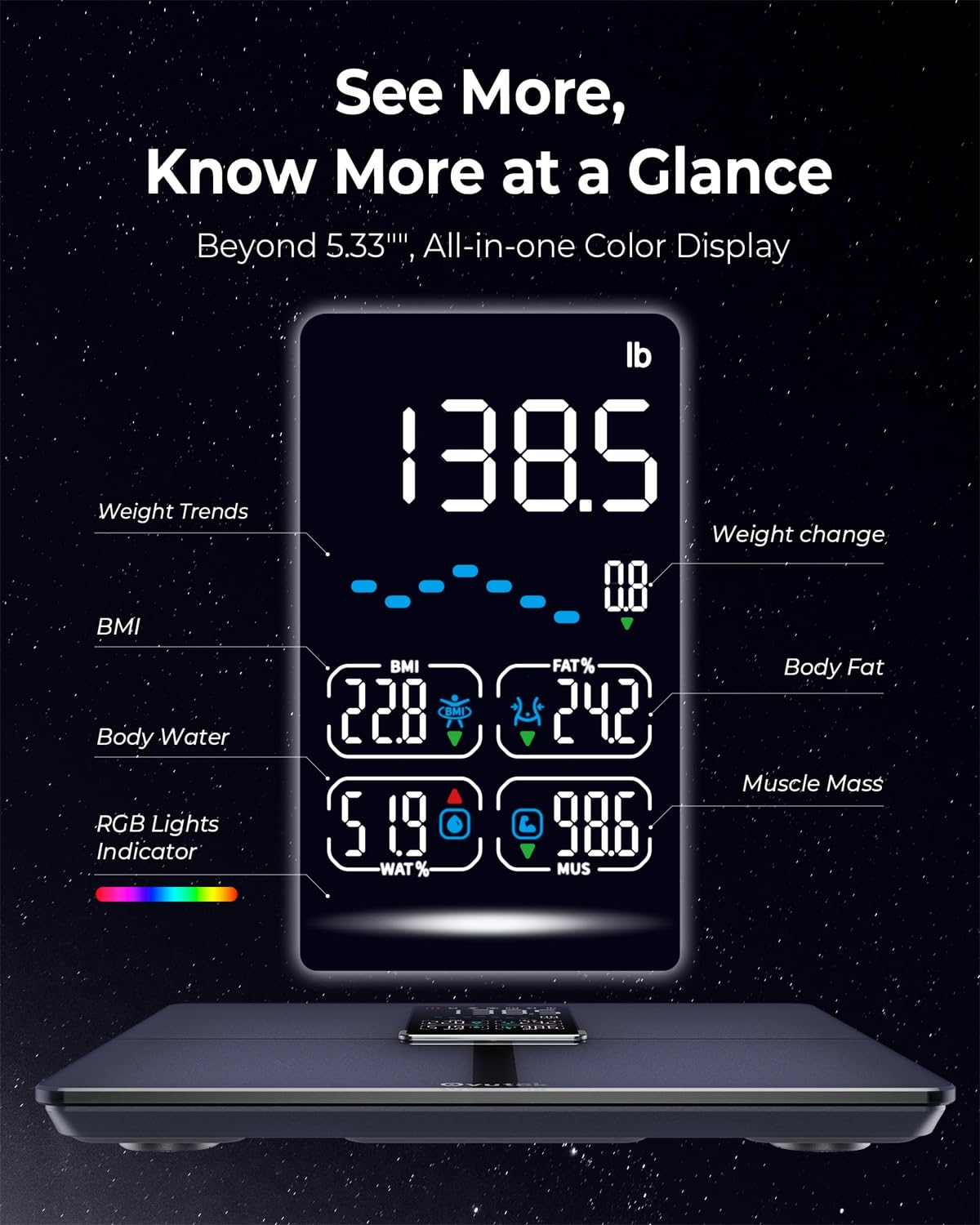
이미지: 자세한 view of the scale's digital display, highlighting various body composition metrics such as weight, BMI, body fat percentage, 체수분 퍼센트tage, 그리고 근육량.

Image: An illustration of the precise manufacturing process of the OVUTEK Smart Scale, emphasizing its guaranteed high accuracy and fully automated production, featuring Famicares Patent Technology.
설치 가이드
- 언박싱: Carefully remove the scale from its packaging. Ensure all components are present: the OVUTEK Smart Scale and 4 AAA batteries.
- 배터리 설치: 저울 아랫면의 배터리함을 여세요. AAA 배터리 4개를 넣을 때, 극성(+/-)을 정확히 확인하세요. 배터리함을 단단히 닫으세요.
- 놓기: 저울을 단단하고 평평하며 안정적인 표면에 놓으세요. 카펫이나 고르지 않은 바닥은 정확도에 영향을 줄 수 있으므로 피하세요.
- 앱 다운로드 : Scan the QR code provided in the manual or on the product packaging, or search for "Ovuteker" in your device's app store (Apple App Store or Google Play Store). Download and install the application.

Image: The Ovuteker app interface on a smartphone, demonstrating the ability to add multiple users and integrate with popular health platforms such as Google Fit, Fitbit, and Apple Health. A QR code for app download is also visible.
- 초기 페어링:
- 스마트폰에서 블루투스를 활성화하세요.
- Open the Ovuteker app and create your user profile.
- Step onto the scale barefoot. The scale will activate and attempt to pair with the app.
- 앱의 화면 안내에 따라 페어링 과정을 완료하세요.
작동 지침
측정하기:
- 저울은 단단하고 평평한 표면에 놓아야 합니다.
- Open the Ovuteker app on your smartphone and ensure Bluetooth is enabled.
- Step onto the scale barefoot, ensuring your feet are centered on the electrodes.
- Stand still until your weight is displayed and the app shows all body composition metrics.
- The data will automatically sync to your app profile.
Understanding Your Metrics:
The scale measures 14 key body metrics. Refer to the app for detailed explanations and historical tracking of each metric.

Image: A user tracking their fitness progress with the Ovuteker app, which displays various body metrics like weight, body fat, and BMI, along with historical data and goal setting features.
다양한 모드 사용:
- Zero-current Mode: Designed for pregnant users or individuals with medical implants. This mode measures only weight and BMI, avoiding bioelectrical impedance analysis. Select this mode within the Ovuteker app profile 설정.
- Athletes Mode: For individuals with a high level of physical activity. This mode adjusts the algorithm for more accurate body composition readings for athletes. Activate this in your app profile.
- 패밀리 모드: Allows multiple users to track their data independently within the same app. Each family member can create their own profile.

Image: Visual representation of the scale's versatile modes, including Zero-current Mode for pregnant users, Athletes Mode for highly active individuals, and Family Mode for managing multiple user profiles.
유지 보수 및 관리
- 청소: 부드러운 천으로 저울 표면을 닦으세요.amp 천으로 닦아주세요. 연마성 세제를 사용하거나 스케일을 물에 담그지 마세요.
- 저장: 체중계를 서늘하고 건조한 곳에 보관하세요. 극한의 온도나 직사광선을 피하세요.
- 배터리 교체: 디스플레이 또는 앱에 배터리 부족 표시가 나타나면 배터리를 교체하십시오. AAA 배터리 4개는 항상 동시에 교체해야 합니다.
- 손질: The scale is made with shatterproof glass, but avoid dropping it or subjecting it to strong impacts.

Image: A visual breakdown of the OVUTEK Smart Scale's physical attributes, including its dimensions, the location of the 4*AAA battery compartment, and a close-up illustrating the upgraded ITO technology and shatterproof glass construction.
문제 해결
| 문제 | 가능한 원인 | 해결책 |
|---|---|---|
| 저울이 켜지지 않습니다. | 배터리가 방전되었거나 잘못 설치되었습니다. | 배터리 극성을 확인하십시오. AAA 배터리 4개를 모두 교체하십시오. |
| 부정확한 판독값. | Scale on uneven surface; not standing still; dirty electrodes; initial calibration needed. | Place on hard, flat surface. Stand still. Clean scale surface. Step on and off quickly to calibrate to zero before weighing. |
| 앱이 확장에 연결되지 않습니다. | Bluetooth off; app not open; scale not active; interference. | Ensure Bluetooth is on. Open Ovuteker app. Step on scale to activate. Move closer to scale. Restart app/phone. |
| 체성분 데이터가 표시되지 않습니다. | Not barefoot; feet not making contact with electrodes; Zero-current mode active. | Ensure you are barefoot and feet are centered on the scale. Check app settings to ensure Zero-current mode is not enabled if you wish to see full metrics. |
명세서
- 모델: VFS535-KUS
- 상표: OVUTEK
- 디스플레이 유형: Digital, 5.33-inch Color Display
- 중량 용량: 450파운드 / 205kg / 32스톤
- 측정 증분: 0.1파운드 / 0.05킬로그램
- 전원: AAA 배터리 4개(포함)
- 연결성: 블루투스
- 치수: 33.71 x 32 x 4.39cm(13.27 x 12.6 x 1.73인치)
- 재료: Upgraded ITO technology, Shatterproof Glass
- 색상: 검은색
보증 및 지원
For warranty information and customer support, please visit the official OVUTEK website or contact their customer service directly. You can find more information at: www.ovutek.com
Please have your model number (VFS535-KUS) and ASIN (B0D2NYLPVT) ready when contacting support.


