1. 서론
This manual provides detailed instructions for the installation, operation, and maintenance of the Intellinet 48-Port L3 Managed Gigabit PoE+ Switch, Model 562041. This device is designed for enterprise networks requiring efficient and scalable routing solutions with high-powered Power over Ethernet (PoE) capabilities.
2. 안전 정보
Observe the following safety precautions to prevent damage to the device and injury to personnel:
- 장치의 접지가 올바르게 되어 있는지 확인하세요.
- 스위치를 물이나 과도한 습기에 노출시키지 마십시오.
- 지정된 온도 및 습도 범위 내에서 장치를 작동하세요.
- Use only the power cable provided or a compatible replacement.
- Do not open the switch casing; 자격을 갖춘 인력에게 서비스를 의뢰하세요.
- 과열을 방지하기 위해 스위치 주변에 적절한 환기를 확보하세요.
3. 패키지 내용
패키지에 모든 품목이 들어 있는지 확인하세요.
- Intellinet 48-Port L3 Managed Gigabit PoE+ Switch (Model 562041)
- 전원 케이블
- 19" rackmount brackets
- 고무 발
- 사용 설명서(이 설명서)
4. 제품 오버view
The Intellinet 562041 is a robust Layer 3 managed switch featuring 48 Gigabit PoE+ ports and six 10G SFP+ uplink slots. It supports a total power budget of 850 watts for PoE devices.
4.1 전면 패널
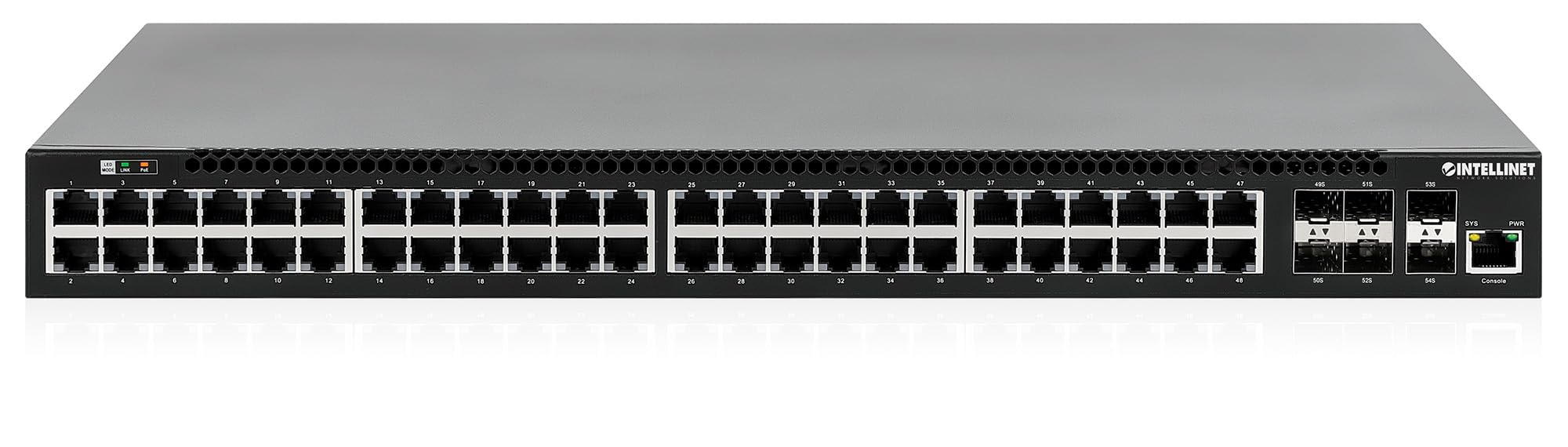
전면 패널에는 다음이 포함됩니다.
- 48 x 10/100/1000 Mbps RJ45 Ports: These ports support Power over Ethernet Plus (PoE+) for connecting compatible devices.
- 6 x 10 Gigabit SFP+ Slots: For high-speed uplink connections to other network devices.
- LED 표시등: Provide status information for power, system, link activity, and PoE status.
- 콘솔 포트: For local management and configuration.


4.2 후면 패널

The rear panel typically includes the AC power input and cooling fans for heat dissipation.

5. 설정
5.1 물리적 설치
이 스위치는 표준 19인치 장비 랙에 설치하거나 책상 위에 놓을 수 있습니다.
- 랙마운트 설치: Attach the provided rackmount brackets to the sides of the switch using the included screws. Secure the switch into a standard 19-inch rack.
- 데스크탑 설치: Attach the provided rubber feet to the bottom of the switch to prevent scratching and ensure stability. Place the switch on a flat, stable surface.
5.2 전원 연결
Connect the provided power cable to the AC power input on the rear panel of the switch and then to a grounded electrical outlet. Ensure the power switch is in the OFF position before connecting the power cable.
5.3 네트워크 연결
- PoE 장치: Connect PoE-compatible devices (e.g., IP cameras, VoIP phones, wireless access points) to any of the 48 Gigabit RJ45 ports. The switch will automatically detect and provide power to these devices.
- 업링크 연결: Insert compatible SFP+ transceivers into the 10 Gigabit SFP+ slots and connect them to your core network or other high-speed devices using appropriate fiber optic cables.
- 콘솔 연결: For initial configuration or direct management, connect a console cable from your computer to the console port on the switch.
5.4 초기 구성
Refer to the separate software configuration guide for detailed instructions on accessing the switch's management interface (web-based GUI or command-line interface via console port) and performing initial setup, including IP address assignment, user accounts, and basic network settings.
6. 사용 설명서
6.1 레이어 3 라우팅
This switch offers dynamic Layer 3 IP routing capabilities, including OSPF (Open Shortest Path First), RIP (Routing Information Protocol), and VRRP (Virtual Router Redundancy Protocol). These protocols enable efficient and scalable routing within complex network environments.

6.2 이더넷 전원 장치(PoE+)
The switch provides up to 30 watts of power per port across its 48 PoE+ ports, with a total power budget of 850 watts. This allows for seamless integration of various PoE devices without the need for separate power adapters.
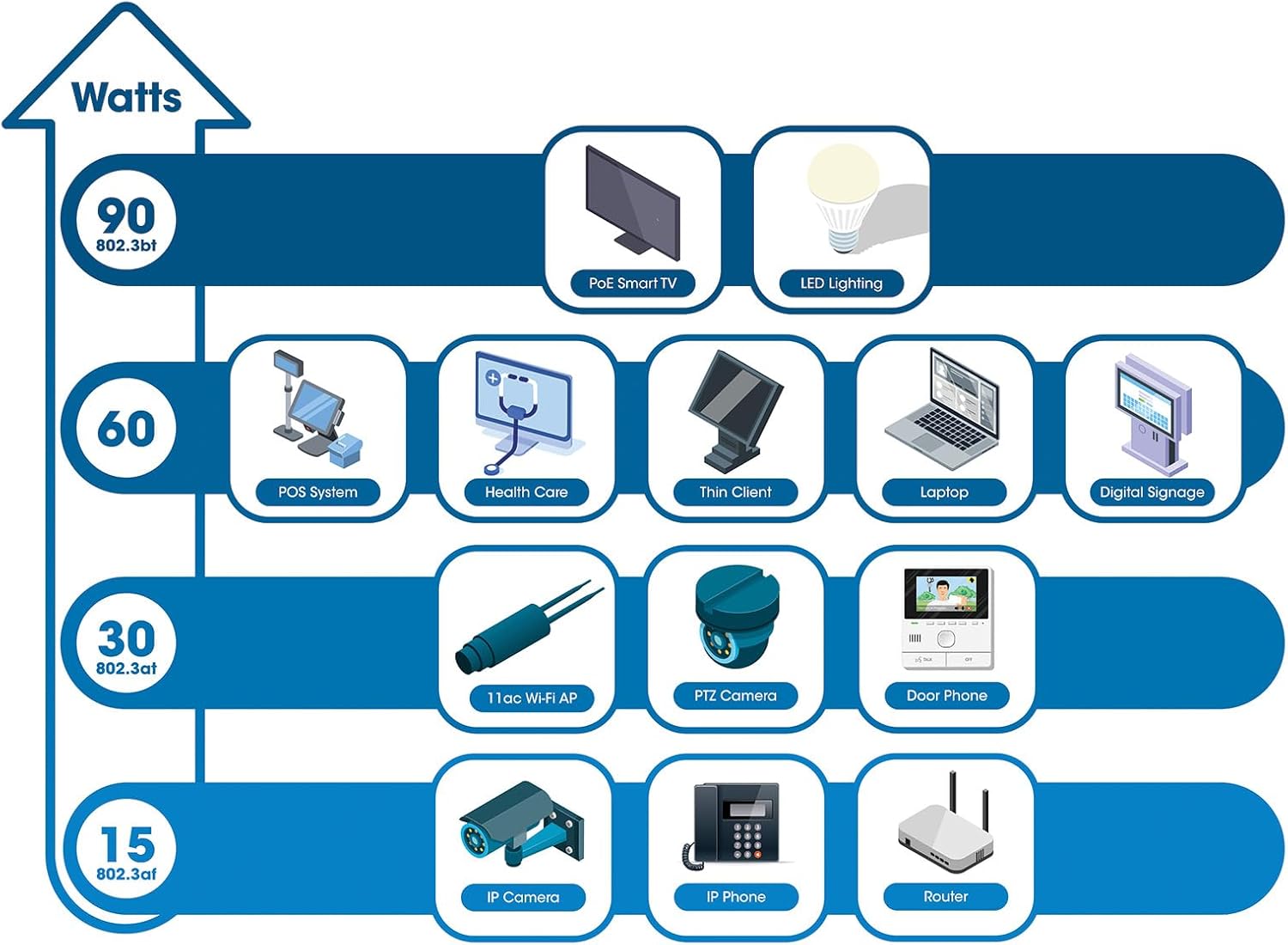
6.3 PoE Scheduling
The switch supports PoE scheduling, allowing administrators to define specific times for powering on, powering off, or rebooting connected PoE devices. This feature can optimize power consumption and enhance network security.


6.4 Self-Healing Functionality (PDM)
The Powered Device Monitor (PDM) feature enables the switch to proactively monitor the status of connected PoE devices. If a device becomes unresponsive, the PDM can automatically restart the PoE port to restore functionality, minimizing downtime and maintaining network integrity.
6.5 클라우드 관리
The switch supports cloud management capabilities, allowing for remote configuration, monitoring, and troubleshooting of the device from a centralized platform. Refer to the cloud management documentation for setup and usage details.
7. 유지관리
7.1 펌웨어 업데이트
Regularly check the Intellinet Network Solutions website for the latest firmware updates. Applying firmware updates can improve performance, add new features, and address security vulnerabilities. Follow the instructions provided with the firmware update package carefully.
7.2 청소
To clean the switch, power it off and disconnect all cables. Use a soft, dry cloth to wipe the exterior. Do not use liquid or aerosol cleaners. Ensure ventilation openings are free from dust and debris.
7.3 환경 고려 사항
Ensure the switch operates within its specified temperature and humidity ranges. Avoid placing the switch in direct sunlight, near heat sources, or in areas with high dust accumulation.
8. 문제 해결
이 섹션에서는 스위치 사용 시 발생할 수 있는 일반적인 문제에 대해 설명합니다.
8.1 전원 없음
- Verify the power cable is securely connected to both the switch and a working electrical outlet.
- 후면 패널의 전원 스위치가 ON 위치에 있는지 확인하세요.
- 다른 기기를 사용하여 전원 콘센트가 정상적으로 작동하는지 확인하십시오.
8.2 포트에 링크 없음
- 이더넷 케이블의 양쪽 끝 연결 상태를 확인하십시오. 케이블이 단단히 꽂혀 있는지 확인하세요.
- Verify the cable is not damaged. Try a different cable.
- 연결된 장치의 전원이 켜져 있고 올바르게 작동하는지 확인하세요.
- 스위치의 관리 인터페이스에서 포트 상태를 확인하십시오.
8.3 PoE 장치가 전원을 수신하지 못함
- Confirm the connected device is a PoE-compatible device.
- 해당 포트의 PoE 상태 LED를 확인하십시오.
- Verify the total PoE power budget (850W) is not exceeded by all connected devices.
- Utilize the Powered Device Monitor (PDM) feature to automatically restart the port if the device is unresponsive.
- Check PoE settings in the switch's management interface.
9. 사양
| 특징 | 사양 |
|---|---|
| 모델 번호 | 562041 |
| 상표 | 인텔리넷 네트워크 솔루션 |
| 포트 수 | 54 (48 x Gigabit PoE+, 6 x 10G SFP+) |
| 인터페이스 유형 | PoE, SFP |
| 최대 전력(PoE 예산) | 850 와트 |
| 데이터 전송 속도 | 10 Gigabits Per Second (SFP+ uplinks) |
| 품목 무게 | 6.2킬로그램(13.64파운드) |
| 제품 크기(L x W x H) | 13.78 x 17.32 x 1.73 인치 |
| 상한 온도 등급 | 화씨 104도(섭씨 40도) |
| 낮은 온도 등급 | 화씨 32도(섭씨 0도) |
| 호환 장치 | Desktop, Router, PoE devices (IP cameras, VoIP phones, WAPs) |
| 포함된 구성 요소 | 19" rackmount brackets, Instructions, Rubber feet, power cable |
| 한국어: | 766623562041 |
10. 보증 및 지원
10.1 보증 정보
This Intellinet Network Solutions product is covered by a 3년 제조사 보증. 보증 청구를 위해 구매 증빙 자료를 보관해 주십시오. 보증은 정상적인 사용 상태에서 발생하는 재료 및 제조상의 결함에 적용됩니다.
10.2 기술 지원
For technical assistance, product documentation, or to register your product, please visit the official Intellinet Network Solutions web해당 웹사이트를 방문하거나 고객 지원팀에 문의하십시오. 연락처 정보는 일반적으로 제조업체 웹사이트에서 찾을 수 있습니다. web사이트 또는 제품 포장.


