제품 끝view
The SONRU Bluetooth 5.0 Receiver is a versatile audio adapter designed to bring wireless capabilities to non-Bluetooth devices, including car audio systems, home stereo systems, and wired headphones. It features advanced Bluetooth 5.0 for stable connectivity, hands-free calling with CVC8.0 noise cancellation, and dual fast-charging ports (PD 30W & QC3.0 18W) for convenient device charging on the go. This device allows for seamless music streaming, GPS audio, and hands-free phone calls, enhancing your audio experience in various environments.

Image: The SONRU Bluetooth 5.0 Receiver and its accompanying car charger unit, showcasing their compact design and connectivity options.
패키지 내용
패키지에 모든 품목이 들어 있는지 확인하세요.
- Bluetooth 5.0 Receiver Unit
- Car Charger with Dual USB Ports (PD 30W & QC3.0 18W)
- 3.5mm 오디오 케이블
- RCA Cable (if included with specific model)
- 사용자 설명서
설정 및 설치
Bluetooth Receiver Setup (for Car/Home Audio)
- 수신기 충전: Before first use, fully charge the Bluetooth receiver using a standard 5V USB charger. The receiver offers up to 12.8 hours of music/talking time and 250 hours of standby time on a full charge, which takes approximately 1.2 hours.

Image: Diagram illustrating the battery life of the Bluetooth receiver: 12.8 hours music/talking, 250 hours standby, 1.2 hours charging time.
- Turn On the Receiver: Press and hold the power button on the receiver until the LED indicator lights up.
- 오디오 시스템에 연결: Plug the 3.5mm audio jack of the receiver into the AUX input of your car stereo, home audio system, or wired headphones. For home audio systems with RCA inputs, use the appropriate RCA cable.

Image: Step-by-step visual guide showing how to turn on the receiver, plug it into a stereo system, and connect with Bluetooth devices.

Image: The Bluetooth receiver connected to a wooden home audio speaker, demonstrating wireless music streaming from a smartphone.
- 장치와 페어링:
- 스마트폰, 태블릿, 노트북에서 블루투스를 활성화하세요.
- 검색 "SONRU" or the device name displayed on the receiver's LED (if applicable) in your device's Bluetooth settings.
- Select the device to pair. Once paired, the LED indicator on the receiver will change, indicating a successful connection.

Image: Diagram showing the wide compatibility of the Bluetooth receiver with cellphones, tablets, laptops, home audio, car audio, and wired headphones, with a wireless range of 33 feet.
Car Charger Setup (FM Transmitter)
- 차량용 시가 라이터에 삽입하세요: Plug the car charger unit into your vehicle's 12V/24V cigarette lighter socket. The LED display will light up.
- FM 주파수 맞추기: Find an empty FM frequency on your car radio (one with no static or broadcast). Then, adjust the FM frequency on the SONRU car charger to match your car radio's frequency. Refer to the "Easy Button Control" diagram for FM tuning buttons.
- 장치와 페어링: Enable Bluetooth on your smartphone and search for the car charger's Bluetooth name (e.g., "SONRU FM Transmitter"). Select to pair.
- 충전 장치 : Use the PD 30W and QC3.0 18W USB ports to fast charge your compatible devices.

Image: Close-up of the car charger unit highlighting its dual USB ports (PD 30W and QC3.0 18W) for fast charging, showing a smartphone being charged.
작동 지침
음악 재생
- 블루투스 스트리밍: Once paired, open your music app on your device and start playing. Audio will be transmitted wirelessly to the connected receiver or car stereo.
- SD/TF Card & USB Disk Playback (Car Charger): Insert an SD/TF card or USB disk into the designated slot on the car charger. The device will automatically detect and play audio files (MP3, WMA, WAV, FLAC formats supported). Use the navigation buttons on the car charger to control playback (next/previous track, play/pause). Note: Only the right USB port can serve as a USB reader.
핸즈프리 통화
Both the Bluetooth receiver and the car charger support hands-free calling with built-in microphones and CVC8.0 noise cancellation for clear conversations.
- 전화 받기/종료: Press the multi-function button (on receiver) or the call button (on car charger) once to answer an incoming call. Press again to end the call.
- 전화 거부: Press and hold the multi-function/call button for 2 seconds to reject an incoming call.
- 마지막 번호 재다이얼: Double-press the multi-function/call button to redial the last dialed number.
- 통화를 전화로 전환: During a call, press and hold the multi-function/call button to switch the call audio between the device and your phone.

Image: An in-car setup showing the Bluetooth receiver mounted, with a smartphone displaying an incoming call, emphasizing the hands-free calling feature.
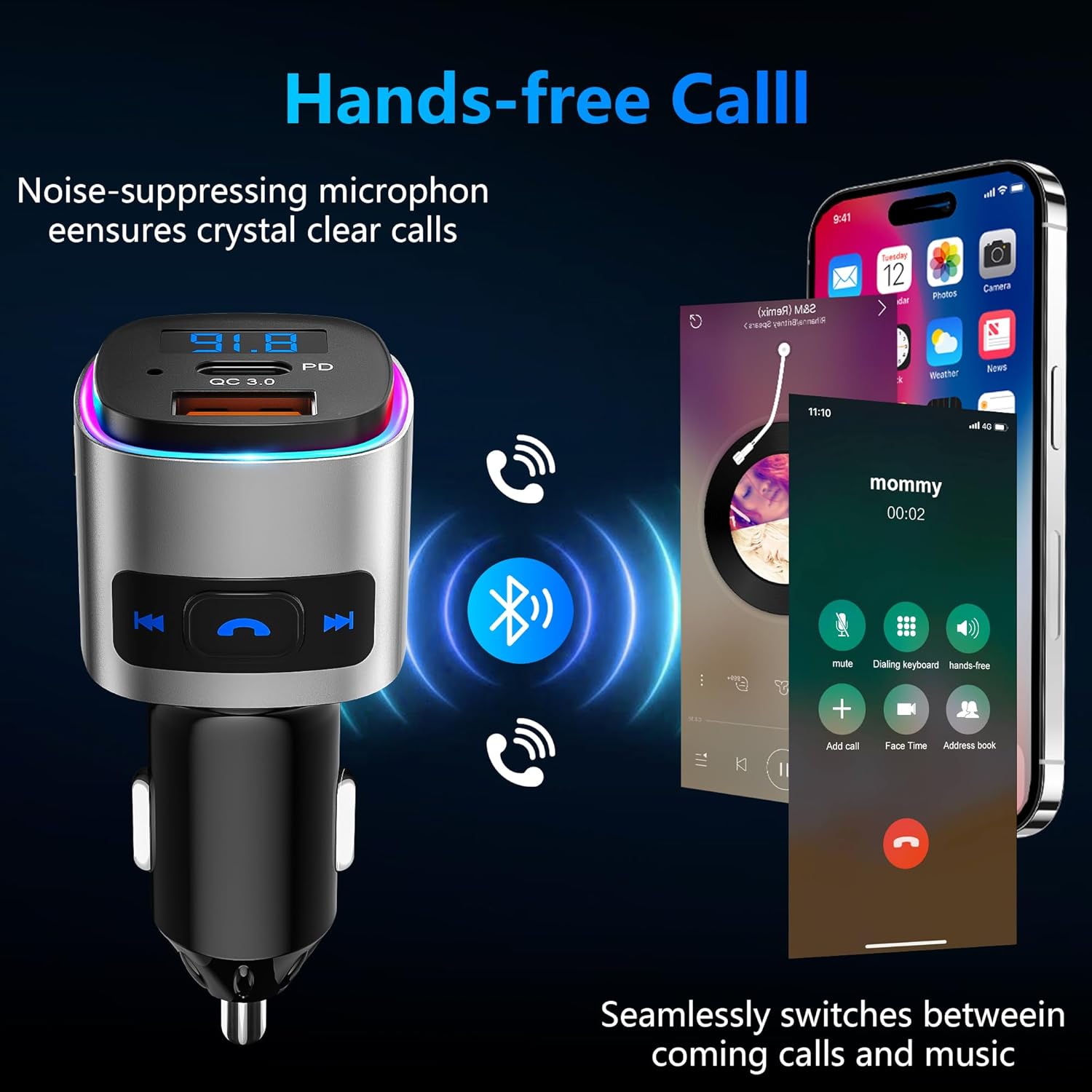
Image: The car charger unit with a smartphone showing a call interface, illustrating the noise-suppressing microphone for crystal clear calls and seamless switching between calls and music.
Button Controls (Car Charger)
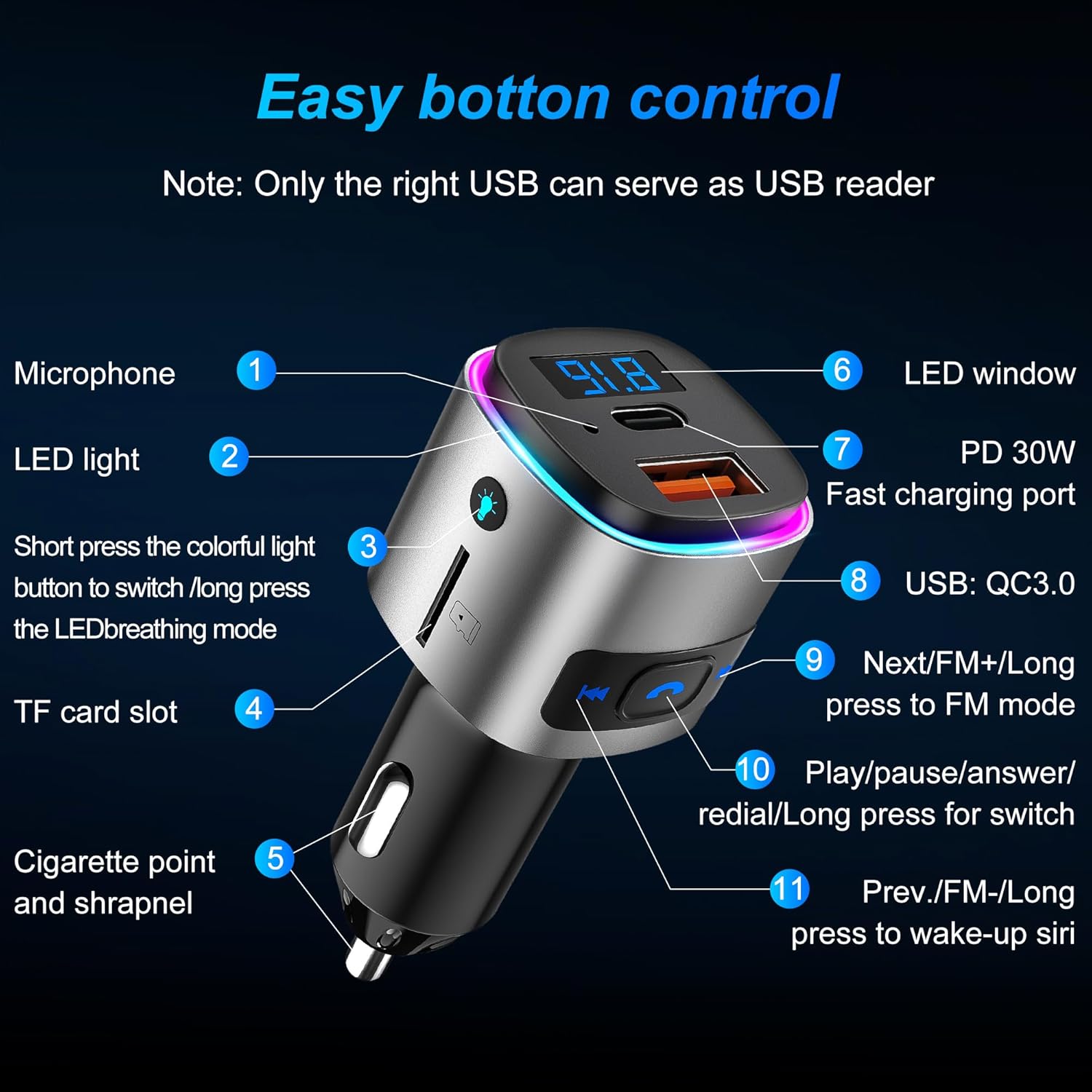
Image: Detailed diagram of the car charger unit, labeling its various components and buttons: Microphone, LED light, colorful light button, TF card slot, Cigarette point and shrapnel, LED window, PD 30W Fast charging port, USB: QC3.0, Next/FM+/Long press to FM mode, Play/pause/answer/redial/Long press for switch, Prev./FM-/Long press to wake-up Siri.
- 마이크(1): 핸즈프리 통화를 위해.
- LED 조명(2): 표시등
- Colorful Light Button (3): Short press to switch colorful light mode; long press for LED breathing mode.
- TF card slot (4): For TF card audio playback.
- Cigarette point and shrapnel (5): 전원 연결.
- LED window (6): Displays FM frequency and other information.
- PD 30W Fast charging port (7): Power Delivery fast charging.
- USB: QC3.0 (8): Quick Charge 3.0 fast charging.
- Next/FM+/Long press to FM mode (9): Short press for next track; long press to enter FM tuning mode (then short press to adjust frequency up).
- Play/pause/answer/redial/Long press for switch (10): Multi-function button for playback and calls.
- Prev./FM-/Long press to wake-up Siri (11): Short press for previous track; long press to enter FM tuning mode (then short press to adjust frequency down); long press to activate voice assistant (Siri/Google Assistant).
유지 보수 및 관리
- 기기를 건조한 곳에 보관하세요. 습기나 액체에 노출되지 않도록 하세요.
- 기기를 분해하거나 직접 수리하려고 시도하지 마십시오. 그렇게 하면 보증이 무효화됩니다.
- 부드럽고 마른 천으로 기기를 닦으세요. 강한 화학 물질이나 연마성 세제는 사용하지 마세요.
- 사용하지 않을 때는 장치를 서늘하고 건조한 곳에 보관하십시오.
- 극한의 온도를 피하세요.
문제 해결
| 문제 | 가능한 원인 | 해결책 |
|---|---|---|
| 기기와 페어링할 수 없습니다. | Bluetooth not enabled; device too far; receiver not in pairing mode; interference. | Ensure Bluetooth is on; bring devices closer; restart receiver to enter pairing mode; turn off other Bluetooth devices. |
| 오디오 출력이 없습니다. | Volume too low; incorrect input selected on stereo; cables not connected properly. | Increase volume on both devices; select correct AUX/FM input; re-plug audio cables securely. |
| Poor FM signal/static (Car Charger). | FM 주파수 간섭; 신호 약화. | Change to a different, clear FM frequency on both the car radio and the transmitter. |
| Charging slow or not working. | 케이블 문제; 기기가 고속 충전과 호환되지 않음; 포트 문제. | Try a different USB cable; ensure your device supports PD/QC3.0; try a different charging port. |
명세서
- 상표: 손루
- 모델: Bluetooth 5.0 Receiver (B0D1MMLXQ1)
- 연결 기술 : 보조, 블루투스, USB
- 무선 통신 표준: 블루투스 5.0
- 블루투스 프로files 지원됨: A2DP, AVRCP, HSP, HFP
- 전원: 직류 전원 공급 장치
- 충전 포트: PD 30W, QC3.0 18W
- Receiver Play Time: Up to 12.8 hours (music/talking)
- 수신기 대기 시간: 250시간
- Receiver Charging Time: 약 1.2시간
- 무선 범위: 최대 33피트(10미터)
- 특징: Bluetooth FM Transmitter, Hands Free Calls, CVC8.0 Noise Cancellation
- 제조업체: 손루
- 첫 번째 가능한 날짜: 1년 2024월 XNUMX일
보증 및 지원
SONRU provides a 12개월 품질 보증 for this product from the date of purchase. Additionally, a one-month money-back guarantee is offered for any reason.
For technical support, warranty claims, or any inquiries regarding your SONRU Bluetooth 5.0 Receiver, please contact SONRU customer service through the retailer's platform or visit the official SONRU store page on Amazon:
보증 목적으로 구매 증빙서류로 구매 영수증을 보관하세요.


