소개
This manual provides detailed instructions for the setup, operation, and maintenance of your MageGee V560 Wireless Gaming Keyboard and Mouse Combo. Please read this manual thoroughly before use to ensure optimal performance and longevity of your device.

Image: The MageGee V560 Wireless Gaming Keyboard and Mouse Combo, featuring a blue, white, and purple color scheme, with the USB receiver visible.
패키지 내용
패키지에 모든 품목이 들어 있는지 확인하세요.
- MageGee V560 Wireless Keyboard
- MageGee Wireless Mouse
- 2.4GHz USB Receiver (stored in mouse battery compartment)
- USB-C 충전 케이블
- 사용자 설명서

Image: Contents of the MageGee V560 package, including the keyboard, mouse, USB receiver, charging cable, and user manual.
설치 지침
- USB 수신기를 찾으세요: Open the battery cover of the wireless mouse. The 2.4GHz USB receiver is stored inside the compartment next to the mouse battery slot.
- 수신기를 연결하십시오: USB 수신기를 컴퓨터의 사용 가능한 USB 포트에 연결합니다.
- 전원 켜기 장치: Ensure both the keyboard and mouse are powered on. The devices are plug-and-play and should connect automatically.
- 초기 청구 : For optimal performance, it is recommended to fully charge both the keyboard and mouse before first use. Use the provided USB-C charging cable.

Image: Illustration showing the 2-in-1 USB receiver connecting the keyboard and mouse wirelessly to a laptop.
작동 지침
키보드 기능
- RGB 백라이트 제어:
- 누르다 FN + INS 백라이트를 켜거나 끕니다.
- 누르다 FN + 페이지업 or FN + PgDn to adjust the 3-level backlight brightness.
- 누르다 FN + 1 / 2 / 3 / 4 / 5 to switch between different backlight modes. Note: Backlight settings are not saved after power off.
- 멀티미디어 바로가기: 사용하세요 FN 키와 조합 F1-F12 keys for quick access to multimedia functions such as volume control, media playback, and more.
- 인체공학적 디자인: The keyboard features a stepped layout and foldable brackets at the bottom, allowing you to adjust the typing angle for comfort during extended use.
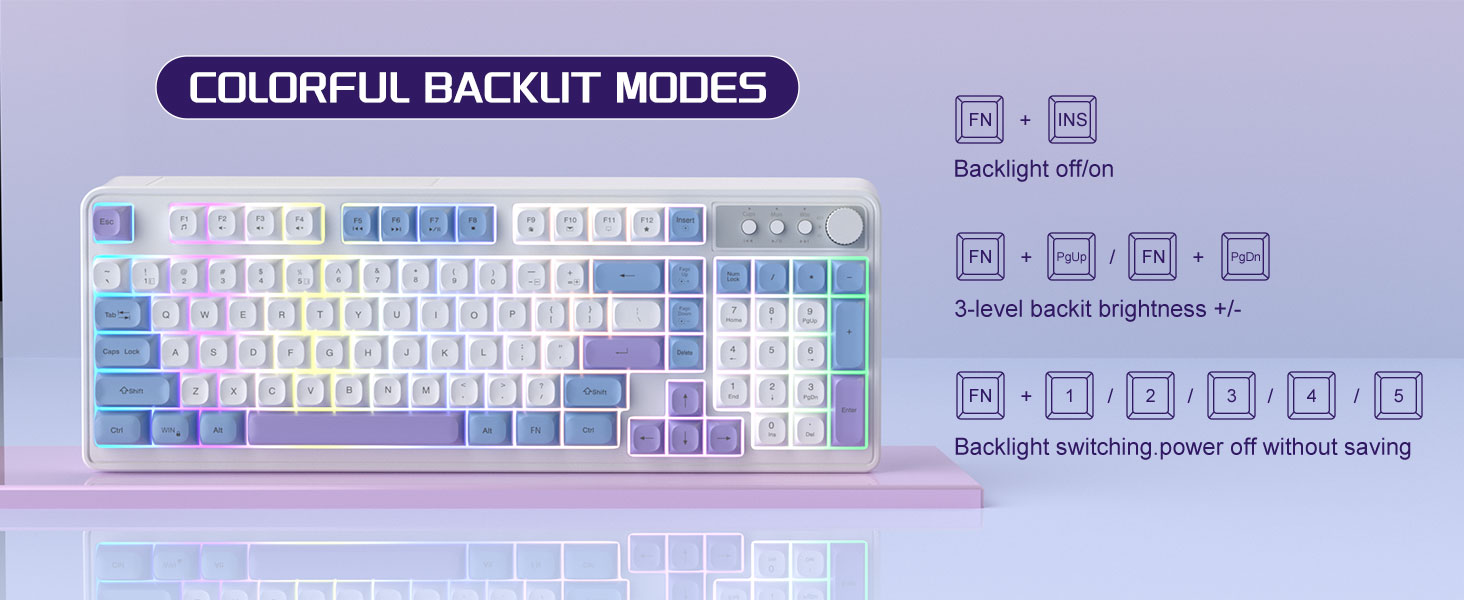
Image: The MageGee V560 keyboard displaying various colorful backlit modes, with instructions for controlling them.

Image: A visual representation of the 16 multimedia shortcuts available on the MageGee V560 keyboard, activated via the FN key.
마우스 기능
- DPI 조정: The mouse supports 6 levels of DPI adjustment (600-3200 DPI). Press the DPI button (usually located below the scroll wheel) to cycle through the sensitivity settings. Internal indicator lights will show the current DPI level.
- 숨쉬는 듯한 백라이트: The mouse features 7 dazzling color breathing backlights. This lighting is automatic and indicates mouse activity.

Image: The MageGee V560 mouse highlighting its DPI settings (1000, 1200, 1600 DPI) and showing the USB-C charging port.
충전 및 배터리 수명
- Both the keyboard and mouse are rechargeable. Use the provided USB-C charging cable to charge them.
- Keyboard Standby Time: 최대 365일.
- Mouse Standby Time: 최대 270일.
- 자동 절전 기능: The devices automatically enter sleep mode after a period of inactivity to conserve battery power and extend battery life.

Image: An illustration demonstrating the intelligent auto-sleep feature of the MageGee V560 combo, which conserves battery life.
호환성
The MageGee V560 Wireless Gaming Keyboard and Mouse Combo is compatible with the following operating systems:
- 윈2000
- 윈 XP
- 나 승리하기
- 추억
- 윈7
- 윈8
- 윈10
- 기계적 인조 인간
- 리눅스
- 맥 OS
문제 해결
If you encounter issues with your MageGee V560 combo, please refer to the following common solutions:
- 장치가 연결되지 않음:
- USB 수신기가 작동하는 USB 포트에 단단히 꽂혀 있는지 확인하세요.
- 키보드와 마우스의 전원이 모두 켜져 있는지 확인하십시오.
- Check the battery levels of both devices and charge if necessary.
- USB 수신기를 다른 USB 포트에 연결해 보십시오.
- 지연 또는 연결 끊김:
- Ensure the devices are within the 33 ft (10 meter) operating range of the USB receiver.
- 다른 2.4GHz 무선 장치(예: Wi-Fi 라우터, 무선 전화기)와의 간섭을 최소화하십시오.
- Charge the devices to ensure sufficient power.
- Keys Not Registering / Mouse Not Responding:
- Recharge the keyboard and mouse.
- Ensure the USB receiver is properly connected.
- 컴퓨터를 다시 시작하세요.
- 백라이트 문제:
- 키보드가 충전되어 있는지 확인하세요.
- 사용 FN + INS 백라이트를 켜려면.
- 밝기를 조절하세요 FN + 페이지업/페이지다운.
명세서
| 상표 | 메이지 |
| 모델 | V560 |
| 연결 기술 | 2.4GHz 무선 |
| 특별 기능 | RGB lighting, rechargeable keyboard and mouse, ergonomic design |
| 호환 장치 | Personal Computer (Win2000, Win XP, Win ME, Vista, Win7, Win8, Win10, Android, Linux, Mac OS) |
| 품목 무게 | 1.87파운드 |
| 패키지 크기 | 16.61 x 9.21 x 1.73 인치 |
| 제조업체 | 마지 |
유지
- 청소: 부드럽고 마른 천으로 키보드와 마우스를 닦으세요. 잘 지워지지 않는 얼룩은 약간 거친 천으로 닦아내세요.amp 천을 사용하면 액체가 장치 안으로 들어가지 않도록 할 수 있습니다.
- 저장: 기기를 직사광선과 극한의 온도를 피해 서늘하고 건조한 곳에 보관하세요.
- 배터리 관리 : 배터리를 자주 완전히 방전시키지 마십시오. 배터리 수명 유지를 위해 정기적으로 충전하십시오.
보증 및 지원
이 제품에는 다음이 포함되어 있습니다. 1년 보증 구매일로부터.
For any questions or support needs, please contact MageGee customer service via Amazon email. We aim to respond within 12 hours and provide a satisfactory solution.


