소개
Thank you for choosing the Spigen ArcField 3-in-1 Wireless Charging Station. This device is designed to efficiently charge your compatible iPhone, Apple Watch, and AirPods simultaneously. Please read this manual carefully to ensure proper use and to maximize the performance of your charging station.
패키지 내용
패키지에 모든 품목이 들어 있는지 확인하세요.
- Spigen ArcField 3-in-1 Wireless Charging Station
- 30W USB-C 벽면 충전기
- 6.6피트 USB-C-USB-C 케이블

Image: The Spigen ArcField 3-in-1 Wireless Charging Station shown with its 30W USB-C wall charger and 6.6ft USB-C to USB-C cable.
설치 가이드
- 전원 어댑터 연결: Plug the provided 30W USB-C Wall Charger into a power outlet.
- USB-C 케이블을 연결합니다. Insert one end of the 6.6ft USB-C to USB-C cable into the wall charger and the other end into the USB-C port on the back of the Spigen ArcField charging station.
- 놓기: Place the charging station on a flat, stable surface. The anti-slip rubber feet on the base will help keep it secure.
The charging station is now ready for use. An indicator light on the front will illuminate to confirm it is powered on.
영상: 애니메이션 오버view demonstrating the Spigen ArcField Wireless Charger's features and functionality.
작동 지침
The Spigen ArcField charging station allows for simultaneous charging of up to three devices:
1. Charging Your iPhone (MagSafe)
- Place your MagSafe-compatible iPhone (iPhone 12 series or newer) onto the vertical charging pad. The magnetic connection will securely hold your device in place.
- The station delivers up to 15W fast wireless charging for your iPhone.
- Your iPhone can be charged in both portrait and landscape orientations, allowing for features like Nightstand Mode.

Image: An iPhone magnetically attached to the vertical charging pad, displaying a charging indicator.
2. 애플 워치 충전하기
- Drape your Apple Watch over the dedicated Apple Watch charging puck on the side.
- The station provides up to 5W charging for your Apple Watch.
3. Charging Your AirPods (Qi)
- Place your AirPods (with wireless charging case) or any other Qi-compatible earbuds onto the horizontal charging pad at the base of the station.
- This pad delivers up to 5W wireless charging.
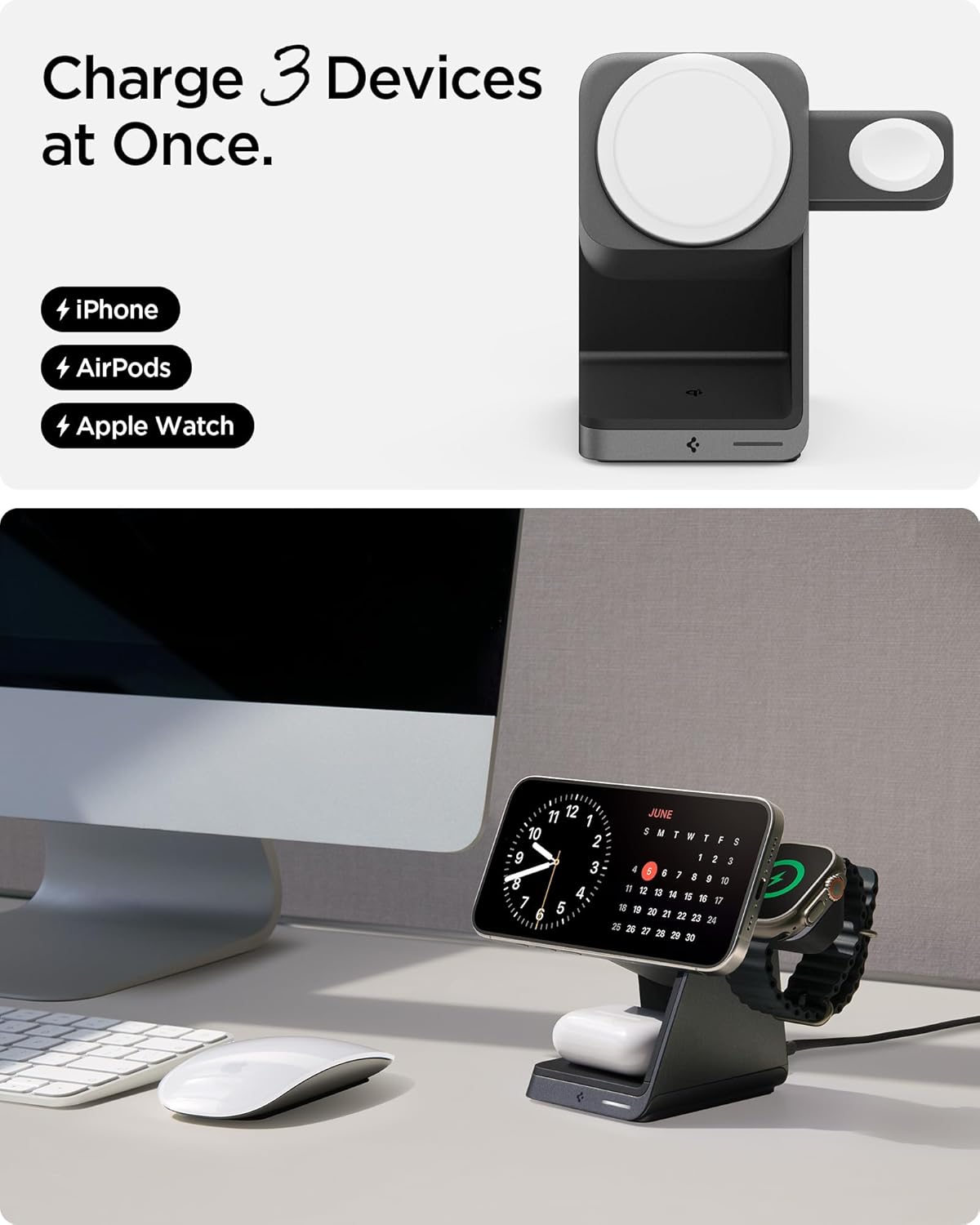
Image: An Apple Watch charging on its dedicated puck and AirPods charging on the base pad.
동시 충전
All three devices can be charged simultaneously without compromising charging speed for each device, thanks to the included 30W power adapter.

Image: The charging station with an iPhone, Apple Watch, and AirPods all actively charging.
MagFit Plus Accessory Storage
The Spigen ArcField features MagFit Plus, a dedicated magnetic area on the back of the vertical charging pad for securely storing MagSafe accessories like wallets or card holders. This area does not provide charging functionality.

Image: The charging station with a MagSafe wallet attached to the MagFit Plus area on the back.
안전 기능
The Spigen ArcField 3-in-1 Wireless Charging Station incorporates advanced safety features to protect your devices:
- AirBoost: Optimizes wireless power delivery to ensure efficient charging.
- 과열 보호: Prevents the charging station and your devices from overheating during charging.
- 지능형 안전: Automatically adjusts current based on device demand, ensuring safe and stable charging.
유지
충전소의 수명 연장 및 최적의 성능을 보장하려면 다음 사항을 고려하십시오.
- Keep the charging surfaces clean and free of dust or debris. Use a soft, dry cloth for cleaning.
- 장치를 극한의 온도나 습도에 노출시키지 마십시오.
- 충전소를 직접 분해하거나 수리하려고 시도하지 마십시오.
문제 해결
- 장치가 충전되지 않음:
- Ensure the charging station is properly connected to a working power outlet using the provided adapter and cable.
- Verify that your device is correctly aligned on the charging pad. For MagSafe, ensure a secure magnetic connection.
- 무선 충전을 방해할 수 있는 두꺼운 케이스나 금속 물체를 기기에서 제거하십시오.
- Confirm your device is wireless charging compatible.
- 느린 충전:
- Ensure you are using the original 30W USB-C Wall Charger and cable provided with the product.
- 충전 패드 위에 기기가 제대로 놓여 있는지 확인하세요.
- Background apps or heavy usage during charging can affect speed.
- 표시등이 켜지지 않음:
- Check all cable connections and ensure the power adapter is securely plugged into the outlet.
- 다른 전원 콘센트를 사용해 보세요.
명세서
| 특징 | 세부 사항 |
|---|---|
| 모델 번호 | 피에프2203 |
| 입력 Voltage | 240 볼트 |
| 총 USB 포트 | 1 (USB 타입 C) |
| 왓tage | 30 watts (total output) |
| iPhone Charging Output | Up to 15W (MagSafe) |
| Apple Watch Charging Output | 최대 5W |
| AirPods/Qi Charging Output | 최대 5W |
| 호환 장치 | iPhone 12-17 Series, AirPods Pro (3rd/4th gen), AirPods Pro, Apple Watch Ultra/10/9/8/7/6/SE series, MagSafe Accessories |
| 포함된 구성 요소 | 30W USB-C Wall Charger, 6.6ft USB-C to USB-C Cable |
| 특별 기능 | Charging Indicator, Magnetic, MagSafe Compatible, Travel, Wireless Charging |
| 품목 무게 | 1.41파운드 |
| 패키지 크기 | 5.39 x 5.16 x 4.02 인치 |
보증 정보
Spigen offers a 24-month hassle-free warranty for the ArcField 3-in-1 Wireless Charging Station. Please retain your proof of purchase for warranty claims. For detailed warranty terms and conditions, please visit the official Spigen web사이트를 방문하거나 고객 지원팀에 문의하세요.
고객 지원
If you encounter any issues or have questions regarding your Spigen ArcField 3-in-1 Wireless Charging Station, please contact Spigen customer support through their official web사이트 또는 제품 포장에 제공된 연락처 정보를 참조하세요.


