1. 서론
This manual provides essential information for the safe and effective operation of your OWON DGE1060 Waveform Generator. Please read this manual thoroughly before using the device and keep it for future reference. The DGE1060 is a versatile arbitrary waveform generator designed for various applications in laboratories, research, and education, offering a 60MHz bandwidth, 300MSa/s sampling rate, and a wide range of waveform outputs.
2. 안전 정보
부상을 예방하고 기기나 기기에 연결된 제품의 손상을 방지하려면 항상 다음 안전 예방 조치를 준수하세요.
- 전원: 지정된 전원 어댑터만 사용하세요. 볼륨을 확인하세요.tage and frequency match the device requirements.
- 접지: 감전을 방지하기 위해 기기가 제대로 접지되었는지 확인하십시오.
- 환경: Operate the device in a dry, well-ventilated area, away from direct sunlight, high temperatures, humidity, and dust.
- 통풍: 통풍구를 막지 마십시오. 과열로 인해 손상될 수 있습니다.
- 청소: 청소하기 전에 전원을 분리하세요. 부드럽고 마른 천을 사용하세요. 액체 또는 에어로졸 세척제는 사용하지 마세요.
- 서비스: 기기를 직접 수리하려고 하지 마십시오. 모든 수리는 자격을 갖춘 서비스 담당자에게 맡기십시오.
3. 패키지 내용
아래 나열된 모든 품목이 패키지에 포함되어 있는지 확인하십시오. 누락되거나 손상된 품목이 있는 경우 공급업체에 문의하십시오.
- Host Machine (OWON DGE1060 Waveform Generator)
- BNC-악어 클립 케이블
- USB 케이블
- USB-DC 케이블
- 전원 어댑터
- 빠른 설명

Figure 3.1: OWON DGE1060 Waveform Generator and included accessories.
4. 제품 오버view
4.1 전면 패널

그림 4.1: 전면 패널 레이아웃
The front panel features a 3.6-inch TFT LCD display for clear waveform observation and parameter settings. Key areas include:
- 3.6인치 TFT LCD 디스플레이: Shows waveform graphs, parameters, and menu options.
- Function Setting Area: Buttons and rotary knob for adjusting parameters and navigating menus.
- Waveform Switching Area: Dedicated buttons for selecting basic waveforms.
- Channel Output Control Area: BNC connector for waveform output and ON/OFF button for the output.
4.2 후면 패널

그림 4.2: 후면 패널 레이아웃
The rear panel provides essential connectivity:
- USB 장치 인터페이스: Supports PC remote control via SCPI commands.
- 전원 소켓: 외부 전원 어댑터를 연결하기 위한 것입니다.
5. 주요 특징
- 파형 생성: 60MHz 대역폭, 300MSa/s 실시간 sampling rate, 8K record depth, 14 bits vertical resolution.
- Comprehensive Waveform Output: Includes 5 standard basic waveforms and 160 built-in arbitrary waveforms (e.g., exponential rise, exponential fall, sin(x)/x, step wave).
- 사용자 친화적인 인터페이스: 3.6-inch TFT LCD display and intuitive function setting area for clear observation and easy operation.
- 다양한 변조 모드: Supports AM, FM, PM, and FSK modulation modes.
- 고급 기능: Features Sweep and Burst functions.
- 파형 저장: Stores 16 digital arbitrary waveforms.
- PC 원격 제어: Compatible with PC remote control for enhanced functionality.
- 컴팩트한 디자인: Ultra-thin body for portability and convenient shortcut keys for improved user interaction.
6. 설정
- 전원 연결: Connect the provided power adapter to the Power Socket on the rear panel and then to a suitable AC power outlet.
- 출력 연결: Connect the BNC to Alligator Clip cable to the OUT1 BNC connector on the front panel. Connect the alligator clips to your test circuit or device.
- 전원 켜기: Press the ON/OFF button on the front panel to power on the device.
- PC 연결 (선택 사항): For remote control, connect the USB cable from the USB Device interface on the rear panel to your computer. Install any necessary drivers or software provided by OWON.
7. 사용 설명서
7.1 기본 파형 생성
To generate a basic waveform (Sine, Square, Pulse, Ramp, Noise):
- Press the desired waveform button in the Waveform Switching Area (e.g., Sine wave button).
- Use the Function Setting Area buttons and rotary knob to adjust parameters such as Frequency, Amplitude, Offset, and Phase.
- Press the OUT1 ON/OFF button to enable the output.
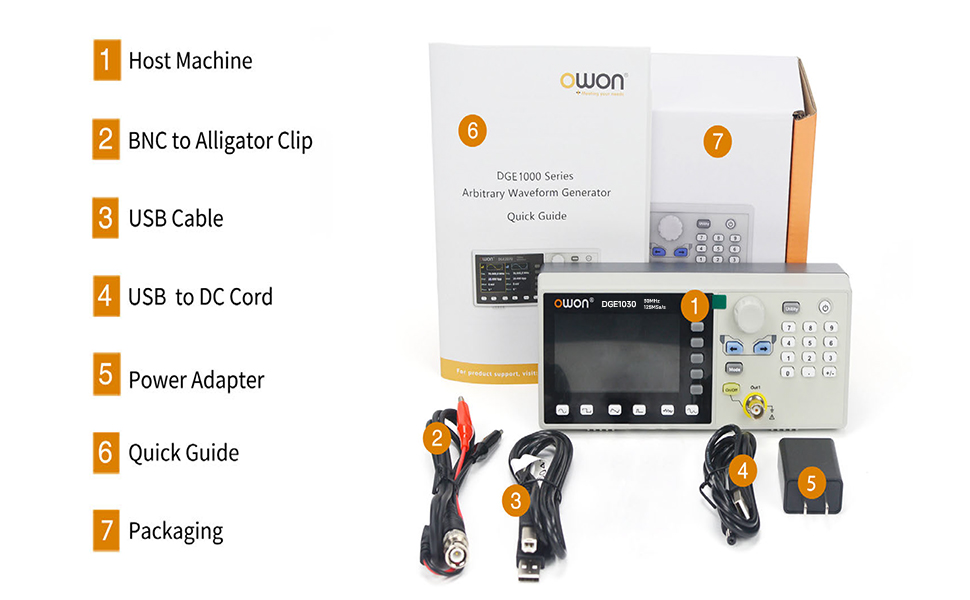
Figure 7.1: High Frequency Stable Output and Arbitrary Waveform Selection
7.2개의 임의 파형
The DGE1060 includes 160 built-in arbitrary waveforms and supports user-defined waveforms.
- Press the 'Arb' button (if available, or navigate through the menu to 'Arb').
- Select a built-in arbitrary waveform from the list using the navigation buttons and rotary knob.
- Adjust parameters as needed and enable output.
7.3 Modulation Functions (AM, FM, PM, FSK)
To apply modulation to a waveform:
- Select a basic waveform to be modulated.
- Press the 'Mode' button and select the desired modulation type (AM, FM, PM, or FSK).
- Adjust the modulation parameters (e.g., depth, frequency) using the controls.

Figure 7.2: Modulation and Sweep Function Settings
7.4 스윕 기능
The sweep function allows the output frequency to vary over a specified range.
- Press the 'Sweep' button.
- Select the sweep type (Linear or Log).
- Set the Start Frequency, Stop Frequency, and Sweep Time.
7.5 Burst Function
The burst function generates a specific number of waveform cycles.
- Press the 'Burst' button.
- Set the Burst Period and the number of Cycles (N-Cycle, Gated, or Infinite).
- Select the Trigger Source (Internal or Manual).

Figure 7.3: Burst Function and Waveform Storage
7.6 PC Remote Control
The DGE1060 supports remote control via a PC using the USB device interface and SCPI commands. Refer to the OWON website or additional software documentation for detailed instructions on setting up and using PC remote control.
Video 7.1: An official product video demonstrating the OWON DGE1060 Waveform Generator, highlighting its compact size, exterior dimensions, large LCD display, and remote operation capabilities. It also introduces various functions like high frequency stable output, arbitrary waveforms, multi-modulation modes (AM, FM, PM, FSK), sweep function, burst function, and waveform storage.
8. 사양
| 범주 | 사양 |
|---|---|
| 상표 | 오원 |
| 모델명 | DGE1060 |
| 주파수 출력 | 60MHz |
| Samp링율 | 300MSa / s |
| 수직 해상도 | 14 비트 |
| 파형 길이 | 8K points |
| 표준파형 | 사인, 사각, 펄스, Ramp, 소음 |
| 임의 파형 | 160 built-in, user-defined |
| 변조 유형 | 오전, FM, 오후, FSK, 스윕, 버스트 |
| 표시하다 | 3.6 인치 TFT LCD |
| 통신 인터페이스 | USB 장치 |
| 전원 | 교류/직류 |
| 권tage | 120볼트(AC) |
| 출력 와트tage | 120 와트 |
| 제품 크기(L x W x H) | 가로 5인치, 세로 3인치, 높이 5인치 (대략적인 크기) |
| 품목 무게 | 2.35파운드 |
| 색상 | 검은색 |
9. 유지관리
- 청소: Regularly clean the exterior of the instrument with a soft, dry cloth. Do not use abrasive cleaners or solvents.
- 저장: When not in use for extended periods, store the device in a cool, dry place, protected from dust and extreme temperatures.
- 구경 측정: 측정 정확도를 유지하기 위해서는 자격을 갖춘 담당자에 의한 주기적인 교정이 권장됩니다.
10. 문제 해결
If you encounter issues with your DGE1060 Waveform Generator, refer to the following common troubleshooting steps:
- 전원 없음: Ensure the power adapter is securely connected to both the device and the power outlet. Verify the power outlet is functional.
- 출력 신호 없음: Check if the OUT1 ON/OFF button is enabled. Verify that the output cable is correctly connected and not damaged. Ensure the amplitude and frequency settings are appropriate for your application.
- 잘못된 파형: Double-check the selected waveform type and all associated parameters (frequency, amplitude, offset, etc.).
- PC Remote Control Issues: Ensure the USB cable is properly connected. Verify that the correct drivers are installed on your PC and that the remote control software is configured correctly.
If the problem persists after attempting these steps, please contact OWON customer support or your local distributor for assistance.
11. 보증 및 지원
보증 정보, 기술 지원 또는 서비스 문의는 OWON 공식 웹사이트를 참조하십시오. website or contact your authorized OWON dealer. Keep your purchase receipt as proof of purchase for warranty claims.


