1. 소개 및 이상view
The Ditec RM-L 1370 is a universal replacement remote control designed for a wide range of Sony Bravia televisions. This remote offers direct compatibility with various Sony LCD, LED, UHD, OLED, and QLED 4K Ultra HD Smart Android TV models, eliminating the need for complex programming or pairing. It features dedicated hotkeys for popular streaming services like YouTube and Netflix for convenient access.

Image: The Ditec RM-L 1370 remote control, highlighting its compatibility as a single remote solution for Sony TVs.
2. 설정 및 초기 사용
This remote control is designed for immediate use without any setup or programming. Simply insert the required batteries, and it will be ready to operate your compatible Sony TV.
2.1 배터리 설치
- 리모콘 뒷면에서 배터리함을 찾으세요.
- 배터리실 커버를 밀어서 엽니다.
- Insert two (2) AAA batteries (not included), ensuring correct polarity (+ and - terminals).
- 배터리 덮개를 단단히 닫으세요.

이미지: 후면 view 리모컨의 배터리 칸 위치를 보여주는 그림입니다.
2.2 첫 번째 사용
Once batteries are installed, point the remote control towards your Sony TV and press the Power button. The remote should operate your TV without any further configuration.
3. 사용 설명서
The Ditec RM-L 1370 remote control provides all standard functions for your Sony Bravia TV, along with convenient shortcut buttons.
3.1 기본 기능
- 전원 버튼: TV를 켜거나 끕니다.
- 숫자 버튼(0-9): 직접 채널을 선택하세요.
- 볼륨 높이기/낮추기: TV 볼륨을 조정합니다.
- 채널 위/아래: TV 채널을 변경합니다.
- 탐색 패드(위/아래/왼쪽/오른쪽/Enter): 메뉴 탐색 및 선택을 위해.
- 홈 버튼: Accesses the TV's Smart Home screen or main menu.
- 돌아가기/뒤로 가기 버튼: 이전 화면 또는 메뉴로 돌아갑니다.
- 옵션 버튼: 상황에 맞는 옵션을 표시합니다.
3.2 특수 기능
- YouTube Hotkey: YouTube 애플리케이션을 바로 실행합니다.
- Netflix Hotkey: 넷플릭스 애플리케이션을 바로 실행합니다.
The remote features an enhanced infrared sensor for a farther transmitting distance, allowing effective control up to 50 feet.

Image: The remote control demonstrating its farther distance sensor, capable of operating up to 50 feet.
4. 호환성
The Ditec RM-L 1370 universal remote is compatible with a wide range of Sony Bravia LCD, LED, UHD, OLED, and QLED 4K Ultra HD Smart Android TVs. It is designed to replace many original Sony remote models, including but not limited to:
- RMT-TX100U, RMT-TX102U
- RMF-TX200U, RMF-TX201U, RMF-TX220U
- RMT-TX300U, RMF-TX310U
- RMT-TX500U, RMF-TX520U, RMF-TX600U
- And many other Sony TV remote models.
For a comprehensive list of compatible Sony TV remote models, please refer to the image below:
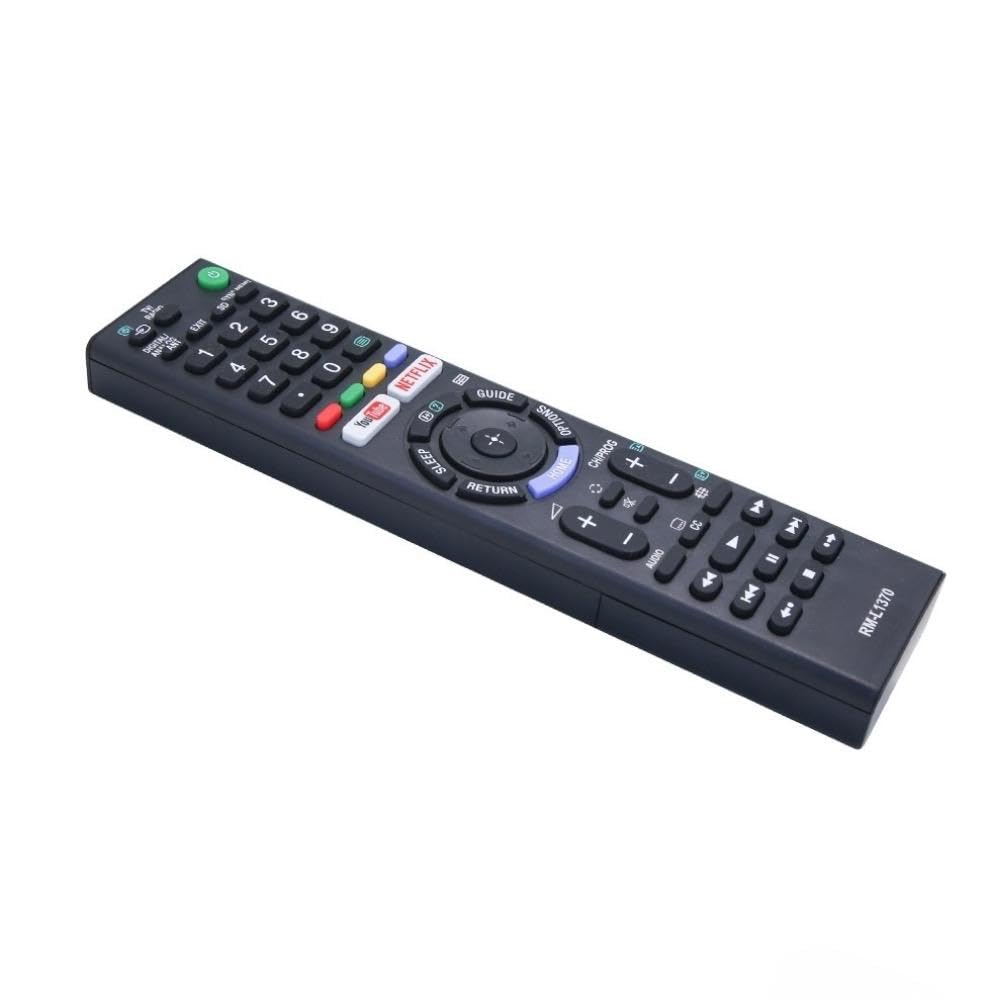
Image: A detailed list of Sony TV remote models that are compatible with the Ditec RM-L 1370.
It is recommended to compare the appearance of this remote with your original remote for visual confirmation of compatibility.
5. 유지관리
5.1 배터리 교체
When the remote control's performance degrades or it stops responding, replace the batteries with two new AAA alkaline batteries. Always replace both batteries at the same time. Do not mix old and new batteries or different types of batteries.
5.2 청소
To clean the remote control, use a soft, dry cloth. Do not use liquid cleaners, sprays, or abrasive materials, as these may damage the remote's surface or internal components.
6. 문제 해결
- 리모컨이 응답하지 않음:
- 배터리가 올바른 극성에 맞게 올바르게 삽입되었는지 확인하세요.
- 오래된 배터리를 새 배터리로 교체하십시오.
- 리모컨과 TV의 적외선 수신기 사이에 장애물이 없는지 확인하십시오.
- 유효 작동 범위(최대 50피트) 내에 있는지 확인하십시오.
- 작동하지 않는 특정 버튼:
- Some advanced functions or TV-specific features might not be supported by a universal replacement remote.
- Ensure the TV is powered on and functioning correctly.
7. 사양
| 특징 | 세부 사항 |
|---|---|
| 상표 | 디텍 |
| 모델 | RM-L 1370 |
| 호환 장치 | Sony Bravia LCD, LED, UHD, OLED, QLED 4K Ultra HD Smart Android TVs |
| 커넥터 유형 | 적외선 (IR) |
| 필요한 배터리 | AAA 2개(포함되지 않음) |
| 특별 기능 | Ergonomic design, YouTube & Netflix Hotkeys |
| 제품 치수 | 3 x 3 x 12cm |
| 품목 무게 | 80g |
| 원산지 | 중국 |
8. 지원
For assistance with compatibility or any questions regarding your Ditec RM-L 1370 remote control, you may contact support by sending a picture of your old remote or your device's brand name and model number to +91 9924350801. This will help in verifying compatibility or addressing specific queries.

Image: Information on how to contact support for compatibility checks or questions.


