1. 설정
This section guides you through the initial setup of your DOOGEE U10 tablet.
1.1 패키지 내용
상자 안에 모든 품목이 들어 있는지 확인하세요.
- 두기 U10 태블릿
- USB Type-C 케이블
- 전원 어댑터
- SIM 카드 추출 도구(해당되는 경우)
- 빠른 시작 가이드
- 보증 카드
1.2 장치 레이아웃
태블릿의 외형적인 특징에 익숙해지세요.
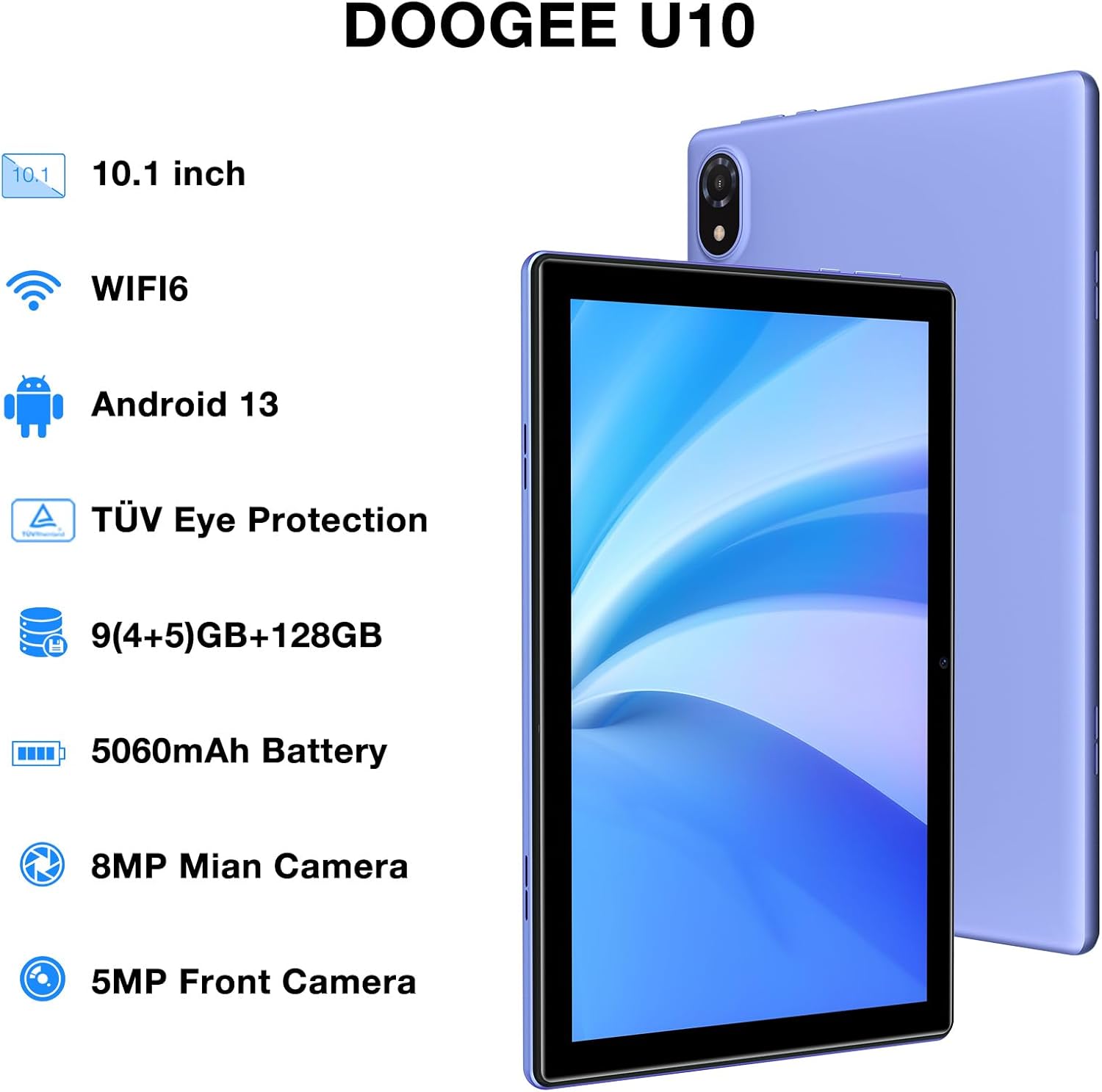
Figure 1: DOOGEE U10 Tablet Overview. This image highlights the tablet's 10.1-inch display, WiFi 6 capability, Android 13 operating system, TÜV Eye Protection, 9GB RAM, 128GB ROM, 5060mAh battery, 8MP main camera, and 5MP front camera.
- 전원 버튼: 측면에 있는 버튼을 길게 누르면 전원을 켜거나 끄거나 재시작할 수 있습니다.
- 볼륨 버튼: Adjust media volume and notification sounds.
- USB 타입-C 포트: 충전 및 데이터 전송용입니다.
- 3.5mm 헤드폰 잭 : 유선 헤드폰을 연결하세요.
- 전면 카메라: 영상 통화와 셀카를 위해.
- 후방 카메라: 사진과 비디오를 촬영하기 위해.
- 스피커: 듀얼 스테레오 스피커로 오디오 출력을 제공합니다.
1.3 초기 전원 켜기 및 충전
Before first use, fully charge your tablet. Connect the USB Type-C cable to the tablet and the power adapter to a wall outlet. The battery indicator will show charging status.
- DOOGEE 로고가 나타날 때까지 전원 버튼을 길게 누르세요.
- 화면의 지시에 따라 언어를 선택하고, Wi-Fi에 연결하고, Google 계정을 설정하세요.
2. 태블릿 작동
Learn how to navigate and use the core features of your DOOGEE U10 tablet.
2.1 디스플레이 및 탐색
The DOOGEE U10 features a 10.1-inch IPS HD display with a resolution of 1280x800 pixels, providing clear visuals for various tasks.

Figure 2: Vivid IPS HD Display. This image illustrates the tablet's 10.1-inch screen with 800x1280 HD+ resolution, ideal for media consumption.
- 터치 제스처: 탭하여 선택하고, 스와이프하여 스크롤하고, 핀치하여 확대/축소합니다.
- 홈 화면: 위젯과 앱 바로가기를 사용하여 사용자 정의하세요.
- 알림: 화면 상단에서 아래로 스와이프하면 알림 및 빠른 설정에 액세스할 수 있습니다.
- 얼굴 인식 : Unlock your tablet using facial recognition for convenience.
2.2 성능 및 스토리지
The tablet is powered by a Quad-Core RK3562 processor clocked at up to 2.0GHz, ensuring smooth performance. It comes with 9GB RAM (5GB physical + 4GB expansion) and 128GB internal storage, expandable up to 1TB via a microSD card.

Figure 3: Powerful Processor and Memory. This image details the tablet's Rockchip RK3562 Quad-Core processor, 9GB RAM, 128GB ROM, and support for 1TB TF card expansion.
2.3 연결성
- 와이파이 6: Connect to high-speed Wi-Fi networks for faster browsing and streaming. Go to Settings > Network & internet > Wi-Fi.
- 블루투스 5.0 : Pair with wireless headphones, speakers, or other Bluetooth devices. Go to Settings > Connected devices > Bluetooth.
- OTG(온더고): Connect USB peripherals like flash drives or keyboards using an OTG adapter (sold separately).
2.4 카메라 기능
The tablet is equipped with an 8MP main camera and a 5MP front camera for photos and video calls.

Figure 4: Dual Camera System. This image showcases the tablet's 8MP main camera and 5MP front camera, suitable for capturing moments and video conferencing.
- 홈 화면이나 앱 서랍에서 카메라 앱을 엽니다.
- 셔터 버튼을 탭하여 사진을 촬영하세요.
- 카메라 아이콘을 사용하여 전면 카메라와 후면 카메라를 전환합니다.
2.5 배터리 관리
The 5060mAh battery provides extended usage. To optimize battery life, adjust screen brightness, close unused apps, and enable power-saving modes.

Figure 5: Large Capacity Battery. This image highlights the 5060mAh battery, Type-C charging, 5V2A fast charging, and 3.5mm headphone jack, along with estimated usage times for gaming, movies, and music.
2.6 Multimedia Experience
Enjoy an immersive audio experience with dual stereo speakers. The tablet supports Widevine L1, allowing for high-quality streaming from various video platforms.

Figure 6: Immersive Audio and DRM L1. This image illustrates the tablet's support for WiFi 6, Bluetooth 5.0, dual speakers, and DRM L1 for enhanced multimedia playback.
2.7 눈 보호 모드
The DOOGEE U10 is TÜV SÜD blue light certified, reducing harmful blue light emissions to protect your eyes during prolonged use.

Figure 7: TÜV Certified Eye Protection. This image shows the TÜV Rheinland certification, indicating the tablet's low blue light feature for eye comfort.
2.8 공식 제품 영상
DOOGEE U10 Tablet Showcase
이 영상은 일반적인 내용을 제공합니다.view and showcase of the DOOGEE U10 tablet's features and design.
DOOGEE U10 Fantastic Experience for Kids
This video demonstrates how the DOOGEE U10 tablet can be used by children, highlighting its suitability for educational and entertainment purposes for younger users.
3. 유지관리
적절한 관리는 태블릿의 수명과 최적의 성능을 보장합니다.
3.1 태블릿 청소
- 부드럽고 보푸라기가 없는 천을 사용하여 화면과 본체를 닦으세요.
- 강한 화학 물질, 연마 세척제 또는 에어로졸 스프레이는 사용하지 마세요.
- 완고한 얼룩의 경우 약간 damp천에 물을 묻히거나 전자제품용 화면 세정제를 묻힙니다.
3.2 소프트웨어 업데이트
Regularly check for and install software updates to enhance performance, security, and add new features.
- 설정 > 시스템 > 시스템 업데이트로 이동합니다.
- 업데이트를 다운로드하기 전에 안정적인 Wi-Fi 네트워크에 연결하세요.
4. 문제 해결
이 섹션에서는 DOOGEE U10 태블릿에서 발생할 수 있는 일반적인 문제에 대해 설명합니다.
4.1 장치 전원이 켜지지 않음
- 배터리가 충전되어 있는지 확인하십시오. 태블릿을 충전기에 최소 30분 동안 연결해 두세요.
- 강제로 재시작하려면 전원 버튼을 10~15초 동안 길게 누르십시오.
4.2 연결 문제(Wi-Fi/Bluetooth)
- Toggle Wi-Fi or Bluetooth off and on in Quick Settings or Settings menu.
- Restart your tablet and the router/Bluetooth device.
- 네트워크/장치를 삭제하고 다시 연결하세요.
4.3 앱 충돌 또는 정지
- 문제가 있는 앱을 닫았다가 다시 열어보세요.
- Clear the app's cache: Settings > Apps > [App Name] > Storage & cache > Clear cache.
- 앱이 최신 버전으로 업데이트되었는지 확인하세요.
- 문제가 지속되면 앱을 제거했다가 다시 설치하는 것을 고려하세요.
5. 기술 사양
Key technical details of the DOOGEE U10 tablet.
| 특징 | 사양 |
|---|---|
| 모델명 | 우10 |
| 운영 체제 | 안드로이드 13 |
| 화면 크기 | 10.1 인치 |
| 화면 해상도 | 1280 x 800 픽셀(HD+) |
| 프로세서 | Quad-Core (Rockchip RK3562, up to 2.0GHz) |
| 숫양 | 9GB (실물 5GB + 확장 4GB) |
| 내부 저장소 | 128GB |
| 확장 가능한 스토리지 | 최대 1TB (microSD/TF 카드 지원) |
| 메인 카메라 | 8MP |
| 전면 카메라 | 5MP |
| 배터리 용량 | 5060mAh |
| 연결성 | Wi-Fi 6, Bluetooth 5.0, OTG |
| 치수(길이x너비x높이) | 9.6 x 6.4 x 0.4 인치 |
| 무게 | 약 1.13파운드(427g) |
| 눈 보호 | TÜV SÜD Low Bluelight Certified |
| DRM 지원 | 와이드바인 L1 |
6. 보증 및 지원
Information regarding your product's warranty and how to obtain support.
6.1 제한 보증
The DOOGEE U10 tablet typically comes with a 2-year limited warranty. This warranty covers manufacturing defects and workmanship under normal use. Please refer to the warranty card included in your package for specific terms and conditions, including coverage details and exclusions.
보증 청구를 위해 구매 증빙 자료를 보관하십시오.
6.2 고객 지원
If you encounter any issues not covered in the troubleshooting section or require further assistance, please contact DOOGEE customer support.
- 온라인 지원: DOOGEE 공식 웹사이트를 방문하세요. web자주 묻는 질문(FAQ), 지원 자료 및 연락 방법을 안내하는 사이트입니다.
- 이메일 지원: Refer to your warranty card or quick start guide for specific email addresses.
- 서비스 센터: Information on authorized service centers may be available on the DOOGEE web대지.
When contacting support, please have your tablet's model number (U10) and purchase information ready.


