소개
This manual provides detailed instructions for installing and operating your BRIKSMAX LED Lighting Kit for the LEGO Disney Stitch (Model 43249) building set. Follow these guidelines carefully to ensure proper installation and optimal performance of your lighting kit. The LEGO building set is not included with this lighting kit.

Image: The LEGO Disney Stitch (Model 43249) building set illuminated by the BRIKSMAX LED lighting kit, showcasing the enhanced visual appeal.
안전 정보
Please read and understand all safety warnings before installation and use:
- 이 제품에는 작은 부품이 포함되어 있으며 질식 위험이 있으므로 3세 미만 어린이에게는 적합하지 않습니다.
- Handle LED wires and components with care to avoid damage. Do not pull excessively on wires.
- Ensure power is disconnected before making any adjustments or modifications to the lighting setup.
- Use only the recommended power source (battery box or USB power bank) to prevent electrical damage.
- Keep the kit away from water and high temperatures.
패키지 내용
Verify that all components listed below are present in your BRIKSMAX LED Lighting Kit:
- LED Light Kit components
- 사용 설명서
- USB 전원 케이블
- Battery Box (batteries not included)
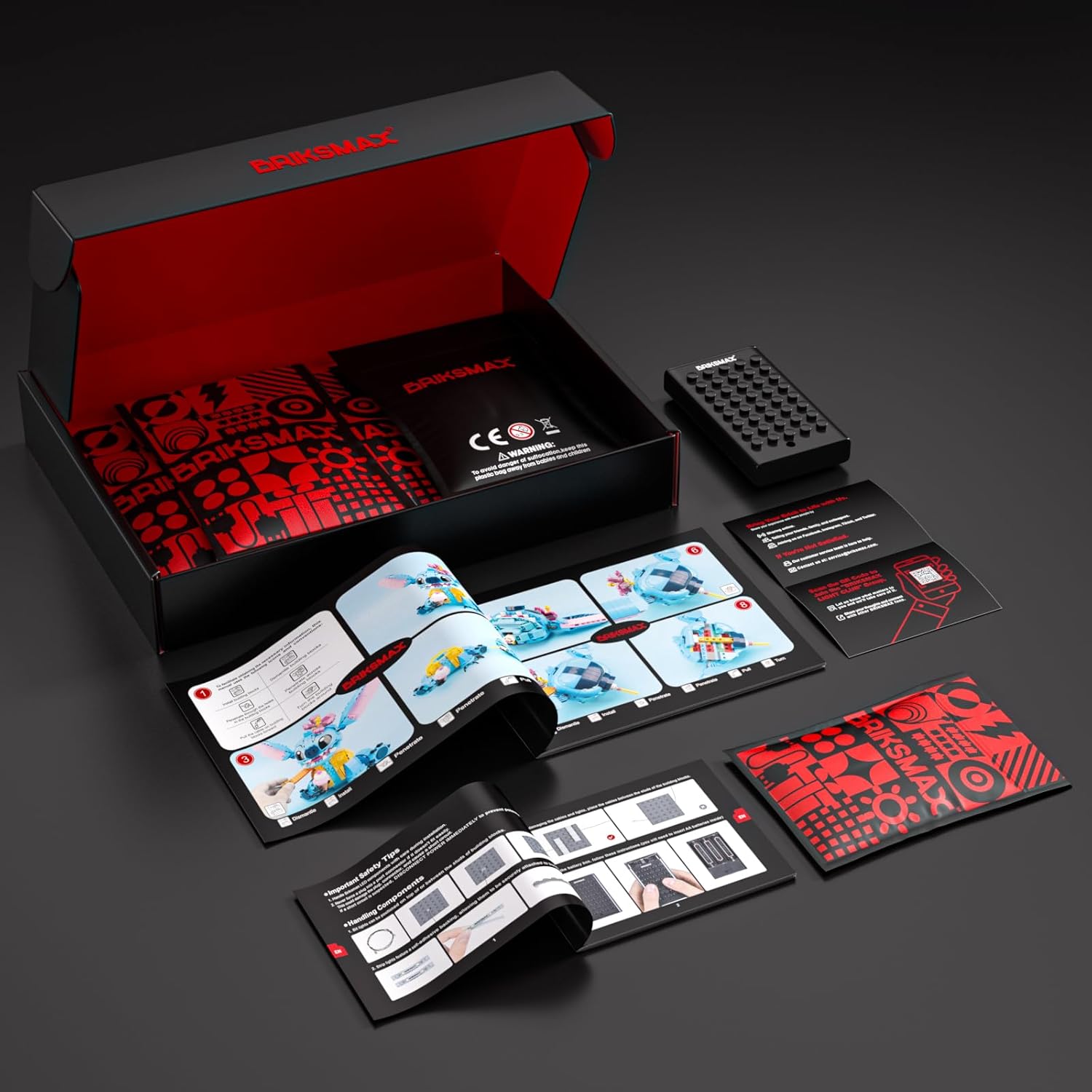
Image: The complete BRIKSMAX LED Lighting Kit package contents, laid out for inspection.
설정 및 설치
Installation of the lighting kit requires careful handling and adherence to the provided step-by-step instructions. For a visual guide, scan the QR code in your physical instruction manual or refer to the official installation video below.
- Disassemble specific sections of your LEGO Stitch model as indicated in the detailed instructions.
- Carefully route the LED wires and attach the light components to the designated areas. Ensure wires are not pinched or stressed.
- Connect the LED components to the expansion boards and then to the main power cable.
- Reassemble the LEGO model, ensuring all wires are neatly tucked away and not visible.
Video: Detailed installation guide for the LIGHTAILING LED Light Kit for LEGO 43249 Stitch. This video demonstrates each step of integrating the lighting components into the LEGO model.

Image: A visual comparison showing the LEGO Stitch model before and after the BRIKSMAX LED lighting kit installation, highlighting the illuminated features.
작동 지침
Once the lighting kit is fully installed, you can power it using either the included battery box or a USB power source.
- 전원 켜기: Connect the USB power cable from the lighting kit to the battery box (with 3x AA batteries, not included) or a compatible USB power bank.
- 조명 활성화: If using the battery box, switch it to the 'ON' position. If using a USB power bank, ensure it is powered on.
- 리모콘(포함된 경우): Some kits may include a remote control for adjusting light modes or brightness. Refer to the specific remote control instructions for details.
- 전원 끄기: Disconnect the power source or switch the battery box to the 'OFF' position.
Video: A demonstration of the BRIKSMAX LED Lighting Kit for LEGO 43249 Stitch, showing the lights in operation and various illuminated features.
유지
To ensure the longevity and optimal performance of your BRIKSMAX LED Lighting Kit, follow these maintenance tips:
- Keep the LEGO model and lighting components clean by gently dusting with a soft, dry cloth.
- Avoid using liquid cleaners directly on the lights or wires.
- Periodically check wire connections to ensure they are secure.
- If using a battery box, replace batteries when lights dim or stop working.
문제 해결
If you encounter any issues with your lighting kit, refer to the following common problems and solutions:
- 불이 켜지지 않음: Check power source connection (USB or battery box). Ensure batteries are fresh and correctly inserted. Verify all wire connections are secure.
- Some lights are dim or not working: Inspect individual LED connections for any loose wires or damaged components. Ensure wires are not pinched.
- 깜빡이는 불빛: This may indicate a loose connection or low battery power. Check connections and replace batteries if necessary.
If the problem persists, please contact BRIKSMAX customer service for further assistance.
명세서
| 제품 치수 | 6.5 x 4.72 x 1.57 인치 |
| 품목 무게 | 6 온스 |
| 품목 모델 번호 | 43249 |
| 제조업체 권장 연령 | 8세 이상 |
| 제조업체 | Briksmax |
보증 및 지원
BRIKSMAX is committed to providing high-quality products and excellent customer service. If you encounter any difficulties with your product, please send us an email. We will assist you in resolving the issue promptly.
For further support, please visit the official BRIKSMAX store on Amazon or refer to the contact information provided in your package.


