소개
The Roland GO:KEYS 3 is a 61-note music creation keyboard designed for ease of use and musical exploration. It features a ZEN-Core engine with a wide variety of sounds, auto-accompaniment functions, and connectivity options for modern music creation. This manual provides essential information for setting up, operating, and maintaining your instrument.
설정
상자 안에 무엇이 들어있나요?
- Roland GO:KEYS 3 Unit
- AC 어댑터
- 8 x AA Batteries (for portable use)
설치를 진행하기 전에 모든 구성 요소가 있는지 확인하세요.
기기에 전원 공급
The GO:KEYS 3 can be powered using the included AC adapter or 8 AA batteries.
- AC 어댑터 : Connect the AC adapter to the DC IN port on the rear panel and then to a power outlet.
- 배터리: 제품 하단의 배터리함을 열고 AA 배터리 8개를 극성을 확인하여 삽입하십시오.
Press the power button located on the top panel to turn the instrument on or off.
기본 연결
- 헤드폰: Connect headphones to the Phones jack for private practice.
- 외부 오디오 입력: Use the Aux In port to connect an external audio device (e.g., smartphone, tablet) and play along with your favorite music.
- 페달: Connect a sustain pedal (sold separately) to the Pedal jack for enhanced piano performance.
- USB 연결:
- USB-A port: For connecting a USB memory device for audio file playback, backup, and Roland Cloud Connect adapter.
- USB-C port: For connecting to a computer or mobile device for USB audio/MIDI functionality.
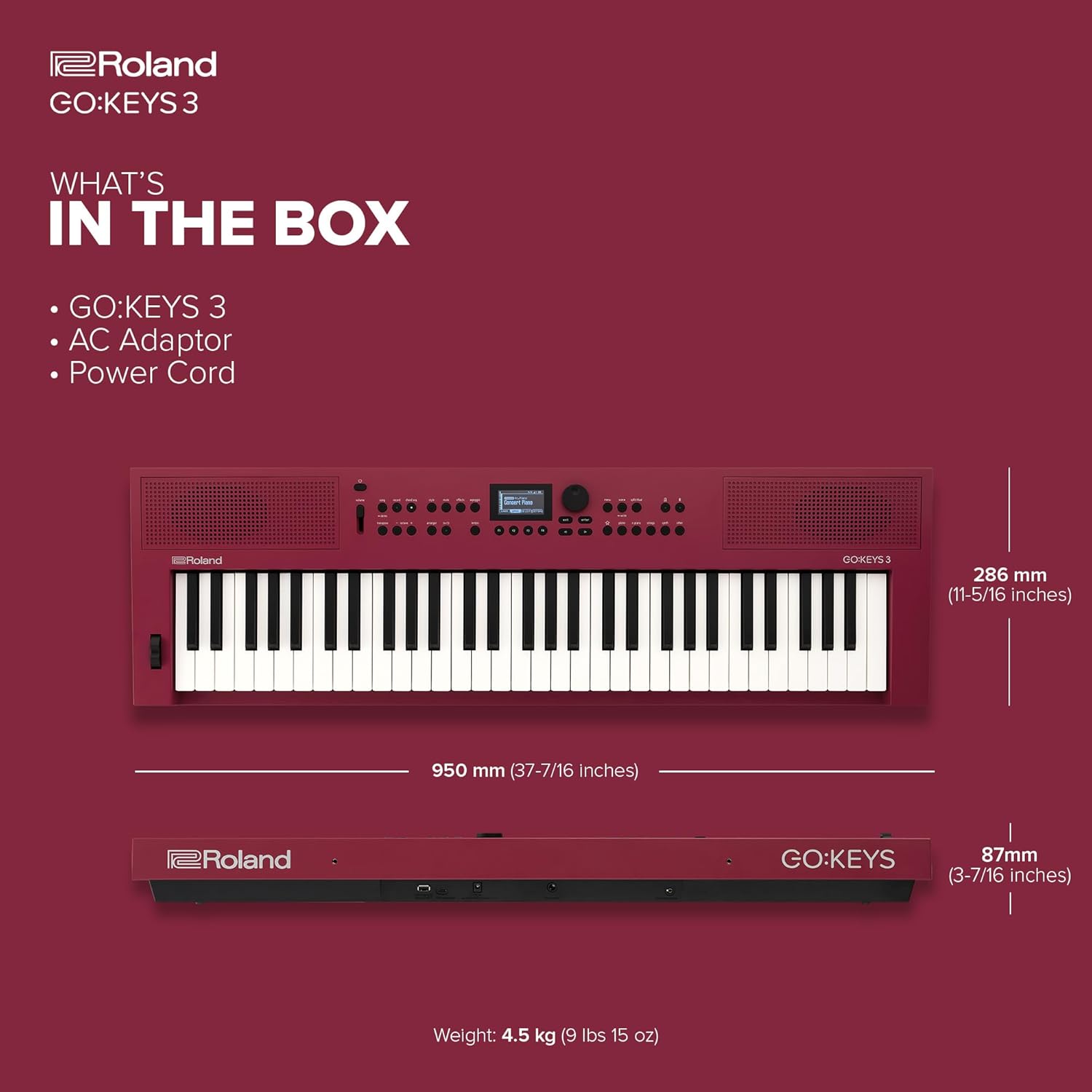
Image: Rear panel of the Roland GO:KEYS 3, showing the power input, pedal input, auxiliary input, phones/output, USB-A, and USB-C ports.
주요 특징
- 61-Note Keyboard with Expressive Touch Sensitivity: Provides a responsive playing experience suitable for various musical styles.
- ZEN-Core Engine: Access over 1000 high-quality Roland sounds, offering a diverse palette for music creation.
- 자동 반주: Features over 200 onboard music styles to provide backing tracks for your playing.
- Chord Sequencer: Includes user editing features and over 300 ready-to-play presets for creating chord progressions.
- 내장 스테레오 스피커: Allows for immediate playback and practice without external amp합리화.
- Bluetooth Audio/MIDI Support: Enables wireless music streaming from mobile devices and MIDI communication for song creation.
- USB Audio/MIDI Interface: Facilitates connection to computers and mobile devices for integration with music software.
- USB Memory/WC-1 Port: Supports backup, audio file playback, and connection of the optional WC-1 adapter for Roland Cloud Connect.

이미지: 위에서 아래로 view of the Roland GO:KEYS 3, highlighting the 61-note keyboard and control panel.
작동 지침
소리(음색) 선택
The GO:KEYS 3 offers a vast library of sounds. Use the dedicated sound category buttons and the data entry knob to browse and select your desired instrument tones.

Image: Close-up of the Roland GO:KEYS 3 control panel, showing the display and various buttons for sound selection and functions.
Using Auto-Accompaniment
Engage the auto-accompaniment feature to play along with various musical styles. Select a style, then play chords with your left hand while playing melodies with your right. The keyboard will automatically generate a full backing band.
블루투스 연결
To stream audio or use MIDI over Bluetooth:
- 모바일 기기에서 Bluetooth를 활성화하세요.
- On the GO:KEYS 3, navigate to the Bluetooth settings (refer to the on-screen display for menu options).
- Select the GO:KEYS 3 from your device's Bluetooth list to pair.
- Once connected, you can stream audio through the keyboard's speakers or use it as a MIDI controller wirelessly.

Image: A person interacting with a smartphone while playing the Roland GO:KEYS 3, demonstrating Bluetooth connectivity for music streaming or app integration.
Recording and Performance Effects
The GO:KEYS 3 includes features for recording your performances and applying various effects. Consult the on-screen display and dedicated buttons for recording functions, and explore the available digital effects to enhance your sound.
Video: Official Roland US video demonstrating the features and sounds of the Roland GO:KEYS 3.
유지
Proper care will ensure the longevity and optimal performance of your Roland GO:KEYS 3.
- 청소: Use a soft, dry cloth to wipe the surface of the instrument. Avoid abrasive cleaners, waxes, or solvents. For stubborn dirt, lightly dampen the cloth with water and a mild, neutral detergent, then wipe dry immediately.
- 저장: Store the instrument in a cool, dry place away from direct sunlight, extreme temperatures, and humidity. If storing for an extended period, remove the batteries to prevent leakage.
- 손질: 악기를 떨어뜨리거나 강한 충격을 주지 마십시오. 건반 위에 무거운 물건을 올려놓지 마십시오.
문제 해결
If you encounter issues with your GO:KEYS 3, try the following basic troubleshooting steps:
- 전원 없음:
- Ensure the AC adapter is securely connected to both the instrument and a working power outlet.
- If using batteries, check that they are inserted correctly and are not depleted.
- 소리 없음:
- 마스터 볼륨 조절 노브를 확인하고 볼륨이 충분히 올라가 있는지 확인하십시오.
- If using headphones, ensure they are fully plugged in and functioning correctly.
- Verify that a sound (tone) is selected and not muted.
- 블루투스 연결 문제:
- Ensure Bluetooth is enabled on both the GO:KEYS 3 and your mobile device.
- 기기의 페어링을 해제한 후 다시 페어링해 보세요.
- 다른 장치가 Bluetooth 신호를 방해하지 않는지 확인하세요.
- 예상치 못한 동작:
- Try turning the power off and on again.
- If the issue persists, consult the full owner's manual for a factory reset procedure.
명세서
| 특징 | 세부 사항 |
|---|---|
| 상표 | 롤랑 |
| 모델명 | GO:키즈 3 |
| 품목 모델 번호 | GOKEYS3-RD |
| 키의 개수 | 61 |
| 운영 체제 | 젠코어 |
| 전원 | 배터리 구동식 또는 유선 전기식 |
| 연결 기술 | 블루투스, USB |
| 커넥터 유형 | USB-A, USB-C, 3.5mm |
| 특별 기능 | Built-In Speaker, Digital Display, Digital Effects, Microphone Input, Preset Tones & Rhythms |
| 품목 무게 | 15.85파운드 |
| 제품 치수 | 11.26 x 37.4 x 3.43 인치 |
보증 및 지원
For warranty information and technical support, please refer to the documentation included with your product or visit the official Roland web사이트. 보증 청구를 위해 구매 증빙 자료를 보관하세요.


