소개
Thank you for choosing the ATTACK SHARK K85 Rapid Trigger Mechanical Gaming Keyboard. This 75% layout wired keyboard features advanced magnetic switches with adjustable actuation and rapid trigger functionality, designed for precision and speed in gaming and efficient typing. It includes a programmable multimedia knob, full RGB backlighting, and PBT keycaps for durability. This manual provides detailed instructions for setup, operation, maintenance, and troubleshooting to ensure you get the most out of your K85 keyboard.
이미지: 이상view of the ATTACK SHARK K85 keyboard highlighting its key features.
패키지 내용
모든 품목이 들어 있는지 확인하려면 패키지 내용물을 확인하세요.
- ATTACK SHARK K85 Mechanical Gaming Keyboard
- USB-C to USB-A Cable (Braided Coiled Cable)
- 키캡 풀러
- 스위치 풀러
- 사용자 설명서
설치 지침
- 키보드 연결: Plug the USB-C end of the provided cable into the Type-C port on the keyboard and the USB-A end into an available USB port on your computer. The keyboard is plug-and-play.
- 소프트웨어 설치: For advanced customization of actuation points, rapid trigger, dynamic keystrokes, and RGB lighting, download the official ATTACK SHARK software from the manufacturer's web사이트. 화면의 지시에 따라 설치하세요.
- 시스템 스위칭: The keyboard supports both Windows and Mac operating systems. To switch between systems, press FN+Q for Mac OS or FN + 승 Windows용.

Image: The Type-C port for connecting the keyboard.
작동 지침
1. Rapid Trigger (RT) and Dynamic Keystrokes (DKS)
The K85 keyboard features magnetic switches that allow for highly customizable actuation points and rapid trigger functionality. These features are primarily configured through the dedicated software.
- 조절 가능한 작동 지점: Customize the keystroke actuation point from a light 0.2mm to a strong 3.8mm. This allows you to fine-tune the sensitivity of each key to your preference.
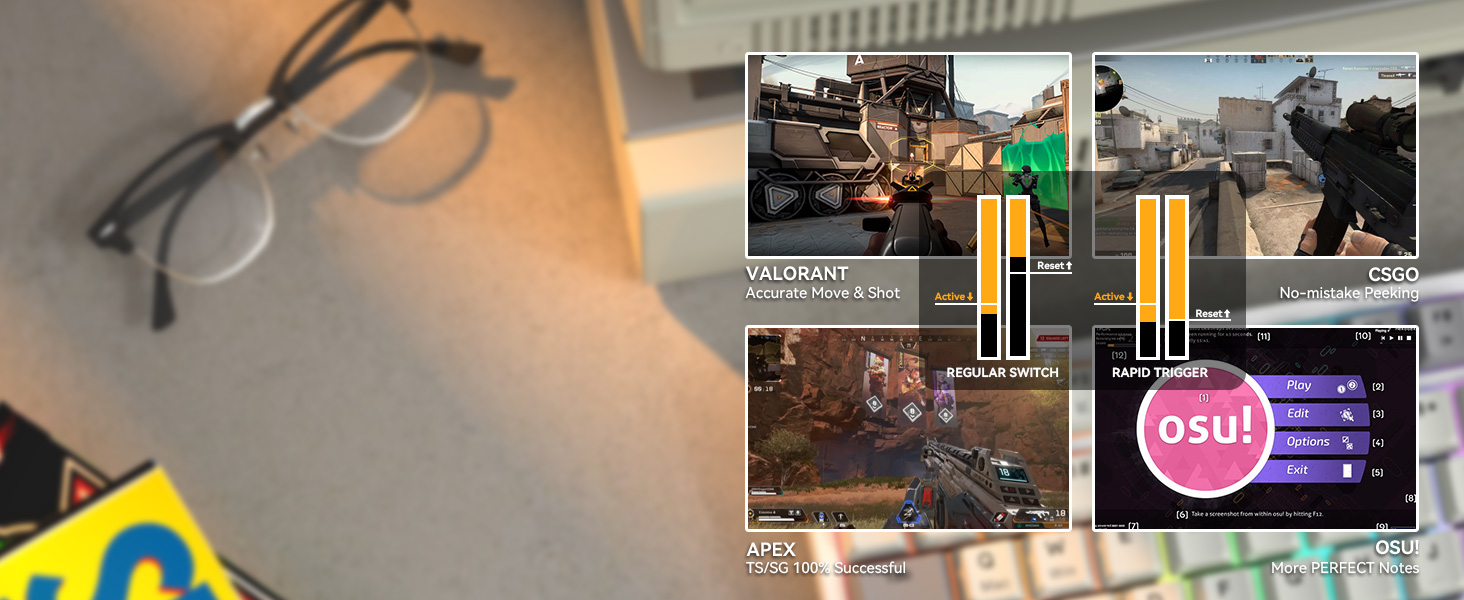
- 빠른 트리거(RT): This function enables keys to reset and re-press faster than traditional mechanical switches. It allows for instant re-actuation upon key lift, providing a significant advantag빠른 속도의 게임에서.
- 동적 키스트로크(DKS): Bind up to 4 functions to a single key based on different pressing depths. For example, a light press could activate one action, while a deeper press activates another.

Image: Visual representation of adjustable actuation points.

Image: Benefits of Rapid Trigger mode in various gaming scenarios.
Video: Demonstrating the ATTACK SHARK K85 Rapid Trigger Mechanical Gaming Keyboard features.
Video: Highlighting the magnetic switch technology of the ATTACK SHARK K85 keyboard.
2. 멀티미디어 노브
The aluminum alloy multimedia knob located in the upper right corner provides quick access to volume control and mute functions. It can also be customized via the software for other functions.
- Rotate Right: Increase volume
- Rotate Left: Decrease volume
- Press Down: Mute/Unmute
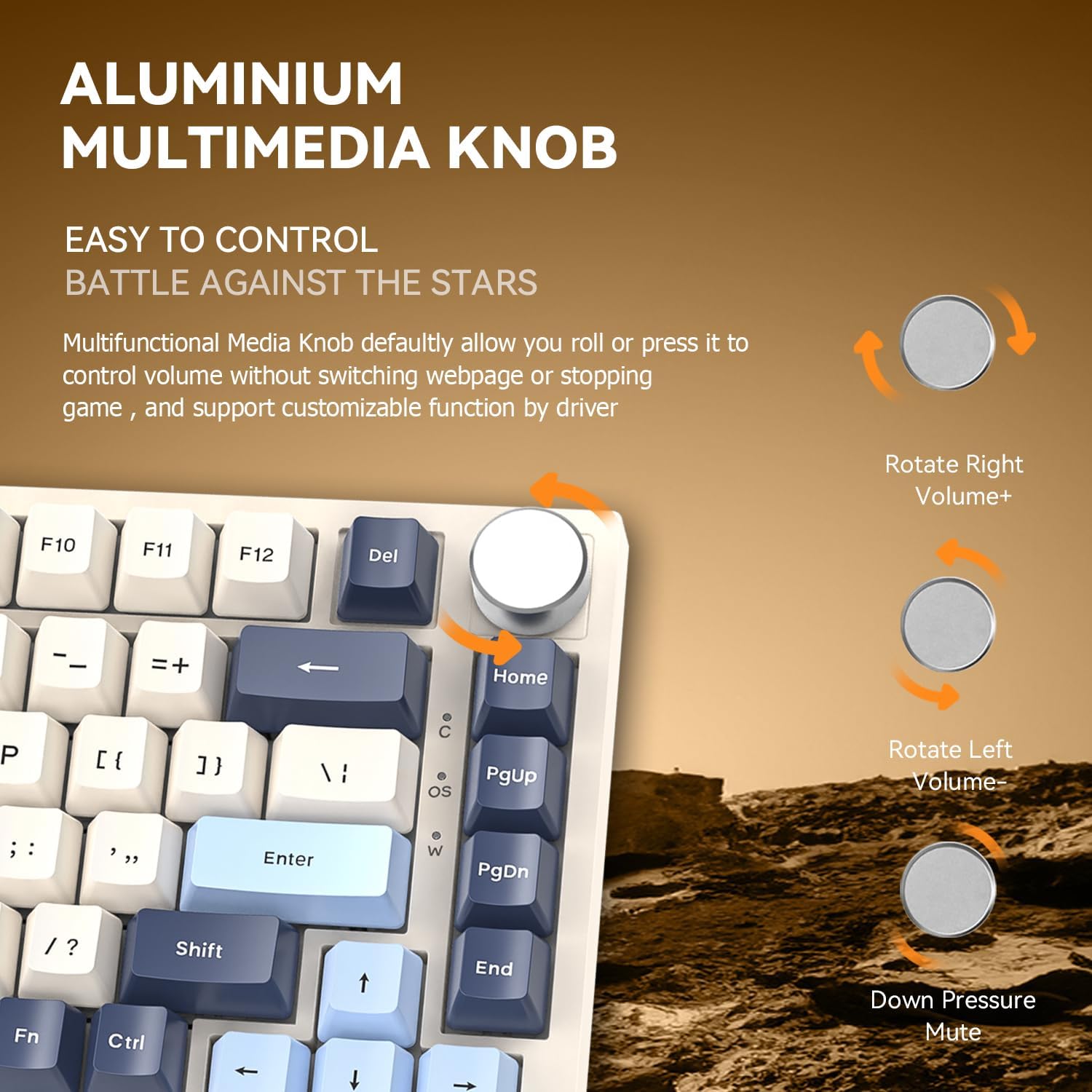
Image: Details of the aluminum multimedia knob and its functions.
3. RGB 백라이트
The K85 features full RGB backlighting with 18 pre-installed modes and 9 color options. You can customize lighting effects using the software or through FN key combinations:
- FN + </ / >: Adjust Backlit Speed
- FN + Up / Down Arrow백라이트 밝기 조절
- FN + 델: 조명 모드 전환
- FN + 홈: 조명 색상 전환
- FN + 에스케이프: Restore to Factory Settings
- FN + 승리: Window Lock
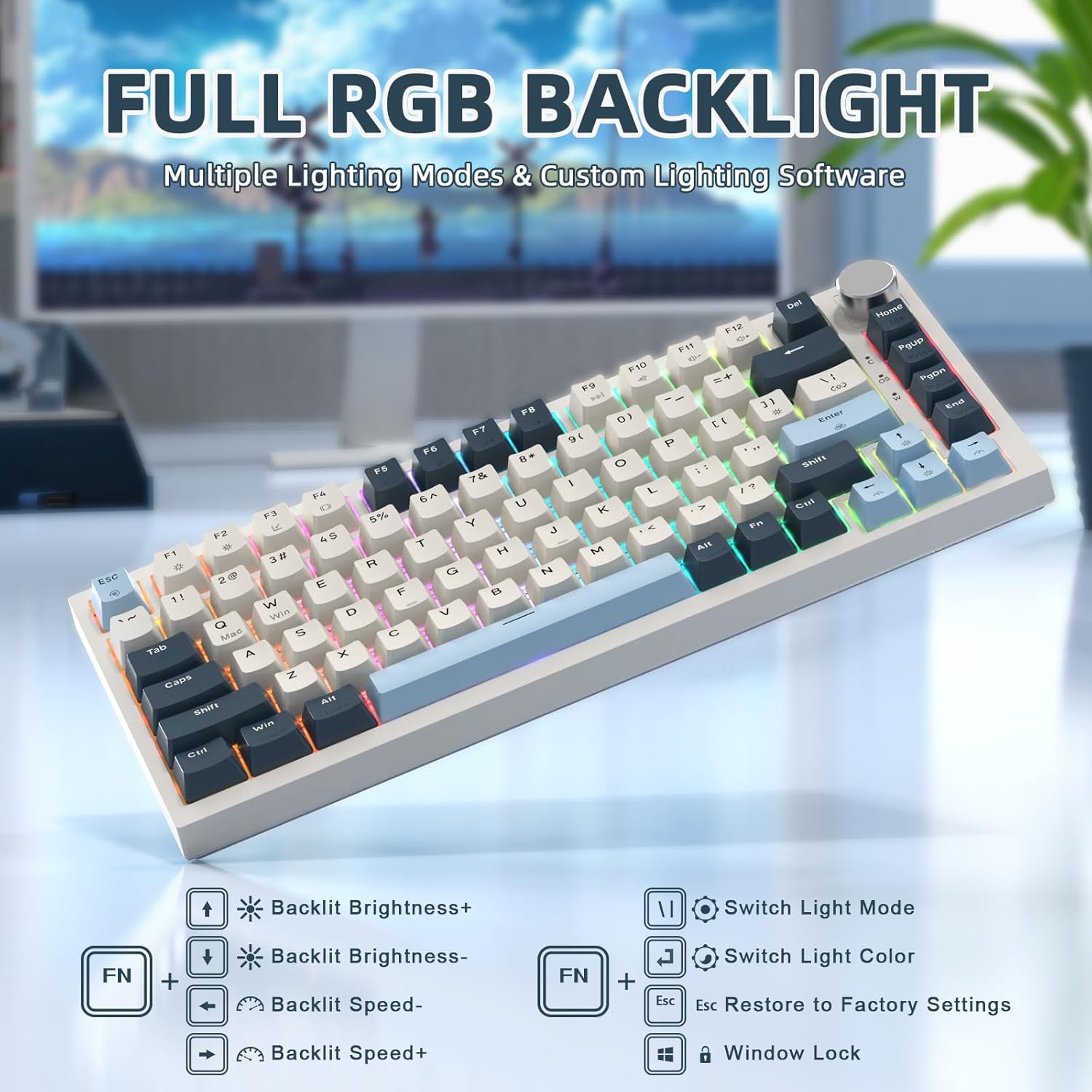
Image: RGB backlighting controls and effects.
4. 핫스왑 가능 스위치
The K85 keyboard features a full-key hot-swappable PCB base, allowing you to easily change switches without soldering. Please note that it is currently only compatible with Outemu magnetic switches.
중요한: After replacing any Outemu magnetic switch, recalibration in the software is necessary. Navigate to the "About" section in the software, then "Maximum stroke calibration," and press "Start Calibration" by gently pressing every key.

Image: Hot-swappable switches on the K85 keyboard.
유지
적절한 유지관리는 키보드의 수명과 성능을 보장합니다.
- 키캡 청소: 제공된 키캡 풀러를 사용하여 키캡을 조심스럽게 제거하세요. 부드러운 천으로 닦아주세요.amp 필요하면 천과 순한 비누를 사용하세요. 다시 부착하기 전에 완전히 말랐는지 확인하세요.
- 스위치 청소: Use compressed air to remove dust and debris from around the switches. Avoid spraying liquids directly into the switches.
- 일반 청소: Wipe the keyboard surface with a soft, dry cloth. Avoid abrasive cleaners or solvents.
문제 해결
If you encounter issues with your ATTACK SHARK K85 keyboard, refer to the following common solutions:
| 문제 | 해결책 |
|---|---|
| 키보드가 응답하지 않습니다 | USB-C 케이블이 키보드와 컴퓨터에 단단히 연결되어 있는지 확인하세요. 다른 USB 포트나 케이블을 사용해 보세요. 컴퓨터를 다시 시작하세요. |
| 키가 등록되지 않거나 두 번 입력됨 | Recalibrate the magnetic switches using the software (refer to "Hot-Swappable Switches" section). Ensure no debris is lodged under the keycaps or switches. |
| RGB 조명이 작동하지 않거나 올바르지 않습니다. | Check lighting settings in the software. Try resetting to factory settings using FN + 에스케이프. Ensure the software is up to date. |
| 멀티미디어 조절 노브가 작동하지 않습니다 | Verify software settings for the knob. Ensure no other software is conflicting with multimedia controls. |
| Keyboard prevents computer from sleeping | This can sometimes occur with certain peripherals. Check your computer's power management settings for USB devices. You may need to adjust settings to allow the computer to put USB devices to sleep. |
| Cannot switch between Windows/Mac modes | Ensure you are using the correct key combination (FN+Q 맥용, FN + 승 (Windows의 경우). |
명세서
| 특징 | 세부 사항 |
|---|---|
| 모델 번호 | 케이85 |
| 공들여 나열한 것 | 75% (82키) |
| 스위치 유형 | Magnetic Switch (Outemu compatible) |
| 작동 점 | 0.2mm에서 3.8mm까지 조절 가능 |
| 연결성 | USB-C Wired with Braided Coiled Cable |
| 키캡 | PBT Keycaps (Tri-color Theme) |
| 백라이트 | Full RGB (18 modes, 9 colors) |
| 특별 기능 | Rapid Trigger, Dynamic Keystrokes, Programmable Keys, Hotkeys, Media Keys, Metal Media Knob, Hot-Swappable |
| 호환 장치 | 노트북, PC, 맥 |
| 운영 체제 지원 | 윈도우, 맥 OS |
| 품목 무게 | 2.07파운드 |
| 패키지 크기 | 14.13 x 7.24 x 1.93 인치 |
| 재료 | Plastic (retro blue finish) |
보증 및 지원
The ATTACK SHARK K85 keyboard comes with a standard manufacturer's warranty. For specific warranty details, please refer to the warranty card included in your package or contact ATTACK SHARK customer support.
If you require further assistance, encounter issues not covered in this manual, or need to download the latest software, please visit the official ATTACK SHARK website or contact their customer support team. Contact information can typically be found on the product packaging or the brand's official web대지.


