제품 끝view
The SUNOL H08 Mecha Bluetooth Wireless Headset offers a unique transparent design combined with advanced audio technology. Engineered for comfort and convenience, these headphones provide clear sound quality, low latency, and extended battery life, making them suitable for various activities from daily listening to gaming and calls.
Key features include Bluetooth 5.3 for stable connectivity, environmental noise reduction for clear calls, and a robust charging case with an LED display.
상자 안에 무엇이 들어있나요?
- H08 Mecha Bluetooth Wireless Headset (Left and Right Earbuds)
- 충전 케이스
- 충전 케이블
- Multiple Sizes of Ear Tips (for comfortable fit)
설치 가이드
1. 초기 충전
Before first use, fully charge the headset and charging case. Place the earbuds into the charging case. Connect the charging cable to the case and a USB power source. The LED display on the charging case will indicate the charging status and battery level.
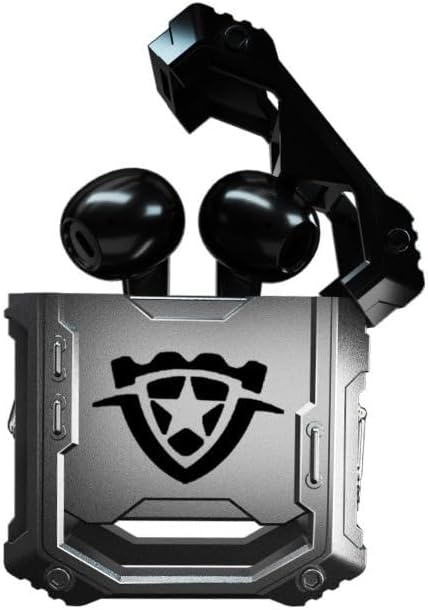
Image: The H08 Mecha Bluetooth Wireless Headset, showing both earbuds securely placed within their open charging case. The case features a distinctive, rugged design with a central emblem.
2. 장치와 페어링
- 이어버드가 충전되어 있고 충전 케이스에 넣어져 있는지 확인하세요.
- 충전 케이스를 여세요. 이어버드가 자동으로 페어링 모드로 진입합니다.
- 기기(스마트폰, 태블릿, 컴퓨터)에서 Bluetooth 설정으로 가서 Bluetooth를 켜세요.
- 검색 available devices and select "H08" from the list.
- Once connected, a voice prompt will confirm successful pairing. The effective connection distance is up to 10 meters.

Image: The H08 Mecha Bluetooth Wireless Headset charging case in a closed position, showcasing its metallic, rugged exterior. The image highlights the zinc alloy material and suggests a long battery life.
3. 이어버드 착용
Select the ear tips that provide the most comfortable and secure fit for your ears. Gently insert each earbud into your ear canal and twist slightly to ensure a snug fit. A proper fit enhances sound quality and noise isolation.
작동 지침
전원 켜기/끄기
- 전원 켜기: 충전 케이스를 열면 이어버드의 전원이 자동으로 켜집니다.
- 전원 끄기 : 이어버드를 충전 케이스에 다시 넣고 뚜껑을 닫으세요. 자동으로 전원이 꺼지고 충전이 시작됩니다.
음악 재생 제어
- 재생/일시 중지: 이어버드 양쪽의 터치 컨트롤 영역을 한 번 탭하세요.
- 다음 트랙: 오른쪽 이어버드를 두 번 탭하세요.
- 이전 트랙 : 왼쪽 이어버드를 두 번 탭하세요.
통화 관리
- 전화 받기/종료: 전화가 걸려오는 동안 이어버드 양쪽의 터치 컨트롤 영역을 한 번 탭하세요.
- 전화 거부: 수신 전화가 오는 동안 양쪽 이어버드의 터치 컨트롤 영역을 2초간 길게 누릅니다.
The built-in environmental noise reduction (ENC) chip ensures clear sound quality during calls by filtering out ambient noise.

Image: A close-up of the H08 Mecha Bluetooth Wireless Headset earbuds, highlighting their sleek design. The background features a graphic representation of sound waves, illustrating the intelligent noise reduction technology for clear audio.
낮은 대기 시간 모드(게임)
The headset features a low latency mode, significantly improving Bluetooth transmission speed for a more synchronized audio experience, especially beneficial for gaming. This ensures that sound effects and dialogue are heard with minimal delay.
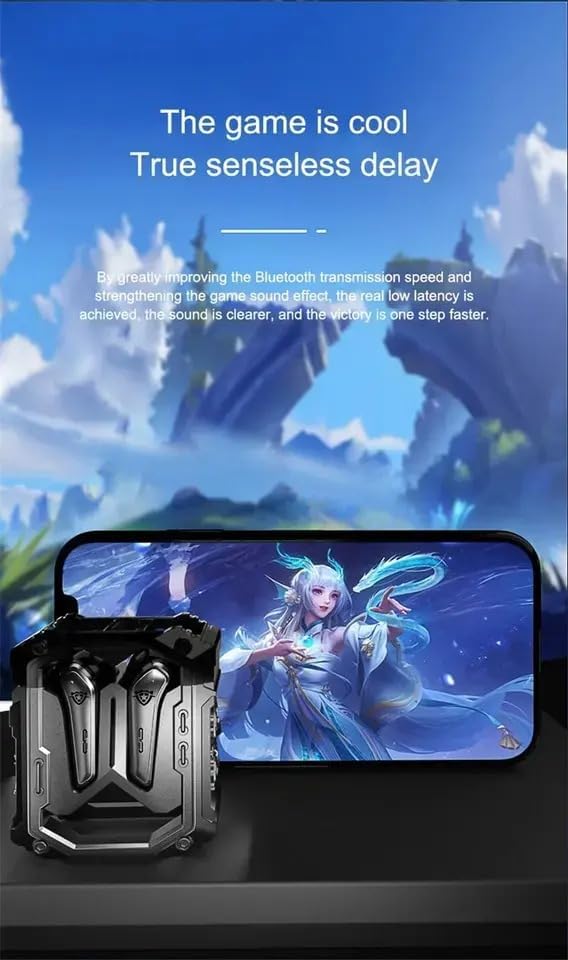
Image: The H08 Mecha Bluetooth Wireless Headset charging case positioned next to a smartphone displaying a vibrant game scene. This image emphasizes the headset's low latency feature, ideal for an immersive gaming experience.
유지
Charging the Headset and Case
- The charging case has a built-in 600mAh battery, capable of charging the earbuds approximately four times, providing up to 48 hours of total playtime.
- The LED display on the charging case shows the battery level of both the case and the earbuds.
- Use the provided charging cable to charge the case.

Image: The H08 Mecha Bluetooth Wireless Headset with its charging case open, revealing the earbuds inside. The image highlights the "mechanical metal technology" and the robust design of the charging compartment, emphasizing its durability and environmental noise filtering capabilities.
청소
Regularly clean the earbuds and charging case with a soft, dry, lint-free cloth. Avoid using abrasive materials or harsh chemicals. Ensure charging contacts on both the earbuds and case are clean and dry.
저장
사용하지 않을 때는 먼지와 손상으로부터 보호하기 위해 헤드셋을 충전 케이스에 넣어 보관하십시오. 서늘하고 건조하며 극한 온도에 노출되지 않는 곳에 보관하십시오.
문제 해결
- 페어링할 수 없습니다:
- 기기에서 Bluetooth가 활성화되어 있는지 확인하세요.
- Make sure the earbuds are charged and in pairing mode (open the case).
- 이어버드를 기기에 더 가까이 대세요.
- 기기의 블루투스 목록에서 "H08"을 삭제하고 다시 페어링을 시도해 보세요.
- 한쪽 이어버드에서 소리가 나지 않음:
- 두 개의 이어버드를 충전 케이스에 다시 넣고 뚜껑을 닫은 후 몇 초간 기다린 후 다시 엽니다.
- 양쪽 이어버드가 모두 충전되어 있는지 확인하세요.
- 충전 문제:
- 충전 케이블이 케이스와 전원에 모두 단단히 연결되어 있는지 확인하세요.
- 이어버드의 충전 접점과 케이스 내부가 깨끗한지 확인하세요.
- 다른 충전 케이블이나 전원 어댑터를 사용해 보세요.
- 통화 품질이 좋지 않음:
- 마이크가 가려지지 않았는지 확인하세요.
- Move to a quieter environment if environmental noise is excessive.
- 기기의 통화 음량 설정을 확인하세요.
명세서
| 특징 | 세부 사항 |
|---|---|
| 모델명 | H08 |
| 연결 기술 | 무선(블루투스) |
| 무선 통신 기술 | 블루투스 5.3 |
| 블루투스 범위 | 최대 10미터(33피트) |
| 오디오 지연 | 60밀리초 |
| 배터리 수명(이어버드) | 최대 18시간(단일 충전) |
| 총 재생 시간(충전 케이스 포함) | 약 48시간 |
| 충전 케이스 배터리 용량 | 600mAh |
| 오디오 드라이버 유형 | 14mm Dynamic Bass Unit |
| 소음 제어 | Environmental Noise Reduction (ENC) for calls |
| 제어 유형 | Media Control, Call Control (Touch/Remote) |
| 재료 | 재질: 플라스틱(이어폰), 아연 합금(충전 케이스) |
| 무게 | 6.4온스(전체 패키지) |
| 색상 | 검은색 |
| 귀 위치 | 귀에 |
| 제조업체 | 스위스인 |
보증 및 지원
For warranty information and detailed support, please refer to the documentation included with your purchase or visit the official SUNOL website. You may also contact the seller, SWISSES, through the platform where the product was purchased for assistance.
보증 청구를 위해 구매 증빙서류를 보관하세요.


